Emochi AI lets you chat with fictional characters, build your own personas, and turn a conversation into an ongoing story. Pick an anime-inspired companion, start a fantasy adventure, or create an original character with a personality and opening scene of your own.
The appeal is simple: you can start with a character instead of an empty chat box. Free access makes it easy to explore, while paid features add options for models, customization, and multimedia. Before upgrading, though, separate three things: how much you can chat, which model answers, and how well it follows your story.
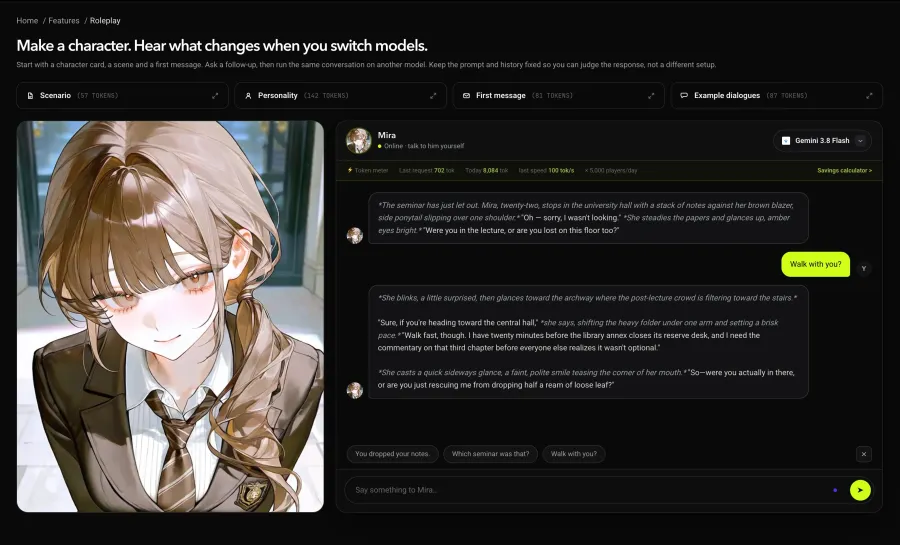
Want to hear how different models play the same character? Try GPTProto's independent roleplay experience and compare their replies.
What Is Emochi AI?
Emochi is an AI character chat and roleplay platform associated with FlowGPT. Its product introduction emphasizes anime and fantasy characters, custom personas, and free chats. You choose a character, read the situation, and respond to its opening message. The AI then continues the scene.

For example, your character might meet a suspicious traveler at an inn. You decide whether to question them, offer help, or leave. The conversation develops through those choices rather than following a fixed script.
That makes Emochi useful for casual character conversations, collaborative fiction, and experimenting with original characters. If you enjoy creating a persona but do not want to configure a separate AI service, the ready-made character format is appealing.
In this context, “Emochi” is the product name. It should not be treated as an established English gaming term with a separate, verified meaning.
What Can You Do with Emochi?
Chat with Anime and Original Characters
The Emochi character catalog organizes discovery around story genres and personality or relationship tags. That gives you a starting point: perhaps a fantasy encounter, a dramatic rivalry, or a quieter everyday conversation.
Read the character's introduction before sending your first message. A good opening gives you something to respond to—a problem, an invitation, or an unresolved question. A familiar face alone does not tell you whether the character's writing will suit you.
Create Your Own Character and Story
Custom characters let you define more than a name and appearance. Think about what the character wants, how they speak, and what they know about your persona when the scene begins.
Compare “a mysterious traveler” with “a guarded mapmaker who needs help finding a missing expedition but refuses to explain why.” The second gives the conversation a direction. This is an illustrative writing example, not an Emochi test result.
Keep your own role clear, too. If you want to decide your actions and dialogue, include that preference in the character setup rather than assuming every bot will respect it automatically.
Add Images and Voice to the Conversation
Emochi also lists image and voice features. These can add a visual identity or spoken element to a character, but their allowances are separate from text messaging. Check the relevant quota before choosing a plan for a particular feature.
Is Emochi Free, and Does It Have Chat Limits?
Yes, Emochi has a free plan. Its official subscription page, checked on November 13, 2026, displayed these web monthly prices:
| Plan |
Web monthly price |
Main distinction |
| Free |
$0 |
Entry-level access with two free chat models |
| Plus |
$9.99 |
Ad removal, additional model access, and customization features |
| Ultra |
$16.99 |
Additional allowances, including a listed 2,000 Mochi per month |
Confirm the checkout price and benefits for your account; app-store and regional offers may differ.
The page advertises unlimited messages, but it also distinguishes model tiers and usage allowances. Voice and image generation have separate quotas. “Unlimited chat” should therefore not be read as every model and feature being free without limits.
Before paying, check the exact model you want to use and whether it consumes Mochi or another allowance. If a usage notice appears, identify what it applies to rather than assuming all conversations are blocked.
There is another distinction: being allowed to send more messages does not establish how much earlier conversation the AI retains. Message access and story memory answer different questions.
Does Emochi Have Good Memory?
For roleplay, useful memory means more than remembering a character's name. It means keeping track of a broken promise, a relationship change, or an event that happened before the current scene.
Emochi lists memory-related benefits, but the public materials reviewed here do not establish a dependable, technical context limit for every model and plan. A character-profile field measured in characters is not the same thing as the model's conversation capacity.
Community experiences are mixed. In a Reddit discussion about Emochi's memory, some users described satisfactory recall, while others reported losing events from the middle of long conversations. Several discussed reinforcing important details. These are individual reports, not a controlled comparison or proof of a fixed forgetting point.
For an ongoing story, keep a short recap of established facts. For example:
Mira knows the map is forged. The expedition leaves tomorrow. She trusts the guide with navigation, but has not told him about the missing letter.
Update the recap when something important changes. Keep stable character traits separate from recent events so the two do not contradict each other. This may help maintain continuity, but it cannot guarantee perfect recall.
If long stories are your priority, compare AI models for roleplay with attention to character consistency, story progression, and how much context your setup can supply.
Is Emochi AI Safe and Private?
There are two separate questions here: what you may encounter in a character conversation, and what happens to the information you submit.
For content, inspect the character description and scenario before starting. A user-created character catalog can contain very different themes and writing styles. A friendly-looking portrait does not establish that a particular conversation is appropriate for every user.
For privacy, the Emochi privacy policy says the service collects submitted chat content and images. It also describes model training and service improvement purposes. A conversation that is not publicly posted should not be assumed to be inaccessible to the service or excluded from all processing.
Use fictional details for fictional scenarios. Avoid putting passwords, payment information, private work material, or identifying details about other people into a character chat. Review the available deletion controls and the policy before sharing anything sensitive.
These are practical precautions, not evidence that a specific data breach has occurred. The public policy does not support an absolute promise that the app is completely private or risk-free.
Does Emochi Allow NSFW Roleplay?
Emochi's promotional language about unrestricted chats is broader than the wording of its formal rules. Its Terms of Service prohibit sexually explicit content and pornography.
That distinction matters when reading older reviews or community posts. A user's report that a conversation produced certain material does not establish that the service officially permits it, or that the same experience remains available.
If content policies are part of your platform decision, our comparison of roleplay APIs and their content policies provides another route to explore. Check both the provider's and the selected model's rules; API access does not mean every request is supported.
Emochi vs Janitor AI: Which Fits Your Roleplay Style?
The useful comparison is how you want to manage your conversations. Emochi presents its character catalog and paid feature tiers together. Janitor AI is also relevant to players exploring external model connections: our Janitor AI setup guide documents a GPT Proto proxy configuration.
| Your priority |
What to compare |
| Start a story quickly |
Character introductions and how easily you find a scenario you enjoy |
| Adjust the model behind the conversation |
Emochi's available model choices versus the external connection workflow documented for Janitor |
| Understand spending |
Emochi's subscription and allowances versus any separate API charges in an external setup |
| Maintain a long-running plot |
Test continuity with your own character and recap; the interface alone cannot establish memory quality |
Choose based on the workflow you will actually use. If you enjoy browsing characters and keeping settings inside one service, start there. If choosing the underlying model matters more, investigate an external connection. That adds configuration and potentially separate billing; it is not automatically a better conversation.
Want More Control? Try Your Own Roleplay Setup
You may like a character but want shorter replies, less narration, or a different pace. A separate setup gives you a way to compare models while keeping your character instructions under your control.
This is an alternative workflow, not a method for replacing Emochi's internal model with a GPT Proto key.
Try the Same Character with Different Models
Start with the GPT Proto roleplay experience. Keep the character, opening scene, and your reply consistent when comparing models.
Look for behavior you care about: does the reply sound like the character, respond to your action, and leave your next decision to you? A longer answer is not necessarily a better one. Treat a short comparison as an initial impression, not a long-term memory test.
Choose a Model for Your Story
For a focused comparison, see our guide to the best Kimi model for roleplay. If you plan to use a dedicated character-chat interface, the SillyTavern model guide is the next stop.
Once you have a candidate, check its current model page for availability and rates. For example, the GLM-5.3 model page is the model page used in our SillyTavern walkthrough. It is a starting point for that tutorial, not a claim that one model suits every story.
Connect It to SillyTavern
SillyTavern provides the chat interface and character settings; a connected model generates the replies. Its API connection documentation explains how character information and conversation context are assembled for the model.
Follow the step-by-step GPT Proto integration guide to connect your key and start a conversation. Check current API pricing before a longer session. More context can increase the amount of text processed, so your character setup and conversation history affect usage as well as the replies.
If your goal goes beyond playing and you want to build your own character-chat product, explore our guide to API providers for AI companion apps for planning text, image, voice, and video features.