How We Ranked Models for SillyTavern
The main evidence is the September 2026 AI Roleplay Bench, which tested 14 official models across 10 categories and scored 840 replies. Its categories cover companion chat, Game Master behavior, strict character voice, villains, robustness, mature themes, and safety boundaries. Kimi K3, GLM-5.3, and DeepSeek V4.1 Flash are separated by less than two points, so the benchmark itself advises reading them as an effective tie rather than treating a decimal as a decisive win.
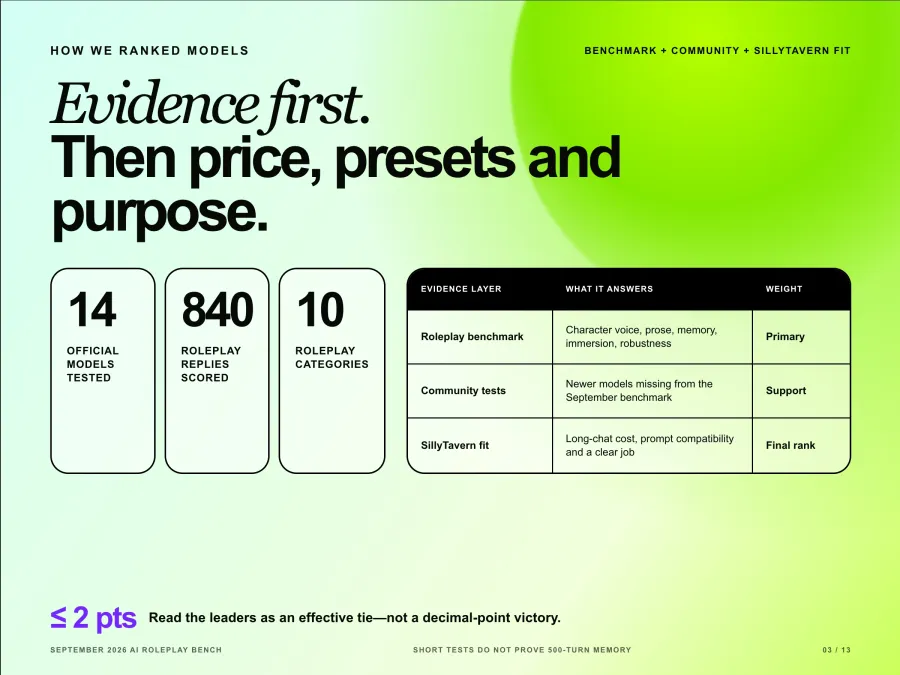
The benchmark also has limits. Its published methodology uses short multi-turn scenarios, does not measure drift over hundreds of messages, and excludes community fine-tunes. Newer releases such as Gemini 4 Argon also arrived after that test. For those models, I use community comparisons as supporting evidence and mark the recommendation as less certain.
The final ranking adds three SillyTavern-specific factors:
Long-chat economics. Input tokens usually dominate later turns because SillyTavern sends the character card, instructions, relevant lore, and conversation history again.
Prompt and preset compatibility. Chat Completion, Text Completion, instruct templates, samplers, and reasoning controls are not interchangeable.
A clear job for each model. A cheaper model earns a place only if it has a useful role, not simply because its price is low.
The 8 Best AI Models for SillyTavern Roleplay
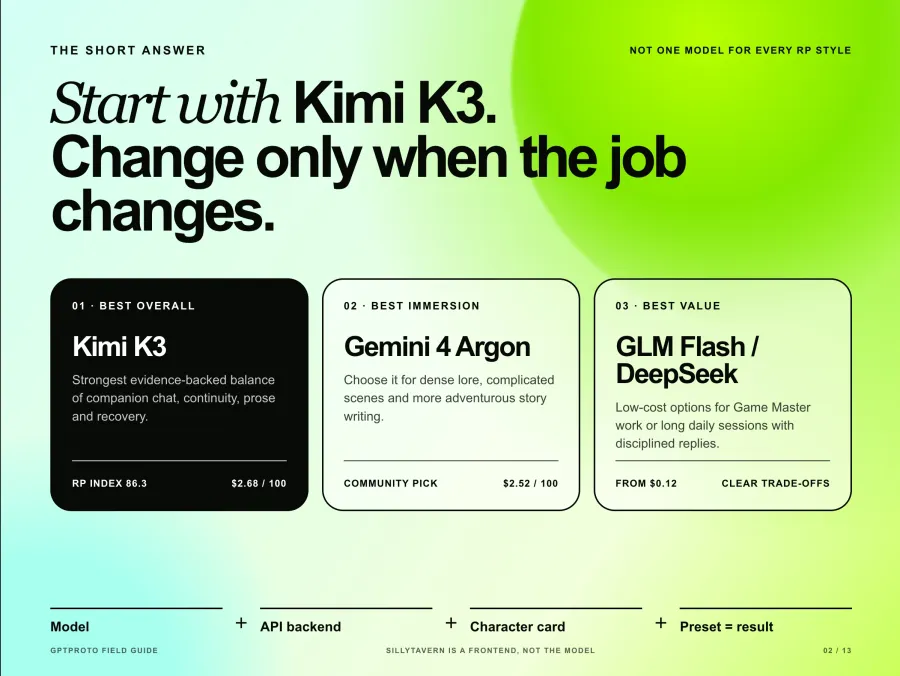
1 Kimi K3 Best Overall SillyTavern Model
Kimi K3 is the safest first choice when you do not yet know which roleplay style you prefer. It scored 86.3 overall, 90.0 for Companion, and 88.3 for Robustness in the roleplay benchmark. It also led the benchmark's ratings for character, prose, memory, and immersion.
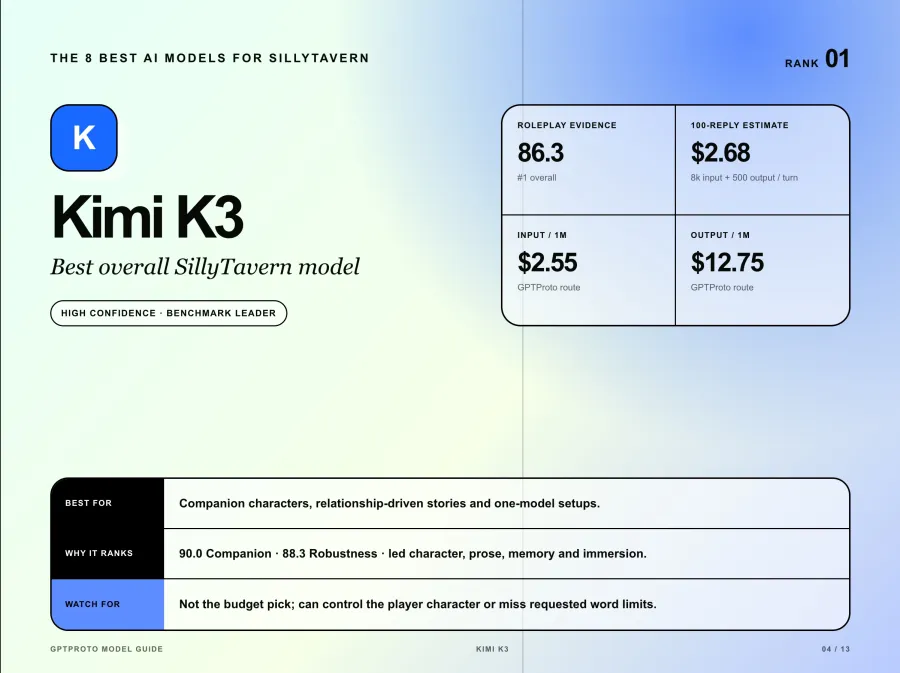
That balance matters more in SillyTavern than a single flashy reply. Kimi handled one-word user messages, remembered planted details, and kept the character active instead of turning into a generic assistant. Its weaknesses were concrete: it sometimes controlled the player's character as Game Master and missed requested word limits.
Best fit: companion characters, relationship-driven stories, and users who want one model for several RP styles. SillyTavern starting point: use Chat Completion, the exact kimi-k3 model ID, and a moderate response length before adding more complex preset rules. At $2.55 input and $12.75 output per million tokens, it is not the budget pick.
2 Gemini 4 Argon Best for Immersive Roleplay
Gemini 4 Argon is the strongest recent community favorite for dense lore, complicated scenes, and long-form story writing. SillyTavern users have praised its precision with large prompts and its ability to add useful scene details instead of merely paraphrasing the character card. One detailed community discussion of long-story use described a clear improvement after the same story had grown stale on other models.
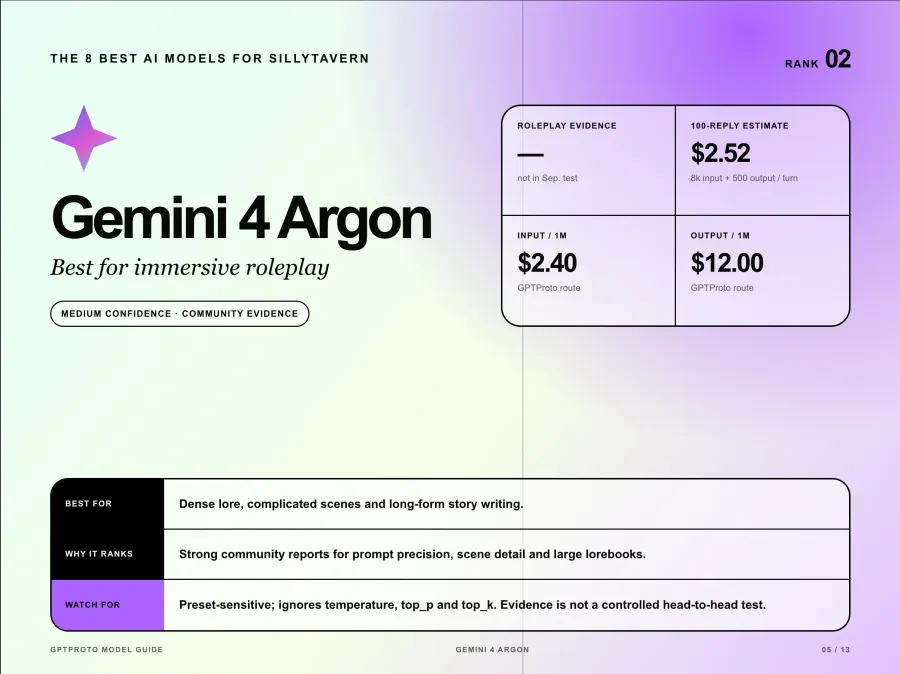
The confidence level is lower than for Kimi or GLM because Argon was not included in the September roleplay benchmark. Community enthusiasm is evidence, but it is not a controlled head-to-head test.
Argon also needs its own preset. Its API ignores temperature, top_p, and top_k, so copying an older sampler-heavy Gemini preset creates the illusion of control without changing those values. Start with medium thinking for one-to-one character chat and test high thinking only for rule-heavy RPGs or large lorebooks. The downside is cost: its $2.40 input and $12 output rates put a fixed 100-reply test near $2.52 before the history expands.
3 GLM 5.3 Best Balanced Story Model
GLM-5.3 is the most convincing alternative to Kimi K3 when you want the model to carry more of the story. It scored 85.1 overall, 92.5 for Strict Voice, and 85.8 for Robustness. The benchmark describes it as particularly effective for story-driven roleplay, dark fiction, and adventure bots.
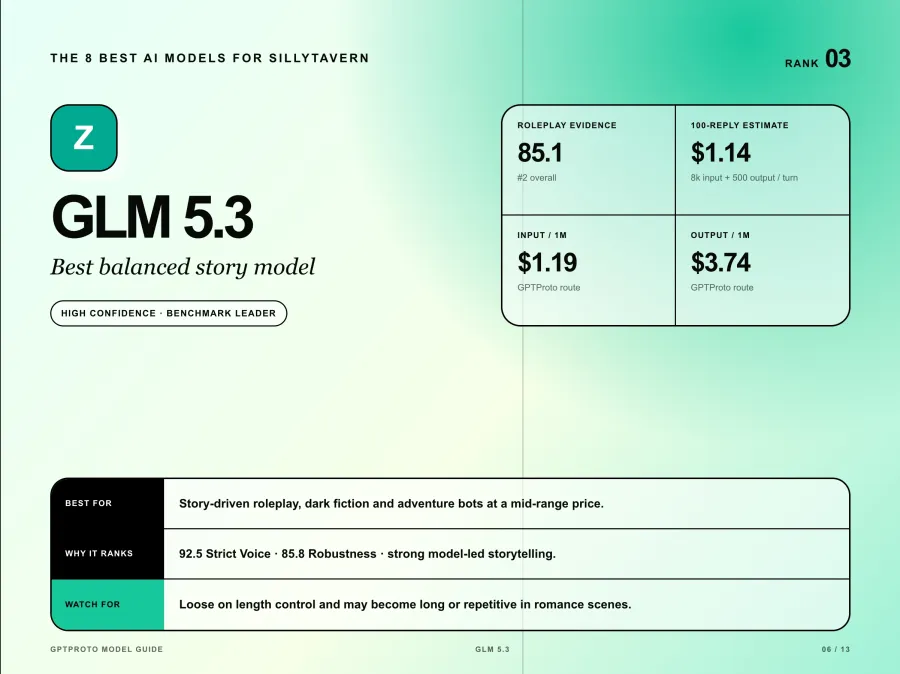
The trade-off is control over length and pacing. GLM-5.3 was the loosest of the leading models on word limits and performed much worse in the benchmark's romance scenario, where replies became long and repetitive. A strict maximum response length and a clear post-history instruction help, but they do not guarantee concise output.
At $1.19 input and $3.74 output per million tokens, GLM-5.3 costs less than half as much as Kimi K3 in the fixed 100-reply example. Use model ID glm-5.3. It is a sensible default for users who want strong roleplay quality without paying premium-model rates on every turn.
4 DeepSeek V4.1 Flash Best for Affordable Long Sessions
DeepSeek V4.1 Flash offers the cleanest quality-to-cost argument in the list. It scored 84.4 overall, stayed within the word limit on all 28 of 28 core-roleplay replies, and tied for first in the Villain category. Its $0.24 input and $0.96 output rates put the fixed 100-reply example at about $0.24.
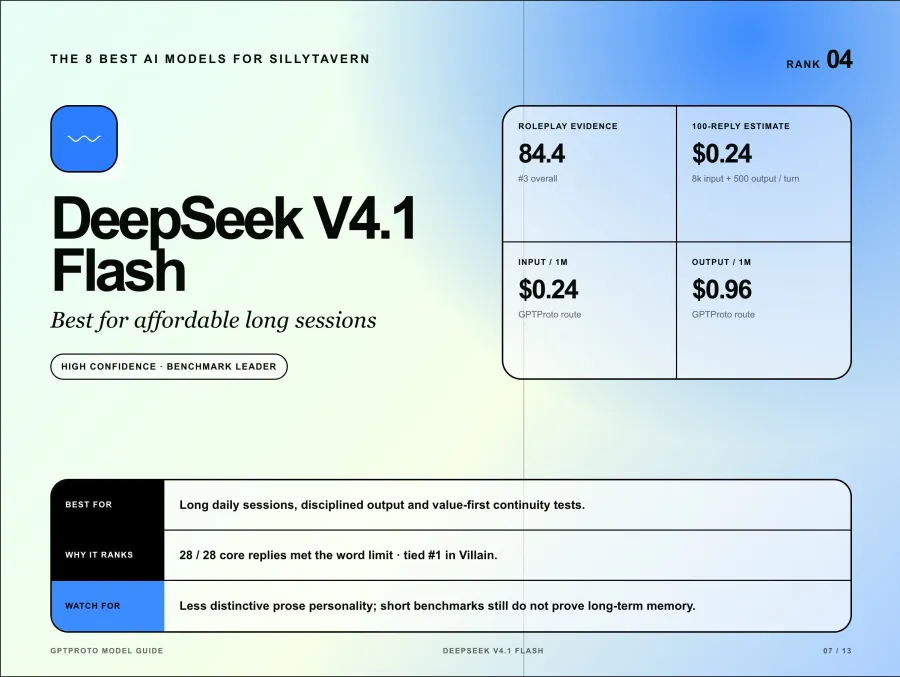
The model is less distinctive as a prose stylist than Kimi, Argon, or Opus. That can be a benefit when the character card already contains a strong voice: the model is less likely to overwrite it with its own house style. It is also useful when you expect long daily sessions and want to reserve a more expensive model for pivotal scenes.
Use deepseek-flash in SillyTavern. My judgment is that this is the best first value test for long-running chats, but the benchmark still used short scenarios. You should run your own 30- to 50-turn continuity test before treating its low price as proof of long-term memory.
5 GLM 5.3 Flash Best Cheap Game Master
GLM-5.3 Flash is the budget specialist. It scored 89.2 as Game Master and 98.3 for Strict Voice, the highest single category score in the September benchmark. At $0.1275 input and $0.425 output per million tokens, the fixed 100-reply example costs about $0.12.
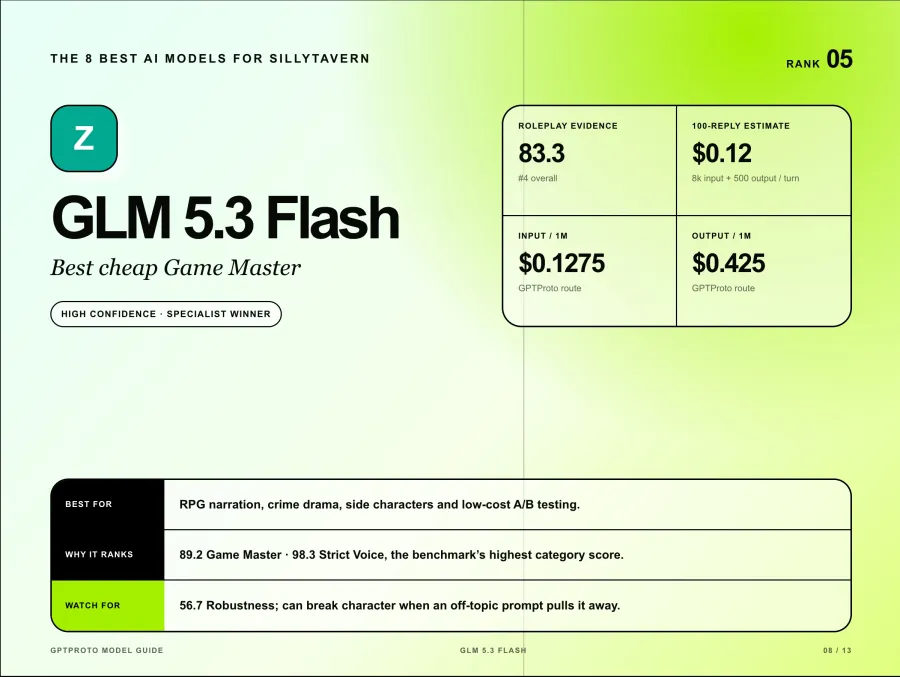
Its low point is just as important. GLM-5.3 Flash scored only 56.7 for Robustness after breaking character to answer an off-topic request like a general assistant. It also missed more core-roleplay word limits than the other leaders.
Choose it for RPG narration, crime drama, side characters, or cheap A/B testing. Do not assume the low price makes it the best companion model. In SillyTavern, keep the character rules close to the end of the prompt and test deliberate derail attempts before committing a long chat to it. The model ID is glm-5.3-flash.
6 Gemini 3.8 Flash Best Fast Everyday Model
Gemini 3.8 Flash deserves a full place in this list rather than a passing mention. A recent community roleplay benchmark tested up to 64 responses per model across eight chapters and gave Gemini 3.8 Flash a 91.9 quality score. That test weighted writing preference at 75 percent and robustness at 25 percent. It is useful evidence, but its score is not directly comparable with AI Roleplay Bench because the prompts and scoring method differ.
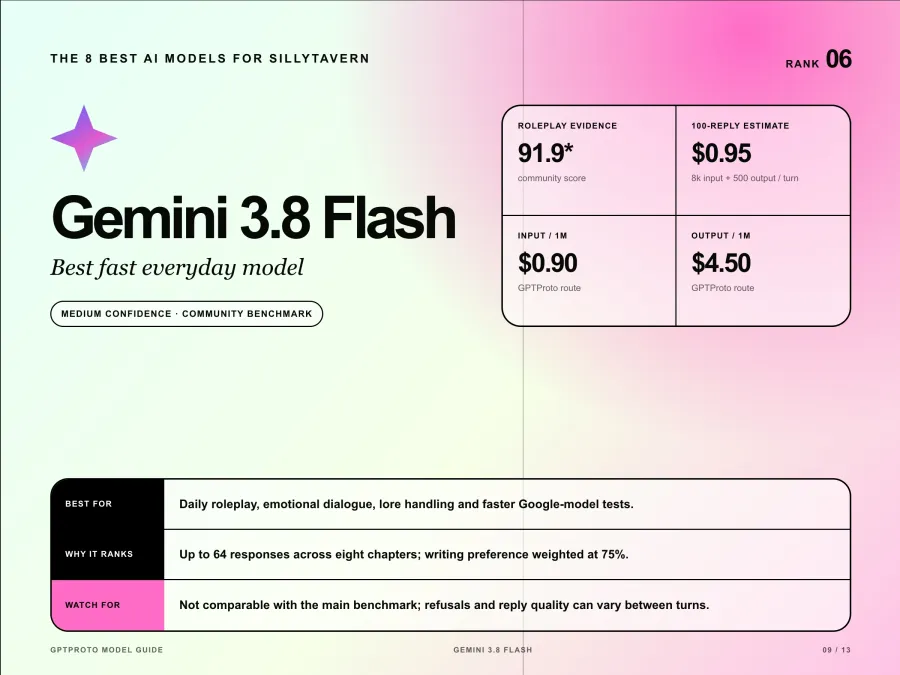
Community reports also praise its emotional dialogue, lore handling, and conversational rhythm. The rough edge is consistency: some users report random refusals or uneven replies even when neighboring turns work well.
Use gemini-3.8-flash and begin with medium thinking. Its $0.90 input and $4.50 output rates make it much cheaper than Argon, although the fixed 100-reply example still costs about $0.95. Choose it when you want a Google model for daily use but do not need Argon's premium reasoning on every turn.
7 Claude Opus 5.5 Best Premium Prose Model
Claude Opus 5.5 is the premium prose pick, not the universal winner. Users who like it point to spatial awareness, world knowledge, pacing, and the ability to make a setting feel active. A detailed SillyTavern community report recommends it for general story roleplay while switching models when a scene requires different content handling.
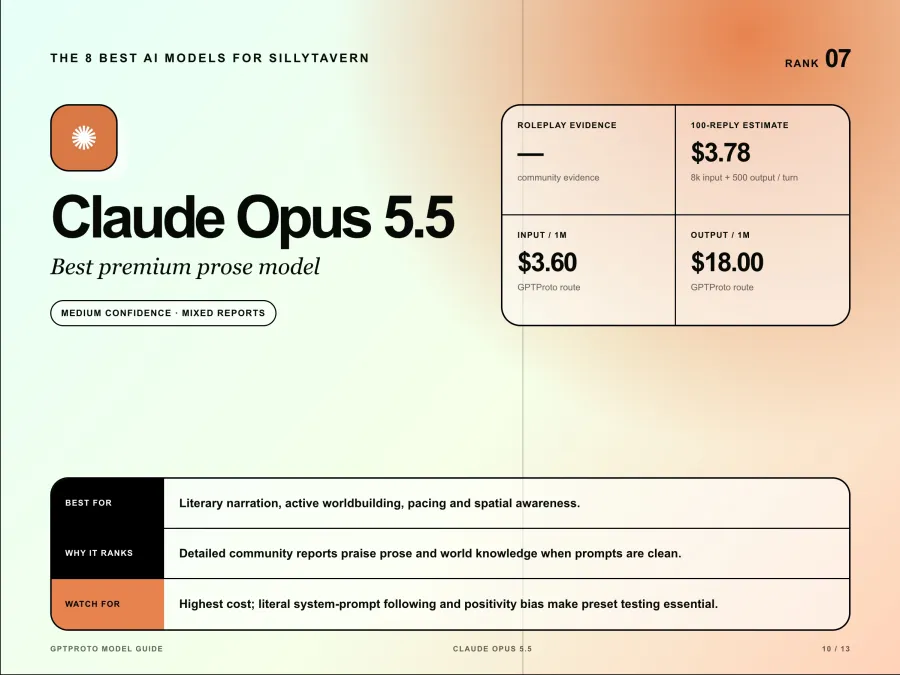
Other users report that Opus follows large system prompts so literally that conflicting instructions in a character card or preset can distort the character. Positivity bias is another recurring complaint. That split explains why I would not rank it above the benchmark leaders without testing the exact card.
The price is the clearest downside: $3.60 input and $18 output per million tokens, or about $3.78 in the fixed 100-reply example. Use claude-opus-5-5, start with a clean prompt, and remove inherited preset rules you cannot explain. Opus is worth testing for literary narration. It is hard to justify for casual high-volume chat.
8 GPT 6 Luna Best Ultra Cheap GPT Model
GPT-6 Luna is why GPT should not be absent from a SillyTavern guide, even though it is not a top overall roleplay model. Luna scored 71.1 overall, well below the four benchmark leaders, with 68.3 for Companion, 60.0 for Strict Voice, and 54.2 for Robustness. Its caution repeatedly pulled it out of the fiction.
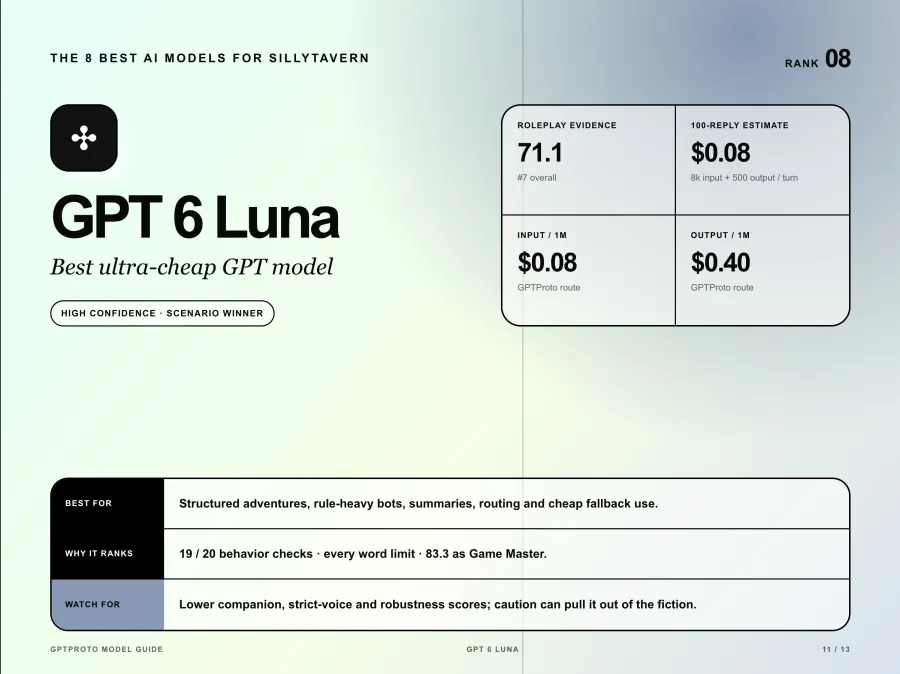
The other half of the result is useful. GPT-6 Luna passed 19 of 20 behavior checks, kept every tested word limit, and scored 83.3 as Game Master. At $0.08 input and $0.40 output per million tokens, the fixed 100-reply example costs about eight cents.
Use gpt-6-luna for structured adventures, rule-heavy bots, summaries, routing, or a cheap fallback. Do not choose it over Kimi, GLM, or Gemini when emotional immersion is the main goal. This is a scenario winner, not a disguised claim that the benchmark's seventh-place model is best overall.
Why There Are Not More GPT Claude and Gemini Models
A useful ranking should not reserve equal space for each provider. Each additional model needs either strong roleplay evidence or a clearly different job.
| Model family |
Main-list choice |
Other model worth testing |
Why the alternative is not separately ranked |
| GPT |
GPT-6 Luna |
GPT-6.1 Terra at $0.80 / $4.00 |
Terra has attractive pricing and general writing ability, but no comparable roleplay benchmark yet |
| Claude |
Claude Opus 5.5 |
Claude Sonnet 5.5 at $1.80 / $9.00 |
It is a cheaper Claude option, but current RP-specific evidence is too thin for a separate winner claim |
| Claude |
Claude Opus 5.5 |
Claude Haiku 5.5 at $0.09 / $0.45 |
Haiku is positioned for high-volume lightweight work; low price alone does not establish strong prose or long-session consistency |
| Gemini |
Gemini 4 Argon and 3.8 Flash |
Gemini Flash Lite variants |
The cheaper Lite models lack the same RP-specific community evidence |
| Kimi |
Kimi K3 |
Kimi K3.1 Pro at $2.00 / $10.00 |
It is newer and promising, but it has not replaced K3 in the specialist benchmark |
This is also why GPT-6 Luna ranks eighth instead of disappearing. It has evidence for a narrow job. Terra may later outrank it, but making that claim now would confuse general capability with tested roleplay performance.
Best Local Model for SillyTavern by VRAM
Running SillyTavern locally does not mean the language model is local. The frontend itself has modest requirements, while local inference needs enough GPU memory for the model weights and the context cache. The official SillyTavern overview recommends at least 6 GB of VRAM as a starting point for local inference.
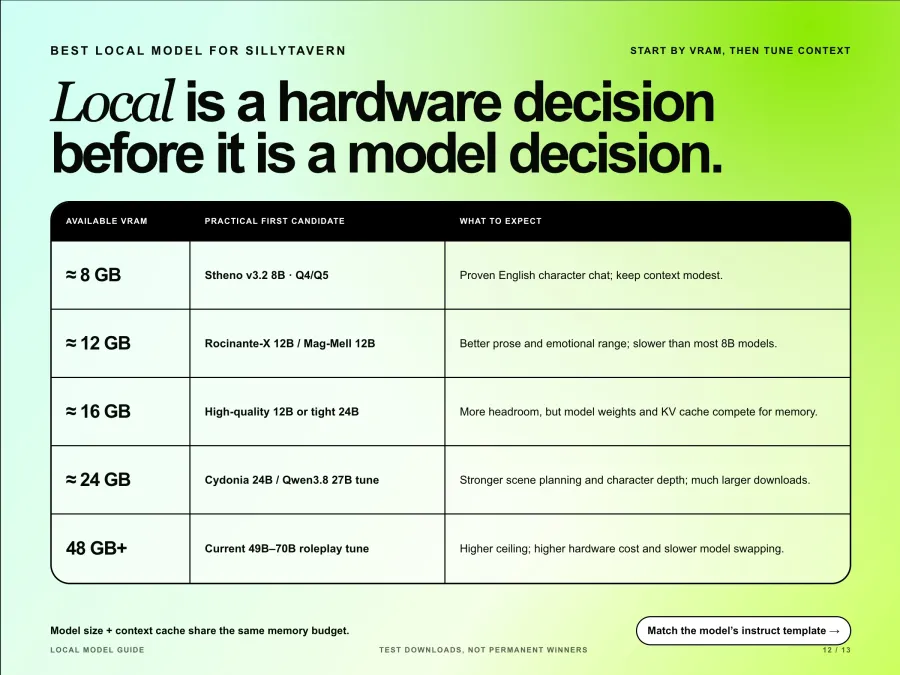
Local model recommendations change quickly, so treat these as first downloads to test rather than permanent winners. The current Hugging Face roleplay model directory contains thousands of community variants with very different templates and quantizations.
| Available VRAM |
Practical first candidate |
What to expect |
| About 8 GB |
Stheno v3.2 8B in Q4 or Q5 |
A proven entry point for English character chat, but context must stay modest |
| About 12 GB |
Rocinante-X 12B or Mag-Mell 12B |
Better prose and emotional range than most 8B models, with slower generation |
| About 16 GB |
A higher-quality 12B quant, or a 24B model with short context and partial offload |
More quality headroom, but a model file fitting in VRAM does not guarantee a large KV cache will fit |
| About 24 GB |
Cydonia 24B or a Qwen3.8 27B roleplay tune |
Better scene planning and character depth, with much larger downloads |
| 48 GB and above |
A current 49B to 70B roleplay tune |
Higher ceiling, but large hardware cost and much slower model swapping |
For 8 GB cards, the central trade-off is simple: model size and context compete for the same memory. Start with a smaller context, confirm the character voice, then raise the limit while watching VRAM and generation speed.
For local Text Completion backends, select the model's actual instruct template. SillyTavern's Instruct Mode documentation warns that the chosen template must match the format expected by the model. A strong fine-tune with the wrong template can look worse than a smaller model configured correctly.
Best Model for Long Term Roleplay
Kimi K3 is the strongest evidence-backed choice for long-term character continuity, while DeepSeek V4.1 Flash is the more economical choice when the history becomes expensive. Gemini 4 Argon is appealing for large lorebooks, but a million-token window should not be confused with reliable memory.
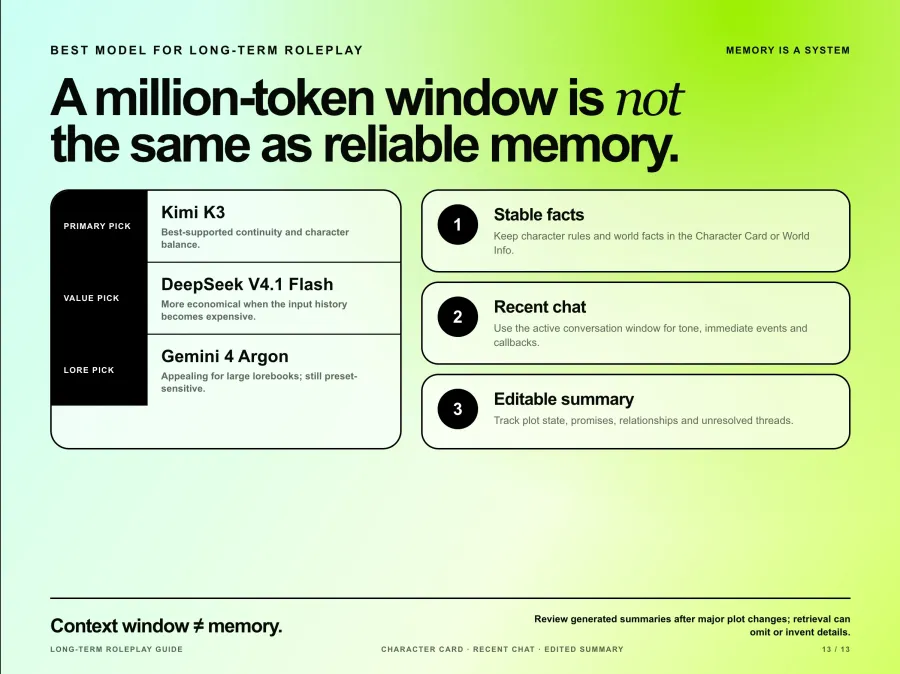
SillyTavern's context documentation explains that only messages inside the active context range are sent to the model. Character information, system prompts, World Info, summaries, and response space all consume that same budget. Once old messages fall outside it, the model cannot recall them unless you inject the relevant facts again.
Use three layers rather than relying on context size alone:
Keep stable character facts and world rules in the character card or World Info.
Use recent chat history for tone and immediate events.
Maintain a short, editable summary for plot state, relationships, promises, and unresolved threads.
The Summarize extension can automate the third layer, but its own documentation warns that model-generated summaries may omit details or invent them. Review the summary after major plot changes. Chat Vectorization is experimental and may make retrieval less effective, so it should be tested rather than enabled on faith.
How to Switch Models in SillyTavern
Switching does not delete the chat, but it can change voice, formatting, refusal behavior, and how earlier messages are interpreted. Save a separate preset for each model family instead of forcing one preset across GPT, Claude, Gemini, and local text-completion models.
For GPT Proto, the short setup is:
Open API Connections in SillyTavern.
Select Chat Completion and Custom OpenAI compatible.
Set the Base URL to https://gptproto.com/v1. Do not append /chat/completions; SillyTavern adds it.
Paste the API key and enter an exact model ID such as kimi-k3, glm-5.3-flash, or gemini-3.8-flash.
Start with Prompt Post-Processing set to None, connect, and run Test Message.
The illustrated SillyTavern API integration guide covers installation, character cards, screenshots, and common connection errors.
If you want to verify the same key and model outside SillyTavern, this request uses the identical OpenAI-compatible route:
export GPTPROTO_API_KEY="YOUR_KEY"

curl --request POST "https://gptproto.com/v1/chat/completions" \
  --header "Authorization: Bearer $GPTPROTO_API_KEY" \
  --header "Content-Type: application/json" \
  --data '{
    "model": "kimi-k3",
    "messages": [
      {"role": "user", "content": "Reply in character with one short sentence."}
    ],
    "max_tokens": 120
  }'
After switching, test at least five turns with the same character card. Include one short reply, one off-topic prompt, one instruction about reply length, and one callback to an earlier detail. That catches more problems than judging the opening message alone.
Which SillyTavern Model Should You Choose
Choose Kimi K3 when you want one evidence-backed default.
Choose Gemini 4 Argon for complex lore and immersive scene development, accepting higher cost and lower benchmark certainty.
Choose GLM-5.3 when you want a strong storyteller at a mid-range price.
Choose DeepSeek V4.1 Flash for affordable long sessions and disciplined output.
Choose GLM-5.3 Flash for budget RPG narration and strict character voices.
Choose Gemini 3.8 Flash for a faster, cheaper Gemini with encouraging community tests.
Choose Claude Opus 5.5 when prose quality matters enough to justify the bill.
Choose GPT-6 Luna for the cheapest structured RP, summaries, or fallback routing.
Choose a local roleplay fine-tune when privacy, offline use, and unmetered generation matter more than setup time and cloud-model quality.
You can compare current usage signals and model prices on the GPT Proto SillyTavern model page, then test the same character and history across models through the roleplay API playground.