If you are deciding between GPT 6.1 Terra vs Sonnet 5.5 today, here is the short decision rule I use before running a benchmark:
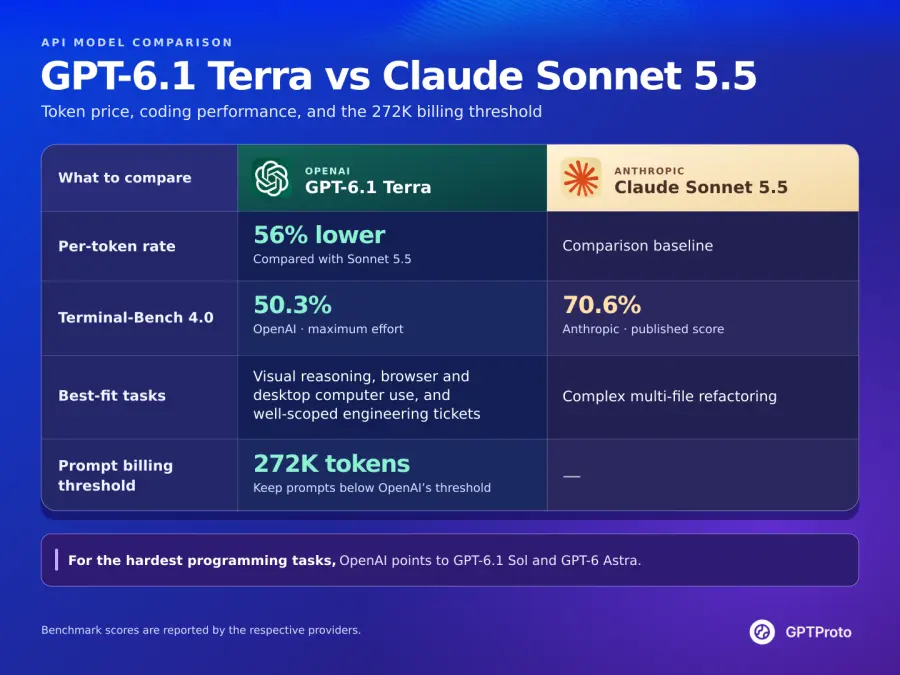
Choose GPT-6.1 Terra if your pipeline runs high-volume screenshot inspection, form and invoice automation, UI layout debugging, or bounded coding tasks where a $0.80/$4.00 token rate and 3x faster task execution matter more than peak autonomous refactoring depth—and your single-request inputs stay at or below 272K tokens.
Stick with Claude Sonnet 5.5 if your agent executes multi-file repository migrations, deep terminal debugging where a missed edit is more expensive than the token bill, or single-pass prompts between 300K and 900K tokens where OpenAI's long-context surcharge erases Terra's input price advantage.
You can check live catalog rates or run your own monthly token volume through the GPT Proto model comparison hub before committing to either route. Everything below is a documentation- and benchmark-grounded comparison verified on November 5, 2026; vendor-reported benchmarks are labeled separately from independent measurements by Artificial Analysis and early developer feedback.
GPT-6.1 Terra vs Claude Sonnet 5.5 Comparison at a Glance
Developers searching for ChatGPT 6.1 Terra vs Sonnet 5.5 or Anthropic Claude Sonnet 5.5 vs GPT 6.1 Terra often run into conflicting spec sheets because the two vendors structure their reasoning controls, tool endpoints, and long-context surcharges differently. The table below aligns both models against OpenAI's officia gpt-6.1-terra documentation, Anthropic's Claude Sonnet 5.5 overview, and live GPT Proto catalog rates.
| Specification |
GPT-6.1 Terra (gpt-6.1-terra) |
Claude Sonnet 5.5 (claude-sonnet-5-5) |
| Provider |
OpenAI |
Anthropic |
| Release date |
October 26, 2026 |
September 28, 2026 |
| Official standard input / output (per 1M tokens) |
$1.00 / $5.00 |
$2.00 / $10.00 |
| GPT Proto input / output (per 1M tokens) |
$0.80 / $4.00 (−20% vs official) |
$1.80 / $9.00 (−10% vs official) |
| Official cached input read (per 1M tokens) |
$0.05 (5% of base input) |
$0.10 (cut from $0.20 on Oct 7, 2026) |
| Official cache write (per 1M tokens) |
$1.25 (30m TTL) / $2.50 (12h TTL) |
$2.50 (5m TTL) |
| GPT Proto cache read / write (per 1M tokens) |
$0.04 / $1.00 |
$0.09 / $2.25 (verify live model page) |
| Context window |
1,050,000 tokens |
1,000,000 tokens |
| Long-context pricing rule |
>272K input bills full request at 2x input/cache and 1.5x output |
Flat rate across the full 1M context window |
| Maximum output tokens |
128,000 tokens |
128,000 tokens |
| Input / output modalities |
Text, Image, Document in → Text out |
Text, Image, Document in → Text out |
| Knowledge cutoff |
June 1, 2026 |
Early-to-mid 2026 (retains Sonnet 5 tokenizer) |
| Reasoning / effort controls |
none, low, medium (default), high, xhigh, max |
Adaptive thinking on by default; medium, high (API default), max, between_tools |
| Required endpoint for tool calling |
/v1/responses required by OpenAI docs |
/v1/messages (native) or OpenAI-compatible /v1/chat/completions |
| Client & IDE availability |
ChatGPT Work & Codex (not regular Chat), GitHub Copilot, Claude Code (via API) |
Claude.ai, Claude Code, GitHub Copilot, Cursor |
| AA Intelligence Index (v4.3.2) |
41 (medium) / 48 (max) |
56 (max, Default Fallback) |
| AA average evaluation task cost |
$0.10 (`medium`) / $0.40 (max) |
$5.46 (max, Default Fallback) |
| Terminal-Bench 4.0 (vendor-reported) |
50.3% (max effort) |
70.6% |
Three rows in that table do almost all the work when you are budgeting an application. First, on standard requests under 272K tokens, GPT-6.1 Terra is 56% cheaper per token on GPT Proto for both input and output, so long completions do not flip the cost ranking. Second, Sonnet 5.5 holds a 20.3-percentage-point lead on Terminal-Bench 4.0, which tracks closely with how the two models behave on unguided repository edits. Third, unlike GPT-6.1 Sol, GPT-6.1 Terra restores support for reasoning.effort: "none", giving OpenAI developers a true non-reasoning fast path again.
Pricing and Cost Breakdown: Which Is Paid High and Which Is More Cost-Effective?
When developers search "GPT 6.1 Terra vs Sonnet 5.5 which is paid high" or "which is cost-effective," they are usually trying to reconcile two different numbers: the per-million-token tariff on the pricing page and the actual dollar cost of a finished agent task. Those two ratios are not the same.
At the per-token level, Claude Sonnet 5.5 is the higher-priced model by a wide margin. Official Anthropic pricing is $2.00 per million input tokens and $10.00 per million output tokens—twice OpenAI's $1.00/$5.00 list price for Terra. Because GPT Proto applies a 20% discount on GPT-6.1 Terra ($0.80 input / $4.00 output) and a 10% discount on Claude Sonnet 5.5 ($1.80 input / $9.00 output), Sonnet 5.5 costs 2.25x as much per token on the platform. Both vendors now price cached input reads at 5% of base input ($0.05 official for Terra vs $0.10 official for Sonnet 5.5 after Anthropic halved Sonnet's cache read price in October 2026), and both charge 1.25x base input for standard cache writes ($1.25 vs $2.50 official). Note that a single-use long prompt written to cache actually adds a 25% surcharge on either model if you never read that prefix a second time.
At the per-task level, the gap becomes much steeper. In Artificial Analysis's Intelligence Index v4.3.2 (published October 26–27, 2026), the tested Claude Sonnet 5.5 configuration (max effort with Default Fallback) recorded a weighted average cost of $5.46 per evaluation task. In the same evaluation suite, [GPT-6.1 Terra at `max` effort](https://artificialanalysis.ai/models/gpt-6-1-terra) averaged $0.40 per task, and GPT-6.1 Terra at medium effort averaged just $0.10 per task. That is a 13.6x difference at max effort and a 54.6x difference when comparing Sonnet's top setting against Terra's default medium setting.
Why does a 2x per-token difference turn into a 13x to 54x bill gap? Reasoning models bill thinking tokens as output tokens. When Sonnet 5.5 runs at high or maximum effort on an open-ended benchmark, it generates long reasoning chains at $10.00 per million tokens ($9.00 on GPT Proto). Terra's announcement also notes that at maximum effort on Agents' Last Exam, Terra used less than one-third as many tokens as Claude Opus 5.5. Even more important is Artificial Analysis's Pareto-frontier finding: for GPT-6.1 Terra, the low and medium effort settings are Pareto-optimal for intelligence versus cost. Turning Terra up to max pushes its score from 41 to 48, which ties GPT-6.1 Sol at medium effort—except Sol medium costs $0.21 per task while Terra `max` costs $0.40. In short, if you want the most cost-effective setup on Terra, keep it on low or medium; if a task is hard enough to demand max effort, you should already be testing Sol or Sonnet 5.5.
Worked Cost Math: Two Real Production Scenarios
To see where the cheaper token rate actually pays off—and where it backfires—let us run the exact arithmetic at GPT Proto's live catalog rates ($0.80/$4.00 for Terra; $1.80/$9.00 for Sonnet 5.5), assuming uncached requests under 272K tokens.
Scenario A is a 20-step visual QA and form-extraction agent loop. Each step sends a screenshot and DOM snippet totaling 15,000 input tokens and generates 1,500 output tokens (including medium reasoning tokens). Across 20 steps, a single workflow consumes 300,000 input tokens (0.3M) and 30,000 output tokens (0.03M):
At 10,000 workflows per month, Terra costs $3,600 against Sonnet's $8,100—a monthly saving of $4,500. Even if Terra fails validation on 20% of its runs and has to retry those 2,000 workflows from scratch (adding $720), your total bill is $4,320, which still saves $3,780 per month over a zero-retry Sonnet run.
Scenario B is a multi-file backend refactor in an active pull request. Suppose each attempt reads 80,000 input tokens and emits 10,000 output tokens. One clean pass on Sonnet 5.5 costs (0.08 * $1.80) + (0.01 * $9.00) = $0.234. One pass on Terra costs (0.08 * $0.80) + (0.01 * $4.00) = $0.104. You save 13 cents on the API call. The catch is that if Terra misses a cross-module type dependency—which aligns with its 50.3% vs 70.6% Terminal-Bench gap—and forces three retries plus 12 minutes of a senior engineer's time at $90/hour ($18.00 of labor), that 13-cent token saving just cost your team $18.18. In one sentence: Terra wins overwhelmingly on repeatable, machine-verifiable loops, while Sonnet 5.5 pays for its higher tariff whenever a failed edit burns human review time.
Window Context (1.05M vs 1M): Why Passing 272K Flips the Bill
On paper, the GPT 6.1 Terra vs Sonnet 5.5 window context comparison looks like a dead heat with a slight edge to OpenAI: Terra accepts 1,050,000 input tokens and emits up to 128,000 output tokens, whereas Claude Sonnet 5.5 accepts 1,000,000 input tokens and emits up to 128,000 output tokens. Most comparison tables stop there.
If you read OpenAI's gpt-6.1-terra model documentation, however, there is a billing boundary at 272,000 input tokens that completely changes long-context economics. Whenever a prompt exceeds 272K input tokens on GPT-6.1 Terra, OpenAI bills the entire request—not just the tokens above 272K—at 2x the input and cache rates and 1.5x the output rate.
Here is what happens to the official per-million-token tariff the moment your prompt crosses from 272,000 tokens to 272,001 tokens:
| Context Bracket |
GPT-6.1 Terra (Official Rate) |
Claude Sonnet 5.5 (Official Rate) |
Input Price Relationship |
| Standard prompt (≤272K input tokens) |
$1.00 input / $5.00 output / $0.05 cache read |
$2.00 input / $10.00 output / $0.10 cache read |
Terra is 50% cheaper on input and output |
| Long-context prompt (>272K to 1M+ input tokens) |
$2.00 input / $7.50 output / $0.10 cache read |
$2.00 input / $10.00 output / $0.10 cache read |
Input and cache read rates are identical ($2.00 / $0.10) |
Unlike Anthropic's smaller Haiku 5.5 model (which applies a 5x surcharge above 100K tokens), Claude Sonnet 5.5 maintains flat pricing across its entire 1,000,000-token context window.
Run the math on a single 400,000-token repository audit that produces 10,000 output tokens at official list rates:
Once your prompt passes 272K tokens, Terra's 50% input discount disappears completely, leaving a $0.025 total difference on a 400K-token call. My recommendation is straightforward: never send >272K-token monolithic prompts to GPT-6.1 Terra expecting half-price economics. Either chunk/retrieve your context below 272K tokens so Terra stays in its $1.00 ($0.80 GPT Proto) bracket, or route 300K–900K repository dumps directly to Claude Sonnet 5.5, where you pay the same official input rate and get stronger long-horizon code comprehension. (Before running >272K prompts in production through GPT Proto, confirm with platform support how the upstream 272K tier adjustment is reflected on your account balance.)
Benchmarks and Community Feedback: Coding, Frontend, and Agentic Work
Headline composite scores hide where each model actually succeeds. On the Artificial Analysis Intelligence Index v4.3.2, Claude Sonnet 5.5 (max, Default Fallback) scores 56, GPT-6.1 Sol (max) scores 52, and GPT-6.1 Terra scores 48 at max effort and 41 at medium effort. (On the November 3, 2026 index snapshot displayed on GPT Proto's comparison card, Sonnet 5.5 registers 54.2 and Terra max registers 51—a narrower 3.2-point spread that still favors Sonnet.) To make a practical routing decision for code, frontend UI, or agent loops, we have to break those aggregates down by task type and compare them against what developers are reporting in the wild.
1. Backend and Terminal Coding (GPT 6.1 Terra vs Sonnet 5.5 for code)
For pure software engineering from the command line, Anthropic still holds a clear advantage. On Terminal-Bench 4.0, Anthropic reports 70.6% for Claude Sonnet 5.5 (up from 10.3% on Sonnet 5), whereas OpenAI reports 50.3% for GPT-6.1 Terra at max effort (up from 21.5% on GPT-5.6 Terra). In Artificial Analysis's newly released Coding Agent Index v2.0, Terra scores 48—17 points ahead of lightweight GPT-6 Luna (31), but 6 points behind GPT-6.1 Sol (54). Artificial Analysis also notes that for coding agents specifically, Terra's low and xhigh effort settings sit on the cost-efficiency frontier, while other effort settings lag behind.
Early real-world testing points to the exact boundary between the two models:
GitHub Copilot's October 26, 2026 release changelog reported that in early internal testing, GPT-6.1 Terra solved noticeably more terminal and C# coding tasks than GPT-5.6 Terra, adding a crucial behavioral observation: "It works in focused, consolidated steps on well-scoped tasks." GitHub did not publish raw pass-rate percentages in that note, so treat it as a qualitative platform finding rather than a controlled benchmark.
On the Claude side, an early head-to-head developer test on r/ClaudeAI (running ten personal coding tasks three times per configuration at high effort in Claude Code and pi-agent) found that Sonnet 5.5 consistently completed implementations in fewer conversational turns and fewer output tokens than its predecessor, largely because Sonnet 5.5 batches parallel tool calls more aggressively. Similarly, on Cursor's external CursorBench 4.0 evaluation, Sonnet 5.5 at high effort scored 47.8% at $1.67 per task.
The takeaway for backend developers: if the ticket is well-scoped—writing a C# service method, adding a unit test, or fixing an isolated CLI script—Terra at low or medium effort will finish it quickly at less than half the token price. If the ticket requires tracing state across ten files where an extra retry loop ruins the workflow, Sonnet 5.5's 70.6% terminal competence justifies the higher rate. Where scientific computing is involved, OpenAI also reports that on Terminal-Bench-Science 0.1 (such as writing code to track cell divisions in time-lapse video), Terra at max effort actually surpasses GPT-6.1 Sol and comes within five points of Claude Opus 5.5 at less than one-fifth the estimated cost.
2. GPT-6.1 Terra vs Sonnet 5.5 for Frontend Coding
Searching GPT 6.1 Terra vs Sonnet 5.5 for Frontend Coding deserves its own answer because frontend engineering is two different jobs glued together: visual/DOM layout work and state/architecture logic.
When OpenAI introduced GPT-6.1 Terra's 50.3% score on Terminal-Bench 4.0, the single concrete coding example it highlighted in the announcement was a frontend bug: "fixing a webpage whose layout shifts as it loads" (Cumulative Layout Shift, or CLS). At the same time, OpenAI reported that on MMMU-Pro—a benchmark for visual reasoning over diagrams, screenshots, and dense layouts—GPT-6.1 Terra outperforms GPT-5.6 Terra across all effort levels and nearly matches frontier GPT-6 Astra and GPT-6.1 Sol at a fraction of the price. In the launch-day thread on the OpenAI Developer Community forum, one of the first developer reactions summarized Terra as "a great bang for the buck, especially where visual understanding is concerned. Decent on coding as well."
That split gives frontend teams a clean division of labor:
Use GPT-6.1 Terra for visual and UI-layer frontend work: turning Figma screenshots or wireframes into initial Tailwind/HTML markup, comparing rendered Playwright screenshots against design specs to spot overlapping DOM nodes or mobile breakpoint regressions, and diagnosing CSS layout shifts. Because Terra processes images natively, runs over 3x faster than GPT-6.1 Sol and Astra on visual-action benchmarks, and costs $0.80/$4.00 on GPT Proto, your CI pipeline can afford to run visual regression checks on every commit.
Use Claude Sonnet 5.5 for logic-heavy frontend architecture: refactoring complex React/Next.js server-action state trees, resolving intricate TypeScript generic constraints, or migrating a legacy Redux store without breaking hydration. When there is no screenshot to inspect and the difficulty lies purely in multi-file state coherence, Sonnet 5.5 remains the safer pair of hands.
3. Agentic Work, Computer Use, and Factuality (for agentic work)
If your definition of GPT 6.1 Terra vs Sonnet 5.5 for agentic work centers on GUI automation, document parsing, and back-office computer use, GPT-6.1 Terra is arguably OpenAI's strongest value release of 2026.
In OpenAI's vendor-reported evaluations on Agents' Last Exam v1 (which tests multi-step professional workflows like converting architectural drawings into a 3D model or logging shot-by-shot timecodes across an animated film), GPT-6.1 Terra at medium effort scored 15 percentage points higher than GPT-5.6 Terra at roughly one-third the cost, matching flagship GPT-6 Astra at one-tenth the token price. At max effort, OpenAI reports that Terra is over 3x as token-efficient as Claude Opus 5.5 and 1/4th its price per token, yielding roughly a 9x lower cost per task while completing workflows over 3x faster than both GPT-6 Astra and GPT-6.1 Sol.
On OSWorld 2.1 (desktop application control), OpenAI reports that Terra at medium effort beats GPT-5.6 Terra's best score at a fraction of the per-task cost. To keep that balanced, Anthropic's published OSWorld 2.1 (offline) score for Claude Sonnet 5.5 is a very high 83.9% (disclosed in Anthropic's October 2026 Haiku 5.5 benchmark table). Both models are top-tier computer-use engines; the difference is that screen-scraping agents send a fresh screenshot on every click, which burns input tokens rapidly and makes Terra's $0.80/M GPT Proto input rate far easier to sustain at scale.
Just as important for autonomous agents is knowing when the model does not know something. In Artificial Analysis's independent AA-Omniscience benchmark, GPT-6.1 Terra's hallucination rate (how often the model guesses when it lacks knowledge) dropped by 50 percentage points—from 88% on GPT-5.6 Terra down to 38%—while simultaneously gaining 2 points in overall accuracy. That independent measurement backs up OpenAI's internal factuality evaluation (detailed further in the GPT-6.1 Terra System Card), where low-effort factual error rates on difficult prompts fell from 53.6% to 16.7% (and down to 4.3% at max effort). Lower hallucination rates mean fewer poisoned tool calls downstream.
Developer Experience and API Gotchas (GPT 6.1 Terra vs Sonnet 5.5 for developer)
Switching between gpt-6.1-terra and claude-sonnet-5-5 in production is rarely a one-line string replacement. If you are evaluating GPT 6.1 Terra vs Sonnet 5.5 for developer ergonomics, four API-level constraints will dictate your integration work.
First, GPT-6.1 Terra supports reasoning.effort: "none", whereas GPT-6.1 Sol does not. When OpenAI launched GPT-6.1 Sol on September 29, 2026, it removed the none and minimal reasoning tiers, forcing every request onto low or higher and breaking temperature and top_p across the board. According to OpenAI's official gpt-6.1-terra prompting and migration guide, Terra supports the full spectrum: none, low, medium (default), high, xhigh, and max. If you set reasoning_effort: "none", Terra runs without generating hidden reasoning tokens and allows standard sampling parameters. However, the moment you use low, medium, high, xhigh, or max, you must strip temperature, top_p, top_logprobs, and logprobs from your request payload or the API will reject the call with an HTTP 400 error.
Second, OpenAI requires the Responses API (/v1/responses) for tool calling on GPT-6.1 Terra. While plain text and image prompts work on /v1/chat/completions, OpenAI's model documentation states explicitly that tool calling requires /v1/responses. Once on the Responses API, Terra supports all nine of OpenAI's native built-in tools—Web search, File search, Image generation, Code interpreter, Hosted shell, apply_patch, Skills, Computer use, MCP, and Tool search—plus async: true on custom function tools so the model can keep reasoning while a slow background tool executes. Furthermore, Terra supports sending a configuration_update input item mid-conversation to raise or lower reasoning.effort on a hard turn without rewriting the prompt prefix or invalidating your 30-minute prompt cache (prompt_cache_options.ttl: "30m").
Third, Claude Sonnet 5.5 has its own strict 400-error traps. According to Anthropic's Sonnet 5.5 migration guide, Sonnet 5.5 uses adaptive thinking by default (defaulting to high effort on the API and medium in Claude Code, as noted in Anthropic's Claude Code configuration docs). If your legacy Claude integration sends thinking: {"type": "disabled"}, you must update it to between_tools for the lowest thinking setting. More importantly, Sonnet 5.5 rejects forced tool choices (tool_choice: {"type": "any"} or a forced named tool) with a 400 error when adaptive thinking is active; you have to use auto and guide tool selection in the prompt. You also need to parse response content blocks by type rather than assuming content[0] is text, because the first block is frequently a thinking block.
Fourth, IDE and CLI integration is already wired up for both. Note that in consumer subscriptions, OpenAI's release notes confirm that GPT-6.1 Terra rolled out to ChatGPT Work and Codex (for Plus, Pro, Business, Enterprise, and Edu plans), not the standard ChatGPT Chat interface, and it does not support UAE inference residency (though Fast mode supports EU data residency). For developers working in local terminals, both models can be connected to Claude Code and OpenAI Codex through GPT Proto. On the GPT-6.1 Terra model page, clicking Try this model opens a Quick Start panel where you can select Claude Code or ChatGPT (Codex) under Let AI finish the integration, or click Copy Markdown for AI to let your coding assistant wire up the environment variables automatically.
Building Apps: How to Route Both Models with One API Key
When teams ask about GPT 6.1 Terra vs Sonnet 5.5 for building apps, the best architecture is almost never picking one model for 100% of traffic. Because both models live under a single prepaid balance on GPT Proto, you can route by the step rather than by the vendor: send high-frequency visual inspection, screenshot classification, and bounded UI fixes to gpt-6.1-terra at $0.80/$4.00, and escalate multi-file code synthesis to claude-sonnet-5-5 at $1.80/$9.00.
1. First-Call cURL Check (OpenAI-Compatible Chat Completions)
Both models can be called for text and visual analysis through GPT Proto's unified OpenAI-compatible /v1/chat/completions endpoint using a standard Bearer token. Switching between them requires changing only the "model" string:
# Call 1: GPT-6.1 Terra ($0.80 input / $4.00 output per 1M tokens on GPT Proto)
curl --fail-with-body https://gptproto.com/v1/chat/completions \
  -H "Authorization: Bearer $GPTPROTO_API_KEY" \
  -H "Content-Type: application/json" \
  -d '{
    "model": "gpt-6.1-terra",
    "messages": [
      {
        "role": "user",
        "content": "Inspect this CSS rule and explain in two sentences why it triggers a layout shift on mobile: .hero-banner { width: 100%; height: auto; }"
      }
    ]
  }'

# Call 2: Claude Sonnet 5.5 ($1.80 input / $9.00 output per 1M tokens on GPT Proto)
curl --fail-with-body https://gptproto.com/v1/chat/completions \
  -H "Authorization: Bearer $GPTPROTO_API_KEY" \
  -H "Content-Type: application/json" \
  -d '{
    "model": "claude-sonnet-5-5",
    "messages": [
      {
        "role": "user",
        "content": "Write a TypeScript helper that validates webhook signatures using Web Crypto API with constant-time comparison."
      }
    ]
  }'
2. Python Step-Router Example for Frontend & App Pipelines
Here is a practical Python pattern using the standard openai SDK pointed at https://gptproto.com/v1. In this workflow, Step 1 uses gpt-6.1-terra to triage a UI bug report (where token volume is high and visual/DOM diagnosis is cheap), and Step 2 dynamically routes the actual code patch to either gpt-6.1-terra (for isolated single-component CSS fixes) or claude-sonnet-5-5 (when the triage flags a cross-file state change or when the prompt approaches the 272K cliff):
import os
import json
from openai import OpenAI

# One API key and shared balance across both OpenAI and Anthropic models
client = OpenAI(
    api_key=os.environ["GPTPROTO_API_KEY"],
    base_url="https://gptproto.com/v1",
)

def triage_and_patch_ui_issue(dom_snapshot: str, screenshot_url: str, approx_tokens: int) -> dict:
    # Step 1: Always run visual/DOM triage on GPT-6.1 Terra ($0.80 / $4.00 per 1M)
    triage_response = client.chat.completions.create(
        model="gpt-6.1-terra",
        messages=[
            {
                "role": "system",
                "content": (
                    "You are a frontend QA triage agent. Inspect the screenshot and DOM. "
                    "Return JSON with keys: 'root_cause', 'scope' ('isolated_css' or 'multi_file_state'), "
                    "and 'target_files' (array of strings)."
                ),
            },
            {
                "role": "user",
                "content": [
                    {"type": "text", "text": f"DOM Snapshot: {dom_snapshot}"},
                    {"type": "image_url", "image_url": {"url": screenshot_url}},
                ],
            },
        ],
        response_format={"type": "json_object"},
    )

    triage_data = json.loads(triage_response.choices[0].message.content)

    # Step 2: Route by task scope AND the 272K long-context billing boundary
    # If the fix touches multi-file state OR exceeds 272K input tokens, escalate to Sonnet 5.5
    if triage_data.get("scope") == "multi_file_state" or approx_tokens > 272_000:
        selected_model = "claude-sonnet-5-5"
    else:
        selected_model = "gpt-6.1-terra"

    patch_response = client.chat.completions.create(
        model=selected_model,
        messages=[
            {
                "role": "user",
                "content": (
                    f"Triage diagnosis: {json.dumps(triage_data)} | "
                    f"Generate a minimal, production-ready patch for the DOM/component: {dom_snapshot}"
                ),
            }
        ],
    )

    return {
        "triage": triage_data,
        "routed_to": selected_model,
        "patch": patch_response.choices[0].message.content,
    }

if __name__ == "__main__":
    sample_dom = "<div class='card-grid'><img src='/hero.webp' /><h2>Checkout</h2></div>"
    result = triage_and_patch_ui_issue(
        dom_snapshot=sample_dom,
        screenshot_url="https://example.com/cls-regression-frame.png",
        approx_tokens=12_000,
    )
    print(f"Routed patch to: {result['routed_to']}")
    print(result["patch"])
Pre-deployment note (smoke test required): Verify the exact model strings (gpt-6.1-terra and claude-sonnet-5-5) against the live API Usage panels on their GPT Proto model pages before deploying billable loops. If your agent relies on OpenAI's native Responses API tools (apply_patch, Hosted shell, or async: true function calls) or Anthropic's native /v1/messages adaptive thinking parameters (output_config.effort), run a quick smoke test against GPT Proto's respective native endpoints (/v1/responses and /v1/messages) to confirm parameter passthrough on your route.
Verdict: Which One Should You Use?
If you want a single table to paste into an architecture review doc, match your primary workload to the failure mode and billing boundary you care about most:
| Workload / Scenario |
Recommended Model |
Recommended Setting |
Why It Wins |
| High-volume screenshot QA, invoice/form reading, & browser computer use |
GPT-6.1 Terra |
low or medium effort |
56% lower GPT Proto token rate ($0.80/$4.00), >3x faster task completion than Sol/Astra, and Astra-level MMMU-Pro vision. |
| Frontend UI debugging (CLS layout shifts, Figma-to-CSS, visual regressions) |
GPT-6.1 Terra |
medium effort |
Built for visual + DOM inspection; explicitly benchmarked on webpage layout-shift fixes. |
Low-latency classification, routing, or JSON extraction where temperature is needed |
GPT-6.1 Terra |
reasoning.effort: "none" |
Restores the non-reasoning none tier that GPT-6.1 Sol dropped, keeping latency and output token counts minimal. |
| Multi-file backend refactoring & complex TypeScript/React state changes |
Claude Sonnet 5.5 |
medium or high effort |
70.6% vs 50.3% on Terminal-Bench 4.0; batches tool calls in fewer turns, saving expensive developer review time. |
| Single-request long-context repository analysis (300K to 900K input tokens) |
Claude Sonnet 5.5 |
medium or high effort |
Terra triggers a 2x input / 1.5x output surcharge above 272K tokens (jumping to $2.00 official input), erasing its price advantage. |
Deepest OpenAI-native terminal coding when Terra max falls short |
GPT-6.1 Sol |
medium effort |
Scores 54 vs Terra's 48 on AA Coding Agent Index v2.0, and Sol medium ($0.21/task) is actually cheaper per task than Terra `max` ($0.40/task). |
To sum up the verdict without hedging: start every repeatable visual, computer-use, and bounded coding step on GPT-6.1 Terra at low or medium effort to capture the $0.80/$4.00 rate, and keep Claude Sonnet 5.5 on the multi-file coding steps and >272K-token prompts where its higher first-pass accuracy and flat 1M context pricing pay for themselves. To plug in your own monthly input and output ratios, open the GPT Proto comparison calculator and test both models side by side on a single balance.