What Is ByteDance Seedream 5.5?
Seedream 5.5 is ByteDance Seed's latest multimodal model for generating and editing still images. It takes text and image references, then produces a new image or modifies an existing one. It is not a video model: ByteDance uses the Seedream name for images and Seedance for video.
ByteDance officially released Seedream 5.5 on November 9, 2026. The company groups the update into three areas: more stable repeated editing, native transparent-image output, and better realism and text rendering.
That positioning matters. A visually impressive first result is useful, but production work rarely ends there. A product image may need a new label, then a different background, then another headline. If each change quietly alters the product, the model saves little time. Seedream 5.5 is ByteDance's attempt to make that longer workflow more reliable.
Seedream 5.5 Release Date and Availability
The ByteDance Seedream 5.5 release date was November 9, 2026. The model is rolling out through Jimeng/Dreamina, Doubao, Doubao Work, and Volcengine Ark, according to the Chinese launch announcement.
Availability needs a little unpacking, though. Being able to select a model in a consumer app is not the same as having a documented production API.
As of November 10, ByteDance's English model directory points users to Dreamina, while the public international BytePlus ModelArk model list does not show a stable Seedream 5.5 model ID. GPT Proto has not added it either. Some third-party endpoints appeared around launch, but that does not establish the final official API name, limits, pricing, or regional availability.
Chinese media reported that a square 2K edit would cost about CNY 0.28, using separate input-image and output-image charges with no text-token fee. Treat that as launch reporting, not a confirmed international rate card. BytePlus had not published a 5.5 price when this article was checked.
What Is New in Seedream 5.5?
1. More Stable Multi-Turn Editing
Repeated image editing has a compounding-error problem. One request changes a jacket correctly but also softens a face. The next request changes the background but shifts the lighting. After several rounds, the result may no longer resemble the starting image.
ByteDance says Seedream 5.5 preserves regions that were not selected for editing at the pixel level, reduces color shifts, and limits detail loss across successive revisions. Its headline demonstration feeds each result into the next edit for 100 rounds on the same portrait. Clothes, glasses, jewelry, and tabletop objects change while other parts remain visually stable.
For a designer, the takeaway is simple: you should be able to revise the same asset instead of regenerating the whole composition after every small request.
2. Native RGBA and Transparent Assets
Seedream 5.5 can generate images with an Alpha channel, including fully and partially transparent areas. ByteDance's official model gallery shows transparent characters, stickers, lettering, and extracted subjects created from text or reference images.
This is more useful than a background-removal checkbox. A genuine RGBA file can move directly into a layout, web page, product mockup, or video overlay. Fine edges—hair, feathers, fabric, and small gaps between objects—are the difficult part.
There is still a distinction between a clean transparent cutout and physically accurate transparency. A bottle can have an Alpha channel around its outline while the glass itself remains opaque. Early testing, covered below, found exactly that limitation.
3. More Natural Lighting, Materials, and Skin
ByteDance also reports better handling of light, surface materials, and skin texture. The stated goal is to reduce waxy skin, excessive gloss, blown highlights, and pasted-in objects whose shadows do not fit the scene.
The launch examples look promising, particularly for portraits, product scenes, and composites. They are selected vendor examples, however. Until broader same-prompt tests are available, they show what Seedream 5.5 can produce—not how often it produces that quality.
4. Denser and More Accurate Text
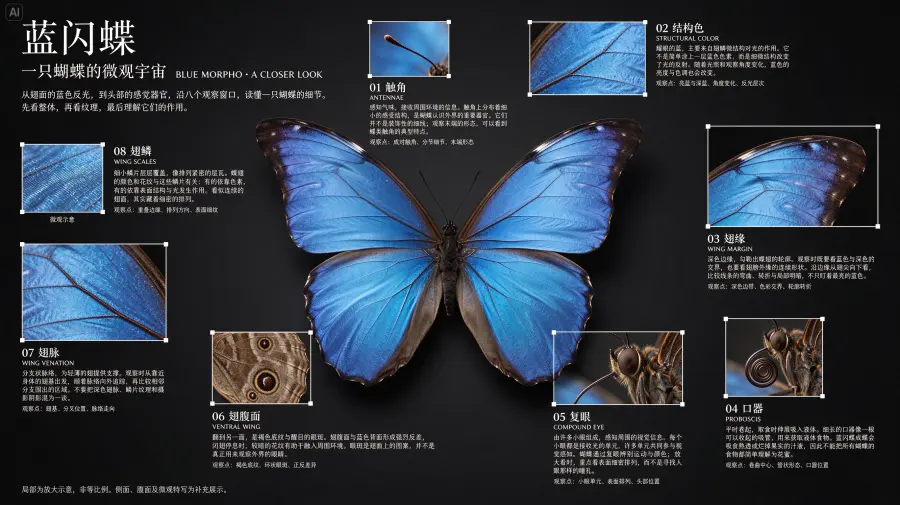
In ByteDance's internal test covering Chinese, English, and densely arranged small text, Seedream 5.5 recorded a 0.4% severe text-corruption rate and a 1.7% minor rate. The examples include a Chinese butterfly infographic and an English newspaper layout with multiple blocks of small copy.
Those numbers are specific and useful, but the company did not publish the test-set size, evaluator count, or error threshold. The accurate phrasing is therefore “ByteDance reported,” not “Seedream 5.5 has a 99.6% text-accuracy rate.” Those are not equivalent claims.
Can Seedream 5.5 Really Survive 100 Editing Rounds?
ByteDance demonstrated 100 successive edits on one portrait, using the output of each round as the next input. That is stronger evidence than showing 100 unrelated generations. It directly addresses the drift that occurs when small errors accumulate.
It is not yet a universal durability guarantee. The public material does not include a multi-image test set, a failure rate, or a curve showing how fidelity changes at rounds 10, 25, 50, and 100. The most defensible conclusion is that ByteDance has demonstrated one convincing long sequence; performance across different subjects and edit types remains unverified.
The distinction matters because iterative degradation is hard to measure. The Banana100 study generated 28,000 images through 100 iterative steps with another image model. It found accumulating artifacts and reported that none of 21 common no-reference quality metrics consistently ranked degraded images below clean ones. Banana100 did not test Seedream 5.5, so it does not prove that ByteDance's model fails. It explains why a single clean demo is not the end of the evaluation.
The fair verdict: Seedream 5.5's 100-round demo is promising evidence, not a guarantee that every image can survive 100 edits without drift.
Seedream 5.5 vs Seedream 5.0 Pro: What Actually Changed?
Seedream 5.0 Pro already offered precise regional editing, dense layouts, multilingual text, and layer decomposition. Seedream 5.5 does not make those ideas appear from nowhere; it changes how some of them work and puts more emphasis on repeated editing.
| Capability |
Seedream 5.5 |
Seedream 5.0 Pro |
| Repeated editing |
Official 100-round portrait demo |
Precision editing, but no comparable 100-round claim |
| Transparent output |
Generates native RGBA assets from text or references |
Decomposes an existing image into transparent layers |
| Layer workflow |
Direct transparent-asset generation |
One base image plus up to 16 layers |
| Text |
New vendor-reported corruption-rate results |
Multilingual text and dense-layout generation |
| Public API documentation |
Still incomplete |
Documented model ID and API |
| GPT Proto availability |
Not available yet |
Available now |
The transparency difference is easy to miss. Seedream 5.0 Pro can break an input image into a base image and up to 16 Alpha-enabled PNG layers. Seedream 5.5 can directly create transparent or semi-transparent assets. One is structured decomposition; the other is native transparent generation.
If you need an API today, Seedream 5.0 Pro remains the practical option. If direct RGBA generation and extended revision chains are the priority, Seedream 5.5 is the version to watch while its API details settle.
Seedream 5.5 vs GPT Image 2.6 and Nano Banana 2.1
There is no published independent test comparing Seedream 5.5, GPT Image 2.6, and Nano Banana 2.1 under identical prompts and settings. Current comparisons need to stay task-specific.
| Model |
Best current reason to choose it |
Important limitation |
| Seedream 5.5 |
Native RGBA, repeated editing, dense text |
API specifications and independent tests are incomplete |
| Seedream 5.0 Pro |
Available ByteDance API, precise editing, layer decomposition |
Not built around the new 100-round/RGBA claims |
| GPT Image 2.6 Flare |
Speed-focused generation and editing |
No disclosed direct 5.5 comparison |
| GPT Image 2 |
Composition planning, native 2K, mask-based edits |
Older than 2.6 and no disclosed direct 5.5 comparison |
| Nano Banana 2.1 |
1K/2K/4K output, up to 14 references, conversational editing |
ByteDance reports stronger 5.5 results on selected text tasks |
Seedream 5.5 vs GPT Image 2.6
ByteDance's release names GPT Image 2.5 Sunburst, not GPT Image 2.6. According to the Arena changelog, GPT Image 2.6 Flare and Sunburst entered the image leaderboards on November 4, five days before Seedream 5.5 launched. ByteDance does not say whether 2.6 was included in its unpublished comparison set.
That leaves no honest basis for declaring an overall winner. Choose GPT Image 2.6 Flare if you need an available, speed-focused generation and editing API now. Watch Seedream 5.5 if native transparency and long revision chains matter more than immediate integration.
Seedream 5.5 vs ChatGPT Image 2
GPT Image 2 is a better-defined production choice today: it supports composition planning, native 2K output, multilingual in-image text, and mask-based editing with multiple references. Seedream 5.5's more distinctive promises are native RGBA output and stability over repeated edits. The trade-off is evidence and availability. GPT Image 2 can be called now; Seedream 5.5 still needs a documented public endpoint and broader testing.
Seedream 5.5 vs Nano Banana 2.1
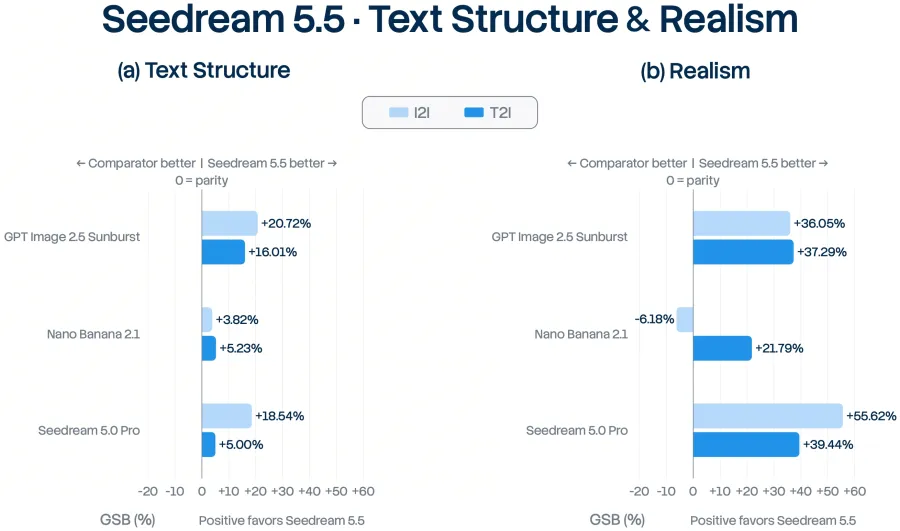
ByteDance reports that Seedream 5.5 leads Nano Banana 2.1 on text structure in both text-to-image and image-to-image tasks, as well as text-to-image realism. But the official comparison chart contains an important exception: Seedream 5.5 scores -6.18% GSB against Nano Banana 2.1 for image-to-image realism. That is not an overall win.
Use Nano Banana 2.1 when you need a live API with 1K, 2K, or 4K output, as many as 14 references, and conversational editing. Seedream 5.5 looks more interesting for transparent design assets and repeated local edits, but those advantages need direct independent comparison.
What the Official Seedream 5.5 Benchmarks Actually Show
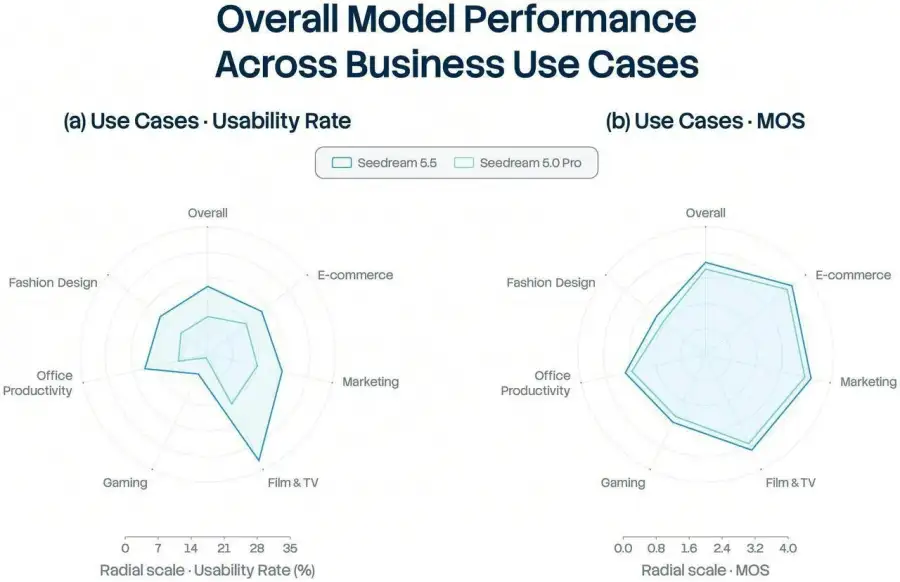
ByteDance evaluated Seedream 5.5 across six production areas: e-commerce, marketing, film and television, gaming, office productivity, and fashion design. The company reports higher quality and usability than Seedream 5.0 Pro in all six. Usability in film/TV and office tasks was more than twice that of the previous model.
In separate expert preference tests, the company assessed text structure and realism for text-to-image and image-to-image tasks. All four comparisons against Seedream 5.0 Pro were positive, with image-to-image realism reaching +55.62% GSB.
Here is what those results do and do not establish.
| The results support |
The results do not prove |
| Improvement over Seedream 5.0 Pro in ByteDance's test |
Overall superiority over every image model |
| Strong results in selected text and realism tasks |
Better results under every prompt and setting |
| Lower reported Chinese and English text errors |
Equal text performance in every language |
| One successful 100-round editing sequence |
Guaranteed stability across all images and edit types |
The numbers deserve attention. They also need the vendor-test label. Sample sizes, evaluator details, and full prompts were not disclosed, and GPT Image 2.6 was not a named comparison target.
What an Early Independent Test Found
One launch-day independent test produced 35 outputs: 28 text-to-image generations and seven consecutive edits of one portrait. It is a small sample, but it adds useful evidence beyond the launch gallery.
All four transparency tests returned files with a real Alpha channel.
Three prompts involving glass or transparent materials produced opaque objects, so clean cutouts worked better than optical transparency.
The portrait's face stayed unchanged through most of the seven-edit sequence, although one request to add a smile was ignored.
Across 11 images containing 823 Polish characters, the tester counted nine character errors; seven images had none.
The tester used one run per prompt through a third-party endpoint. These results should not be treated as a benchmark or a promise about the eventual official API. They do support a narrower conclusion: native Alpha output appears real, while transparent materials and instruction adherence can still fail.
Who Should Use Seedream 5.5?
Seedream 5.5 is most relevant to workflows where the first image is only the starting point:
e-commerce and advertising assets that go through repeated revisions;
stickers, characters, products, and overlays that need transparent files;
posters and infographics with dense Chinese or English text;
product and portrait edits where untouched regions must remain stable;
design systems that reuse the same character or asset across compositions.
Wait for more evidence if your deployment depends on a stable international model ID, published rate limits, formal service guarantees, verified 4K support, or high-volume benchmark data. Also remember that Seedream 5.5 generates images, not video. Use a Seedance model for video workflows.
How to Get Seedream 5.5 API Access
You cannot access Seedream 5.5 through GPT Proto yet. GPT Proto will need a stable upstream model and verified request format before it can offer a real model page and working code. Until then, any Seedream 5.5 endpoint shown here would be invented.
The closest API-ready option is Seedream 5.0 Pro. It supports text-to-image, reference-based editing, and structured layer decomposition.
The request below calls Seedream 5.0 Pro, not Seedream 5.5:
curl --request POST \
  "https://gptproto.com/api/v3/doubao/dola-seedream-5-0-pro-260628/text-to-image" \
  --header "Authorization: Bearer $GPTPROTO_API_KEY" \
  --header "Content-Type: application/json" \
  --data '{
    "prompt": "A clean product hero image of a translucent perfume bottle on dark slate, dramatic side light, visible water droplets, no text",
    "size": "2048x2048",
    "enable_base64_output": false,
    "enable_sync_mode": false,
    "output_format": "png"
  }'
The response returns a result_id. Insert it below to retrieve the completed result:
export RESULT_ID="paste-result-id-here"

curl --request GET \
  "https://gptproto.com/api/v3/predictions/$RESULT_ID/result" \
  --header "Authorization: Bearer $GPTPROTO_API_KEY"
If Seedream 5.0 Pro is not the right fit, three other available routes cover different needs:
All four can use the same GPT Proto account and API balance. Seedream 5.5 should only be added to that list after the integration is real.