Introduction
GPT Image 1.5 has finally been released! Want to know what's new in this model? This article can help you find the answers. OpenAI recently released GPT Image 1.5, its latest image generation model that marks a significant turning point in artificial intelligence image technology. This release comes as OpenAI's direct response to Google's advancing Nano Banana Pro model, signaling intensified competition in the AI image generation field. The new model addresses critical needs for creators: generation speed, editing precision, and cost efficiency. Whether you're a designer, content creator, or business user, GPT Image 1.5 brings professional-grade tools within reach.
Key Points About GPT Image 1.5
-
Generate images up to 4 times faster than previous versions
-
Reduce API costs by 20 percent compared to GPT Image 1
-
Edit existing images with precise control and consistency
-
Render text accurately in images, infographics, and diagrams
-
Access through ChatGPT or integration via OpenAI API
-
Maintain lighting, composition, and facial likeness across edits
-
Support for complex layouts with 36+ elements in single image
What Is GPT Image 1.5?
GPT Image 1.5 represents OpenAI's latest evolution in image generation technology, building on GPT-5.2 reasoning capabilities to understand user requests with remarkable accuracy. Unlike earlier versions, this model translates creative intent into visual output with unprecedented precision.
Core Capabilities That Set It Apart
GPT Image 1.5 excels at understanding nuanced instructions and applying targeted changes. When you request specific modifications like changing clothing color or adjusting facial expressions, the model applies these edits precisely without reinterpreting the entire image. This breakthrough solves a long-standing problem in AI image editing.
The model handles text rendering at a professional level. Previously, generating legible text within images proved challenging, but GPT Image 1.5 renders clear typography, layouts, and complex information graphics accurately. You can now create posters, infographics, and diagrams with properly-placed text in various styles and sizes.
Performance metrics demonstrate substantial improvements. Generation speeds increased by 400 percent compared to its predecessor. This acceleration results from hardware efficiency improvements that allow faster processing without sacrificing quality.
GPT Image 1.5 fundamentally changes how creators interact with AI image tools, moving from passive generation to precise, iterative creation.
What's New in GPT Image 1.5?
Upgrade 1: Precise Editing Control
The new editing system enables "point-and-click" modifications that maintain visual consistency. Users can change specific elements—a person's clothing color, background details, or artistic style—while preserving original lighting, composition, and facial characteristics across multiple edits.
Real-world examples include:
-
Modifying a subject's outfit while maintaining natural pose and expression
-
Adding or removing background elements without disrupting the main scene
-
Applying artistic filters while preserving facial likeness
-
Multi-step sequential edits with guaranteed consistency
This capability transforms tedious manual editing workflows into intuitive, rapid iterations.
Upgrade 2: Enhanced Creative Transformation
Creative flexibility has expanded dramatically with advanced style conversion capabilities. Users can transform ordinary photos into specific artistic contexts—converting everyday portraits into Hollywood Golden Age movie posters, transforming casual photos into vintage 1980s fitness magazine covers, or reimagining subjects in completely different environments.
The model understands complex creative briefs and executes them coherently, combining multiple style elements while maintaining subject recognition and quality.
Upgrade 3: Superior Instruction Following
The instruction-following capability represents a major technical breakthrough. The model successfully handles extraordinarily complex requests including:
-
6x6 grids containing 36 distinct elements (Greek letters, animals, objects, symbols)
-
Dense text rendering with multiple information layers
-
Complex programming interfaces and code display
-
Detailed scene composition with precise spatial relationships
This advancement means users can trust the model to execute sophisticated requirements without approximation.
Upgrade 4: Cost Reduction and API Accessibility
OpenAI reduced API pricing by 20 percent, allowing developers and businesses to generate more images within the same budget. This pricing adjustment, combined with faster generation speeds, significantly improves operational efficiency for high-volume image creation workflows.
These four upgrades work synergistically to position GPT Image 1.5 as a comprehensive creative tool for both individual creators and enterprises.
What makes GPT Image 1.5 different?
GPT Image 1.5 vs. Previous Generation
GPT Image 1.5 represents a major leap forward from its predecessor through measurable improvements across key dimensions. The performance gains manifest in both technical metrics and user experience.
| Feature |
GPT Image 1 |
GPT Image 1.5 |
Improvement |
| Generation Speed |
Baseline standard |
4x faster |
300% improvement |
| API Cost |
Full pricing |
20% reduction |
Significant savings |
| Text Rendering |
Limited accuracy |
Advanced precision |
Major upgrade |
| Image Editing |
Basic edits only |
Precise targeted edits |
Much higher control |
| Instruction Following |
Standard comprehension |
Enhanced accuracy |
Better prompt alignment |
| Detail Preservation |
Moderate consistency |
High consistency |
Significant improvement |
GPT Image 1.5 vs. Current Market Competitors
The AI image generation field has become intensely competitive, with multiple providers offering increasingly sophisticated tools. OpenAI accelerated the release of GPT Image 1.5 specifically to respond to Google's Nano Banana Pro model, which achieved strong performance across multiple industry benchmarks.
The competitive landscape includes:
-
Google Nano Banana Pro: Advanced model with Gemini 3 Pro integration, strong photorealism
-
Qwen-Image: Supports readable Chinese and English text generation with multi-language capabilities
-
Black Forest Labs Flux.2: Open-source model with strong creative capabilities and accessibility
| Capability |
GPT Image 1.5 |
Nano Banana Pro |
Qwen-Image |
Flux.2 |
| Generation Speed |
4x faster |
Standard |
Standard |
Varies |
| API Cost |
20% reduced |
Standard |
Competitive |
Open-source |
| Text Rendering (English) |
Excellent |
Good |
Good |
Good |
| Text Rendering (Chinese) |
Poor |
Poor |
Excellent |
Poor |
| Photorealism |
Good |
Excellent |
Good |
Very Good |
| Complex Composition |
Excellent |
Good |
Good |
Very Good |
| Instruction Following |
Excellent |
Good |
Excellent |
Good |
| Detail Accuracy |
Good |
Excellent |
Good |
Very Good |
| E-Commerce Products |
Good |
Excellent |
Good |
Very Good |
| Facial Feature Preservation |
Good |
Excellent |
Good |
Very Good |
| Multi-Person Editing |
Moderate |
Good |
Moderate |
Good |
| Artistic Style Control |
Good |
Good |
Good |
Excellent |
| Overall Ease of Use |
Excellent |
Good |
Good |
Moderate |
GPT Image 1.5 excels in instruction following and complex element composition, making it ideal for users who need precise control. However, Google's Nano Banana Pro maintains superiority in photorealism and detail accuracy, particularly valuable for e-commerce and professional product photography. Qwen-Image stands out for multi-language text rendering, especially Chinese. Black Forest Labs' Flux.2 offers the strongest artistic style control and is available open-source for custom implementations.
This performance variation underscores an important truth: no single model dominates across all dimensions. Tool selection depends on your specific use cases rather than aggregate rankings.
What Users Can Actually Create with GPT Image 1.5?
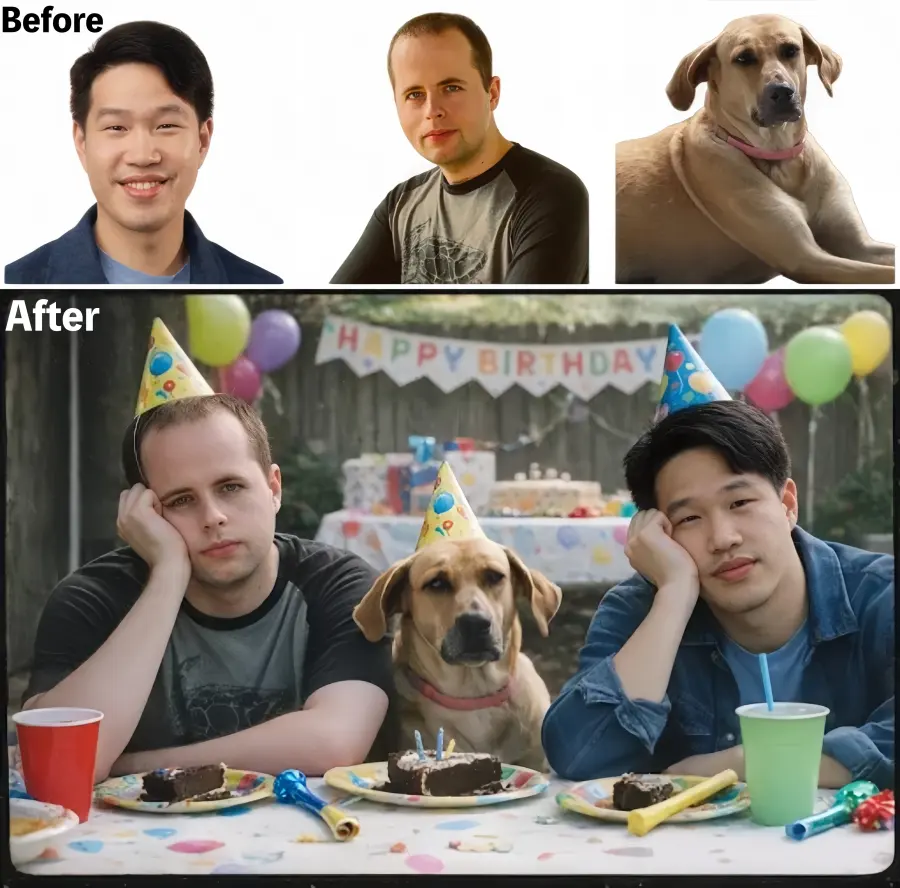
1.Multi-Step Editing Example: The Birthday Party Scenario
Users can transform a simple group photo through sequential edits. The model maintains consistency while:
-
Adding detailed background elements (multiple children, activity)
-
Changing individual outfits without affecting others
-
Converting artistic styles (cartoon vs. realistic)
-
Switching entire backgrounds while preserving subjects
Each edit builds on the previous version while maintaining visual coherence.
Prompt Example: Make a 2000s film-style photo, composite these two men and the dog into it, and capture them looking bored at a kid's birthday party.
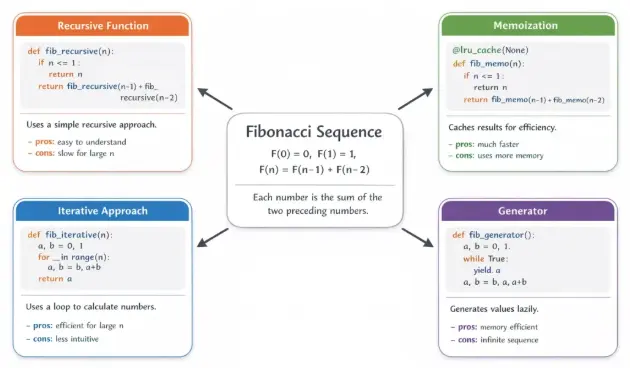
2.Complex Composition Example: Information Graphics
The model successfully renders sophisticated layouts including:
-
Calorie information tables with precise formatting
-
Programming code interfaces with proper syntax highlighting
-
Dense text layouts with varying font sizes and styles
-
Multi-language documentation (with English language advantage)
3.Creative Transformation Example: Style Conversion
GPT Image 1.5 convincingly reimagines subjects across vastly different contexts:
-
Contemporary photos as vintage movie posters
-
Casual portraits as 1970s street photography
-
Modern clothing styled as 1980s fashion magazine covers
-
T-shirt design concepts rendered as wearable products
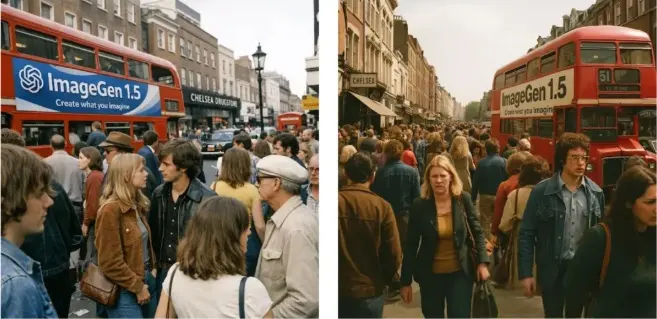
These examples demonstrate GPT Image 1.5's ability to handle both precise technical requirements and open-ended creative requests.
GPT Image 1.5 Critical Limitations
Despite impressive capabilities, GPT Image 1.5 has notable limitations that require honest assessment. Understanding these boundaries helps users apply the tool appropriately to suitable use cases.
1.Multi-Person Editing Challenges
When editing group photos with multiple subjects, the model struggles to maintain consistent facial features across all individuals. Simple modifications like adding matching clothing across a group can result in:
-
Facial proportion distortions
-
Feature misalignment or blurring
-
Unnatural appearance in processed subjects
-
Loss of likeness in group contexts
This limitation particularly impacts marketing teams needing consistent product photos across multiple models.
2.Multi-Language Text Rendering Failures
The model exhibits severe limitations with non-English languages:
-
Chinese text: Completely unusable, with garbled characters and unreadable output
-
Arabic and Hebrew: Inconsistent rendering with alignment issues
-
European languages: Better performance but still imperfect
English-language text rendering remains the clear strength, limiting global applicability.
3.Artistic Style Accuracy Issues
The model sometimes struggles with specific artistic style requirements:
-
Japanese anime aesthetics lack authentic emotional depth and linework
-
Dark fantasy art styles produce inconsistent interpretations
-
Specific artistic movements difficult to replicate faithfully
-
Loss of artistic nuance compared to previous versions
OpenAI acknowledges that certain art style capabilities regressed compared to earlier versions.
4.Other Notable Constraints
-
Large group portraits (15+ people) become difficult to render accurately
-
Inconsistent handling of specific design requirements
-
Complex spatial reasoning sometimes requires multiple iterations
-
Some artistic filters produce less authentic results than competitors
These limitations don't negate the model's value but rather define its optimal use cases in professional and creative applications.
Who will Choose GPT Image 1.5?
For Content Creators and Marketers
Content creators benefit from rapid iteration and consistency. The 4x speed improvement enables faster creative workflows. The 20% cost reduction makes experimentation economically viable for small teams and independent creators exploring visual content strategies.
For E-Commerce and Product Photography
Businesses can generate product variations at scale—different angles, backgrounds, and styling options from single source images. Brand consistency features ensure logos, colors, and product appearance remain reliable across generated assets.
For Designers and Creative Professionals
Precise editing capabilities bring AI tools closer to professional design software workflows. Rather than starting over with minor adjustments, designers can request specific changes while maintaining composition and aesthetic integrity.
For Developers and API Users
The 20% API cost reduction combined with faster response times makes image-based features economically feasible for applications. Unified access through OpenAI's platform simplifies integration and billing management.
Different user types benefit from distinct advantages, making GPT Image 1.5 versatile across creative and commercial applications.
How to Access GPT Image 1.5?
Getting started with GPT Image 1.5 is straightforward for both casual users and developers. OpenAI provides multiple access methods depending on your needs and technical expertise.
Method 1: Access GPT Image 1.5 Through ChatGPT (Easiest)
ChatGPT Usage:
For Free Users:
-
Visit ChatGPT - Go to chat.openai.com and sign in with your OpenAI account (create one if needed)
-
Locate the Images Feature - Look for the new "Images" tab or icon in the left sidebar of ChatGPT
-
Select Image Tools - Click on "Generate" or "Create images" option
-
Start Creating - Begin typing your image generation prompts or use pre-built style filters
-
Edit Your Images - Use the built-in editor to modify generated images with specific instructions
-
Save and Share - Download your images and share them directly
For ChatGPT Plus/Pro Subscribers:
ChatGPT Plus users get priority access and faster generation speeds. The process is identical to free users but with enhanced performance and higher usage limits.
Tips: Here is a Tips about How to get ChatGPT Plus Free.
Method 2: Access GPT Image 1.5 API for Developers
API Pricing:
-
Image generation: Price varies based on resolution and quality
-
20% discount on GPT Image 1.5 compared to GPT Image 1
-
Volume discounts available for enterprise customers
Prerequisites:
-
OpenAI account with API access enabled
-
API key generated from your OpenAI account dashboard
-
Basic programming knowledge (Python, JavaScript, or your preferred language)
-
Familiarity with REST APIs or SDK usage
Step-by-Step Setup:
Step 1: Create OpenAI API Account
-
Visit platform.openai.com
-
Click "Sign up" or "Log in" if you have an existing account
-
Complete email verification and phone number confirmation
-
Accept terms of service
Step 2: Generate API Key
-
Navigate to "API keys" section in your account dashboard
-
Click "Create new secret key"
-
Copy the key immediately (you won't see it again)
-
Store it securely in an environment variable or secure vault
-
Never share your API key publicly
Step 3: Set Up Billing
-
Go to "Billing" section in your OpenAI dashboard
-
Add a payment method (credit card)
-
Set usage limits to control spending
-
Monitor your usage regularly
Step 4: Install OpenAI SDK
For Python:
bash

For JavaScript/Node.js:
bash

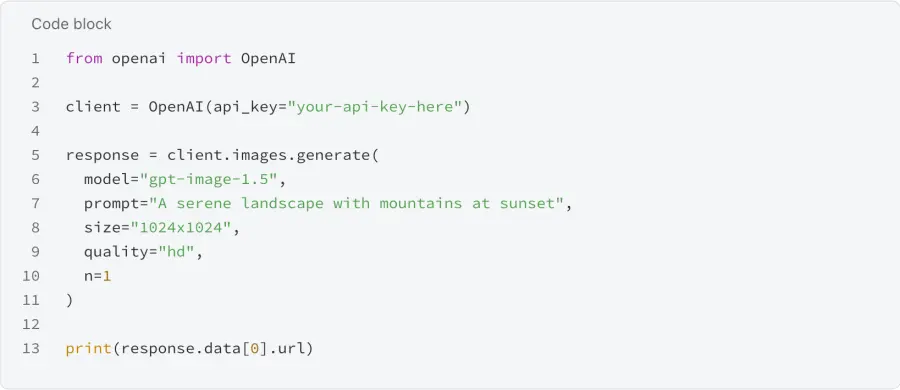
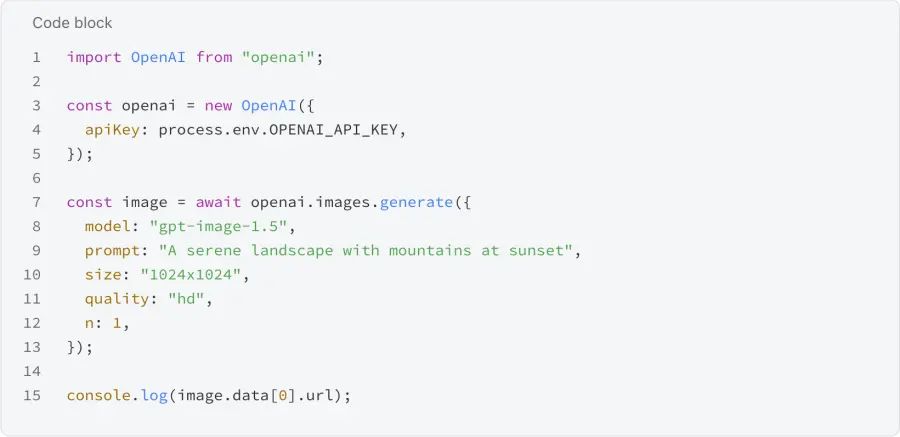
Step 5: Write Your First API Call
Python example:
JavaScript example:
Step 6: Handle API Responses
-
Check response status codes
-
Implement error handling for API failures
-
Store image URLs or download images for long-term storage
-
Implement rate limiting to avoid quota exhaustion
Method 3: Access Through GPT Proto - Best Solution to GPT Image 1.5 (Multi-Model Approach)
When major AI API platforms evolve with uncertain pricing, shifting capabilities, and changing roadmaps, developers and businesses face significant risks. GPT Image 1.5 offers impressive capabilities, but relying on a single provider creates vulnerability to sudden policy changes, pricing increases, or feature modifications. GPT Proto solves this dilemma by providing unified access to multiple leading image generation models, including GPT Image 1.5 itself, alongside Google's Nano Banana Pro and other alternatives.
GPT Proto functions as a comprehensive gateway to multiple leading AI models including GPT Image 1.5, Claude, Gemini, and specialized image generation tools. Rather than managing separate API keys, documentation, and billing systems for each provider, developers integrate once and access everything through a unified interface. This eliminates the need to choose between competing models—you can use them all strategically.
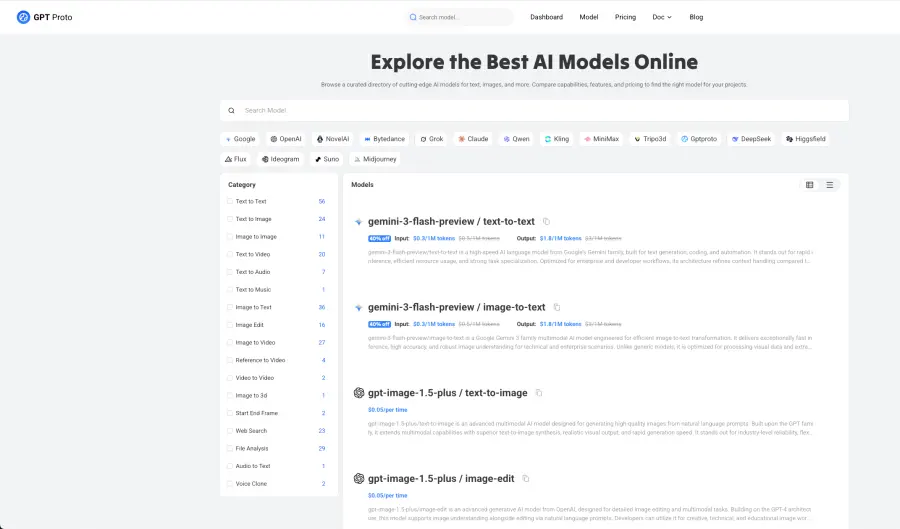
Core Advantages That Make GPT Proto Stand OutFeatureSingle Provider (GPT Image 1.5)GPT Proto Multi-Model AccessVendor Lock-in RiskHigh - dependent on one providerEliminated - multiple optionsPricing ControlSubject to changesNegotiated rates across providersModel FlexibilityLimited to GPT Image 1.5Access to 4+ image modelsResponse TimeStandard latencySub-200 millisecond guaranteeService UptimeProvider dependent99.9% guaranteed uptimeBilling ComplexitySeparate accounts/systemsUnified billing dashboardTechnical SupportStandard supportSpecialized expert assistanceFeature ComparisonManual testing requiredDirect A/B testing built-in
GPT Proto Pricing:
-
Aggregated discounts through volume partnerships
-
Custom pricing based on model combination and usage
-
Contact sales for enterprise quotes
For Organizations Wanting Multiple Models:
-
Visit GPT Proto Platform - Go to gptproto.com
-
Sign Up - Create an account or sign in with existing credentials
-
Configure API Keys - Input your GPT Image 1.5 API key and other model keys
-
Select Models - Enable access to GPT Image 1.5, Nano Banana Pro, and other tools
-
Generate Single Integration Key - Receive unified API credentials
-
Start Building - Use GPT Proto's unified interface to access all models
GPT Proto eliminates managing multiple API keys and billing systems, making it ideal for teams testing multiple models simultaneously.
Common Issues and Solutions
Issue: "API Key Invalid" Error
-
Verify you copied the complete API key without extra spaces
-
Ensure the key hasn't expired
-
Check that you're using the correct API endpoint URL
Issue: Rate Limiting or Quota Exceeded
-
Implement exponential backoff in your code
-
Check your account's usage limits
-
Consider upgrading your billing tier
Issue: Image Generation Taking Too Long
-
GPT Image 1.5 generates 4x faster than previous versions
-
Wait time typically 1-3 seconds
-
If longer, check network connectivity and API status
Issue: Poor Quality Results
-
Provide more detailed, specific prompts
-
Use style references or artistic direction
-
Experiment with different parameter settings
-
Review prompt engineering best practices
Choose your access method based on your needs—ChatGPT for casual creative work, API for developer integration, or GPT Proto for organizations needing multi-model flexibility and cost optimization.
FAQs about GPT-Image-1.5
What makes GPT Image 1.5 faster than previous models?
Hardware efficiency improvements and optimized inference pipelines enable faster processing. The model generates images using less computational overhead while maintaining quality standards. This results in the reported 4x speed improvement without sacrificing output quality.
Can I use GPT Image 1.5 for commercial work?
Yes, images generated through GPT Image 1.5 can be used commercially. Review OpenAI's specific terms of service regarding commercial licensing and usage rights to ensure compliance with your particular business application and jurisdiction.
How does GPT Image 1.5 handle brand consistency across multiple images?
The model excels at preserving visual elements across edits and variations. When you provide brand assets like logos or color palettes, the model maintains consistency throughout generated variations. This makes it particularly valuable for enterprise marketing workflows requiring uniform visual identity.
Conclusion
GPT Image 1.5 delivers genuine improvements—4x faster generation, 20% lower costs, and precise editing capabilities. However, it excels at instruction-following and composition while lagging in photorealism and multilingual text rendering compared to alternatives like Nano Banana Pro and Qwen-Image.
The key is matching the tool to your needs. Content creators benefit most from its speed and precision. E-commerce teams prioritizing photorealism should evaluate Nano Banana Pro. Teams needing strategic flexibility can leverage GPT Proto's multi-model access without vendor lock-in.
Start with ChatGPT's free tier to test against your specific requirements. If GPT Image 1.5 fits your use cases, the API integration is straightforward. If limitations emerge, alternatives are readily available through unified GPT Proto AI API Platform.
The intensity of competition in AI image generation benefits everyone through lower prices and faster innovation. Success depends not on finding "the best" model, but on understanding each tool's strengths and applying them purposefully to your specific problems.