TL;DR:
GPT Image 1.5 shines at precise editing and English text rendering. Nano Banana Pro wins on speed, Chinese support, and natural output. Pick based on your workflow needs.
Compare GPT Image 1.5 and Nano Banana Pro. Learn which AI image model is better for your needs, pricing, speed, and real-world performance.
GPT Image 1.5 shines at precise editing and English text rendering. Nano Banana Pro wins on speed, Chinese support, and natural output. Pick based on your workflow needs.
OpenAI just dropped GPT Image 1.5, and it's making waves. Everyone's comparing it to Google's Nano Banana Pro, which went viral earlier this year. Both are genuinely impressive, but they work differently. One focuses on giving you control through precise editing. The other prioritizes getting you great results fast.
If you're a content creator or developer trying to figure out which one to use, you're probably feeling overwhelmed by the hype. Let's cut through that and actually look at what each tool does well, where it falls short, and which one makes sense for your specific situation.
GPT Image 1.5 is OpenAI's latest image model. It's built on the same foundation as their other AI tools, but specifically designed for creating and editing images.
Think of it this way: you describe what you want, and it generates it. But here's where it gets interesting—you can then edit those images step by step, and the model remembers what you originally asked for. The lighting stays consistent. The composition stays intact. You're just tweaking specific elements.
What it's good at:
Precise, detailed editing
Following complex instructions word-for-word
Rendering readable English text in images
Creating highly stylized, conceptual artwork
Working with developers via API
Best for: Designers who need control, marketing teams working in English, developers building AI features into apps. Learn more about ChatGPT Image 1.5, please read https://gptproto.com/blog/gpt-image-1-5-guide
Google built this on their Gemini 3 Pro technology, also named Nano Banana Pro. It gained a huge following because it just... works. People started using it and couldn't stop.
The key difference is how it understands the real world. You describe a scene, and it doesn't just follow your words literally—it actually reasons about what would make physical sense. If you ask for "a person standing in a crowded room," it understands perspective, lighting, how fabric folds, that sort of thing.
What it's good at:
Understanding complex real-world scenarios
Generating believable, natural-looking images
Handling Chinese text and other languages
Blazing fast processing
Creating images that look naturally photographed
Best for: Content creators on tight schedules, international teams, people wanting professional results without overthinking prompts.
Let's be honest: waiting sucks. Nano Banana Pro wins here. You're looking at 13-20 seconds for a basic image. GPT Image 1.5 takes 40-60 seconds in normal conditions. During peak hours, GPT Image 1.5 can slow down even more.
| Task | GPT Image 1.5 | Nano Banana Pro |
| Basic image | 40-60 sec | 13-20 sec |
| Quick edits | 30-45 sec | 8-15 sec |
| Complex edits | 60-90 sec | 20-35 sec |
| Peak hours | Slower | Stable |
For creators churning out content daily, this difference matters. Nano Banana Pro lets you iterate faster.
In this section, let's examine the quality of the directly generated photos and see which one looks more realistic.
Prompt: Generate a photorealistic snapshot: an elderly sailor stands on a small fishing boat, tending to his nets, with a dog sitting quietly beside him. Requirements: realistic skin texture (wrinkles, pores, sun damage), clothing wear and salt stains; natural seaside sunlight. Lens language: 50mm, medium close-up, eye-level, shallow depth of field, slight film grain; no posed shots, no retouching; 3:4 aspect ratio.
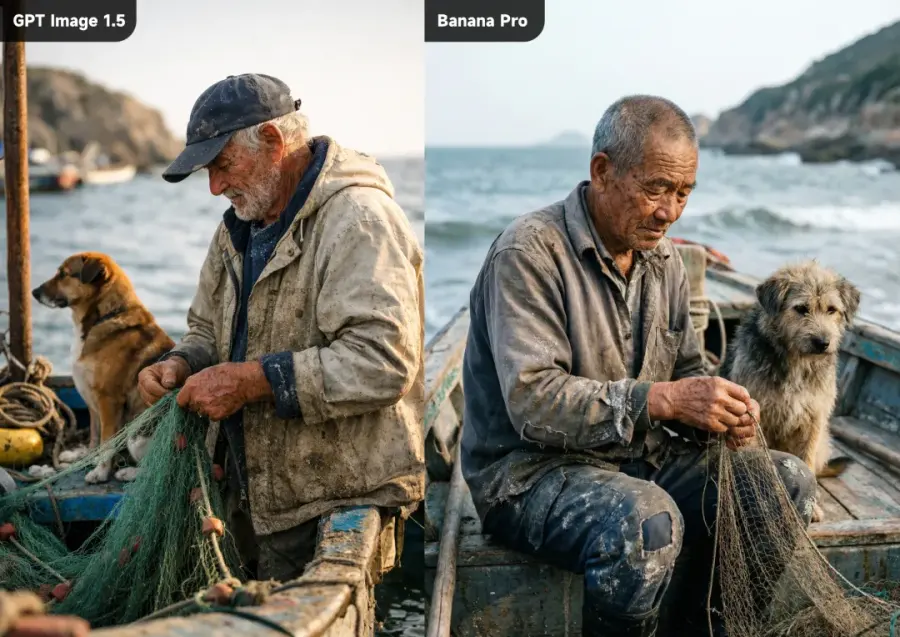
GPT Image 1.5 excels when you have a clear creative vision. Give it detailed instructions about mood, lighting, artistic style, and it delivers. The images look technically impressive. You can see the effort in photorealism, detail, and composition.
Nano Banana Pro's strength is different. The images look like they were actually photographed or naturally created. There's less of that "obviously AI-generated" feeling. For product photography, lifestyle shots, or content meant to feel authentic, Nano Banana Pro often wins.
Reality check: Both produce good results. GPT Image 1.5 feels more "designed." Nano Banana Pro feels more "real." Which one you prefer depends on what you're making.
Here's something most comparisons skip over—actually checking if the models do what you ask them to do.
We tested both with a specific prompt: generate a desktop calendar image for February 2026 with exact title formatting "2026年2月", a standard 7-column table (with days: 日一二三四五六), dates 1-28 filled in, clean grids, and nothing else. Simple requirements, right?
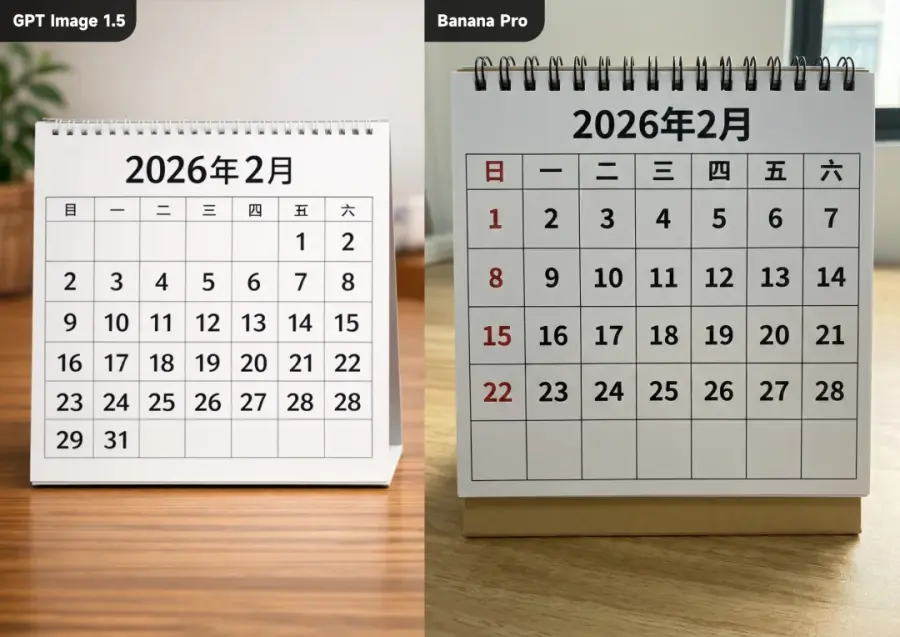
GPT Image 1.5 failed immediately. It generated the calendar but didn't stop at 28. After writing 28, it repeated 28 again, then added 29 and 31—completely wrong. The model lost track of instructions mid-generation.
Nano Banana Pro nailed it. Every number was correct. Grid alignment perfect. Exactly what was requested, nothing more, nothing less.
Test Result: Nano Banana Pro executed perfectly while GPT Image 1.5 showed fundamental accuracy issues with instruction-following and numerical consistency.
English text: GPT Image 1.5 absolutely crushes this. You can get readable, professional-looking text for posters, infographics, everything. Crystal clear. This is actually one of GPT Image 1.5's biggest advantages.
Chinese and other languages: Nano Banana Pro handles this. GPT Image 1.5 doesn't. The Chinese characters often come out garbled or weird-looking. If you work internationally or need Chinese text, Nano Banana Pro is the obvious choice.
Prompt (from @Carl's AI Watts): Generate a 3:4 image with a complete poem, 《茅屋秋风所破歌》 written in calligraphy at the top. The content is the "Full Text," with pinyin above each character. The image primarily uses ink painting to depict the scene described in the poem.
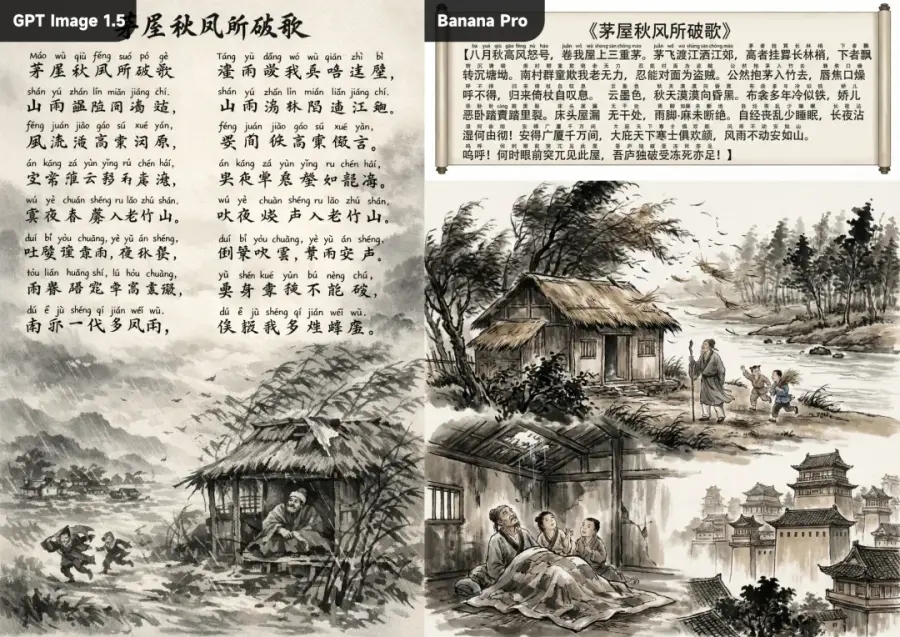
Both sides have their flaws. The result on the left, generated by GPT Image 1.5, is completely incomprehensible; the Chinese characters are a jumbled mess, resembling scribbles. The Chinese characters generated by Nano Banana Pro on the right are quite well-written, with only a few errors. However, for some reason, the prompt requires pinyin to be displayed above the Chinese characters, but it ends up displaying them as Chinese characters instead, and the layout is indeed unattractive.
This is probably the clearest technical win for each model. If you need English text, pick GPT Image 1.5. If you need Chinese, pick Nano Banana Pro. Simple as that.
Prompt: Have the model on the left put on these clothes.
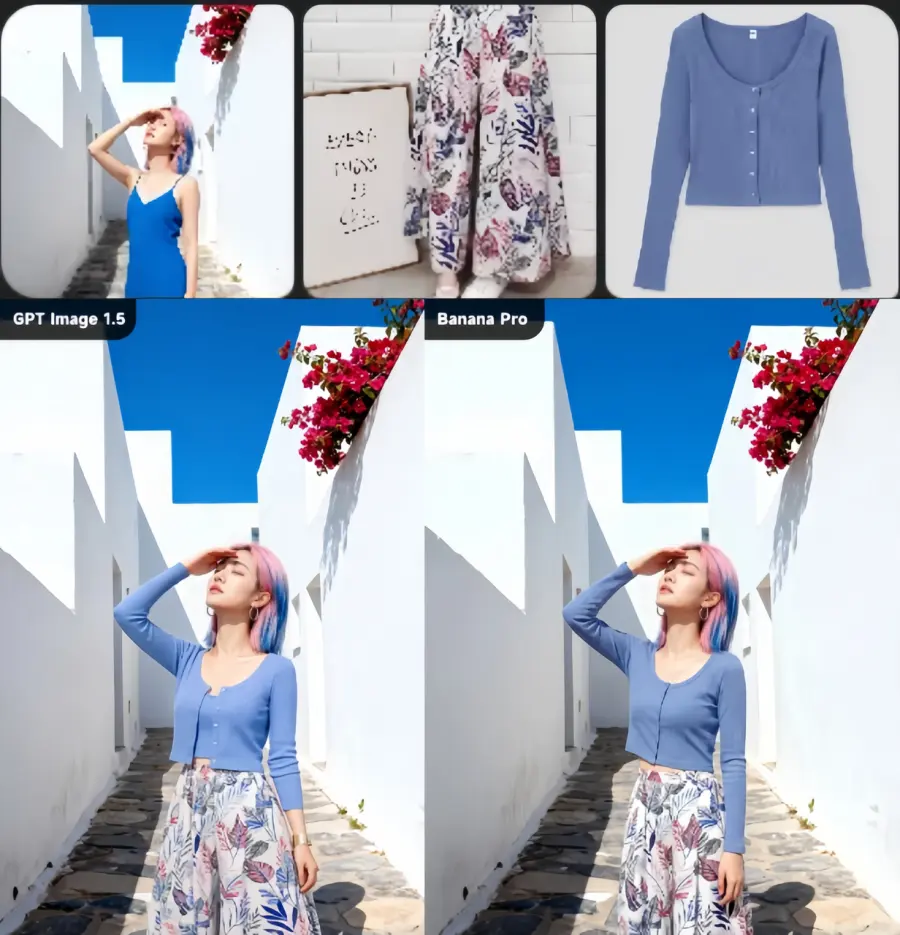
GPT Image 1.5 was specifically built for this. You can make precise changes—swap one person's outfit, change the background, adjust lighting—and it remembers everything else. The model keeps the composition and lighting consistent across edits.
Nano Banana Pro can edit too. It works fine for most things. But GPT Image 1.5's editing is more surgical. More precise. More predictable.
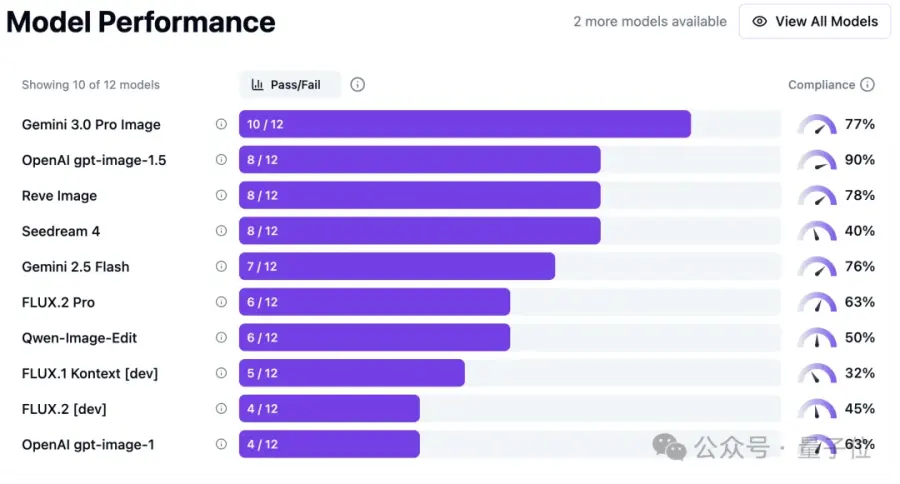
If you're doing lots of iteration and need fine-grained control, GPT Image 1.5 is your tool. If you just need basic edits, both work.
GPT Image 1.5: Around $0.08-0.15 per image depending on resolution.
Nano Banana Pro: Around $0.03 per image.
That's roughly 2-5x cheaper for Nano Banana Pro. Over 1,000 images, you're saving real money. Per-image pricing heavily favors Nano Banana Pro for any serious volume work, but subscription-based access through ChatGPT Plus can be competitive for casual users. Your usage volume is the primary driver of which pricing model delivers better value.
GPT Image 1.5 comes with ChatGPT Plus ($20/month) for casual use. You get some monthly allowance included. Good if you're not a heavy user.
Nano Banana Pro is typically accessed through Google's APIs or platforms. You pay per image, no subscription required. This favors high-volume creators.
For occasional use, the costs are similar enough that it doesn't matter. For heavy users generating 500+ images monthly, Nano Banana Pro costs significantly less. The math is straightforward. GPT Image 1.5 vs Nano Banana Pro Comparison Chart:
| Factor | GPT Image 1.5 | Nano Banana Pro |
| Speed | ★★★★ | ★★★★★ |
| English text | ★★★★★ | ★★★★ |
| Chinese/other text | ★☆☆☆☆ | ★★★★★ |
| Editing precision | ★★★★★ | ★★★★ |
| Natural look | ★★★★ | ★★★★★ |
| Cost | ★★★ | ★★★★★ |
| Ease of use | ★★★ | ★★★★★ |
Subscription models work best for steady, moderate users while pay-per-use excels for high-volume creators and agencies. Running the numbers for your specific monthly image volume will quickly reveal which pricing structure saves you the most money.
You need readable English text in your images
You're doing detailed, multi-step editing
You want maximum creative control
You're building an app and need precise API behavior
You're a professional designer working in English
Speed matters for your workflow
You work with international content or Chinese text
You want images to look naturally created
You need to keep costs down
You value simplicity over configuration options
Both are genuinely good at different things. This isn't a case where one is objectively "better."
Here's the thing nobody talks about: you don't have to choose one. You can use both. When OpenAI changes their pricing or Google shifts their roadmap, you're suddenly stuck. That's the problem with betting everything on one vendor. Their constraints become your constraints.
GPT Proto solves this by connecting both GPT Image 1.5 and Nano Banana Pro through a single API and dashboard. One API key. One billing system. Access to both tools.
Why this matters:
Test each model for your specific project
Switch between them without rebuilding
Avoid vendor lock-in
Compare outputs side by side
Protect against price increases
You could use GPT Image 1.5 for the detailed concept work and creative direction, then use Nano Banana Pro for final production and speed. Or the reverse. The flexibility is actually valuable. The best tool isn't always about picking one—it's about having options.
It can generate text, but GPT Image 1.5 does it better for English. Nano Banana Pro's text rendering is fine for casual use, but if you need poster-quality typography, GPT Image 1.5 is more reliable.
Yeah, Nano Banana Pro is cheaper per image. But if you only generate 20 images a month, the difference is negligible. At high volumes, it adds up.
Nano Banana Pro. It works well with simple prompts. GPT Image 1.5 rewards detailed, specific instructions but requires more trial and error to learn.
Absolutely. Many professionals do exactly this—using different tools for different phases of their workflow. There's no reason to stick with just one.
GPT Image 1.5 is available through ChatGPT or OpenAI's API. Nano Banana Pro is accessible through Google's Gemini platform. If you want both in one place, GPT Proto at https://gptproto.com/ handles unified access.
GPT Image 1.5 and Nano Banana Pro are both legitimately impressive tools. They're just built for different priorities. One emphasizes control and precision. The other emphasizes speed and natural output.
Your choice really comes down to what matters most for your actual work—not the hype around either tool. Try both if you can, see which one fits your workflow, and go from there. If you're curious about accessing both simultaneously, GPT Proto AI API Platform makes that straightforward.
TL;DR: GPT Image 1.5 is OpenAI's latest image generation model delivering 4x faster speeds and 20% lower API costs. It features advanced editing, superior text rendering, and better instruction-following. Available via ChatGPT and API, it competes directly with Google's Nano Banana Pro in the evolving AI image generation market.
Tiffany Layne | 2026-02-03
Introduction On November 20, 2025, Google DeepMind unveiled Nano Banana Pro (officially Gemini 3 Pro Image)—just two days after launching Gemini 3 Pro. Unlike previous image generators that match keywords to pixels, this model genuinely understands context, physics, and creative intent through Gemini 3 Pro's reasoning architecture. The original Nano Banana added 13 million users within four days; now Nano Banana Pro targets professional adoption with 4K output, flawless multilingual text rendering, and real-time Google Search integration
Michael Johnson | 2026-04-30
TL;DR Gemini 2.5 Flash Image, nicknamed "nano-banana," is Google's latest disruptive AI image tool. It can not only create images from scratch but also edit existing ones with remarkable comprehension. Through its deep "visual reasoning" capabilities, the tool enables conversational editing, overcoming previous AI models' challenges with character consistency and making complex photo editing accessible to everyone.
Tiffany Layne | 2026-02-03



