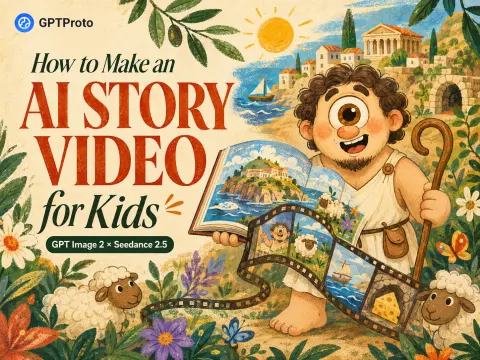
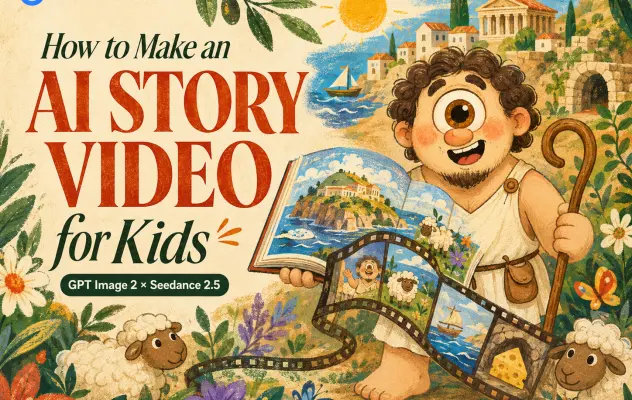
Quick Answer: How to Make an AI Story Video for Kids
To make an AI story video for kids, choose one short and age-appropriate story beat, create a reusable character reference, and give a video model clear instructions for the visuals, dialogue, captions, sound, and timing. Review the complete output before publishing. If the dialogue, scene order, or audio is substantially wrong, revise the prompt and generate again. If the output only has a caption typo or a missing sound effect, keep the usable footage and correct the problem during editing.
Our workflow used five steps:
Choose a short, child-friendly story.
Create the main character with GPT Image 2.
Ask Seedance 2.5 to generate the animation, English dialogue, captions, and sound.
Review the character, story, subtitles, and audio.
Regenerate inaccurate results or correct smaller problems in an editor.
That process works for a 15-second Short, a story trailer, or the first segment of a longer children’s video.
The AI Story Video for Kids Workflow at a Glance
| Stage |
Tool |
Output |
What to Check |
| Story planning |
Your own idea or an AI writing assistant |
One short story beat |
Age, language, conflict, ending |
| Character design |
GPT Image 2 |
Reusable character reference |
Face, clothing, colors, proportions |
| Video generation |
Seedance 2.5 |
Animated clip with dialogue, captions, and sound |
Identity, timing, speech, audio, spelling |
| Post-production |
A video editor |
Corrected final video |
Caption accuracy, audio levels, pacing, export ratio |
The split matters. The character image defines what must remain stable. The video prompt defines what changes over time.
What You Need Before You Start
You do not need a camera, actors, or traditional animation software. You do need:
a GPT Proto account with sufficient balance for the selected generation settings;
a simple story idea suitable for a specific age group;
access to GPT Image 2 and Seedance 2.5;
one clean character reference image;
a video editor that can correct captions, adjust audio, and trim clips;
a few minutes to watch the result from beginning to end.
Do not skip the last item. A polished thumbnail can hide a misspelled name, an unsuitable supporting character, or an audio mistake that only appears for half a second.
Step 1: Choose a Short, Kid-Friendly Story
Why We Chose an Odyssey-Inspired Polyphemus Story
Greek mythology gives you recognizable worlds and simple character hooks, but the original stories are not automatically suitable for young children. In Homer’s Odyssey, Polyphemus is dangerous. Our version deliberately changes the tone: he is friendly, proud, innocent, and completely unaware of how unusual his life sounds.
The resulting premise is simple enough for a child to understand:
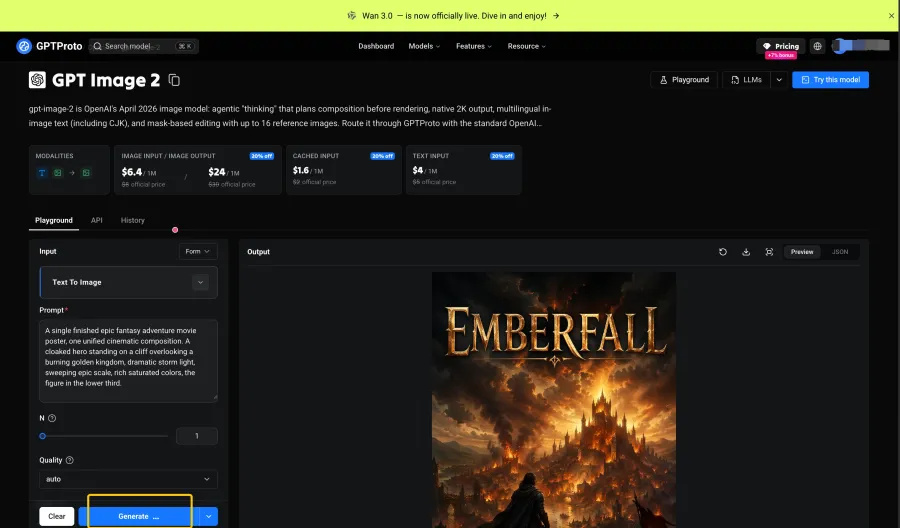
A friendly cyclops introduces himself, explains that his father is always at sea, shows the audience his sheep, and proudly reveals his cheese-filled cave.
This is a child-friendly reinterpretation inspired by Greek mythology, not a literal retelling of Homer’s story. That distinction is useful whenever you adapt myths, fairy tales, or historical characters: preserve the recognizable idea, but rewrite the tone, stakes, and language for the intended age.
Give a 15-Second Video One Narrative Job
We used the clip as a character introduction rather than trying to fit an entire adventure into 15 seconds.
| Timing |
Narrative job |
Polyphemus example |
| 0–3 seconds |
Introduce the character |
“Hi! I’m Polyphemus…” |
| 3–6 seconds |
Establish the world |
His father is out at sea |
| 6–9 seconds |
Add one memorable joke |
He talks about having one eye |
| 9–12 seconds |
Show daily life |
Sheep and cheese-making |
| 12–15 seconds |
End on a strong visual |
The cave becomes a cheese paradise |
This structure is short, but it still moves. A weak 15-second prompt often describes a mood without giving the character anything to do. A better prompt assigns one job to each time block.
Step 2: Create a Consistent Character with GPT Image 2
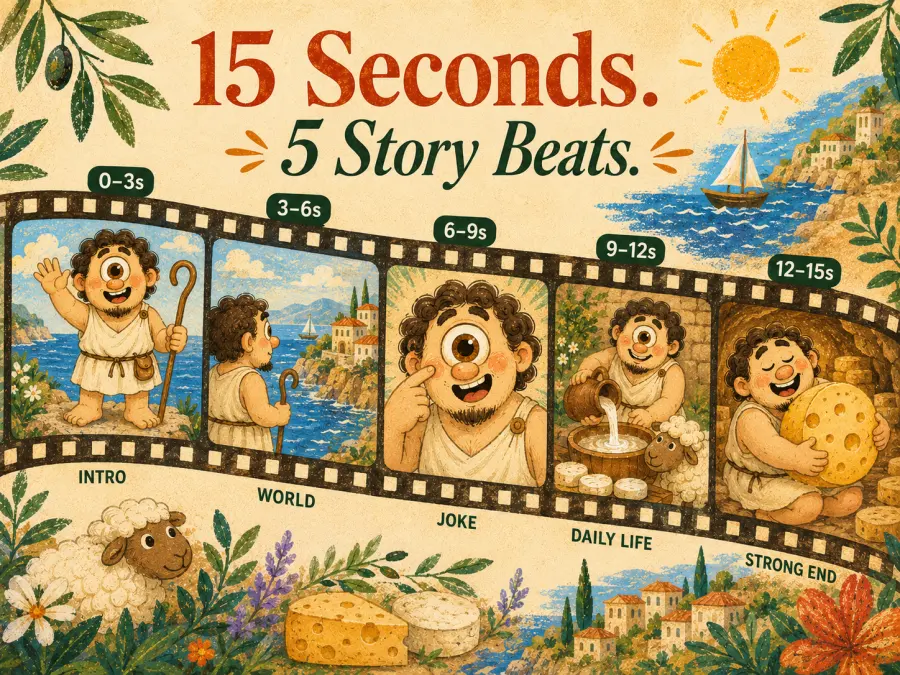
Before asking for motion, establish what Polyphemus looks like. We used GPT Image 2 to create the visual reference that Seedance would receive with the video prompt.
Define the Details That Must Not Change
For this character, the important anchors were:
one large central eye;
short dark curls and a small goatee;
a broad, friendly body shape;
a simple white ancient Greek tunic;
a wooden shepherd’s staff;
warm Mediterranean colors;
hand-drawn pencil lines, watercolor, and colored-pencil shading;
an expressive children’s picture-book finish.
Keep the first reference easy to read. A clean full-body or three-quarter view is usually more useful than a crowded action scene because it shows the face, clothing, proportions, and signature props at the same time.
GPT Image 2 Character Prompt
Use the following structure for the reference image, then replace the character details and visual style for your own story:
Create an original character reference illustration for a children's animated story.

CHARACTER:
Polyphemus, a friendly cartoon cyclops giant with one large central brown eye,
short dark curly hair, a small goatee, rounded facial features, a broad soft body,
and an innocent, slightly goofy smile.

CLOTHING AND PROP:
A simple off-white ancient Greek tunic tied with a brown cord and a curved wooden
shepherd's staff. Keep the outfit modest, simple, and easy to reproduce.

STYLE:
Cute hand-drawn children's picture-book illustration, soft pencil outlines,
watercolor and colored-pencil shading, warm Mediterranean palette, subtle paper
texture, flat 2D design, expressive but not frightening.

COMPOSITION:
Full-body three-quarter view on a clean pale background. Show the complete body,
face, clothing, hands, feet, and staff clearly.

RESTRICTIONS:
Original character only. No text, logo, watermark, extra figures, additional eyes,
or resemblance to characters from existing films, television shows, games, toys,
or commercial franchises.
You can also browse the GPT Image 2 prompt gallery for illustration, character-design, and composition ideas. Use the examples as structural inspiration, then replace the subject and constraints with details from your own story.
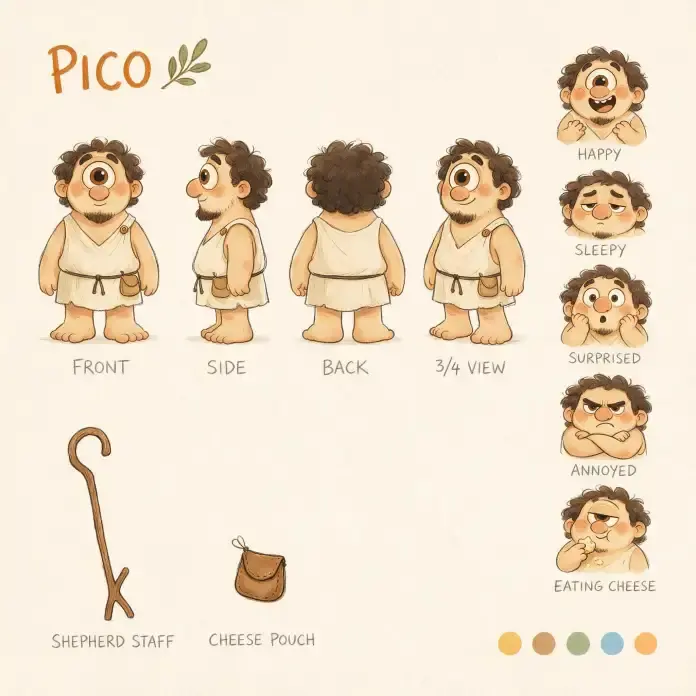
Review the Character Before Spending on Video
Check the still image at full size. Confirm that the eye, hands, feet, clothing, prop, and overall silhouette are usable. If the character already has an anatomy or costume problem, animation will not reliably repair it.
Once the design works, keep the image. Reusing the same reference is more reliable than generating a new version of the hero for every episode.
Step 3: Generate the Video, Subtitles, and Sound with Seedance 2.5
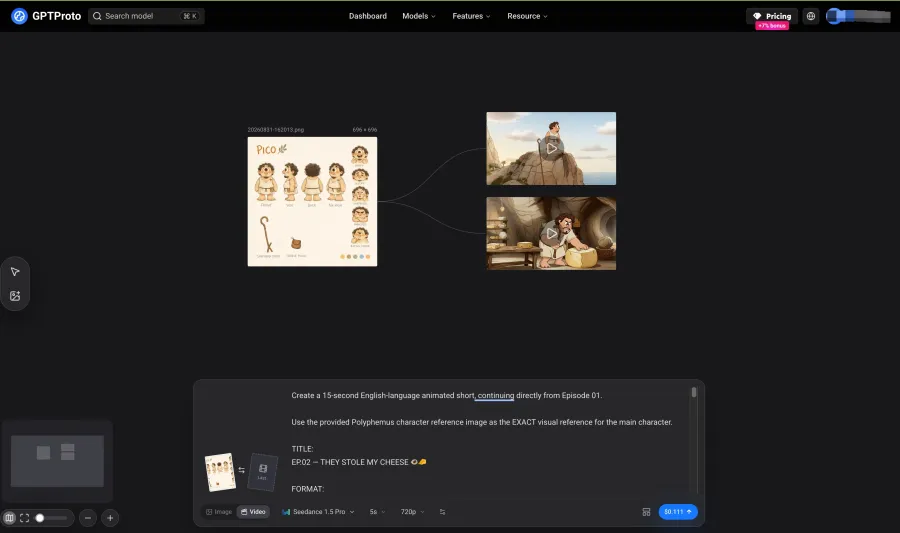
Open Seedance 2.5 on GPT Proto, choose the image-to-video workflow, upload the character reference, and enter the story prompt.
For our test, the delivery requirements were:
| Setting |
Test value |
| Duration |
15 seconds |
| Aspect ratio |
16:9 |
| Spoken language |
English |
| Voice |
Deep, warm male voice |
| Audio |
Dialogue, ambience, and sound effects requested |
| Captions |
Simple English captions requested |
| Visual style |
Hand-drawn watercolor picture book |
| Main reference |
Polyphemus character image |
The downloaded and edited file was exported at 1920×1080 and 30 fps. Do not assume that an editor’s export resolution is automatically the same as the original generation setting; record the value selected in GPT Proto separately if you want to publish an exact cost and resolution breakdown.
The Seedance 2.5 Prompt Used for This Story
The full prompt acts more like a compact production brief than a single visual description. It defines the character, art direction, voice, captions, sound, timing, and restrictions in separate blocks.
View and Copy the Full Seedance 2.5 Prompt
Create a 15-second English-language animated short using the provided character reference image as the exact visual reference for the main character.

The main character is POLYPHEMUS, a cute original cartoon cyclops giant.

IMPORTANT:
Keep the main character's appearance, proportions, colors, clothing, eye design, facial features, and illustration style consistent with the reference image throughout the entire video.

FORMAT:
15 seconds
16:9
English voice-over
English spoken dialogue
English alphabet only
No Chinese characters
No subtitles unless they are simple English captions integrated naturally into the scene
No logos
No watermark

STYLE:
Cute hand-drawn colored illustration.
Simple pencil line art.
Soft watercolor and colored-pencil coloring.
Children's picture-book aesthetic.
Warm Mediterranean island atmosphere.
Slightly imperfect handmade lines.
Flat 2D animation.
Soft paper texture.
Cute, expressive, whimsical and comedic.

The animation should feel like a charming illustrated storybook coming to life rather than CGI.

CHARACTER PERSONALITY:
Polyphemus is friendly, innocent, proud, slightly goofy and completely unaware of how unusual his life sounds.
He speaks directly to the audience in first person.
His narration feels casual and sincere, almost like he is introducing his daily life in a personal vlog.

VOICE:
Deep but warm male voice.
Friendly.
Slightly slow and innocent.
Confident but adorably naive.
Natural conversational English.
Not dramatic Shakespearean narration.

STORY STRUCTURE:

SCENE 1 — “WHO I AM” — 0–3s

Visual:
Beautiful Mediterranean island at sunrise.
A huge rocky mountain rises above the island.
Polyphemus stands on top of the mountain, looking directly at the camera.
The ocean stretches behind him.
Soft golden sunlight.

He gently points at himself and smiles.

VOICE-OVER:

“Hi! I’m Polyphemus, son of Poseidon.”

Then he looks toward the ocean.

“My dad’s always been out at sea...”

Visual:
Cut to the enormous blue ocean.
Far away, su
The opening blocks supplied for this test were:
Create a 15-second English-language animated short using the provided character
reference image as the exact visual reference for the main character.

The main character is POLYPHEMUS, a cute original cartoon cyclops giant.

IMPORTANT:
Keep the main character's appearance, proportions, colors, clothing, eye design,
facial features, and illustration style consistent with the reference image
throughout the entire video.

FORMAT:
15 seconds
16:9
English voice-over
English spoken dialogue
English alphabet only
Simple English captions
No logos
No watermark

STYLE:
Cute hand-drawn colored illustration. Simple pencil line art. Soft watercolor and
colored-pencil coloring. Children's picture-book aesthetic. Warm Mediterranean
island atmosphere. Slightly imperfect handmade lines. Flat 2D animation. Soft
paper texture. Cute, expressive, whimsical, and comedic.

CHARACTER PERSONALITY:
Polyphemus is friendly, innocent, proud, slightly goofy, and completely unaware
of how unusual his life sounds. He speaks directly to the audience in first
person. His narration feels casual and sincere, almost like he is introducing
his daily life in a personal vlog.

VOICE:
Deep but warm male voice. Friendly. Slightly slow and innocent. Confident but
adorably naive. Natural conversational English. Not dramatic Shakespearean
narration.
Before publishing the article, replace the placeholder with the complete original prompt so readers can copy the exact timed scene instructions rather than an incomplete excerpt.
Why the Prompt Uses Separate Blocks
Each block resolves a different production question:
Format: What must the final file contain?
Character lock: Which identity details must remain fixed?
Style: What should every shot look like?
Personality: How should the character move and react?
Voice: How should the dialogue sound?
Story structure: What happens at each moment?
Audio direction: Which dialogue, ambience, and effects belong to each scene?
Restrictions: What must never appear?
Do not rely on the style block to control the story. “Warm watercolor picture book” can guide the rendering, but it cannot tell the model when to reveal the sheep or when Polyphemus should deliver the joke. That information belongs in the timed scene blocks.
The Seedance 2.0 prompt collection is useful for studying motion, camera, and event ordering. It is a Seedance 2.0 gallery, not a Seedance 2.5-specific library, so adapt the examples to Seedance 2.5’s available duration, reference, caption, and audio controls.
Step 4: Review the Generated Captions and Audio
Do not open the editor immediately after one attractive frame appears. Watch the entire clip with sound.
Check four things:
Is every spoken line present and understandable?
Do the captions match the dialogue?
Are names, punctuation, and spelling correct?
Do the ambience and sound effects support the scene rather than cover the voice?
Then choose between regeneration and editing.
| Problem |
Better response |
| Missing dialogue, wrong voice, or severe lip-sync failure |
Revise the prompt and generate again |
| Events happen in the wrong order |
Simplify the timed blocks and generate again |
| Audio mood is completely wrong |
Rewrite the audio direction and generate again, or replace the track |
| One or two caption spelling errors |
Keep the footage and correct the captions in an editor |
| Caption timing, font, or placement is weak |
Rebuild or restyle the captions in post-production |
| A minor ambience or transition sound is missing |
Add it during editing |
| The visuals are usable but all generated text is wrong |
Keep the cleanest footage and replace the captions manually |
This decision prevents unnecessary reruns. Regeneration makes sense when the error affects the performance or story. It is wasteful when the only problem is one misspelled proper noun.
Our Caption Error: “Polytheus” Instead of “Polyphemus”
In the edited result, the opening caption reads:
“Hi I’m Polytheus”
The correct name is Polyphemus. The character, composition, and opening shot were otherwise usable, so this is a post-production correction, not a reason to discard the entire generation.
Proper nouns deserve extra attention. Mythological names, invented places, product names, and character names can be misheard even when ordinary English words are correct.
What Our 15-Second AI Kids Story Video Got Right
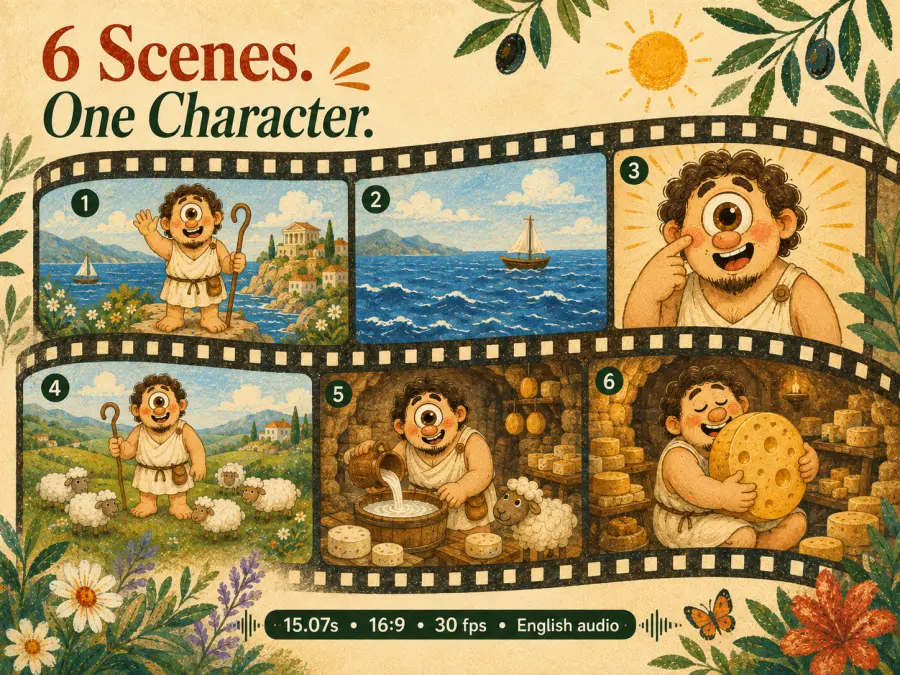
The strongest result was continuity. Polyphemus remained recognizable across a mountain-wide opening, an ocean cutaway, a close-up joke, a sheep pasture, and the cheese cave. His central eye, curls, broad body, white clothing, and friendly watercolor treatment survived the changes in framing and location.
The clip also achieved several story beats without becoming a slideshow. The island establishes where he lives. The one-eye scene establishes the joke. The sheep and cave establish his daily life. The final image of Polyphemus hugging a large wheel of cheese gives the short a clear visual payoff.
| Area |
What we observed |
| Character identity |
Recognizable across wide shots and close-ups |
| Illustration style |
Warm watercolor and colored-pencil look stayed coherent |
| Story progression |
Introduction moved into island life and cheese-making |
| Scene variety |
Island, ocean, one-eye joke, sheep pasture, and cave |
| Audio |
The exported file contains an audio track with English dialogue |
| Final file |
15.07 seconds, 1920×1080 export, 16:9, 30 fps |
What Still Needed Fixing
1. The Character Name Was Misspelled
The Polytheus caption shows why generated captions still need a human pass. The fix is small, but leaving it in the final video makes the story look less trustworthy—especially if the video is supposed to introduce mythology to children.
2. Seedance Invented Extra One-Eyed Characters
During the “Lots of great characters have one” joke, the model introduced several additional one-eyed figures. The beat is visually understandable, but those supporting characters were not defined by the original reference.
This creates two problems. First, they distract from Polyphemus. Second, an invented supporting figure can accidentally resemble a familiar commercial cartoon design.
Add a restriction such as:
Use only original supporting characters. Do not imitate or resemble characters
from existing films, television shows, games, cartoons, toys, or commercial
franchises.
If the extra characters remain too similar or too distracting, regenerate that clip or replace the shot. A negative instruction reduces the risk; it does not replace visual review.
3. The Clip Introduces a Character Rather Than Completing a Full Story
The video has a beginning and a satisfying final image, but it does not contain a full conflict-and-resolution arc. That is fine for a Short, a pilot, or an episode opener. It would be misleading to present it as the complete Odyssey story.
The practical lesson is simple: match the promise to the duration. Fifteen seconds can introduce Polyphemus. A longer sequence is needed for the arrival of Odysseus, a misunderstanding, a challenge, and a child-friendly resolution.
How to Make Longer AI Children’s Story Videos
Do not turn a five-minute script into one enormous prompt. Divide it into short segments with individual narrative jobs.
An Odyssey-inspired sequence could look like this:
Polyphemus introduces his island.
He shows the audience his sheep and cheese cave.
A strange ship appears near the shore.
Polyphemus meets the visitors.
A misunderstanding creates a gentle challenge.
The episode ends with a lesson about curiosity, hospitality, or listening.
Reuse the same continuity block in every segment:
exact character description;
clothing and color palette;
voice description;
illustration style;
recurring props and locations;
prohibited changes;
original-character restriction.
Only the current action, dialogue, camera direction, and sound cues should change. Review each segment before generating the next one. If Polyphemus changes clothing in episode two and you accept it, that error becomes harder to hide when episode three begins.
During editing, use a shared object, direction of movement, line of dialogue, or ambient sound to connect separate clips. Keep caption design and voice volume consistent across the finished sequence.
Prompt Tips for Better AI Story Videos for Kids
Write for One Age Group
A story for a four-year-old should not use the same vocabulary, threat level, or pacing as a story for a ten-year-old. State the intended age and reading level when the dialogue matters.
Give Each Clip One Purpose
“Introduce the cheese cave” is a useful shot objective. “Tell the entire Odyssey in 15 seconds” is not.
Use One Main Action Per Time Block
If a three-second block asks the character to walk, point, turn, speak, pick up a prop, and trigger a camera orbit, the model has to choose which instruction to ignore. Keep the dominant action obvious.
Repeat the Exact Character Lock
Do not rewrite the hero’s description with new synonyms in every episode. Reuse the same eye, hair, clothes, proportions, palette, and personality wording.
Direct the Voice as Carefully as the Picture
Specify gender presentation, age impression, warmth, speed, energy, accent if essential, and performance style. “Friendly narrator” is less informative than “deep but warm male voice, slightly slow, conversational, confident but naive.”
Request Captions and Sound, Then Verify Them
Seedance can be asked to generate dialogue, captions, ambience, and effects in the same job. Treat those outputs as a first pass. Keep them when accurate; regenerate or replace them when they are not.
Protect Against Accidental IP Similarity
Ask for original supporting characters and ban resemblance to existing entertainment franchises. Then inspect the generated figures yourself.
Safety, Copyright, and Publishing Checks
Children’s content needs a stricter review than an ordinary visual experiment. Before sharing the video, confirm that it contains no unexpected frightening imagery, unsafe behavior, adult themes, distorted faces, confusing dialogue, or sudden audio that is much louder than the narration.
Ancient myths may provide source material, but a modern film’s character design, dialogue, music, and specific adaptation are separate creative works. Use an original character design and your own retelling rather than copying the appearance or wording of a recent screen version.
If the finished video is uploaded to YouTube and is directed at children, set its audience accurately as Made for Kids. YouTube’s AI disclosure rules focus on meaningfully altered or generated content that appears realistic, so do not reduce the publishing step to “every cartoon always needs the same AI label.” Check the current upload options and apply the rules to the content you actually made.
Make Your First AI Story Video for Kids
The most reliable way to begin is not with a five-minute epic. Start with one character and one 15-second scene. Use GPT Image 2 to establish the hero, then animate the reference with Seedance 2.5. Ask for the dialogue, captions, and sound you want in the initial generation, but keep editing as the quality-control step.
If you need visual directions before writing from an empty box, browse the GPT Image 2 prompt examples and Seedance video prompt examples, then rebuild the subject, story, and restrictions around your own original character.