TL;DR:
Suno v4.5+에서는 인스트루멘털에 보컬을 추가하거나 그 반대로 작업할 수 있으며, 플레이리스트 기반 영감과 향상된 오디오를 제공합니다. Pro(월 $8) 및 Premier(월 $24) 사용자가 이용할 수 있습니다. v5(2025년 9월)는 더 뛰어난 품질을 제공하지만, v4.5+가 더 빠릅니다.
Suno v4.5 Plus의 기능을 살펴보세요. Add Vocals, Add Instrumentals, Inspire 등의 기능을 소개하고, 새로운 기능과 v5와의 비교 및 구독 가격을 알아보세요.
Suno v4.5+에서는 인스트루멘털에 보컬을 추가하거나 그 반대로 작업할 수 있으며, 플레이리스트 기반 영감과 향상된 오디오를 제공합니다. Pro(월 $8) 및 Premier(월 $24) 사용자가 이용할 수 있습니다. v5(2025년 9월)는 더 뛰어난 품질을 제공하지만, v4.5+가 더 빠릅니다.
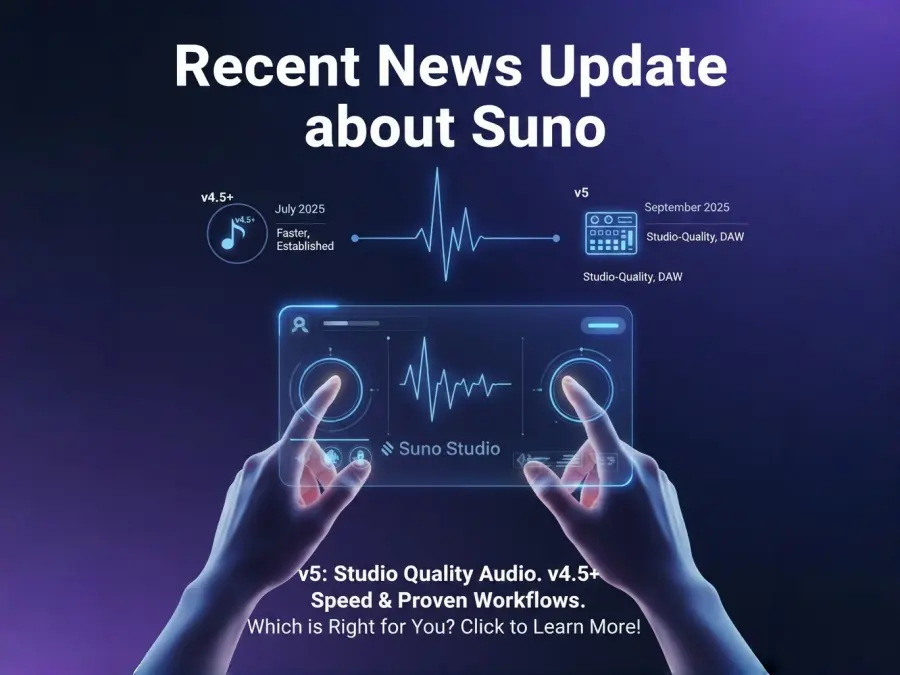
On September 23, 2025, Suno released v5, its most advanced music generation model to date, featuring studio-quality audio and an integrated digital audio workstation called Suno Studio. This guide focuses on v4.5+, which launched in July 2025 and remains a powerful, fast alternative. While v5 offers superior audio quality, v4.5+ delivers faster generation and established workflows that many creators still prefer. Read on to understand what v4.5+ offers, how it compares to newer versions, and whether it's the right fit for your music creation needs.
When Suno released v4.5+ on July 18, 2025, it marked a major shift in how people approach AI music creation. Instead of starting from scratch with every song, v4.5+ lets you build on existing audio—whether that's an instrumental waiting for vocals or a vocal idea needing a professional backing track. This collaborative approach to music creation is what sets v4.5+ apart.
Key capabilities introduced:
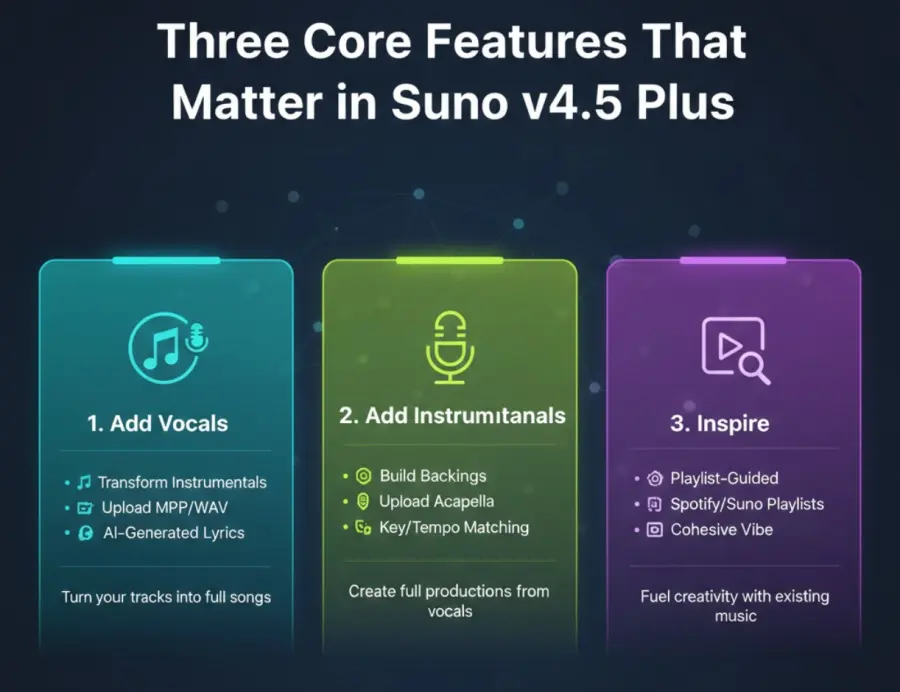
Add AI-generated vocals to instrumentals
Create instrumental arrangements under vocal recordings
Use your favorite songs as creative inspiration
Support for up to 8 minutes of continuous audio
1,200+ genre styles with smarter mashups
Enhanced vocal expression and emotional nuance
If you're new to Suno, the naming can feel confusing. Here's what you need to know:
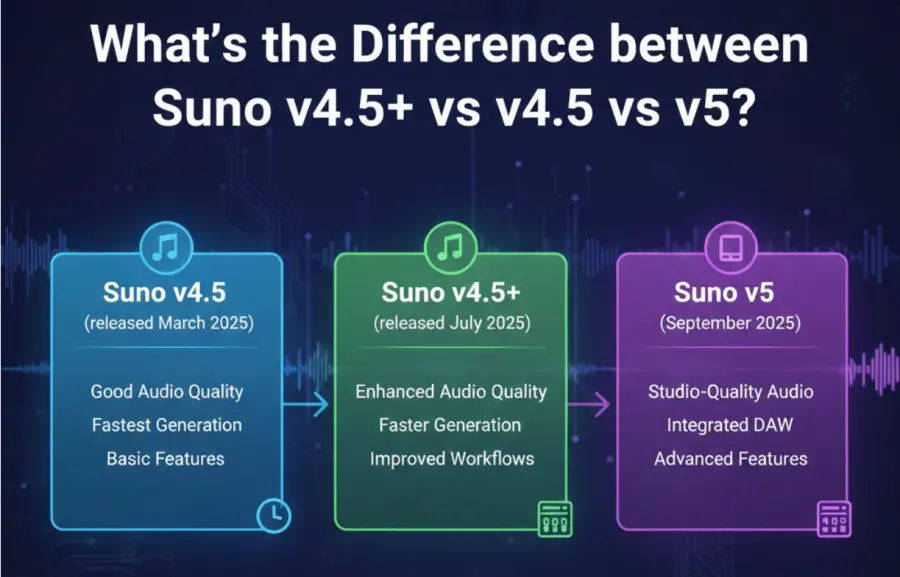
Suno v4.5 (May 2025): The base model that introduced better genre recognition, cleaner audio, and more balanced mixes. It works well for straightforward music generation.
Suno v4.5+ (July 2025): The same v4.5 engine plus three powerful new features—Add Vocals, Add Instrumentals, and Inspire. These tools transform v4.5 into a co-creation platform. If you subscribe to Pro or Premier, you get access to v4.5+ by default.
Suno v5 (September 2025): The newest model, currently in early beta for Pro/Premier users. It features significantly cleaner audio, more natural-sounding vocals, and integration with Suno Studio (a generative DAW). Generation is roughly 10x faster, but it's still being refined. Free users haven't received v5 yet.
Bottom line: Suno v4.5+ is current, feature-rich, and stable. v5 is newer but in beta. v4.5+ remains the best choice for creators prioritizing speed and established workflows.
If you're trying to decide between versions, this comparison clarifies which features matter for your workflow.
| Feature | v4.5 | v4.5+ | v5 |
| Core Model | Yes | Yes (same base) | New, advanced |
| Add Vocals | No | Yes | Yes (improved) |
| Add Instrumentals | No | Yes | Yes (improved) |
| Inspire Feature | No | Yes | Yes (advanced) |
| Max Song Length | 8 min | 8 min | 8 min |
| Audio Quality | Balanced | Balanced | Studio-grade |
| Generation Speed | Fast | Fast | 10x faster |
| Vocal Realism | Good | Good | Excellent |
| Suno Studio (DAW) | No | No | Yes |
| Stem Separation | No | No | Yes |
| Status | Stable | Stable | Early Beta |
| Best For | Speed | Feature-rich workflows | Professional quality |
Suno v4.5+ is production-ready. Thousands of creators use it daily without issues. If your goal is to generate music quickly and ship it, v4.5+ is a solid choice.
Suno v5 represents the future. Its audio quality is noticeably superior, and Suno Studio opens new creative possibilities. But it's still being refined. If you can tolerate occasional hiccups and want the cutting edge, v5 is worth trying.
Imagine you've spent hours crafting the perfect instrumental—lush strings, tight drums, beautiful keys. Now you want vocals, but you're not a singer. That's where Add Vocals solves a real problem.
Here's how it works: You upload an instrumental (either one you generated in Suno or an existing MP3/WAV file). You then write a text prompt describing the vocals you want—something like "uplifting female vocals, emotional delivery, slight breathiness." Add a lyric or let Suno suggest one. Hit generate, and within 30-60 seconds, you have a complete song.
What makes this powerful:
You can swap individual words or entire lyrics after generation
The AI respects your instrumental's tempo and key
Vocals blend naturally with the existing track
Up to 8 minutes of audio per generation
Works with any genre—indie folk, hip-hop, orchestral, synth-pop
Who benefits: Music producers, singer-songwriters without vocal skills, YouTubers needing custom tracks, TikTok creators building viral content.
The reverse workflow is equally powerful. You've recorded a vocal hook or acapella, but you need professional production. Add Instrumentals generates complementary instrument arrangements that enhance your vocal—without replacing it.
Upload your vocal track (up to 8 minutes), describe the instrumental style in a text prompt, and Suno analyzes your vocal's rhythm, key, and energy. It then builds an arrangement around it.
What to expect:
The AI maintains your vocal as the centerpiece
Instrumentation automatically adjusts to match your vocal's key and tempo
You control how closely the AI adheres to your original (100% = near-identical, lower = more creative freedom)
Genres range from lo-fi hip-hop to orchestral film scores
Who benefits: Singers with vocal demos, beatmakers wanting quick instrumentals, podcast creators needing custom intros, TikTok creators with vocal clips.
Inspire does something different from typical AI generation. Instead of writing a text prompt, you let an existing playlist guide the AI. Select any playlist from Spotify or Suno, and the model analyzes its overall vibe—genre, mood, energy, instrumentation—then creates original music that captures that essence.
How it helps: You avoid the blank-canvas problem. Instead of staring at a prompt field, you're giving the AI a reference point. Create a "sad indie acoustics" playlist, and Inspire generates sad indie songs. Mix in lo-fi hip-hop tracks? The AI blends those vibes into something new.
Who benefits: Creators seeking consistent audio aesthetics, podcast producers building mood libraries, indie game developers needing cohesive soundtracks, musicians exploring new genres.
One of v4.5's foundational improvements—carried forward in v4.5+—is its understanding of genres. The system now recognizes 1,200+ genre styles, from mainstream (pop, rock, jazz) to niche (Gregorian chant, jazz house, midwest emo).
More importantly, v4.5+ understands genre blending. You can now request combinations that previously resulted in messy, incoherent outputs:
Midwest emo + neosoul: The AI balances the introspective guitar work of emo with the smooth vocal harmonies and rhythmic depth of neosoul.
EDM + folk: Combines electronic beats and synths with acoustic instrumentation and folk song structures.
Jazz house + ambient: Merges improvisation and swing rhythms with atmospheric, spacious soundscapes.
The AI handles these mashups intelligently, maintaining musical coherence. Tempo, key, instrumentation, and rhythm all align naturally, rather than feeling like two songs stitched together.
v4.5+ maintains several improvements from the base v4.5 model that directly impact how your final track sounds.
Previous Suno versions (v3, early v4) had a reputation for audio degradation—especially in longer pieces. As songs approached the 4-minute mark, they'd develop a "shimmering" artifact or lose clarity. v4.5 solved this by improving mix balance and reducing those artifacts.
v4.5+ carries this forward. Your 8-minute track maintains consistent sound quality from beginning to end. No fading, no shimmer creep, no tonal collapse. Instruments remain clear, vocals stay present, and the overall mix sounds fuller.
For creators working with longer compositions—think podcast intros, cinematic scores, or complete songs—this consistency is a game-changer.
AI-generated vocals have historically sounded robotic. v4.5+ introduces more nuanced vocal control:
Breath control: Vocals include natural breathing sounds, not just sustained notes.
Vibrato and expression: The AI adds subtle vocal ornaments that feel human.
Emotional range: A "melancholic whisper" sounds different from an "uplifting shout"—the AI captures these distinctions.
Harmony complexity: When you request multi-part vocals, the AI generates richer, more sophisticated harmonies rather than simple doubling.
The result is vocals that feel less like a synthetic computer voice and more like a real singer performing your lyrics.
Suno operates a free tier plus two paid subscription options. Access to v4.5+ requires a paid plan.
| Plan | Price | Model Access | Monthly Credits | Commercial Rights | Generation Priority | Key Features | Best For | Cost Context |
| Free Plan | Free | Older Suno models (v3 / early v4) | 50 credits (≈10–15 songs) | ❌ No | — | Basic generation only | Trying Suno, experimentation before upgrading | — |
| Pro Plan | $8 / month | Full v4.5+ access | 300 credits | ✅ Yes | Standard | Add Vocals, Add Instrumentals, Inspire | Casual creators, hobbyists, regular content creators | ≈ $0.03 per song |
| Premier Plan | $24 / month | Everything in Pro + early access (e.g. v5) | 1,500 credits | ✅ Yes | Priority (faster) | Early feature access, high-volume generation | Professional musicians, game devs, agencies | ≈ $0.016 per song |
Important Commercial Rights: This is crucial. Free tier users cannot monetize or commercialize generated music. If you create a song on the free tier and upload it to YouTube or Spotify, you risk copyright strikes (even though the music is AI-generated). Paid plans (Pro and Premier) grant full commercial rights. This is essential for YouTubers, TikTokers, game developers, and anyone monetizing their content.
Decide whether you're starting with vocals or instrumentals. Navigate to Create, then choose:
Simple mode: One text prompt generates everything
Custom mode: Full control over lyrics, style, vocals, and instrumentation
For Add Vocals:
Upload your instrumental (or use a Suno-generated one)
Describe the vocals: "warm, soulful female vocals with slight rasp"
Add lyrics or let Suno suggest them
Select a Persona (voice personality) if desired
Generate and listen to preview
For Add Instrumentals:
Upload your vocal (MP3/WAV, up to 8 min)
Describe the instrumentation: "lo-fi hip-hop beats with jazzy chords"
Set audio influence (how closely to match original)
Generate
Suno lets you regenerate sections or make minor edits. Swap individual lyrics, adjust vocal tone, or tweak the instrumental. This iterative loop is where the magic happens—rarely is the first generation perfect.
Pro tip: Test one variable at a time. If you change the genre, lyrics, and vocal style simultaneously, you won't know which change affected the result.
Rather than building directly against Suno's API, many developers use API aggregation platforms like GPT Proto to abstract away vendor-specific risks. Here's how it works:
Instead of:
Your App → Suno API → Suno's Infrastructure
You get:
Your App → GPT Proto → Suno API (+ fallback options) → Udio API → Other models
An aggregation layer provides several benefits:
Vendor independence. If Suno's API changes pricing or limits, your integration still works—GPT Proto handles the translation layer.
Automatic fallbacks. Use Suno as your primary music generator, but automatically switch to Udio or another generator if Suno experiences downtime.
Rate limit management. GPT Proto handles quota allocation across your requests, preventing bottlenecks.
Unified authentication. One API key for Suno, Udio, Eleven Labs, and other models—no credential sprawl.
Pricing normalization. Some aggregation layers abstract away vendor price increases by spreading load across multiple services.
If you're interested in exploring this approach:
Browse available AI models on GPT Proto – See how Suno fits into a broader ecosystem and understand what fallback options exist
Read GPT Proto's Suno API integration guide – Step-by-step walkthrough for implementing Suno via an aggregation platform
Review GPT Proto's documentation and pricing – Understand how the aggregation layer works, authentication, rate limits, and cost structure
Yes. Only paid plans (Pro and Premier) include v4.5+ features. Free users can access older models (v3/v4) with limited monthly credits.
Only if you're on a paid plan (Pro or Premier). Free tier music cannot be monetized, uploaded to YouTube, Spotify, or used in commercial projects. This includes TikTok videos with monetization enabled.
Not as a separate upgrade. If you're on Pro or Premier, you already have access to v4.5+. It's included in your subscription at no extra cost.
Yes, absolutely. v4.5+ is mature and stable. v5 is in early beta and occasionally buggy. Choose v4.5+ for production work and reliability; choose v5 for experimentation and cutting-edge features. Many creators use both versions depending on the project.
v4.5+ typically takes 30-60 seconds. v5 is faster (15-30 seconds) but prioritizes quality. Actual speed depends on subscription tier (Premier users get faster queues) and server load.
Since v4.5+ launched, Suno has released Suno v5 and Suno Studio—a full digital audio workstation. Understanding this evolution helps you plan your workflow.
Audio quality is the biggest leap. v5 outputs sound cleaner, fuller, and more professional out of the box. Vocals are significantly more natural and emotionally expressive. Instrument separation is clearer.
Suno Studio (released September 2025) lets you edit generated songs like a DAW would. You can reorder sections, extend specific parts, replace verses, and export individual stems (vocals, bass, drums, etc.) for mixing in your preferred DAW.
Composition architecture is smarter. v5 maintains musical coherence across longer pieces better than v4.5+, with improved song structure and transitions.
The good news: v4.5+ isn't going anywhere. Suno supports multiple versions, so you can use v4.5+ for some projects and v5 for others.
Suno v4.5+ transforms AI music creation from random generation into true collaborative production—enabling you to add vocals to instrumentals, build arrangements from acapellas, and draw inspiration from playlists to cut production time from weeks to hours. For independent musicians, YouTubers, podcasters, and game developers, v4.5+ solves expensive production bottlenecks, offering a third option beyond hiring expensive producers or accepting mediocre results, with Pro ($8/mo) and Premier ($24/mo) plans both granting commercial rights. Yes, AI-generated music has limitations, but the practical value is undeniable: over 12 million creators have already chosen Suno, v4.5+ is stable and proven today, and if you're building music-dependent applications, platforms like GPT Proto AI API offer infrastructure protection against vendor consolidation and API pricing volatility as Suno evolves. The decision is straightforward—if you create music regularly and want faster, cheaper access to professional-quality production, start this week with a Pro subscription and test the three core features. Your creative potential is no longer limited by your production budget or technical skills; it's limited only by your imagination.
TL;DR Suno는 현재 셀프서비스 방식의 공개 API를 제공하지 않습니다. 2026년 7월 회사는 엄선된 파트너 그룹을 시작으로 개발자 API를 검토하고 있다고 밝혔지만, 엔드포인트, 일반 공개 가격, 문서 또는 출시일은 아직 발표하지 않았습니다. 이 차이는 중요합니다. Suno의 Free, Pro, Premier 구독은 웹사이트, 모바일 앱, Studio 이용을 위한 것이며 공식 API 호출을 위한 것이 아닙니다. 현재 “Suno AI 음악 API”를 판매하는 서비스는 독립적으로 운영되며 추가적인 기술 및 라이선스 검토가 필요합니다. 오늘 당장 문서화된 음악 생성 API가 필요하다면 MiniMax Music 3.0을 이용 가능한 대안으로 고려할 수 있습니다. 공식 REST 엔드포인트, 무료 API 모델, 공개된 요청 제한, 종량제 가격을 제공합니다. GPTProto는 현재 Suno나 MiniMax Music 3.0을 제공하지 않으므로, 이 가이드의 MiniMax 코드 예시는 공식 API를 직접 호출합니다.
Schuyler Stacy | 2026-07-20
Suno v5 가 공식 출시되면서 생성형 오디오의 진화에 중요한 전환점을 맞이했습니다. 2025년 9월에 출시된 이 최첨단 AI 음악 생성기 는 전문가 수준의 44.1kHz/24-bit 오디오 충실도를 제공하여 크리에이터가 작곡에 접근하는 방식을 혁신합니다. 단순한 생성 이상으로, 이번 업데이트는 정밀한 편집과 보컬 다듬기를 위해 설계된 포괄적인 디지털 오디오 워크스테이션(DAW)인 Suno Studio 를 도입합니다. 독립 아티스트든 상업 프로듀서든, Suno v5 는 어떤 장르에서도 사실적인 보컬과 정교한 악기 편곡을 합성하는 데 필요한 고급 도구를 제공합니다.
Schuyler Stacy | 2026-03-02
TL;DR Suno는 현재 셀프서비스 방식의 공개 API를 제공하지 않습니다. 2026년 7월 회사는 엄선된 파트너 그룹을 시작으로 개발자 API를 검토하고 있다고 밝혔지만, 엔드포인트, 일반 공개 가격, 문서 또는 출시일은 아직 발표하지 않았습니다. 이 차이는 중요합니다. Suno의 Free, Pro, Premier 구독은 웹사이트, 모바일 앱, Studio 이용을 위한 것이며 공식 API 호출을 위한 것이 아닙니다. 현재 “Suno AI 음악 API”를 판매하는 서비스는 독립적으로 운영되며 추가적인 기술 및 라이선스 검토가 필요합니다. 오늘 당장 문서화된 음악 생성 API가 필요하다면 MiniMax Music 3.0을 이용 가능한 대안으로 고려할 수 있습니다. 공식 REST 엔드포인트, 무료 API 모델, 공개된 요청 제한, 종량제 가격을 제공합니다. GPTProto는 현재 Suno나 MiniMax Music 3.0을 제공하지 않으므로, 이 가이드의 MiniMax 코드 예시는 공식 API를 직접 호출합니다.
Schuyler Stacy | 2026-07-20