GPT 2.5 vs GPT 2.0: What Are You Actually Comparing?
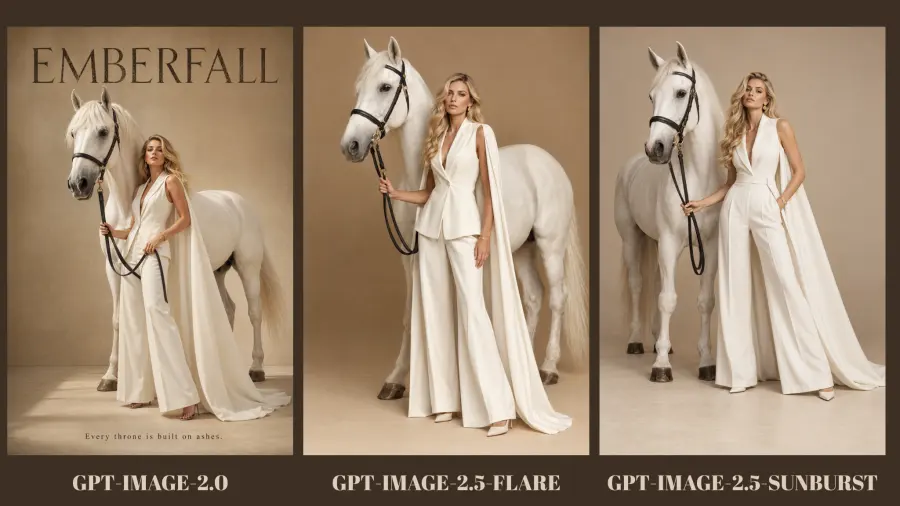
GPT Image 2.5 introduces two API choices rather than one. GPT Image 2.5 Flare accepts text and image inputs and is described by OpenAI as the fastest model in the family for high-quality everyday generation. GPT Image 2.5 Sunburst accepts the same input types but is positioned for tasks where editing precision is the priority.
GPT Image 2 also supports generation and editing from text and image inputs. It remains a valid baseline, not a broken or unusable legacy model. The trade-off is that it does not expose the xhigh and max quality settings available in the 2.5 family.
| Specification |
GPT Image 2 |
GPT Image 2.5 Flare |
GPT Image 2.5 Sunburst |
| Model ID |
gpt-image-2 |
gpt-image-2.5-flare |
gpt-image-2.5-sunburst |
| Official role |
Previous general generation and editing model |
Fast everyday generation |
Precision-focused generation and editing |
| Inputs |
Text and image |
Text and image |
Text and image |
| Output |
Image |
Image |
Image |
| Shared quality settings |
auto, low, medium, high |
auto, low, medium, high |
auto, low, medium, high |
| Additional settings |
None |
xhigh, max |
xhigh, max |
| Fair head-to-head setting |
high |
high |
high |
This API comparison should also be kept separate from ChatGPT product features. Sketch, templates, comments, and prompt sharing may change how people create images inside ChatGPT, but they do not tell an API developer which model should handle a product-photo edit or a batch of ad creatives. For the product-level changes, see What Is ChatGPT Images 2.5?.
How We Test GPT Image 2.5 and GPT Image 2 on the Same Prompts
A same-prompt comparison is only useful when the other important variables stay fixed. If GPT Image 2 runs at high while Sunburst runs at max, the result measures two quality settings as well as two models. If one model gets five attempts and another gets one, the comparison measures cherry-picking.
For the main test, use these controls:
Size: 1024x1024
Quality: high
Output format: PNG
Prompt: identical text, including punctuation
Reference input: the same source file for all editing runs
Attempts: keep the first completed result from each model
Failures: record refusals, timeouts, and unusable outputs instead of silently rerunning them
OpenAI's image generation guide confirms that high is available across all three models. It also states that custom dimensions must use width and height values divisible by 16, stay between 1:3 and 3:1, and remain within the documented pixel limits. Those extra sizes are useful in production, but a square 1024-pixel test is easier to reproduce.
Each output should be scored before looking at the model name. A blind review is better if more than one person is available.
| Metric |
Measurement |
| Prompt adherence |
0–5 score against a written checklist |
| Text accuracy |
Correct requested characters divided by total requested characters |
| Edit locality |
Whether any protected area changed |
| Reference preservation |
0–5 score for subject, shape, identity, and composition |
| Latency |
Seconds from request submission to completed output |
| Retry count |
Additional calls needed for an acceptable image |
| Actual cost |
Amount charged for the completed call, including inputs and output |
| First-pass usable |
Yes or no against a predefined acceptance rule |
Do not combine these measurements into one vague “looks better” score. A polished image can still fail because it misspells the product name. A faithful edit can be visually less dramatic and still be the better API result.
Test 1: Text-to-Image Prompt Following
The first test checks whether each model follows a brief containing count, position, color, text, and negative constraints. It is intentionally closer to an ecommerce request than a loose art prompt.
Use this prompt unchanged:
Create a square editorial product photograph for a fictional sparkling water brand. Place exactly three slim aluminum cans on a pale coral pedestal: one lemon-yellow can in the center, one mint-green can on the left, and one sky-blue can on the right. Print the brand name "MORI FIZZ" once on each can. Add two sliced lemons beside the pedestal, not on top of it. Use a warm cream background, soft afternoon shadows, and a 50 mm studio-photography look. No people, no extra cans, no floating fruit, no duplicate text, and no border.
This prompt creates an objective checklist: three cans, three specified colors, fixed positions, one brand name on each can, two lemon slices, and no prohibited additions. Visual taste still matters, but it no longer decides the entire result.

| Model |
Object count |
Color and position |
Brand text |
Negative constraints |
Visual quality |
First-pass usable |
| GPT Image 2 |
3/3 cans; 2/2 lemon halves |
All three cans correct |
“MORI FIZZ” correct once per can |
Pass; no extra objects or repeated copy |
4.6/5 — clean and balanced, though slightly more rendered than photographed |
Yes |
| Flare |
3/3 cans; 2/2 lemon halves |
All three cans correct |
Main brand correct once per can |
Partial miss; it added repeated flavor, “SPARKLING WATER,” and “330 mL” copy |
4.8/5 — the most detailed retail-style labels and convincing condensation |
No under the strict brief |
| Sunburst |
3/3 cans; 2/2 lemon halves |
All three cans correct |
“MORI FIZZ” correct once per can |
Pass on text and object rules; added non-text label illustrations |
4.9/5 — the strongest material detail, lighting, and premium product finish |
Yes |
GPT Image 2 won strict prompt adherence. It completed the requested count, arrangement, colors, and brand copy without introducing extra label text. Sunburst produced the strongest-looking finished image and still passed the explicit constraints, but its large botanical and fruit illustrations went further beyond the requested brief. Flare looked highly usable as a retail packaging concept, yet the repeated unrequested copy matters because the prompt explicitly said “no duplicate text.”
The practical result is not “the older model is better.” It is narrower: on this first prompt, GPT Image 2 followed the literal brief most closely, while Sunburst produced the best visual finish. Flare needs either a stricter “no other words anywhere” instruction or a retry before it passes the same acceptance rule.
Test 2: Text Rendering and Layout
The next prompt isolates a frequent production failure: an image can look finished while the words are wrong. This matters for product ads, thumbnails, event posters, menu graphics, and interface mockups.
Design a square ecommerce advertisement with one white running shoe on a dark navy background. Use this exact copy and no other text:

NIGHT RUN
LIGHT ON YOUR FEET
$89
SHOP NOW

Place NIGHT RUN at the top, LIGHT ON YOUR FEET directly below it, $89 in the lower-left corner, and SHOP NOW inside a coral rounded button in the lower-right corner. Keep every word fully visible and correctly spelled. Do not place text on the shoe.
Count exact character errors first. Then review placement, hierarchy, and legibility. This order prevents a visually pleasing layout from hiding a spelling failure.
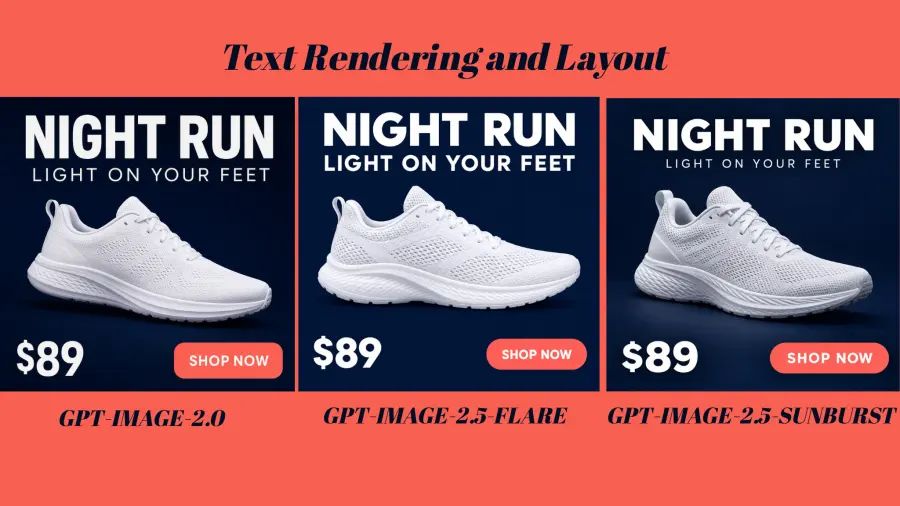
| Model |
Exact copy correct |
Placement correct |
Extra text |
Readable at article width |
Verdict |
| GPT Image 2 |
4/4 text strings exact |
All four placements correct; no text on shoe |
None |
Yes |
Pass — best overall hierarchy and balance |
| Flare |
4/4 text strings exact |
All four placements correct; no text on shoe |
None |
Yes |
Pass — strongest shoe texture, but the composition sits closer to the edges |
| Sunburst |
4/4 text strings exact |
All four placements correct; no text on shoe |
None |
Yes |
Pass — clean spacing and a convincing product angle; subheading is slightly smaller |
This round ended in an objective tie on text accuracy: all three models reproduced NIGHT RUN, LIGHT ON YOUR FEET, $89, and SHOP NOW without spelling errors, extra copy, or text on the shoe. Each also placed the price in the lower-left corner and the coral button in the lower-right corner.
GPT Image 2 gets a narrow layout preference because its headline, subheading, product, price, and button form the clearest reading sequence without crowding the frame. Flare renders especially crisp shoe texture, while Sunburst gives the product more dimensional lighting and breathing room. Those are design preferences, not text failures. On the capability being tested, all three passed.
OpenAI says text rendering has improved, but its own documentation still warns that precise text placement and clarity can fail. This successful prompt shows that all three models can produce a clean, text-heavy ad; it does not establish a 100% success rate across different copy or layouts.
Test 3: Image Editing and Subject Preservation
For image editing, judging only the requested change is too generous. The more useful question is whether the model can make that change without rewriting the rest of the image.
Use one original product photograph for all three calls, then send this instruction:
Change only the bottle label from blue to red. Preserve the exact bottle shape, cap, logo, printed wording, liquid color, reflections, shadows, camera angle, crop, surface, and background. Do not add, remove, resize, or reposition anything. Return a square PNG.
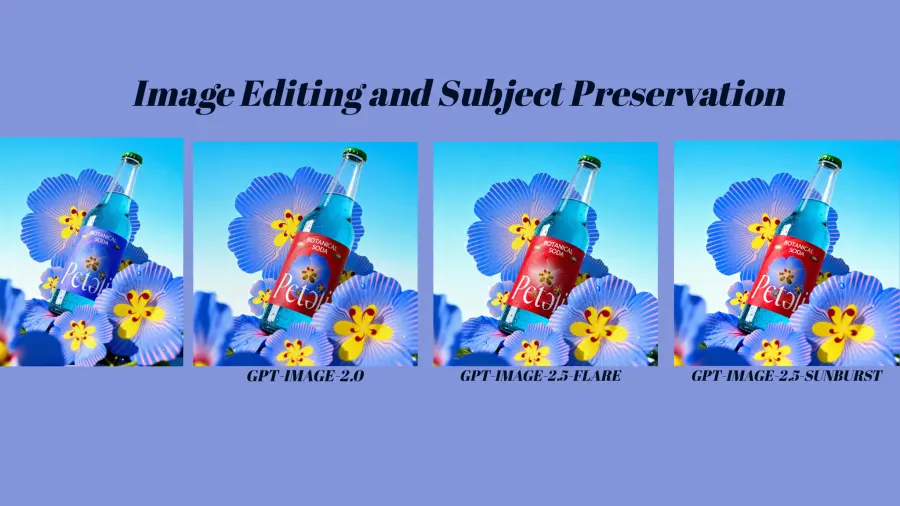
There is an important test-design caveat. The source image is 1080×1350, while all three edited outputs are 1254×1254. Asking the model to “preserve the crop” and “return a square PNG” created incompatible requirements. This round can compare relative preservation among the three models, but it cannot support a clean pixel-locality claim. A stricter rerun should say: Preserve the original dimensions and aspect ratio. Return PNG.
Zoom into the label, bottle edge, logo, reflections, and background. A successful edit changes the label color while leaving protected pixels visually stable. If the logo is redrawn, the bottle becomes wider, or the shadow moves, record the drift even if the new image looks good.
| Model |
Requested change completed |
Wordmark and printed wording |
Bottle shape and angle |
Lighting/background preservation |
Strict-locality verdict |
| GPT Image 2 |
Yes; label changed from blue-purple to red |
Mostly retained, but the label typography and small badge details were visibly regenerated |
Broad shape and angle retained |
Noticeable reframing and changes in flower placement and label reflections |
Fail — correct edit, too much collateral redraw |
| Flare |
Yes; label changed to red |
Main wording retained; central label art and small text changed |
Shape, cap, liquid color, and angle remained close |
Better overall preservation, but the square reframe and several decorative details changed |
Fail under a literal “change only” rule |
| Sunburst |
Yes; label changed to red |
Main wording and visual identity retained most closely; fine label details still changed |
Closest overall preservation of the bottle, cap, liquid, and camera angle |
Strongest relative match in composition, color, and reflections; still not pixel-local |
Best of the three, but not a strict pass |
Sunburst won this relative preservation test. It kept the bottle geometry, green cap, cyan liquid, camera angle, and surrounding floral composition closest to the source while making the requested color change. Flare followed closely, although its label artwork and fine copy were more visibly redrawn. GPT Image 2 completed the requested edit but introduced the most noticeable collateral changes in the label and surrounding composition.
None of the three produced a literal color-only edit. All regenerated at least part of the label design, and all changed the portrait source into a square canvas. For a casual campaign variation, each output may be usable. For packaging approval, legal copy, or pixel-sensitive product editing, all three require another pass—and the benchmark itself should be rerun without the contradictory square-output instruction.
Test 4: Multi-Turn Editing and Visual Drift
A model may pass one edit and still fail a real workflow. Each follow-up gives it another chance to change details the user wanted to preserve.
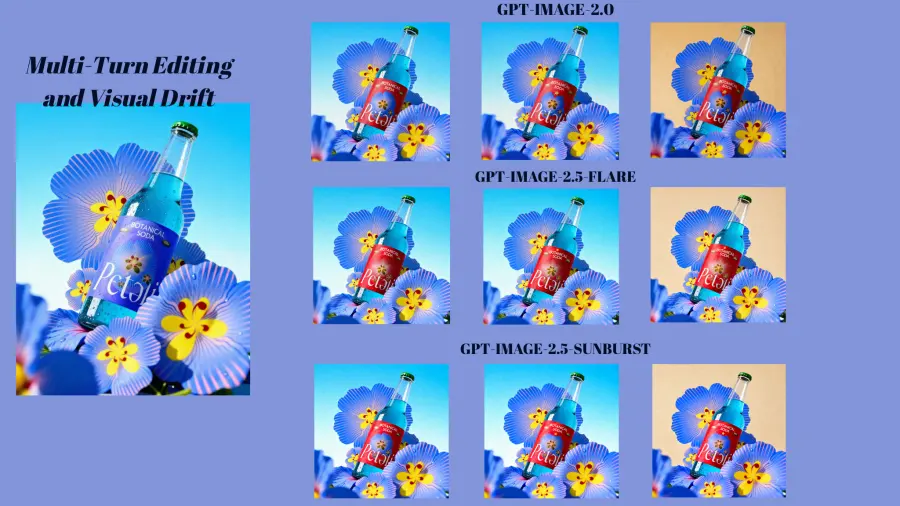
Starting from the original product image, apply these edits in order:
Change only the label from blue to red.
Add one small gold star above the logo. Preserve the completed red label and everything else.
Replace only the background with warm beige paper. Preserve the bottle, red label, logo, gold star, lighting direction, and crop.
| Model |
Round 1: red label |
Round 2: gold star |
Round 3: beige paper |
Earlier edits retained |
Multi-turn verdict |
| GPT Image 2 |
Completed, with the most collateral redraw in the first edit |
Pass; added one gold star above the main wordmark and kept the red label |
Pass; changed the cyan background to warm, textured beige and kept the star |
Yes; both requested edits survived to the final image |
Usable across all three turns, but label art, small details, and surrounding flowers showed the most cumulative regeneration |
| Flare |
Completed, with moderate first-edit redraw |
Pass; added one small star and produced the closest visual continuation of its previous frame |
Pass; replaced the background while retaining the star, red label, bottle pose, and lighting direction |
Yes; the prior state remained the most stable from turn to turn |
Best multi-turn consistency in this sequence |
| Sunburst |
Best relative preservation in the first edit |
Pass; added one centered gold star and kept the red label and composition |
Pass; produced a convincing warm paper background and retained both earlier edits |
Yes; core geometry and identity remained close, with minor changes to tone and fine floral detail |
Strong second for cumulative consistency; best at the initial source-preserving edit |
All three models completed the two follow-up instructions on the first supplied result: each added exactly one star, then replaced the background while preserving the red label and the star. This is a stronger result than Test 3's strict-locality outcome because the benchmark now asks whether earlier semantic state survives—not whether every protected pixel remains unchanged.
Flare won the full edit chain. Its star position, label layout, bottle angle, foreground flowers, and highlight direction remained the most stable between rounds 2 and 3. Sunburst was the better single-edit result in Round 1, but Flare accumulated less additional drift over the next two instructions. GPT Image 2 also preserved both earlier edits, although more of the label art and surrounding composition appeared to be regenerated, and its final background leaned more golden than the other two warm-beige paper treatments.
OpenAI lists improved multi-turn consistency as part of the 2.5 update, but the image documentation still notes that recurring characters and brand elements can lose consistency across generations. The practical takeaway is simple: preserve the source file and test the whole edit chain, not only the first instruction.
GPT Image 2.5 vs GPT Image 2 Pricing, Reported Speed, and Recorded Cost
OpenAI reports that Flare can reduce latency by up to 50% compared with GPT Image 2. Treat “up to” seriously. Complex prompts may still take as long as two minutes according to the official image guide, and traffic, image input, quality, and dimensions can change the result.
The published token prices also require care. At the time of checking, OpenAI's central API pricing table lists the following standard rates per one million tokens:
| Model |
Text input |
Cached text input |
Image input |
Cached image input |
Image output |
| GPT Image 2 |
$2.50 |
$0.625 |
$4.00 |
$1.00 |
$15.00 |
| GPT Image 2.5 Flare |
$5.00 |
$1.25 |
$8.00 |
$2.00 |
$30.00 |
| GPT Image 2.5 Sunburst |
$5.00 |
$1.25 |
$8.00 |
$2.00 |
$30.00 |
There is a documentation conflict worth disclosing. The individual Flare and Sunburst pages currently say their token rates match GPT Image 2, while the central pricing table lists GPT Image 2 at half the 2.5 rates. The central table is the clearer current comparison, but pricing should be checked again immediately before publication.
Even a correct rate table does not reveal cost per accepted image. The official guide tells developers to inspect the response's usage because models may consume different numbers of tokens at the same nominal quality. An output that costs less but requires two retries may be the expensive choice.
The supplied cost dashboard reports the total spend for the full benchmark. The test set contains five recorded calls per model: two text-to-image prompts, the initial label edit, the star follow-up, and the background follow-up.
| Model |
Recorded calls |
Total charged |
Average per recorded call |
Difference vs GPT Image 2 |
| GPT Image 2 |
5 |
$0.2002 |
$0.0400 |
Baseline |
| Flare |
5 |
$0.2601 |
$0.0520 |
+29.9% |
| Sunburst |
5 |
$0.2487 |
$0.0497 |
+24.2% |
The three models cost $0.7090 in total for the 15 recorded calls. GPT Image 2 was the cheapest in this run. Sunburst cost 4.4% less than Flare despite both 2.5 models sharing the same published token rates, which is a useful reminder that rate-card pricing and the amount charged for a particular output are not the same measurement.
These averages are descriptive, not fixed per-image prices. The dashboard totals do not expose per-call latency or output-token use, and the contradictory aspect-ratio requirement in Test 3 prevents a defensible cost-per-accepted-image calculation. Do not infer tested speed from this cost screenshot. Use the OpenAI latency statement only as a vendor claim until request timestamps are available.
For GPT Proto pricing, use the live rates on the GPT Image 2, Flare, and Sunburst model pages when running the benchmark. Store the amount actually charged with the output rather than copying a rate into a spreadsheet once and assuming it will never change.
What Independent Rankings and Users Say
The early independent signal favors the new models. On the Text-to-Image Arena leaderboard dated September 7, 2026, Sunburst ranked first at 1421±13 from 3,149 votes, Flare ranked second at 1399±13 from 2,856 votes, and GPT Image 2 Medium ranked third at 1381±4 from 78,731 votes.
The single-image editing leaderboard showed the same order: Sunburst at 1520±9 from 6,704 votes, Flare at 1491±9 from 5,676 votes, and GPT Image 2 Medium at 1461±3 from 235,928 votes.
Those numbers support testing 2.5 first. They do not prove that Sunburst will beat Flare on every project. Both 2.5 entries are marked Preliminary, their vote counts are much smaller than GPT Image 2's, and the text-to-image rank spreads for Flare and Sunburst overlap. The responsible reading is “strong early lead,” not “settled universal winner.”
Community reactions are less tidy. In one Reddit comparison thread, some participants saw better readable text or more realistic composition in 2.5, while others said the outputs looked about the same. One user also reported more moderation and guardrail errors on apparently harmless prompts. The thread itself attracted accusations of promotion and unreliable analysis, so none of those comments should be treated as benchmark data.
That disagreement is useful for one reason: it shows why labelled, reproducible tests matter. A single attractive example is evidence that a model can produce that image. It is not evidence of a reliable pass rate.
GPT Image 2.5 Flare vs Sunburst vs GPT Image 2: Which Should You Use?
For a multi-turn editing workflow like the one tested here, choose Flare first. It accumulated the least visible drift after the star and background instructions. OpenAI also positions it as the faster 2.5 option, although latency was not recorded in this benchmark.
Choose Sunburst when source preservation in a demanding single edit or final visual polish matters most. It won the relative preservation test and produced the strongest visual finish in the strict product-generation round. Do not route every draft to Sunburst merely because it sits at the top of an early leaderboard.
Keep GPT Image 2 when literal prompt adherence and budget matter more than the 2.5 family's quality ceiling. It won the strictest text-to-image checklist, tied on exact ad copy, and recorded the lowest total spend. Version numbers are not a migration plan: if a change creates new layout failures, moderation interruptions, or prompt regressions, the newer model can still be the worse operational choice for that workflow.
| Project condition |
Start with |
Escalate or fall back when |
| Multi-turn edits or frequent variants |
Flare |
Use Sunburst when the first source-preserving edit misses a written quality rule. |
| Source-sensitive single edits or final campaign assets |
Sunburst |
Try Flare when cumulative consistency, latency, or volume becomes the bottleneck. |
| Literal briefs or cost-sensitive production |
GPT Image 2 |
Shadow-test Flare and migrate only when pass rate or operational speed improves enough to offset the higher observed spend. |
| Maximum 2.5 quality |
Sunburst or Flare at max |
Do not compare this result directly with GPT Image 2 at high. |
My recommendation is to route, not crown one model for everything. Use Flare for iterative editing, Sunburst for preservation-sensitive or final-quality work, and GPT Image 2 for literal, cost-sensitive requests. Keep all three behind the same acceptance tests rather than routing solely by model version.
How to Test All Three Models Through One GPT Proto API Key
GPT Proto exposes each model through its own endpoint while keeping authentication and account balance in one place. The request below follows the format shown on the live Flare model page. Set MODEL_ID to any of the three IDs and keep the other fields fixed for the benchmark.
export GPTPROTO_API_KEY="YOUR_GPTPROTO_API_KEY"
export MODEL_ID="gpt-image-2.5-flare"

curl --request POST \
  "https://gptproto.com/api/v3/openai/${MODEL_ID}/text-to-image" \
  --header "Authorization: Bearer ${GPTPROTO_API_KEY}" \
  --header "Content-Type: application/json" \
  --data '{
    "prompt": "Create a square editorial product photograph for a fictional sparkling water brand. Place exactly three slim aluminum cans on a pale coral pedestal: one lemon-yellow can in the center, one mint-green can on the left, and one sky-blue can on the right. Print the brand name MORI FIZZ once on each can. Add two sliced lemons beside the pedestal, not on top of it. Use a warm cream background, soft afternoon shadows, and a 50 mm studio-photography look. No people, no extra cans, no floating fruit, no duplicate text, and no border.",
    "n": null,
    "quality": "high",
    "size": "1024x1024",
    "enable_sync_mode": false,
    "response_format": "url"
  }'
Run the request three times with these values:
gpt-image-2
gpt-image-2.5-flare
gpt-image-2.5-sunburst
Save the returned task identifier, completion timestamp, usage data, output URL, and charged amount together. For a production migration, send a small sample of existing GPT Image 2 requests to Flare in parallel without changing the user-facing route. Compare results first. Then move only the prompts that pass.
You can also test the models visually through the GPT Proto AI Image Generator. For reusable prompt structures, the GPT Image 2 Prompt Collection provides a starting point, but keep the benchmark prompts frozen once testing begins.
Final Verdict
GPT Image 2.5 is the better family to test for new image API work, but this benchmark does not justify a blanket migration from GPT Image 2.
Flare is the best choice for the tested multi-turn edit sequence because it accumulated the least visual drift. Sunburst is the stronger specialist for a source-preserving first edit and premium visual finish. GPT Image 2 remains the best value result here: it followed the strictest generation brief most literally and cost $0.2002 across five calls, compared with $0.2601 for Flare and $0.2487 for Sunburst.
The public leaderboards lean toward Sunburst, then Flare, then GPT Image 2. The confidence gap, sample-size difference, pricing-document conflict, and anecdotal community reports all argue against treating that order as the final answer for your application.
Use the same prompt. Lock the parameters. Count the failures. Then migrate.