ChatGPT Images 2.5 is OpenAI's latest image-generation and editing system inside ChatGPT. Released on September 8, 2026, it focuses on a practical problem that earlier image models often handled poorly: changing one part of an image without forcing you to rebuild everything else.
The release combines a stronger image model with Sketch, templates, direct comments, background removal, and prompt sharing. OpenAI also released two related API models—GPT-Image-2.5 Flare and GPT-Image-2.5 Sunburst.
The short version is that ChatGPT Images 2.5 is less about generating one impressive image and more about revising the same image without repeatedly starting over. That shift matters for product mockups, campaign assets, character variations, infographics, and any workflow where consistency across edits is more valuable than a lucky first result.
What Is ChatGPT Images 2.5?
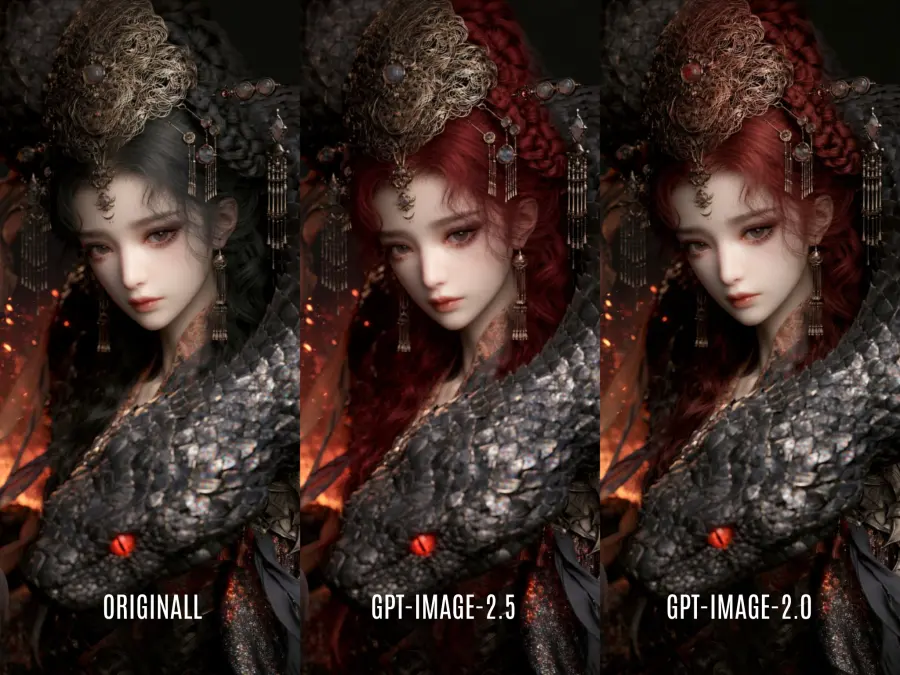
ChatGPT Images 2.5 is both a model upgrade and a set of image-creation features in ChatGPT. OpenAI says it produces more natural lighting, richer textures, better reference-subject preservation, more precise local edits, and more consistent results across multiple editing turns. The company reports up to 50% lower generation latency than ChatGPT Images 2.0—not a guaranteed 50% improvement for every prompt. OpenAI's release announcement provides the product-level details.
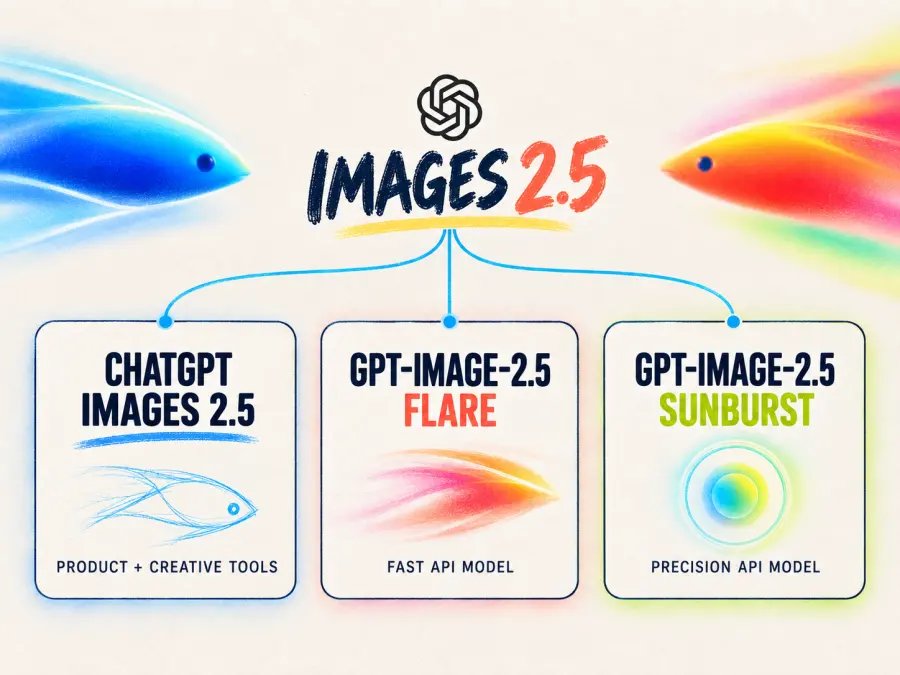
Three similar names appear around this release, but they do not refer to the same thing:
| Name |
What it is |
Best way to think about it |
| ChatGPT Images 2.5 |
The image system and editing experience inside ChatGPT, ChatGPT Work, and Codex |
The consumer and workspace product |
| GPT-Image-2.5 Flare |
A smaller API model optimized for speed and everyday generation |
The default starting point for most API workloads |
| GPT-Image-2.5 Sunburst |
A larger API model optimized for quality and editing precision |
The option for demanding final assets |
Some early searches use “GPT-Image-2.5 Flar,” but the official model name is Flare.
The distinction is important. Sketch, templates, an editing toolbar, and on-image comments are ChatGPT interface features. Flare and Sunburst are model choices exposed through the Images API and the Responses API image-generation tool. An API request can generate or edit an image, but it does not automatically reproduce the complete ChatGPT editor.
ChatGPT Images 2.5 Upgrades vs Images 2.0
Images 2.0 was already capable of generating text, following reference images, and editing existing assets. Images 2.5 improves the parts that determine whether those capabilities hold up through a real creative process.
| Area |
Images 2.0 |
Images 2.5 upgrade |
Why it matters |
| Generation speed |
Often slowed rapid iteration |
Up to 50% lower latency, according to OpenAI |
More variations can be reviewed in the same session |
| Local editing |
Unrequested areas could drift |
Better at changing only the named region or element |
Existing composition and brand treatment are easier to preserve |
| Reference fidelity |
Recognizable subjects could change across transformations |
Better preservation of people, pets, products, and distinctive details |
Reference-led campaigns need fewer repairs |
| Multi-turn edits |
Quality and earlier decisions could degrade |
Better consistency across successive edits |
A conversation can function more like a revision history |
| Layout and information |
Complex visual structures were less dependable |
Improved layouts, infographics, real-world content, and transparent backgrounds |
More useful for presentations, posters, and product assets |
| Output control |
Standard quality options |
Flare and Sunburst add xhigh and max API quality settings |
Teams can trade response time for fidelity |
“Up to 50% faster” needs a qualifier. OpenAI's own GPT Image 2.5 prompting guide tells developers to measure latency on their actual prompts, reference images, dimensions, and quality settings. Sunburst also deliberately takes longer than Flare when extra precision is required.
For a production comparison, run the same prompt set through both models and score fidelity, edit locality, text accuracy, latency, and cost. Start with the existing GPT Image 2 model and GPT Image 2 prompt examples.
How ChatGPT Images 2.5 Sketch and Drawing Tools Work
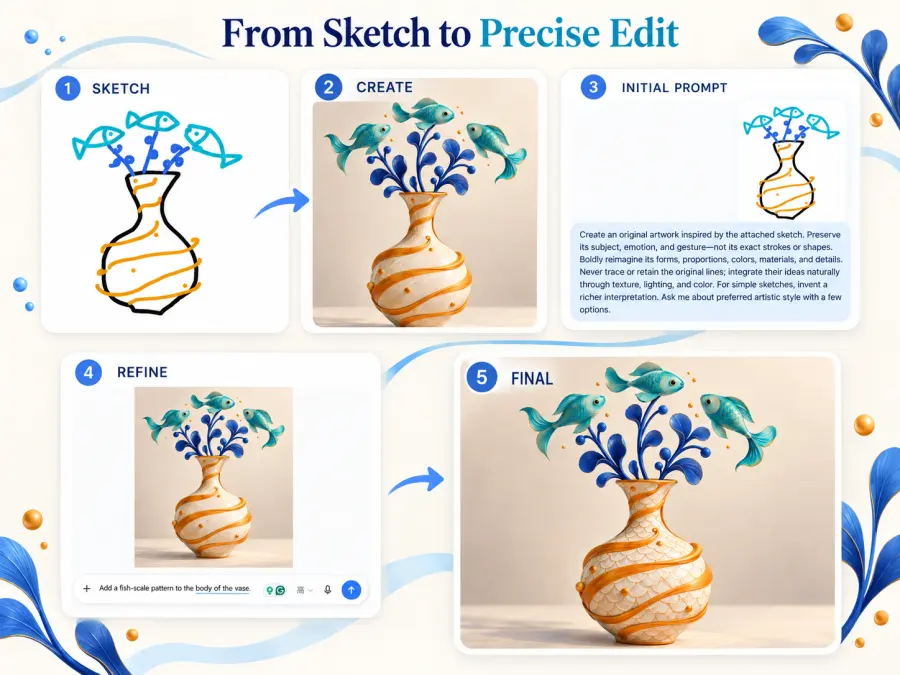
Sketch gives users a spatial way to prompt. Type @Sketch in ChatGPT, draw a rough layout or shape, and add a text description explaining the intended materials, lighting, style, or subject. ChatGPT then treats the drawing as a visual reference rather than requiring the prompt to describe every object's position in words.
A useful sketch prompt is explicit about what should remain fixed:
Turn this rough room sketch into a photorealistic studio interior. Preserve the layout, camera angle, window position, and furniture proportions. Use warm afternoon light, pale oak, and off-white linen. Do not add objects that are not shown in the sketch.
Sketch is most helpful when placement matters: room layouts, clothing silhouettes, packaging concepts, posters, UI compositions, or storyboards. The drawing only needs to communicate structure.
ChatGPT Images 2.5 also lets users place comments directly on an image. A comment such as “change only this label to blue” anchors the instruction to a location. The broader edit interface includes tools such as Markup, Erase, Remove Background, and Resize. A 24-hour hands-on report from TechRadar found these targeted editing controls useful, although it also described the expanded interface as crowded.
Templates provide starting points for posters, merchandise, and product photos. Shared images can optionally include their prompts for reuse with different inputs.
GPT-Image-2.5 Flare vs Sunburst
Flare and Sunburst share the Images 2.5 feature set, but they target different operating points.
| Question |
GPT-Image-2.5 Flare |
GPT-Image-2.5 Sunburst |
| Official positioning |
Fast, high-quality everyday generation |
OpenAI's most capable image-generation and editing model |
| Model class |
Small model |
Base model |
| Main priority |
Lower latency |
Higher quality and editing precision |
| Good first use cases |
Social assets, prototypes, product experiences, visual search, high-volume generation |
Campaign finals, polished product imagery, complex composites, detail-sensitive edits |
| Generation and editing |
Yes |
Yes |
| Transparent backgrounds |
Yes |
Yes |
| Quality settings |
auto, low, medium, high, xhigh, max |
auto, low, medium, high, xhigh, max |
| Common sizes |
From 1024×1024 through 4K landscape or portrait |
Same |
| Tradeoff |
May give up detail on the hardest tasks |
Longer generation time |
OpenAI recommends Flare when speed is the priority and Sunburst for demanding quality requirements. Prototype with Flare, then test accepted prompts in Sunburst only when the final asset needs its quality advantage.
The API model IDs are gpt-image-2.5-flare and gpt-image-2.5-sunburst. Dated snapshots—gpt-image-2.5-flare-2026-09-08 and gpt-image-2.5-sunburst-2026-09-08—are available when a team needs a pinned version. See the official Flare model page and Sunburst model page for current parameters.
To test the models through a shared GPT Proto balance, open the Flare API playground for faster iterations or the Sunburst API playground for quality-focused generation and editing.
How Good Is ChatGPT Images 2.5? Early Benchmarks and Examples
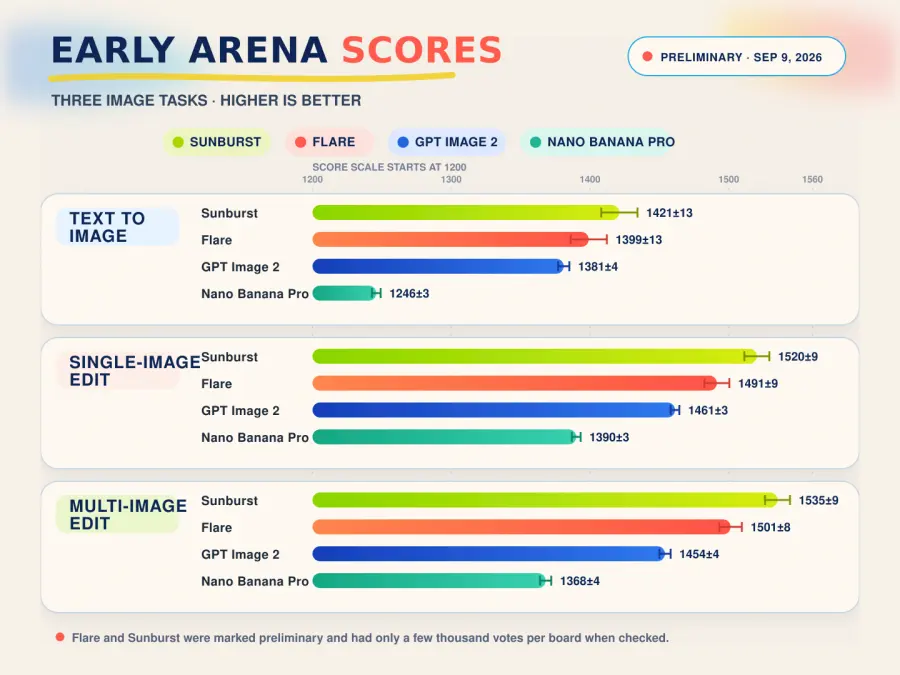
The first independent preference data is encouraging, especially for editing. On the Arena text-to-image leaderboard checked September 9, 2026, Sunburst ranked first at 1421±13 and Flare second at 1399±13. GPT Image 2 scored 1381±4. Sunburst and Flare also occupied the first two positions on Arena's single-image editing and multi-image editing boards.
| Arena task |
Sunburst |
Flare |
GPT Image 2 |
Nano Banana Pro |
| Text to image |
1421±13 |
1399±13 |
1381±4 |
1246±3 |
| Single-image edit |
1520±9 |
1491±9 |
1461±3 |
1390±3 |
| Multi-image edit |
1535±9 |
1501±8 |
1454±4 |
1368±4 |
These are early results, not a settled ranking. Arena marked both Images 2.5 models as preliminary. At the time of checking, the new entries had only a few thousand votes per board, while older models often had tens or hundreds of thousands. The overlapping text-to-image rank spread for Sunburst and Flare also means the board does not yet establish a decisive winner between them.
Real tests reinforce the revision-workflow angle. Axios tested the editor on a pet restyle, tattoo additions, and a logo. Its first logo attempt was underwhelming, but successive direction produced a better design that could then be applied to merchandise. That is more informative than a perfect showcase image: the model's value appears when a usable concept can survive several targeted changes.
Where ChatGPT Images 2.5 Fits
ChatGPT Images 2.5 vs Nano Banana Pro
ChatGPT Images 2.5 and Google's Nano Banana Pro both support high-resolution generation, reference-led work, text rendering, and image editing. The more useful question is which workflow matches the job.
| Need |
Better starting point |
Reason |
| Conversational editing in ChatGPT |
ChatGPT Images 2.5 |
Sketch, comments, templates, and revision history are integrated into the ChatGPT experience |
| Fast API iteration |
GPT-Image-2.5 Flare |
Designed for lower-latency everyday generation |
| Precise local or multi-turn API edits |
GPT-Image-2.5 Sunburst |
Editing precision is its stated priority, with strong early preference scores |
| Search-grounded visuals |
Nano Banana Pro |
Google supports grounding with Google Search |
| Many reference inputs in one composite |
Nano Banana Pro |
Google documents up to 14 standard inputs, six high-fidelity shots, and consistent resemblance for up to five people |
| Predictable published per-image output price |
Nano Banana Pro |
Google lists about $0.134 for a 1K/2K image and $0.24 for 4K; Images 2.5 currently publishes token rates without a 2.5 consumption calculator |
Google positions Nano Banana Pro around 2K/4K output, text accuracy, composition control, multiple references, and optional Search grounding. Its Arena entries also have much larger vote samples than the day-one Images 2.5 results.
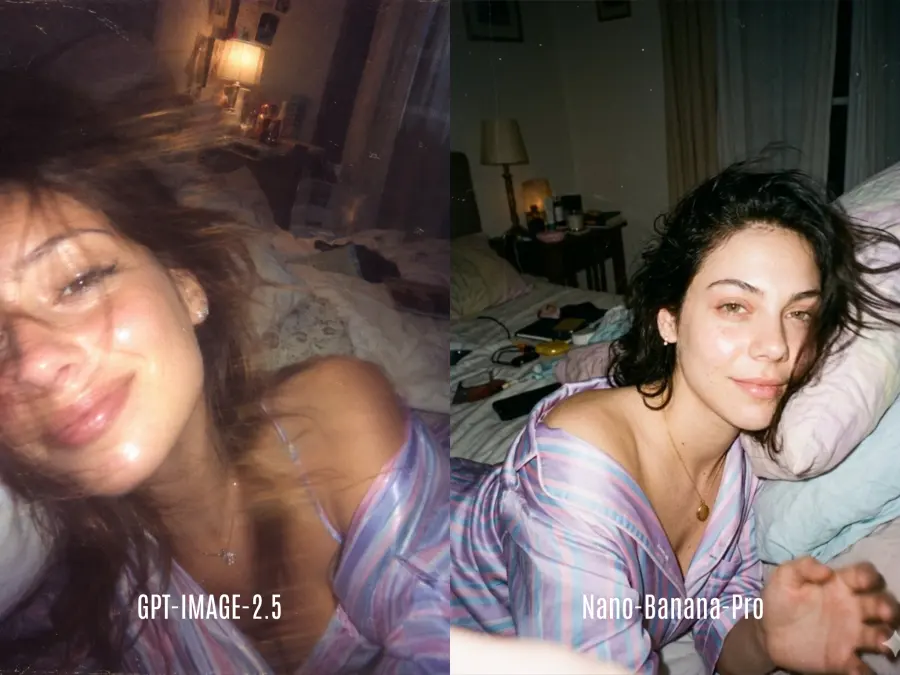
Images 2.5 leads the cited early preference tables, but Nano Banana Pro has clearer reference-count documentation and a grounded-retrieval path. Test both with identical source files, prompts, sizes, and acceptance criteria.
For prompt patterns on the Google side, see the Nano Banana Pro prompt guide.
GPT-Image-2.5 Pricing and API Availability
Flare and Sunburst are available through OpenAI's Images API and the Responses API image-generation tool. As of September 9, 2026, the OpenAI API pricing table lists the same prices for both models:
| Token type |
OpenAI list price / 1M tokens |
GPT Proto price / 1M tokens |
| Text input |
$5.00 |
$4.75 |
| Cached text input |
$1.25 |
$1.1875 |
| Image input |
$8.00 |
$7.60 |
| Cached image input |
$2.00 |
$1.90 |
| Image output |
$30.00 |
$28.50 |
Flare and Sunburst currently use the same published token rates. Flare is faster, but that does not guarantee a lower cost per completed image because output-token consumption varies by request.
There is an important launch-day documentation inconsistency. The individual Flare and Sunburst pages say their token rates match GPT Image 2, while OpenAI's central pricing table currently lists GPT Image 2 at lower rates. The model pages also state that the existing GPT Image 2 calculator does not estimate Images 2.5 token consumption. For budgeting, use the central pricing table as the current billing reference and verify it again before deployment. Do not infer that Flare is cheaper per image simply because it is faster.
Both GPT-Image-2.5 models are now available on GPT Proto. Start with GPT-Image-2.5 Flare when latency, rapid iteration, or generation volume matters. Choose GPT-Image-2.5 Sunburst when final-image detail, subject preservation, or precise multi-round editing matters more than response time.
Both models use the same GPT Proto account, API key, and shared balance. GPT Proto currently charges 5% below OpenAI’s listed token rates, although the final cost of an image still varies with its inputs, dimensions, quality setting, and output-token usage.
The model is most useful when an image must move through several decisions rather than emerge from one prompt.
| Application |
Recommended starting point |
What to evaluate |
| Social posts and thumbnail variants |
Flare |
Turnaround time, text accuracy, brand consistency |
| Product-background replacement |
Flare, then Sunburst if needed |
Edge quality, shadows, unchanged product details |
| Campaign key art |
Sunburst |
Composition, small details, repeatable brand treatment |
| Character or pet transformations |
Either; compare on your references |
Identity preservation across styles and poses |
| Infographics and presentation visuals |
Sunburst |
Layout, factual labels, typography, revision stability |
| Sketch-to-concept work |
ChatGPT Images 2.5 |
Spatial adherence and ease of directed revision |
| High-volume catalog generation |
Flare |
Latency distribution, rejection rate, total token cost |
Test each application with real references and at least two follow-up edits. A strong first generation can still fail if the next edit changes the product, face, typography, or camera angle.
Limitations to Know Before You Switch
Images 2.5 is new, and several claims still need production evidence.
The latency improvement is up to 50%; actual speed depends on model, prompt, inputs, size, and quality setting.
Sunburst intentionally trades response time for quality and precision.
The early Arena scores are preliminary and based on much smaller samples than established models.
OpenAI does not yet provide a reliable Images 2.5 per-image calculator, and its pricing pages currently disagree about the comparison with GPT Image 2.
ChatGPT's Sketch, comments, and templates are interface features, not automatic API components.
More realistic image editing raises misuse risks. OpenAI's Images 2.5 system card discusses prompt and image checks, classifiers, output blocking, and the greater deepfake risk associated with improved realism.
OpenAI says generated images continue to use C2PA metadata and invisible watermarking. These measures help identify provenance but do not remove the need for human review, rights checks, and clear disclosure.
Is ChatGPT Images 2.5 Worth Using?
For ChatGPT users, yes—especially when the current process involves repeated restarts. Sketch, anchored comments, and better edit locality make revision easier.
For API teams, test Flare first when throughput matters and Sunburst first when a bad edit costs more than a longer wait. Existing GPT Image 2 users should compare real prompts and pricing before migrating.
The most credible upgrade is not that every image will look better. It is that more images may remain usable after the second, third, and fourth instruction.