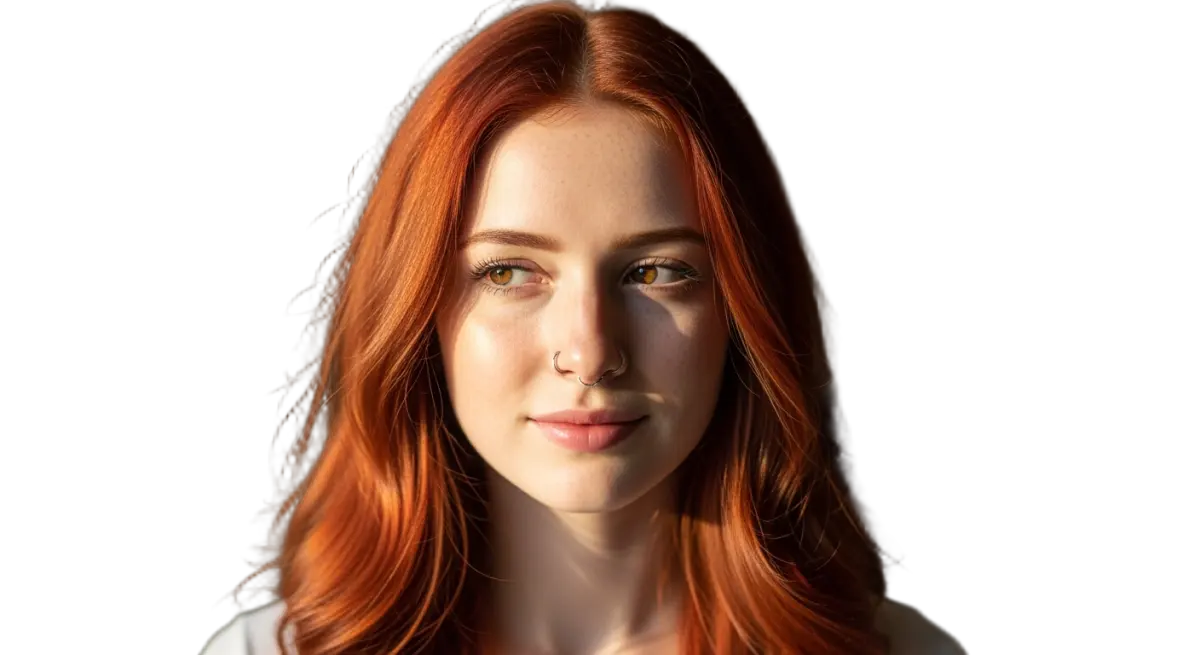
Experience effortless image extraction with the GPTProto ezremove tool. Instantly create clean, transparent PNGs or generate new scenes using advanced AI.
It is an AI-powered feature on GPTProto that instantly clears the backdrop from any image. Just upload your photo, and our ezremove tool automatically detects the subject, delivering a pristine transparent PNG cutout in seconds without manual editing.
Is the ezremove tool free to use online?
Yes, you can use the ezremove AI background remover for standard tasks at no cost. It quickly creates a pristine image cutout without requiring complicated desktop software, making it incredibly accessible for everyday users.
How does ezremove handle complex hair edges?
Our smart ezremove AI is trained on millions of images to detect tricky borders and shiny surfaces. It cleanly separates fine details like human hair or animal fur, ensuring your final cutout looks completely natural and ready to use.
Can I process multiple images at once with ezremove?
Absolutely. GPTProto offers a powerful batch background removal feature within the ezremove suite. You can upload an entire folder of eCommerce product photos and extract them all simultaneously, saving you hours of tedious busywork.
What happens after I use ezremove to clear an image?
You can download your clean cutout immediately, or use our integrated AI Background Generator to drop your subject into a brand new scene, like a cozy cafe, a modern studio, or a vibrant solid color backdrop perfectly suited for ads.
How long does the ezremove process typically take?
It is remarkably fast. For most standard photos, the ezremove background remover completes the extraction and provides your clean, high-quality cutout in under 5 seconds per image, allowing you to maintain a highly efficient workflow.
Does ezremove work well for eCommerce product shots?
Yes! Using ezremove ensures your digital storefront maintains a rigorous visual standard. It accurately clips thin borders, eliminates messy outlines, and provides a polished finish that keeps your product catalogs looking highly professional.
Do I need technical design skills to use the ezremove AI?
Not at all. The entire ezremove workflow is 100% automated. Simply upload your picture, and the AI handles all the heavy lifting. You get professional-grade, transparent image results instantly with absolutely zero manual editing required.
Testimonials
S
Sarah Jenkins
5 / 5
eCommerce Store Owner
As an online seller, the ezremove tool is a lifesaver. It takes my messy photos and gives a flawless cutout in seconds.
M
Marcus Thorne
5 / 5
Social Media Manager
I run ad campaigns and need quick assets. GPTProto's ezremove background remover perfectly clips models seamlessly!
E
Emily Rossi
5 / 5
Product Photographer
The batch background removal feature in the ezremove suite saves me hours. I process 50 jewelry shots perfectly.
D
David Lin
5 / 5
Graphic Designer
Honestly, ezremove is the best AI tool I've tried. The edges never look harsh, and the transparent background is crisp.
C
Chloe Winters
5 / 5
Content Creator
I love using ezremove, then immediately switching to the AI background generator to put my subject on a sandy beach.
R
Ryan Cooper
5 / 5
Freelance Editor
Removing backgrounds manually drove me crazy. Now I just drop files into ezremove and get clean images instantly.
J
Jessica Miller
5 / 5
Marketing Coordinator
Great tool! Occasionally the ezremove ai gets confused by heavy shadows, but a tiny tweak fixes it. Very valuable.
T
Tom Hollander
5 / 5
Art Director
If you need a fast image background remover, use ezremove. The quality of the PNG downloads is perfect for catalogs.
A
Anna Kowalski
5 / 5
Web Designer
The ezremove process is truly automatic. No fiddly lasso tools or zooming in. Just upload and let the AI do its magic!
M
Michael Barnes
5 / 5
Creative Director
Our team switched to the ezremove tool on GPTProto. It handles our complex ad creatives flawlessly and saves time.