ByteDance released Seedream 5.0 Pro on July 8, 2026. The company positions it around dense visual layouts, spatially controlled editing, photographic texture, and native multilingual generation. The official launch post also acknowledges that fine text rendering and pixel-level editing consistency can still improve, so every production image still needs review.
You can run the model through the dedicated Seedream 5.0 Pro API page on GPT Proto.
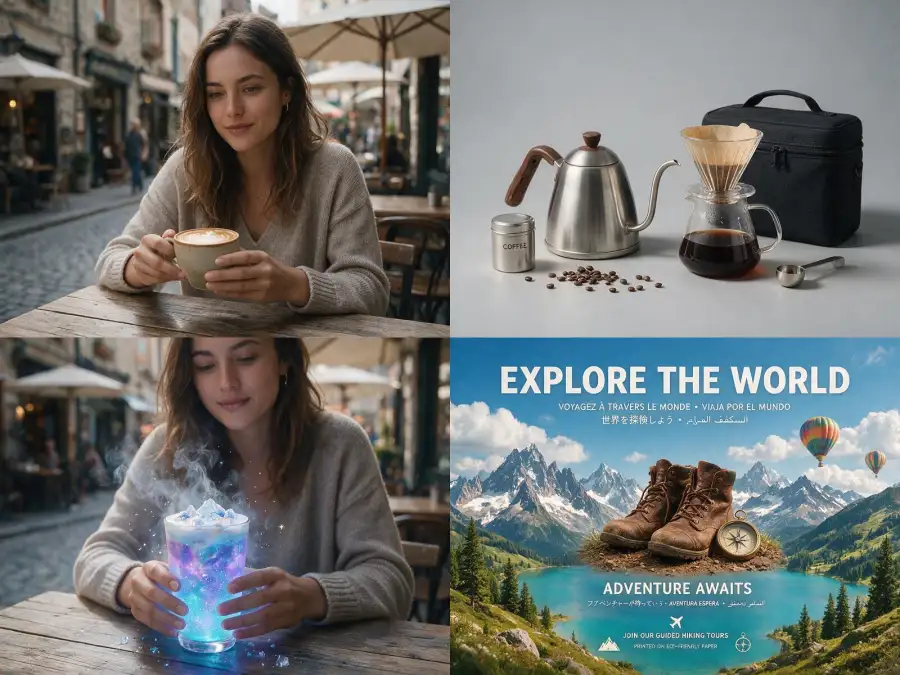
The Seedream 5.0 Pro prompt formula
For a new image, build the prompt in this order:
[asset type] + [main subject] + [environment] + [composition]
+ [camera and lighting] + [materials and textures]
+ [on-image text] + [constraints]
Each part removes a decision the model would otherwise make for you.
- Asset type: portrait, product photograph, poster, infographic, UI mockup, or cinematic still.
- Main subject: visible age, clothing, shape, color, condition, and action.
- Environment: a specific physical place, not a mood word.
- Composition: framing, camera height, subject position, negative space, and aspect ratio.
- Camera and lighting: lens behavior, depth of field, light direction, softness, color temperature, and shadow behavior.
- Materials and textures: skin, glass, metal, wood, fabric, food, or packaging finish.
- On-image text: the exact copy in quotation marks, its language, position, and hierarchy.
- Constraints: one or two important exclusions or details that must remain unchanged.
Do not treat this as a requirement to write the longest possible prompt. Seedream 5.0 Pro can interpret complex briefs, but conflicting instructions still compete with each other. Add detail that removes ambiguity; delete decorative wording that changes nothing.
Here is the same SaaS campaign idea at three levels.
Weak
A professional SaaS hero image, futuristic and beautiful.
Better
A dark SaaS landing-page hero for an automation product. A workflow diagram
floats on the right, with headline space on the left. Navy background, cyan
accents, soft glass panels, clean enterprise design.
API-ready
16:9 landing-page hero for a workflow automation SaaS. Reserve the left 42%
as clean negative space for a headline and CTA. On the right, show a structured
node-based workflow with six translucent glass panels connected by thin cyan
lines. Deep matte navy background, subtle grid, restrained cyan and pale-lime
accents. Soft top-left key light, low reflections, crisp panel edges. No logos,
no decorative text, no people.
The third prompt is better because the layout can be checked. “Futuristic” cannot be measured; a left-side text area occupying roughly 42% of the frame can.

Generation prompts and editing prompts need different structures
Text-to-image generation starts with an empty frame, so the prompt must define the frame. Image editing starts with visual information already in place, so restating the entire scene can encourage unnecessary changes.
| Mode |
What the prompt should control |
Starting structure |
| Text to image |
The complete target frame |
Subject + scene + composition + light + materials |
| Image editing |
A bounded change to an existing image |
Target + change + protected details + integration |
| Multi-reference editing |
The job assigned to each input |
Image roles + final composition + protected details |
Use this generation template:
Create [asset type] featuring [subject] in [environment].
Arrange [composition]. Use [camera and lighting].
Render [materials and textures]. Include [exact text if needed].
Avoid [one or two specific unwanted elements].
Use this editing template:
Change [specific target] to [new state].
Keep [identity, pose, product geometry, composition, background, or lighting]
unchanged. Match the edited area to the existing [light, perspective, texture,
grain, and depth of field].
Use this multi-reference template:
Use Image 1 for [subject identity]. Use Image 2 for [outfit, product, or material].
Use Image 3 for [environment, pose, or lighting]. Create [final composition].
Preserve [critical identity and design details].
One boundary matters for API users. ByteDance's official Seedream 5.0 Pro showcase demonstrates point selection, boxes, sketches, color references, and layer separation. GPT Proto's current model endpoint exposes prompt, size, output controls, and images for the image-edit task. It does not currently expose separate lasso, bounding-box, or layer-export parameters. Do not design an integration around interface controls that are not present in the API request.
Seedream 5.0 Pro prompts for realistic photos
Adding “photorealistic, 8K” does not define realistic light, skin, reflections, or camera behavior. A better prompt describes the physical reasons a photograph looks real.
1. Natural editorial portrait
Editorial environmental portrait of a woman in her early 40s standing beside
the window of a small ceramics studio. Shoulder-length black hair with a few
loose strands, minimal makeup, visible pores and fine expression lines. She
wears a faded indigo work jacket with clay dust on the cuffs. Medium shot at
eye level, subject placed slightly right of center. Soft overcast window light
from camera left, gentle shadow on the right side of the face, muted earth-tone
grade, shallow but believable depth of field. Natural skin texture, no beauty
retouching, no glossy skin.
The prompt identifies where the light comes from and what it should reveal. “Visible pores” is more useful than “high quality skin.”
2. Casual smartphone photograph
Casual smartphone photo of two friends sharing noodles at a crowded late-night
street stall. One person is mid-laugh and the other is reaching for a bowl.
Slightly imperfect off-center framing, eye-level handheld camera, mild motion
blur in the reaching hand, mixed warm stall light and cool light from nearby
shop signs. Background diners remain recognizable but softly out of focus.
Natural exposure, moderate phone-camera sharpening, realistic fabric wrinkles,
no studio lighting, no posed expressions.
Real snapshots contain small imperfections. Perfect symmetry, perfect skin, and perfectly even light often make an image feel less photographic.
3. Commercial product photograph
Square e-commerce hero photograph of a 250 ml amber glass hand-soap bottle on
a honed limestone slab. Preserve a straight cylindrical bottle shape and crisp
vertical label edges. The label reads "FIELD SOAP" in small black uppercase
English text. Three-quarter camera angle at bottle height, 70 mm product-photo
perspective. Large diffused key light from upper left, narrow white reflection
along the left edge of the glass, soft contact shadow falling back-right.
Visible liquid line, fine stone grain, restrained beige and amber palette.
No flowers, no floating objects, no extra text.
4. Interior and architecture photograph
Wide interior photograph of a compact Japanese reading room with pale oak
shelving, lime-plaster walls, a low linen chair, and one paper pendant lamp.
Camera at seated eye height in the doorway, straight vertical architectural
lines, 24 mm lens with controlled edge distortion. Late-afternoon daylight
enters from a window on the right and mixes naturally with the warm pendant
light. Preserve realistic scale, soft wall texture, subtle reflections on the
wood floor, and detail outside the window. No people, no oversized furniture,
no extreme HDR.
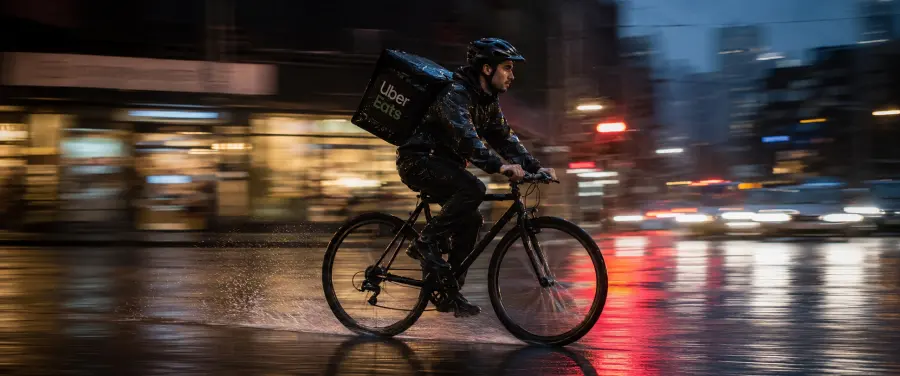
5. Cinematic panning still
2.39:1 cinematic panning photograph of a bicycle courier crossing a wet city
intersection at blue hour. The rider's face, torso, and bicycle frame remain
sharp while the storefronts stretch into horizontal motion blur and the wheel
spokes show rotational blur. Camera moves laterally at the rider's speed.
Cool ambient sky light, warm traffic-signal reflections across the asphalt,
light rain, realistic spray behind the rear tire. Low camera angle, restrained
contrast, no frozen background, no artificial speed lines.
This last example follows a photographic behavior ByteDance demonstrates in its launch material: the subject can stay sharp while the background and wheels show different kinds of motion blur. Treat that as a vendor-demonstrated capability, not a guarantee that every generation will reproduce the effect perfectly.
Seedream 5.0 Pro prompts for editing photos
For an edit, start by naming the target. Then define the change, the protected details, and how the new pixels should fit the old ones.
6. Replace a background without changing the person
Replace only the office background with a quiet railway platform on an
overcast morning. Keep the person's face, facial proportions, expression,
hairstyle, body shape, pose, hands, clothing, and camera crop unchanged.
Match the new background to the existing soft light on the subject. Add a
subtle contact shadow at the feet and use realistic platform perspective.
Do not change the subject's identity or apply skin retouching.
7. Recolor a product
Change the body of the center coffee machine from glossy red to matte charcoal
black. Keep its dimensions, buttons, chrome parts, logo, camera angle, counter,
background, and composition unchanged. Preserve the original highlight and
shadow positions, but reduce their intensity to match a matte finish. Do not
alter the power cord or the objects around the machine.
8. Replace a material
Replace the white plastic shell of the desk lamp with pale ash wood showing a
fine straight grain and matte oil finish. Keep the lamp's silhouette, joints,
shade thickness, cable, position, and warm light unchanged. Make the grain
follow the geometry of each part. Preserve the existing perspective, contact
shadow, background, and depth of field.
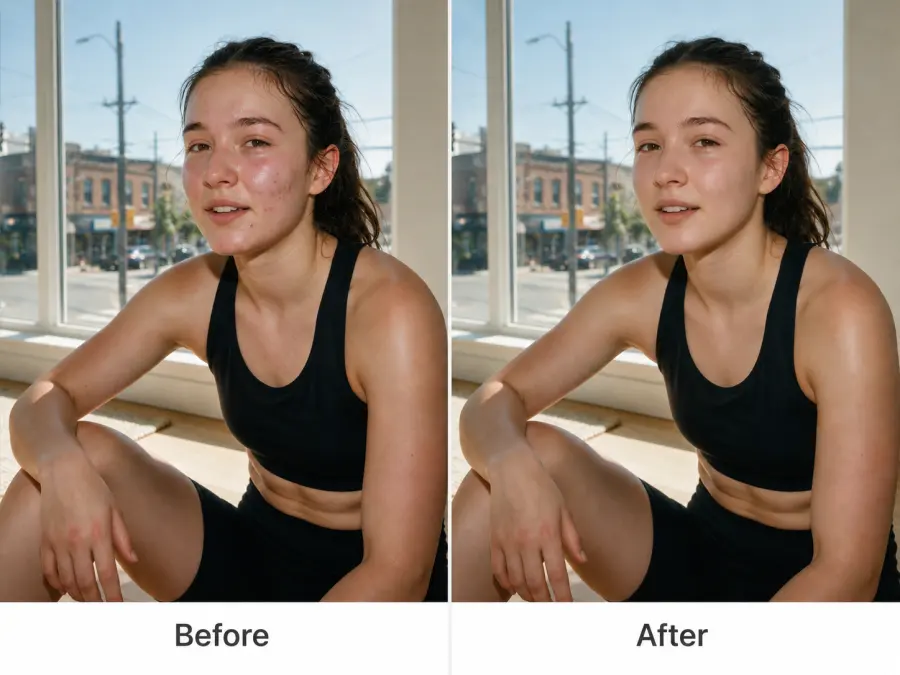
9. Retouch a face without identity drift
Remove the two temporary blemishes on the subject's right cheek and reduce the
shine on the forehead. Keep the exact facial structure, eye shape, nose, lips,
jawline, expression, skin tone, freckles, pores, fine lines, hair, and makeup
unchanged. Maintain the existing side light and camera grain. Do not smooth the
entire face, reshape features, whiten teeth, or change apparent age.
10. Replace clothing while preserving pose and face
Replace the subject's grey hoodie with a structured dark-navy wool blazer over
a plain white crew-neck shirt. Keep the face, identity, hairstyle, expression,
body proportions, shoulder position, arm position, hands, camera crop, and
background unchanged. Make the blazer follow the existing pose with natural
folds and match the original window light and shadow direction.
11. Relight without changing the composition
Change the lighting from flat midday light to soft late-afternoon light coming
from the upper right. Add a warm edge light to the subject and a long, soft
shadow falling left. Keep every person, object, facial feature, color, camera
position, crop, background element, and depth of field unchanged. Preserve
realistic material reflections and avoid orange skin tones.
12. Remove an object and rebuild the background
Remove the red suitcase beside the bench. Reconstruct the hidden pavement,
bench leg, and wall behind it using the surrounding textures and perspective.
Keep the person, bench, shadows, wall marks, camera grain, color grade, and
composition unchanged. Do not add a replacement object or blur the repaired
area.
Five more Seedream 5.0 Pro prompt examples to copy
The next five prompts move beyond ordinary photography. They use areas ByteDance emphasizes for Seedream 5.0 Pro: information-dense layouts, localized text, spatial composition, and multiple visual references.
13. Multilingual campaign poster
Vertical 4:5 poster for a neighborhood summer night market. Deep indigo sky,
warm paper lanterns, small food stalls along the lower third, and clean negative
space at the top. Main English headline reading "NIGHT MARKET" in bold cream
letters at top center. Japanese subheading reading "夏の夜市" directly below
in a smaller red type block. Date text reading "18–20 JULY" at bottom left.
Clear visual hierarchy, screen-printed poster texture, accurate Japanese
characters, no additional copy, no logos.
14. High-density educational infographic
Vertical 9:16 educational infographic titled "HOW A HEAT PUMP MOVES HEAT".
Warm ivory background with sage-green and dark-charcoal accents. Show four
numbered stages from top to bottom: outdoor heat collection, refrigerant
compression, indoor heat release, and expansion. Connect stages with clear
arrows. Add a small comparison bar chart at bottom right labeled "HEAT OUTPUT
PER UNIT OF ELECTRICITY" with values 1 and 3.5. Use concise English labels,
generous spacing, consistent icon style, and a clearly separated source-note
area at the bottom. No decorative photography.
Verify every generated label and number before publishing an infographic. The model may arrange dense information well and still make a small transcription error.
15. E-commerce landing-page hero
16:9 e-commerce homepage hero for a compact countertop coffee grinder. Product
stands on the right on a warm grey stone surface, three-quarter view, matte
black aluminum body with a clear glass hopper. Reserve the left 45% as clean
space. Headline reading "GRIND WITH INTENT" at upper left, one line only.
Smaller text reading "40 precise settings" below. Soft directional studio light
from upper left, controlled metal reflections, muted charcoal and sand palette,
premium editorial layout, no coffee beans floating in the air, no extra text.
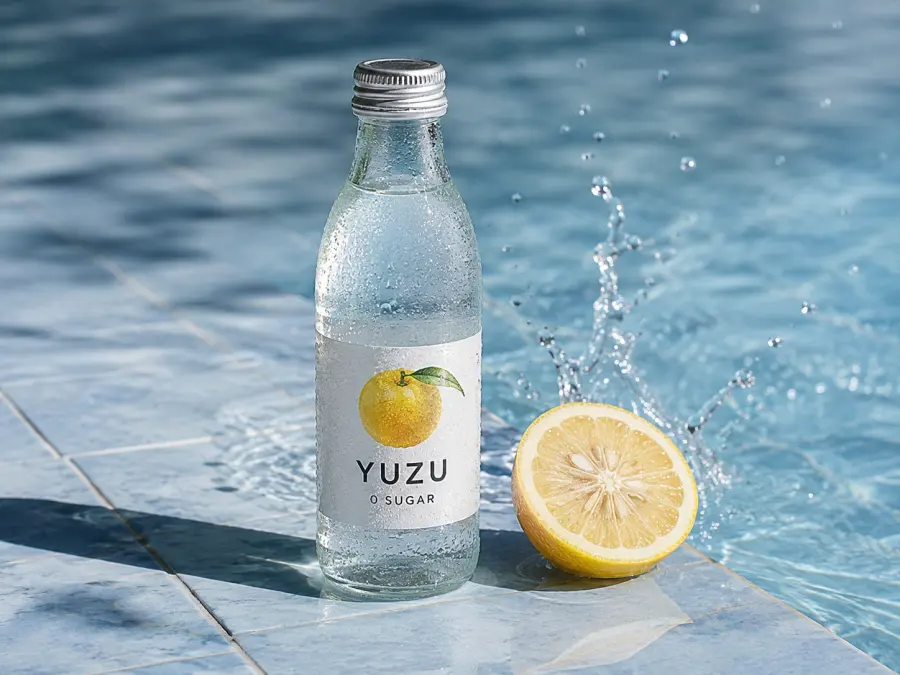
16. Editorial food advertisement
Vertical 4:5 editorial food advertisement for sparkling yuzu water. A cold
clear-glass bottle stands on pale blue tile with visible condensation and an
accurate paper label reading "YUZU / 0 SUGAR". One sliced yuzu rests beside the
bottle; a small splash rises behind it, physically connected to a shallow pool
of water. Hard morning light from upper right creates crisp shadows to the
left. Macro surface detail, realistic glass refraction, restrained yellow and
blue palette, no floating fruit, no extra copy.
17. Multi-reference campaign image
Use Image 1 only for the model's facial identity and hairstyle. Use Image 2
only for the rust-colored technical jacket and its pocket details. Use Image 3
for the rocky coastal environment and overcast lighting. Create a waist-up
outdoor campaign photograph with the subject facing slightly left of camera.
Preserve the face from Image 1 and the jacket construction from Image 2 without
blending their colors or shapes. Match the subject to the cool soft light and
wind direction in Image 3. Natural skin texture, realistic fabric folds, no
logos, no text.
These are copy-ready starting points, not verified “best prompts on X.” A public social post rarely includes every reference image, size setting, failed attempt, and edit pass that produced the final result.
Explore More Seedream 5.0 Pro Prompt Ideas
The 17 templates above are designed to help you understand how Seedream 5.0 Pro prompts are structured. If you prefer to begin with a finished visual, explore our Seedream 5.0 Pro prompt collection for more trending ideas and generated examples.
Open any image to view its original prompt, then adapt the subject, visual style, lighting, colors, camera angle, or composition for your own project. You can copy the prompt, customize it, or use it with Seedream 5.0 Pro to generate a similar image without rebuilding the instructions from scratch.
How to use these prompts with the Seedream 5.0 Pro API
GPT Proto serves the international BytePlus model ID dola-seedream-5-0-pro-260628. BytePlus documents the 5.0 family in its Seedream 4.0–5.0 tutorial; GPT Proto exposes this model through its own /api/v3/ surface.
The current request fields are straightforward:
| Field |
Used by |
Purpose |
prompt |
Both tasks |
Generation or edit instruction |
size |
Both tasks |
Output width and height |
images |
Image edit |
Publicly accessible source/reference image URLs |
enable_base64_output |
Both tasks |
Return Base64 instead of an image URL |
enable_sync_mode |
Both tasks |
Wait for the generated result in the same response |
The live model page currently lists $0.0405 for a 1K image and $0.081 for a 2K image. The image-edit task accepts up to 10 references; the first is included in the base generation price and each additional reference adds $0.0027.
Generate an image with cURL
Set enable_sync_mode to true for the simplest first call. The /api/v3/ surface uses the raw API key in the Authorization header—do not prepend Bearer.
curl --location \
  'https://gptproto.com/api/v3/doubao/dola-seedream-5-0-pro-260628/text-to-image' \
  --header "Authorization: $GPTPROTO_API_KEY" \
  --header 'Content-Type: application/json' \
  --data '{
    "prompt": "Square e-commerce hero photograph of a 250 ml amber glass hand-soap bottle on a honed limestone slab. Straight cylindrical bottle, crisp vertical label reading FIELD SOAP in black uppercase English text. Three-quarter view at bottle height, large diffused key light from upper left, narrow reflection along the glass, soft contact shadow falling back-right. Visible liquid line, fine stone grain, restrained beige and amber palette. No flowers, no extra text.",
    "size": "1024x1024",
    "enable_base64_output": false,
    "enable_sync_mode": true
  }'
Generate an image with Python
This version prints the complete JSON response and then reports any URL or Base64 output returned in the common data.outputs or outputs locations. Printing the full response on the first call is useful because it gives you the exact response shape deployed for your account.
import json
import os
import requests

API_KEY = os.environ["GPTPROTO_API_KEY"]
URL = (
    "https://gptproto.com/api/v3/doubao/"
    "dola-seedream-5-0-pro-260628/text-to-image"
)

prompt = """Square e-commerce hero photograph of a 250 ml amber glass
hand-soap bottle on a honed limestone slab. Straight cylindrical bottle,
crisp vertical label reading 'FIELD SOAP' in black uppercase English text.
Three-quarter view at bottle height, large diffused key light from upper left,
narrow reflection along the glass, soft contact shadow falling back-right.
Visible liquid line, fine stone grain, restrained beige and amber palette.
No flowers, no extra text."""

response = requests.post(
    URL,
    headers={
        "Authorization": API_KEY,
        "Content-Type": "application/json",
    },
    json={
        "prompt": prompt,
        "size": "1024x1024",
        "enable_base64_output": False,
        "enable_sync_mode": True,
    },
    timeout=300,
)
response.raise_for_status()
payload = response.json()
print(json.dumps(payload, indent=2))

data = payload.get("data", payload)
outputs = data.get("outputs") or payload.get("outputs") or []

if outputs:
    print("Generated output:", outputs[0])
else:
    print("No outputs array found; inspect the JSON above for the returned field.")
Install the only dependency with pip install requests, export your key as GPTPROTO_API_KEY, and run the script.
Edit an image with references
The image-edit task changes the final path and adds an images array. Each URL must be publicly reachable by the API.
import json
import os
import requests

API_KEY = os.environ["GPTPROTO_API_KEY"]
URL = (
    "https://gptproto.com/api/v3/doubao/"
    "dola-seedream-5-0-pro-260628/image-edit"
)

response = requests.post(
    URL,
    headers={
        "Authorization": API_KEY,
        "Content-Type": "application/json",
    },
    json={
        "images": ["https://your-cdn.example.com/source-portrait.jpg"],
        "prompt": (
            "Replace only the office background with a quiet railway platform "
            "on an overcast morning. Keep the person's face, expression, "
            "hairstyle, pose, hands, clothing, and camera crop unchanged. "
            "Match the new background to the existing soft light."
        ),
        "size": "1024x1024",
        "enable_base64_output": False,
        "enable_sync_mode": True,
    },
    timeout=300,
)
response.raise_for_status()
print(json.dumps(response.json(), indent=2))
For background jobs, set enable_sync_mode to false. The request then returns a prediction identifier, and the client must poll /api/v3/predictions/{result_id}/result. Before publishing a polling implementation, run one live request and lock the exact identifier, status, output, and error fields returned by the current endpoint.
[IMAGE PLACEHOLDER 7] GPT Proto playground or response screenshot showing the prompt, size, successful response, and generated image.
Suggested alt text: Calling the Seedream 5.0 Pro API through GPT Proto with a structured image prompt.
You can browse other image models without creating a separate key or vendor balance for each one.
Common Seedream 5.0 Pro prompt problems
| Problem |
Likely prompt issue |
What to change |
| The face changes during an edit |
Identity was not protected |
Lock facial structure, expression, apparent age, and skin details |
| Skin looks like plastic |
The prompt asks for generic perfection |
Request pores, fine lines, restrained shine, and natural texture |
| The background also changes |
The edit scope is broad |
Name the target and list the background/composition as protected |
| Product shape changes |
Geometry is undefined |
Preserve silhouette, dimensions, label edges, and camera angle |
| The image still looks like CG |
Only quality adjectives were added |
Define physical light, material response, depth of field, and camera behavior |
| Text is wrong |
Copy or hierarchy is too dense |
Shorten the copy; state exact wording, language, position, and priority |
| References blend together |
Inputs have no assigned roles |
Give each reference one job and state what must not be averaged |
| The API returns a task but no image |
The request is asynchronous |
Poll the prediction endpoint, or use enable_sync_mode: true for the first test |
If a prompt fails, change one category at a time. First fix composition, then identity, then light, then surface detail. Rewriting every part after each result makes it difficult to learn which instruction caused the improvement.
Seedream 5.0 Pro prompt checklist
Before sending a generation prompt, check:
- Is the asset type clear?
- Is the subject visually specific?
- Does the prompt define composition and negative space?
- Does it name the light source, direction, and shadow behavior?
- Are the important materials and textures described?
- Is on-image text quoted and assigned a language and position?
- Are exclusions limited to the details that matter?
Before sending an edit prompt, also check:
- Is the edit target unambiguous?
- Does the prompt distinguish the change from the protected details?
- Are identity, geometry, pose, composition, and light locked where necessary?
- Does the new area need to match existing perspective, grain, reflections, or depth of field?
- Does every reference image have one explicit role?
The takeaway
Do not prompt an edit as if the model were drawing a new image. Generation prompts need the full frame; editing prompts need a bounded target, a specific change, and a list of protected details. For realism, replace quality adjectives with physical light, material behavior, camera position, and natural texture.
The fastest way to validate the formulas is to run one prompt in the Seedream 5.0 Pro playground, keep the size and source images fixed, and revise one prompt category per attempt. The same GPT Proto key can then be used to compare other image models or access the broader GPT Proto API platform.