Emochi AI online

Preview image

Emochi AI Character Profile Generator

Turn a text prompt or reference image into a profile-ready character portrait with GPT Image 2. Create anime, fantasy, romantic, or realistic original characters online from approximately $0.015 per image.

Create a Profile-Ready Emochi Companion

Define the face, hairstyle, outfit, expression, and setting of an original companion character. Generate a focused portrait that can serve as the visual starting point for an Emochi profile or other roleplay character page.

ultra handsome man, pitch black hair, piercing deep blue eyes, sharp jawline, lean muscular build, wearing a perfectly tailored black suit and black tie, mafia boss aura, CEO presence, sitting in a dark luxury office, low lighting, cinematic shadows, city skyline at night behind him, intense gaze, confident posture, expensive watch, glass of whiskey on desk, photorealistic, hyper-detailed skin, 8k, dramatic lighting, moody atmosphere, depth of field --stylize 400 --niji 7

Prompt
Create a Profile-Ready Emochi Companion
After

Generate an Anime or Fantasy OC

Build an original character around a role, world, and visual style. Combine distinctive facial features, clothing, props, and environmental details to make the character feel connected to a larger story.

Anime thick painting style, semi-thick painting realistic style, bird's-eye view (high angle overhead perspective), facial close-up, (((half-body shot))), 25-year-old nightclub owner, handsome with a rebellious and unruly expression, cold fair skin, natural side lighting, matte lip color, (((V-shaped face))), long narrow upward-slanting silver-gray eyes, small mole at the outer corner of the eye, high straight nose bridge, full lips with naturally upturned corners, deep black wolf-cut long hair with luxurious peacock-style side-parted chopped bangs, wearing an opulent black velvet suit with gold embroidery, layered over a dark silk patterned shirt, multiple thick chain necklaces stacked. One hand handing a black credit card to the camera, the other hand in pocket. Background: lavish nightclub interior, crystal chandeliers, velvet sofas, golden decorations, neon ambient lighting, exquisite realistic thick painting style, anime thick painting style, upscale street-cool atmosphere, Korean thick painting, strong line sense, advanced cinematic lens feel, delicate light and shadow, half-body portrait. --no look up, look up --ar 9:16 --stylize 750 --niji 7

Prompt
Generate an Anime or Fantasy OC
After

Design a Fantasy AI Boyfriend Profile Image

Use expression, pose, clothing, color, and atmosphere to communicate a character's visual personality. This works well for an AI boyfriend concept, romantic fantasy lead, visual novel character, or roleplay companion image.

中国古风风格,半厚涂风格,电影级柔和光影,电影美学画面风格与元素,大师级构图,画面美学,8K高清,oc细腻渲染,面部细腻渲染,半油画,丙烯颜料,皮肤细腻渲染,发丝细腻渲染,精美插画,古风写意,丰富细节,颗粒感,朦胧感,笔触线条清晰自然,颗粒感,明暗对比,超高清,高级感,最高画质。高质量,细腻肌理,皮肤纹理细腻,bjd,obj,蔡徐坤,写实,非真人艺术构图。 一个男人,男人boy,红色头发,头发长,发丝飘逸,发丝根根分明,精致发型,五官精致美人,男生女相,五官深邃,高挺漂亮的鼻梁,嘴唇性感,珠光感,整体气质慵懒,性感邪魅,美艳动人,浓妆,身穿红色薄纱中国古装,低领,赤裸脚踝,皮肤白皙有光泽,裸脚踝,冷白皮,手指指节分明,手指修长漂亮。寝殿,室内背景,红纱飘逸,星光,人物看着镜头,画面构图冲击感,柔和暗色调,微烛光,脖子有布条

Prompt
Design a Fantasy AI Boyfriend Profile Image
After

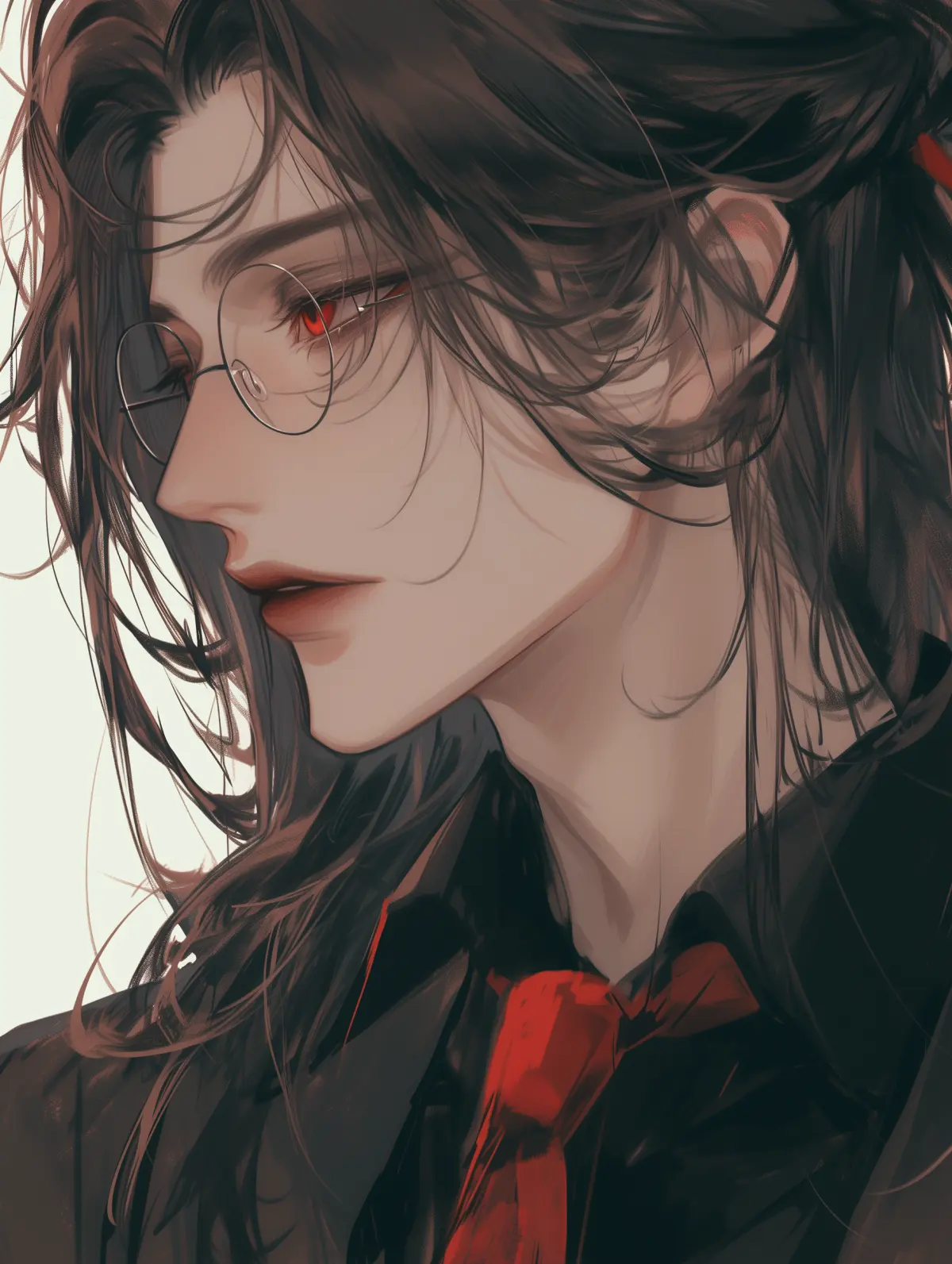
Create a Clean Emochi Profile Avatar

Generate a simple upper-body portrait with a readable expression and uncluttered background. The profile-focused framing makes the result easy to crop for character cards, avatars, OC directories, and chat profiles.

1boy, long dark brown hair, half-up hairstyle, red eyes, sharp gaze, long eyelashes, wearing glasses, black dress shirt, red necktie, formal suit, elegant expression, profile photo style, upper body shot, high detail, clean white background, soft studio lighting --no accessories --profile 3wqk89a --niji 6

Prompt
Create a Clean Emochi Profile Avatar
After

What Is an Emochi Character Profile Generator?

An Emochi character profile generator helps you create the visual identity of an original character before you build the rest of the profile. You can describe the character's appearance, role, outfit, expression, and world, then generate a portrait that represents those choices.

GPTProto generates the character image with GPT Image 2. It does not create an Emochi chatbot, conversation memory, personality system, or evolving storyline. After downloading the image, you can separately add a name, personality, backstory, relationship dynamic, welcome message, and scenario on a platform that supports custom character profiles.

Text to Character or Image to Character: Choose How You Start

Text to Character: Start from a written idea. Describe the character's age range, facial features, hairstyle, clothing, role, expression, art style, setting, lighting, and profile framing. GPT Image 2 turns those details into a new character portrait.

Image to Character: Upload a sketch, avatar, or reference image you have the right to use, then describe what should change. You can adjust the hairstyle, outfit, color palette, art style, background, mood, or framing while asking the model to preserve important visual traits.

What Makes a Strong OC Profile Image?

A useful OC profile image does more than show an attractive face. It gives viewers immediate clues about who the character is, what kind of world they belong to, and how they may behave.

  • A Recognizable Character Identity

Choose two or three defining traits that remain easy to recognize, such as a specific hairstyle, eye color, scar, accessory, silhouette, or color combination. Too many unrelated details can weaken the design.

  • Personality Shown Through Visual Cues

An image cannot create a working personality, but it can suggest one. A guarded expression, formal posture, worn jacket, bright accessories, or restrained palette can communicate different character archetypes without adding text.

  • Role and World-Building Details

Use clothing, props, architecture, and lighting to show the character's role and setting. A black credit card and luxury office suggest a wealthy executive; embroidered clothing and candlelight suggest a historical fantasy world.

  • Profile-Ready Framing

For an avatar or character card, keep the face readable and avoid placing essential details at the outer edges. A centered head-and-shoulders or half-body composition is easier to crop across different profile layouts.

How to Create an Emochi Character Profile Image

Create an original character image in three steps. No manual illustration or photo-editing workflow is required.

1. Create an Account and Add Balance

Sign up for GPTProto and add credit to your account. The current Emochi character image workflow uses GPT Image 2 and costs approximately $0.015 per generation.

2. Enter a Prompt or Upload a Reference

Describe the character from scratch, paste one of the prompt starters above, or upload a reference image you own or have permission to use. State both the details you want to change and the traits you want the model to preserve.

3. Generate, Refine, and Download

Generate the image, review the face, hands, clothing edges, accessories, and background, then adjust the prompt if needed. Download the selected portrait and use it wherever custom character images are permitted.

Turn Your Image Into a Full Emochi Character Profile

The generated portrait is the visual layer of the profile. To turn it into a complete roleplay character, define the writing layer separately:

  • Character name: A memorable name that fits the setting.

  • Short introduction: One or two sentences explaining who the character is.

  • Personality and flaws: Core traits, emotional habits, boundaries, and weaknesses.

  • Backstory: The events that shaped the character before the roleplay begins.

  • Relationship dynamic: How the character knows or approaches the user.

  • Welcome message: The first line or scene that starts the interaction.

  • Scenario: The location, conflict, or shared situation that gives the conversation direction.

Copyable character profile template:

Name:
Role:
Short introduction:
Core personality traits:
Flaws or internal conflict:
Backstory:
Relationship with the user:
Speaking style:
Welcome message:
Opening scenario:

How to Use AI OC Profile Generator in 3 Steps

Just use our AI OC Profile Generator online tool in 3 simple steps — upload a clear portrait, apply a preset age prompt, and your transformed photo is ready to compare and download in seconds.

1Sign in

Create a GPTProto account or sign in with Google, then top up your balance. Your credits work across every tool on the platform.

2Upload your photo and apply the preset

Drop a clear, front-facing portrait into the image slot and load the configured age prompt for the look you want — AI Character Profile

3Generate

Click Generate, and your age-transformed photo is ready in seconds to compare and download.

Frequently Asked Questions

What is an Emochi AI character profile generator?

It is a tool for creating the visual identity of an original character. On GPTProto, you enter a text prompt or upload a reference image and use GPT Image 2 to generate a profile-ready character portrait.

Does this tool create a full character bio or only a profile image?

It generates the profile image only. It does not create a working chatbot, personality system, conversation memory, or complete written bio. You can use the template above to prepare those profile details separately.

Is this an official Emochi tool?

No. GPTProto is an independent AI image generation platform and is not affiliated with, endorsed by, or sponsored by Emochi or FlowGPT.

Can I upload a reference image for my OC?

Yes. You can upload a sketch, avatar, or other image you have the right to use, then explain which traits should stay consistent and which details should change.

Can I generate both anime and realistic characters?

Yes. Your prompt can request anime, semi-realistic illustration, historical fantasy, cinematic realism, or another visual direction. Include the preferred style near the beginning of the prompt.

What should I include in an original character prompt?

Start with the character's role and age range, then add defining facial features, hairstyle, clothing, expression, pose, setting, lighting, art style, and framing. Focus on the details that make the character easy to recognize.

Can I use the generated image as an Emochi character avatar?

You can download the result and upload it to a platform that permits custom character images. Check the destination platform's current image-size, content, and ownership requirements before publishing.

How much does it cost to generate an image?

The current GPTProto workflow costs approximately $0.015 per image with GPT Image 2. Check the amount displayed in the generator before submitting, as selected settings may affect the final charge.

Can I create an AI boyfriend or AI girlfriend character image?

Yes. You can describe the appearance, expression, outfit, setting, and visual archetype of an adult romantic companion character. This page generates the character's image; it does not provide companion chat.

Can I use the generated character image commercially?

Commercial use depends on the current GPTProto terms, the destination platform's rules, and your rights to any uploaded material. Review the applicable terms before commercial use, and do not imitate protected characters, celebrities, or images you do not have permission to use.

Ready to Use These AI Models in Your Workflow?