What You Need Before Making an AI Factory Video
Start with a specific product. “A food factory” leaves the model free to invent a production line; “a factory making rectangular dark-chocolate bars from cocoa beans” gives it a sequence to follow. Lock the bar's shape, the wrapper, one employee's appearance, and the look of the facility before drafting individual shots.
For this example, the fictional company's chocolate bar has six rows of four rectangular pieces. Its packaging is matte cocoa-brown paper with one narrow copper stripe. Our recurring employee is a woman in her late twenties with dark hair, a cream work coat, and dark olive trousers. She puts on an appropriate hair covering before entering the food-production area. Keep her face and clothing stable across the film, but let the exterior arrival shot show her before she changes into production clothing. The factory uses clean stainless-steel equipment and warm daylight rather than an empty science-fiction set.
The manufacturing sequence needs its own fact-check. Cocoa beans are fermented and dried before they reach the factory. A plausible factory sequence then includes inspection or cleaning, roasting, cracking and separating the shells, grinding the nibs, mixing and refining, conching, tempering, molding, cooling, inspection, and packaging. Exact equipment and order can vary by manufacturer. We will show selected moments from that sequence, not claim that ten seconds explains every step. The International Cocoa Organization's processing overview and Meiji's factory process guide are useful checks when you adapt the shots.
For a real food business, ask someone who knows the line to review the depicted equipment, worker clothing, and product handling. A convincing camera angle cannot repair an incorrect manufacturing claim.
Step 1: Plan a 9-Shot Chocolate Factory Storyboard
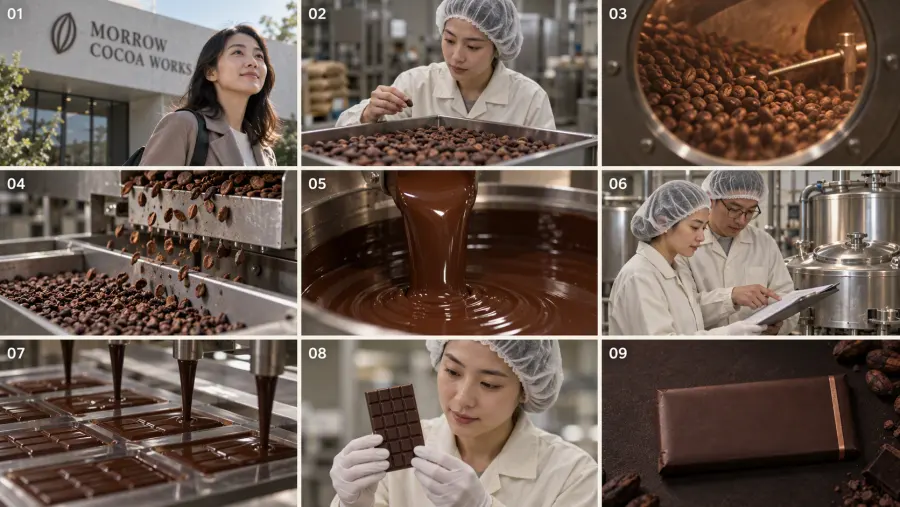
The film follows one simple path: person → ingredient → process → inspection → finished bar. Use a horizontal 16:9 storyboard sheet divided into three rows and three columns. Give each cell a small shot number for planning. Those numbers and grid lines belong on the storyboard only; the final video should use full-screen shots.
| Shot |
Time in a 10-second edit |
What the viewer should see |
| 01 |
0.0–0.9s |
Morning exterior; the employee approaches the factory entrance. |
| 02 |
0.9–1.8s |
In production clothing, she checks a tray of received cocoa beans. |
| 03 |
1.8–2.7s |
Cocoa roasting, filmed through an equipment viewing window. |
| 04 |
2.7–3.6s |
Cracked beans moving through a shell-separation line; clean nibs emerge. |
| 05 |
3.6–4.6s |
A close shot of ground nibs becoming flowing cocoa liquor. |
| 06 |
4.6–5.7s |
She and a colleague review the conching equipment and a process sheet. |
| 07 |
5.7–7.0s |
Tempered chocolate flows into rectangular bar molds. |
| 08 |
7.0–8.5s |
After cooling and demolding, she checks a finished bar's surface. |
| 09 |
8.5–10.0s |
A wrapped bar on a dark surface, with space reserved for an edited brand end card. |
The brief inspection shot is deliberate. A bar cannot be examined as a solid finished product at the same moment liquid chocolate enters its mold. Tempering, molding, cooling, demolding, and inspection have to read in that order, even when the edit skips the cooling tunnel. Meiji's factory sequence makes this a useful sanity check.
Paste the following into an image generator or adapt it in GPT Proto's AI Storyboard Generator:
Create a photographic storyboard for a 10-second corporate brand film for MORROW COCOA WORKS, a fictional dark-chocolate manufacturer. Theme: "Every bar has a beginning." Show a real sequence of work and the care of the people making the chocolate. This is a brand film, not a documentary claiming to show every manufacturing stage.

OUTPUT: One horizontal 16:9 image divided into nine equal panels, three columns by three rows. Each panel is itself a horizontal 16:9 composition. Use thin cream separators and a small white 01–09 label at the top-left of each panel. Read left to right, top to bottom. The panel grid and numbers are planning marks, not elements of the eventual video.

CHARACTER LOCK: The same woman in her late twenties in shots 01, 02, 06, and 08. Dark hair; natural face and build; calm, attentive expression. In shot 01 she is outside with her hair visible. Inside the food-production area she wears the same clean cream work coat, dark olive trousers, appropriate hair covering, and closed work shoes. No jewelry. Keep her face and proportions consistent. Hands near food or machinery must be physically plausible.

PRODUCT LOCK: Dark-chocolate bar made of six rows of four rectangular pieces. The final wrapper is matte cocoa-brown paper with a single narrow copper stripe. Preserve this shape, material, and color in all relevant shots. Do not invent label text inside the storyboard.

FACTORY LOCK: A working, clean chocolate factory with stainless-steel roasting, nib-separation, grinding, conching, tempering, molding, and inspection equipment. Use cocoa brown, warm cream, brushed steel, and restrained copper accents. Natural daylight mixed with practical factory light. No futuristic robots or empty showroom floors.

01: Wide exterior in low morning light. The woman walks toward the factory entrance. No production clothing is worn outdoors.
02: Inside the plant, medium shot of the same woman, now correctly dressed for the production area, inspecting received cocoa beans in a tray.
03: Detail shot of roasting cocoa beans, viewed safely through a roasting-machine window. Warm reflections on the glass.
04: Close shot of a plausible cracking and winnowing line: shells separated from cocoa nibs, with the two materials visibly distinct.
05: Macro shot of cocoa nibs being ground; dark cocoa liquor flows from the equipment outlet. Show believable viscosity and scale.
06: The same woman and a colleague review a conching machine's controls and a process sheet. Their hands stay clear of moving machinery.
07: Smooth tempered chocolate flows from a depositor into clean rectangular bar molds. Show the flow contacting the molds; no magical change into finished bars.
08: Later in the process, the woman checks a cooled, demolded dark-chocolate bar for surface finish and intact edges. Keep the bar's 6 × 4 piece pattern.
09: Product hero shot of the completed wrapped bar on a charcoal-brown tabletop. Show the cocoa-brown paper and copper stripe. Leave clean negative space for brand text to be added during editing.

STYLE: Natural live-action food-manufacturing film. Varied wide, medium, and macro shots. Realistic cocoa, metal, paper, hands, and skin textures. Restrained contrast and warm color. No floating ingredients, showers of cocoa powder, incorrect food handling, melting finished bars, cloned workers, unreadable labels, stray logos, watermarks, or extra panels.
Review the sheet before generating video. Check the panel order, the bar pattern, the woman's appearance, and the transition from liquid chocolate to cooled solid bar. GPT Proto describes its storyboard output as one composite image; it does not give you nine separately editable frames. If a cell is too small or inaccurate for use as a video reference, crop it for planning and regenerate that shot as a full-size standalone image. The storyboard tool is the first practical stop; it does not claim to finish the edit for you.
Step 2: Turn the Storyboard into Video Shots
First try a single-pass approach: provide the approved storyboard as a visual reference and tell the video model to recreate each panel as its own full-screen shot. On GPT Proto, open the Seedance 2.0 reference-to-video model page and use Try This Model. Select the reference-to-video task, add the image, set a horizontal aspect ratio and a 10-second duration where those controls are available, then use this prompt:
Create a 10-second live-action corporate brand film for the fictional dark-chocolate maker MORROW COCOA WORKS. Theme: "Every bar has a beginning."

VISUAL REFERENCE: Use the uploaded 3 × 3 storyboard to identify the same employee, food-production workwear, factory, chocolate bar, wrapper, lighting, and camera compositions. Read the nine panels left to right, top to bottom. Recreate each panel as a separate FULL-SCREEN shot. Do not show the storyboard grid, borders, panel numbers, split screens, or any collage in the output.

CONTINUITY: The same woman appears in shots 01, 02, 06, and 08. She changes into clean food-production clothing and a hair covering before entering the production area. Keep her face, build, coat, and trousers consistent after that change. The dark-chocolate bar has six rows of four pieces whenever its surface is visible. Its wrapper is cocoa-brown with one copper stripe.

TIMED SHOTS:
00.0–00.9 — Wide morning exterior. The woman walks toward the factory entrance; a slow, steady camera move.
00.9–01.8 — She checks a tray of cocoa beans inside the plant. The camera moves gently alongside her hands.
01.8–02.7 — Close shot through a roaster's viewing window. Beans tumble; warm reflections, no open equipment or unsafe handling.
02.7–03.6 — Cracking and winnowing detail. Shell fragments travel toward one collection point; clean nibs toward another.
03.6–04.6 — Ground nibs form glossy cocoa liquor and flow from a grinder outlet. Keep the machine and the moving material physically coherent.
04.6–05.7 — The woman and a colleague check the conching controls and a process sheet. Brief eye contact and a nod, without touching moving machinery.
05.7–07.0 — Tempered chocolate fills rectangular bar molds. Frame the stream and molds so the physical contact is clear.
07.0–08.5 — A later moment: the woman inspects a cooled, demolded chocolate bar. She turns it slightly to check its smooth surface and complete edges.
08.5–10.0 — Quiet product hero shot of the wrapped bar on a charcoal-brown surface. Copper stripe, warm rim light, negative space to the left. Do not generate brand typography inside the video.

EDITING: Use clean hard cuts between independent shots. Match the direction of moving beans, flowing chocolate, and the worker's gaze where practical. No morphing of beans into chocolate bars. No sudden camera spins. Leave the final product visible long enough for a separately edited end card.

AUDIO: Low, original instrumental music with soft percussion. Layer restrained roaster, grinder, and wrapper sounds where the pictured action calls for them. No voiceover is required for this draft; brand wording will be added and checked in editing.

AVOID: Repeated or missing panels; split-screen footage; changing faces or uniforms; incorrect factory steps; hands inside operating machines; uncovered hair in the production area; floating beans; implausible chocolate physics; warped packaging; generated captions, logos, or watermarks.
Treat this as a testable direction, not a guarantee that one upload will yield nine correct cuts. If the output animates the entire grid, combines several panels into one frame, skips a manufacturing stage, or changes the employee, make the critical cells into individual full-size reference images. Generate shorter clips by shot or by a small group of shots, then assemble them on a timeline. This costs more generation and editing work, but you can replace one failed shot without rerendering the whole film.
| Approach |
Use it when |
Main limitation |
| One storyboard, one video attempt |
You want to test whether the model follows the whole 10-second shot list. |
A skipped or merged shot can force a full rerender. |
| Full-size references, several short clips |
A face, machine action, or product shape must survive close inspection. |
More generations and manual editing are needed. |
Optional: Submit a reference-to-video job with the API
The model page also exposes a reference-to-video request with prompt, images, aspect_ratio, duration, and other controls. The following Python example submits one 10-second attempt. Set your own GPT Proto API key and the HTTPS URL of an approved storyboard image; a path on your computer is not a usable image URL. This example follows the currently displayed request fields, but no paid generation has been executed for this fictional case. Inspect the response and use the model page's Check Status control for the resulting job rather than assuming the video returns instantly.
import json
import os
import urllib.error
import urllib.request

api_key = os.environ["GPTPROTO_API_KEY"]
storyboard_url = os.environ["STORYBOARD_IMAGE_URL"]

payload = {
    "prompt": (
        "Create a 10-second live-action chocolate factory brand film. "
        "Use the uploaded 3x3 storyboard in reading order as nine "
        "independent full-screen shots: exterior, bean inspection, "
        "roasting, winnowing, grinding, conching, molding, cooled-bar "
        "inspection, packaged-bar hero shot. Keep the employee and "
        "product consistent. No grid, numbers, split screen, or text."
    ),
    "images": [storyboard_url],
    "videos": [],
    "audios": [],
    "aspect_ratio": "16:9",
    "duration": 10,
    "resolution": "720p",
    "generate_audio": True,
    "camera_fixed": False,
    "seed": -1,
}

request = urllib.request.Request(
    "https://gptproto.com/api/v3/doubao/"
    "dreamina-seedance-2-0-260128/reference-to-video",
    data=json.dumps(payload).encode("utf-8"),
    headers={
        "Authorization": f"Bearer {api_key}",
        "Content-Type": "application/json",
    },
    method="POST",
)

try:
    with urllib.request.urlopen(request, timeout=60) as response:
        print(response.read().decode("utf-8"))
except urllib.error.HTTPError as error:
    print(error.read().decode("utf-8"))
    raise
For visual fidelity, start with the longer prompt in the model's interface. The shorter code prompt demonstrates the request format; it does not contain every camera and continuity instruction above. Pricing depends on the settings and may change, so check the live model page before running repeated drafts.
| Request field |
Value in this example |
Why it matters |
images |
One accessible storyboard URL |
Supplies a visual reference; it is not a command to split the grid automatically. |
aspect_ratio |
16:9 |
Sets the intended horizontal output independently of prompt wording. |
duration |
10 seconds |
Matches this shot plan; each individual shot remains very short. |
resolution |
720p |
A draft setting shown on the current model page. |
generate_audio |
true |
Requests model-generated audio; the final mix still needs review. |
For a larger batch, check the live rate card on the Seedance 2.0 model page before you render every variation.
Step 3: Edit the Film and Add the Brand Ending
Import the accepted clips into a video editor. Keep the factory's direction of travel coherent: beans moving one way in the winnowing shot should not abruptly appear to reverse during the next machine cut. Reduce or remove a shot if the material changes shape in an impossible way. A cut from molding to inspection can imply the cooling stage; a continuous morph from liquid chocolate to a wrapped bar cannot.
Then add the brand end card as editable text over shot 09:
MORROW COCOA WORKS
Every bar has a beginning.
If you need a logo, use an approved graphic asset in the editor. Generated letters and wrapper marks may look plausible at a glance but change spelling or shape between frames. A prompt asking for exact English wording does not ensure that the exported frame contains those same words. Check your actual exported file, not just the prompt you sent.
Listen to the edit once without looking at it. A roaster should not sound like a stamping press; each machine sound should begin and end near the action on screen. If you have not verified which machine is being shown, use a quieter ambient track instead of assigning it an exact industrial sound. Nine shots in ten seconds are brisk. If the bean-to-bar transition or the brand name becomes unreadable, give the film more time rather than adding even faster cuts.
Fix the Mistakes That Make AI Factory Videos Look Fake
The nine-panel grid appears in the finished video. The model treated your input as a single composition. Give it full-size reference images for the problem shots, ask for one independent shot per clip, and cut them together yourself. The storyboard remains a planning tool.
The worker changes face or clothing. Approve one clear character reference and repeat the same identity and clothing details in each shot prompt. The outdoor arrival and indoor production clothing are an intentional change; the employee's identity is not. Keep hair covered inside the production area.
The manufacturing action is wrong. Check what enters and leaves each machine against a real production reference. Cocoa nibs become cocoa liquor during grinding; cooled bars are inspected only after molding and cooling. Regenerate the offending shot instead of writing a longer instruction for every shot. Sources such as ICCO and Meiji's factory walkthrough help with the order.
The wrapper or brand text mutates. Lock a product reference image for color and shape, use short shots if the package still changes, and place exact typography during editing. If this is a real brand, use its actual packaging and approved text; the example wrapper in this guide belongs only to a fictional brief.
What If You Want a Factory Documentary Instead?
A corporate brand film and a factory documentary solve different viewing problems. The 10-second film asks the viewer to remember the worker and finished bar. A documentary has time to explain how the beans become chocolate. Use the same researched process, but give roasting, separation, grinding, refining, conching, tempering, molding, cooling, and inspection their own clips and narration where needed. Do not stretch a 10-second storyboard and call it a complete production record.
For YouTube or other longer formats, verify the real factory's method before naming equipment or stating that a shot documents its actual facility. AI-generated scenes are useful for a concept film or an explicitly illustrative sequence. They do not prove that a company uses the depicted machines or working practices.
Start by making the board with GPT Proto's AI Storyboard Generator. When the nine shots make sense as still images, take the approved references to the Seedance 2.0 reference-to-video model page and run a short draft. Review the exported shots, correct the ones that fail, and add the final brand text in the edit.