Why Is It Called Nano Banana?
The name came from a person, rather than a technical specification. In Google's account of the naming story, product manager Naina Raisinghani explains that she combined two personal nicknames when the team needed a public codename for anonymous model testing on LMArena.
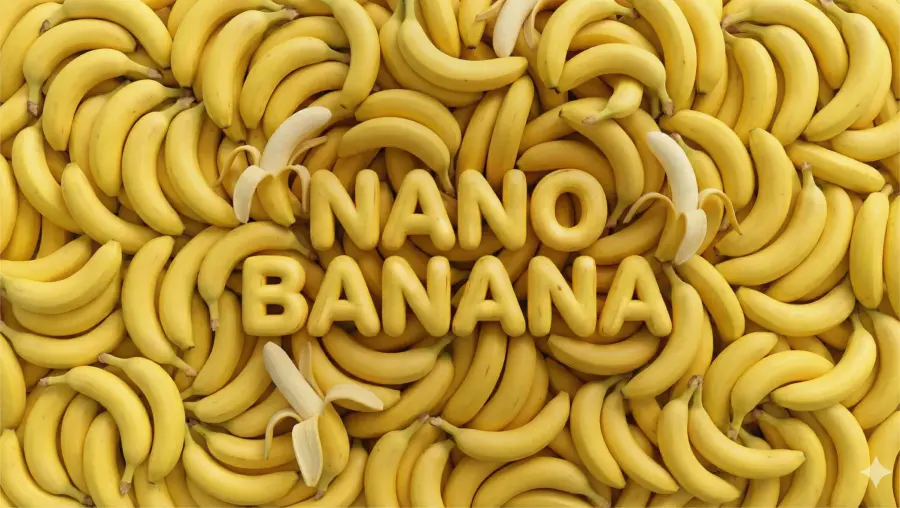
The nickname caught on. Google kept using it as the image models developed, which is why searches for Nano Banana can refer to either the original model or the wider series.
What Is the Latest Nano Banana Model?
As of this update, Google identifies Nano Banana 2.1 as its latest high-efficiency image generation and conversational editing model. Its official model description lists improvements to visual quality, text rendering, and consistency across edits, with 1K, 2K, and 4K output.
The names are easier to follow when matched to their technical identifiers:
| Name |
Google model ID |
Position in the series |
| Nano Banana, original |
gemini-2.5-flash-image |
Earlier generation and the origin of the nickname |
| Nano Banana Pro |
gemini-3-pro-image |
Professional image creation and complex visual tasks |
| Nano Banana 2 |
gemini-3.1-flash-image |
Previous high-efficiency generation |
| Nano Banana 2 Lite |
gemini-3.1-flash-lite-image |
Workloads that prioritize speed and cost |
| Nano Banana 2.1 |
gemini-nano-banana-2.1 |
Updated high-efficiency generation and editing |
This mapping follows Google's image-generation documentation. Individual platforms may retain different route names, so copy the integration instructions from the service you actually use.
For an initial product-image experiment, I would start with Nano Banana 2.1. If you are choosing between it and Pro, our Nano Banana 2.1 vs Nano Banana Pro comparison shows the differences on business-oriented prompts.
What Can Nano Banana Do?
Three examples from our published ecommerce comparison illustrate the main capabilities. That comparison used five prompts with one output per model for each prompt. These are individual observations, not statistical win rates. Nano Banana 2.1 appears on the left of each comparison image below; Pro appears on the right.
Generate Product Images from a Description
You can specify a product, surface, lighting, and composition to create an image from text. This is useful for exploring a campaign concept before arranging a shoot.
Our product-image test requested a white bottle with specific cap and stripe details. Both models followed the main brief; we preferred the more natural photographic appearance of the 2.1 output.
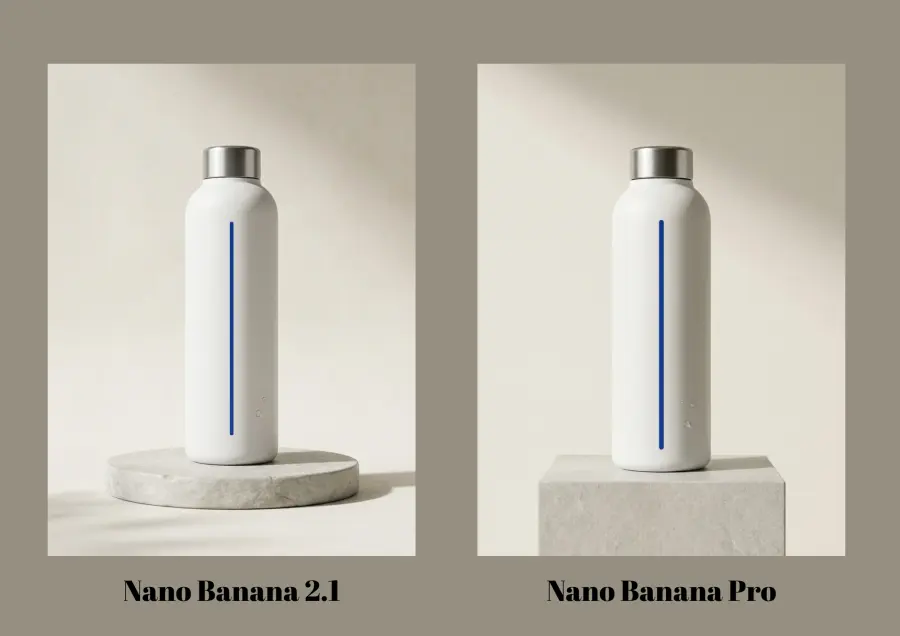
Product-image example from the published comparison. Left: 2.1. Right: Pro.
A generated product concept still needs checking against the real item. For an existing product, supplying a reference gives the model a visual starting point and makes changes easier to inspect.
Edit an Existing Photo with Instructions
Image editing starts with a photo you already have. You might ask for a different background while preserving the bottle, label, camera angle, and crop.
In our kitchen-background test, 2.1 kept the product closer to the input. Pro blended the scene's colors more strongly but changed the product shape.
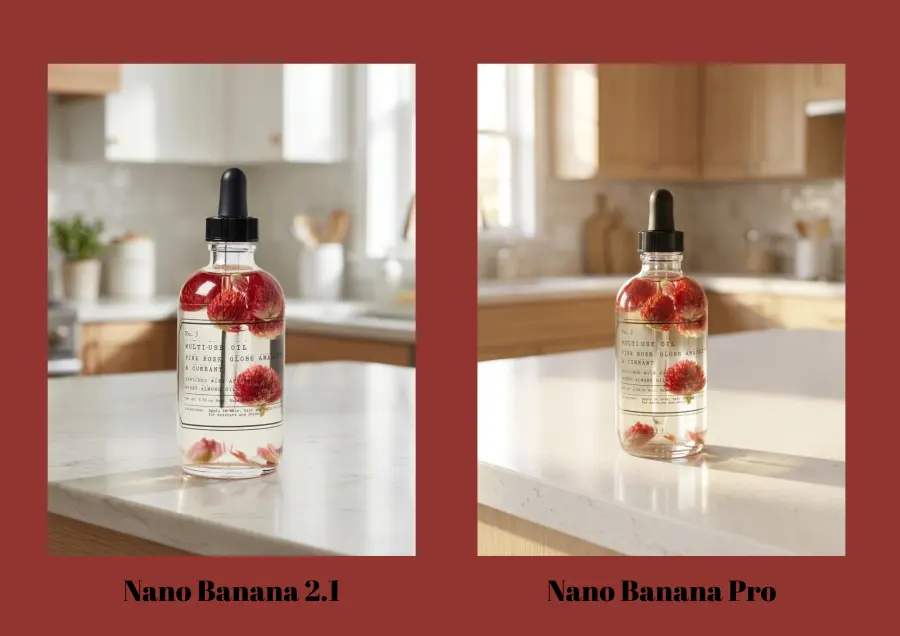
Background replacement from the published comparison. Left: 2.1. Right: Pro.
For ecommerce, assess the product and the surrounding scene separately. Inspect the silhouette, label, and proportions before deciding whether attractive lighting makes the edit usable.
Developer Max Woolf's original Nano Banana experiments also demonstrate multiple edits to one image. His later note about ambiguous left/right directions is a useful reminder to specify the viewer's perspective. Those experiments concern the original model, not 2.1.
Create Posters, Packaging, and Text-Based Visuals
Nano Banana can work with written content inside an image, making it useful for packaging concepts and promotional graphics.
Our English-and-Japanese poster test produced readable copy with both models. We preferred 2.1's promotional layout in that run.
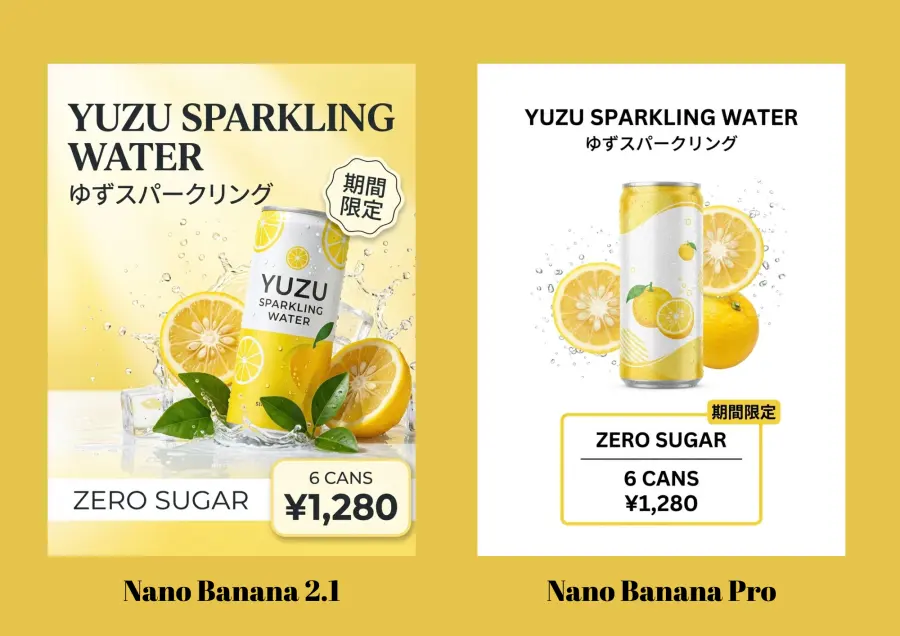
Multilingual poster from the published comparison. Left: 2.1. Right: Pro.
Check every price, character, and product claim before publishing. If your next decision involves another model family, the Nano Banana Pro vs Seedream 5.0 Pro tests provide additional examples.
Is Nano Banana Good? Strengths and Limitations
Nano Banana is worth trying when you need to explore image concepts or make reference-based changes. A social media creator can test a visual direction; an ecommerce team can examine background variations; a developer can build an interface around repeatable image requests.
The decision becomes stricter when an output must preserve a real person's appearance or a saleable product. Google's Nano Banana 2.1 model card identifies remaining problems with small or lengthy text, character consistency, partial instruction following, and spatial relationships. It also acknowledges occasional slow responses or timeouts.
My recommendation is to evaluate a representative image before planning a batch. Decide what counts as acceptable: correct product shape, legible copy, consistent identity, or all of these. An inexpensive generation loses its advantage if you must repeatedly repair or reject it.
Google also documents an invisible SynthID watermark in generated images. Whether a download carries an additional visible mark depends on the product used.
For photo editing, start from the original input when a sequence drifts too far. Name the specific change and the details that must stay fixed. Our Nano Banana Pro photo-editing prompts include targeted instructions for common tasks.
How to Access and Use Nano Banana
Use It in Gemini
Open Gemini, sign in, and choose Create images from the tools menu. Enter a description or upload an image with your requested edit. Inspect the result, then make a focused follow-up request. The available model and allowance depend on your account and plan; Google's Gemini image-generation page describes the current options.
Use It on GPT Proto
Open the Nano Banana 2.1 model page, sign in, and prepare enough balance for a test. Choose the task and settings available on that page, supply your prompt or reference, and generate an image. Check the output before increasing volume.
For an application integration, open Try this model and use Copy Markdown for AI to give the current instructions to your coding assistant. Keep your API key in your project's secret configuration.
Here is a Bash and cURL example that submits a Nano Banana Pro text-to-image task. Set GPTPROTO_API_KEY in your environment first. This example uses Pro's current GPT Proto route:
: "${GPTPROTO_API_KEY:?Set GPTPROTO_API_KEY first}"
curl --fail-with-body --silent --show-error \
  --request POST \
  'https://gptproto.com/api/v3/google/gemini-3-pro-image-preview/text-to-image' \
  --header "Authorization: Bearer ${GPTPROTO_API_KEY}" \
  --header 'Content-Type: application/json' \
  --data '{
    "prompt": "A ceramic coffee cup on a pale oak table in soft daylight",
    "size": "1K",
    "aspect_ratio": "1:1",
    "output_format": "png",
    "enable_sync_mode": false,
    "enable_base64_output": false
  }'
This submits a job; the initial response is not the finished image. The Nano Banana Pro API tutorial covers the key setup and complete polling flow. Use the corresponding model-page instructions when switching to 2.1.
Is Nano Banana Free?
Some Google interfaces offer free access, with conditions that vary by product. A Gemini subscription, a third-party balance, and free prompt examples are separate things.
| Access route |
What to expect |
| Gemini App |
Google currently lists Nano Banana 2 as free and 2.1 access with a Google AI plan |
| Google Flow |
Its help page lists image allowances for accounts without a Google AI plan, including a shared 2.1 and Lite allowance |
| GPT Proto model pages and API |
Generations are charged against your account balance |
| GPT Proto prompt gallery |
Browsing and copying prompts is free; generating an image may consume credits |
Check the Gemini overview and Flow image help for your chosen route. Free availability and limits can change.
At the current GPT Proto rate, 2.1 starts at approximately $0.02 per 1K image. Nano Banana Pro lists $0.0804 per 1K or 2K image. Higher resolutions and repeated attempts affect the total; confirm the selected model's live rate before budgeting. You can also review the platform's pricing information.
Nano Banana Prompt Examples to Try
These are starting prompts to adapt, rather than claims about a particular generated result.
For a product concept:
Create a product photograph of a cobalt-blue ceramic mug on a pale
stone counter. Use soft window light from the left and a neutral
background. Show the whole mug and its handle. Leave room above
the product for a headline. Add no text.
For editing an uploaded photo:
Replace only the background with a bright, uncluttered kitchen.
Keep the product shape, label, colors, camera angle, and crop
consistent with the uploaded photo. Match the new background's
lighting to the product. Do not redesign the packaging.
For the Nano Banana 3D figurine style:
Using the uploaded character illustration as a reference, create
an image of a miniature collectible figure on a plain display base.
Preserve the character's hairstyle and clothing colors. Use painted
resin textures and soft studio lighting, with no packaging or text.
The last prompt asks for a picture of a figure. A separate workflow is needed to turn a concept into an editable 3D asset.
Browse the Nano Banana Pro prompt gallery for visual examples. If you are comparing prompt libraries, our Banana Prompts XYZ review explains what a gallery can help you reproduce and which settings you still need to check.