What You Need to Make an AI Cat Dance Video
You do not need to film your cat performing the action. You also do not need a 3D model, a digital skeleton, or a manual animation timeline.
| Material |
What It Controls |
| Cat image |
The cat’s face, fur pattern, body shape, accessories, and starting composition |
| Dance reference video |
The choreography, timing, poses, and rhythm |
| Dance prompt |
The general movement when you do not have a reference video |
| Wan 3.0 |
Generates a new video from the supplied instructions and references |
| Video editor |
Optional trimming, captions, music, sound effects, and looping |
The two visual inputs do different jobs. On GPT Proto’s cat dance tool, the image defines which cat appears in the result, while the video supplies the visible movement. This is why a good cat photo cannot rescue a confusing dance clip—and a clean dance clip cannot recover legs that are missing from a tightly cropped cat portrait.
Step 1: Choose a Clear Photo of Your Cat
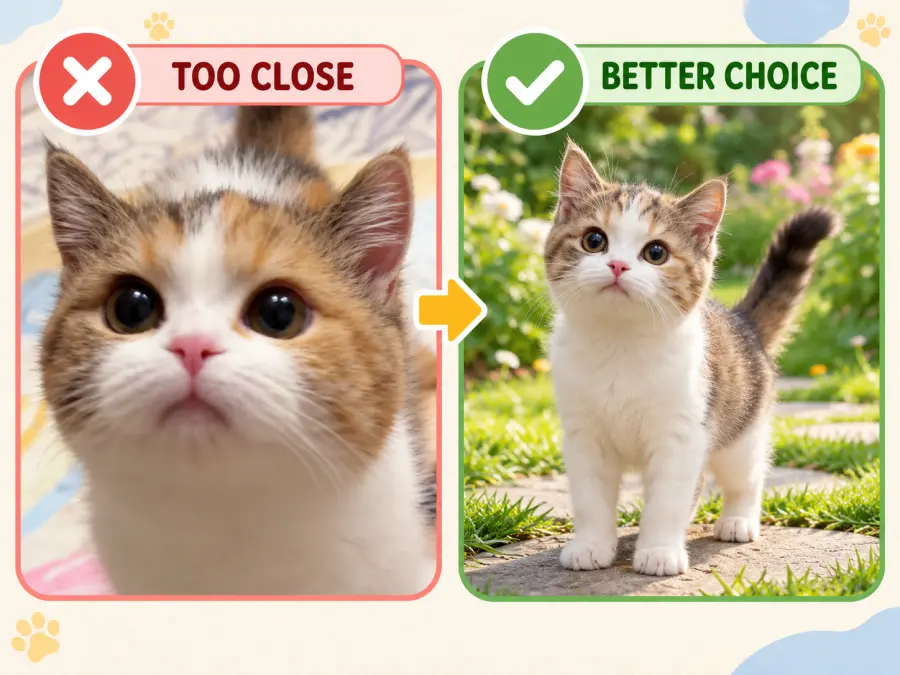
Start with one cat in a simple, well-lit image. For a full-body dance, the head, torso, four legs, paws, and tail should all be visible. Leave some empty space around the body so the generated cat has room to step, turn, or raise its front paws.
A cute close-up may be an excellent pet portrait, but it is a poor starting point for a full-body routine. If the source image ends at the cat’s chest, Wan 3.0 must invent the hips, legs, paws, tail position, and floor contact while also generating motion. That is a lot of guessing in a single pass.
Use this checklist before moving on:
One main cat, without another animal overlapping it.
Sharp face and readable fur markings.
Limbs and tail visible rather than hidden under a blanket or chair.
A full-body composition for a full-body dance.
Enough room around the cat for the planned action.
A pose that is reasonably compatible with the opening pose of the dance.
The GPT Proto cat dance guide also recommends matching the framing: pair a full-body cat with a full-body dance reference, or use an upper-body cat image for an upper-body routine.
What If You Only Have a Close-Up or Cropped Photo?
Do not immediately send a face-only photo into the video model. First, use an image model to create a cleaner full-body reference. Modern image tools can edit an uploaded image or generate a new image from visual references, which makes this a practical preparation step rather than a manual reconstruction job. The OpenAI image documentation describes both editing existing images and generating new images from reference inputs.
Upload the best photo you have, then use a prompt like this:
Use the uploaded photo as the identity reference for the same cat.

Create a clear full-body image of the cat standing naturally and facing the camera. Keep its facial features, eye color, fur color, fur pattern, ear shape, tail, body size, and recognizable markings consistent with the reference.

Show the entire head, torso, four legs, paws, and tail without obstruction. Leave generous empty space around the body for later animation. Use even lighting, a simple neutral background, and a centered composition.

Do not add clothes, accessories, extra animals, text, or exaggerated human anatomy.
Inspect the new image before using it. Image generation can fill in missing anatomy, but it can also invent a stripe, change the eye color, shorten the tail, or make the body heavier. If the generated full-body image no longer looks like your cat, revise it before moving to video.
Step 2: Choose How You Want the Cat to Dance
There are two practical ways to direct Wan 3.0: give it a dance video to follow, or describe a dance in words. Neither route is always better. They solve different problems.
| Question |
Reference Video |
Dance Prompt |
| Can it follow a recognizable routine? |
Better choice |
Not reliably |
| Is it quick to prepare? |
Requires a suitable clip |
Yes |
| Is the movement predictable? |
More directed |
More improvised |
| Best for |
Trends, hand dances, and chosen choreography |
General funny or stylized cat videos |
Option A: Use a Reference Dance Video
Choose this route when the exact performance matters. The reference can contain a human dancer; your cat does not need to perform or even appear in it. Wan 3.0 uses the clip as a guide for the action while the cat image supplies the new subject.
A useful dance reference normally has:
One clearly visible performer.
One continuous shot with few or no cuts.
A stable or gently moving camera.
Moderate, readable movement.
Limited motion blur and limited body obstruction.
A performer who remains inside the frame.
Framing that resembles the cat image.
For the first attempt, avoid a group routine, rapid floor work, several full spins, or choreography in which arms and legs repeatedly cross. Human choreography already needs to be adapted to feline anatomy. A simpler reference gives the model fewer conflicts to resolve.
You should also use a reference video that you created, licensed, or have permission to process. Reusing a video as an AI input does not automatically grant rights to its footage, music, characters, logos, or choreography recording.
Option B: Describe a General Dance Style
Use a cat dance video prompt when you care more about the idea than the exact routine. This works well for requests such as a cute paw dance, a slow side-to-side groove, or a short hip-hop meme.
Avoid stopping at “make my cat dance.” Name a few visible actions, the movement speed, the camera behavior, and an ending pose. Three or four compatible actions are easier to interpret than a long list of unrelated tricks.
For example:
A full-body orange tabby cat performs a simple playful hip-hop dance: two side steps, alternating front-paw gestures, a gentle body bounce, and a confident final pose. Preserve the cat's face, fur pattern, eye color, body shape, paws, and tail. Keep the cat centered and fully visible. Fixed camera, clean living-room background, moderate movement speed, one continuous shot, no spinning, no jumps, and no extra animals.
The trade-off is control. A phrase such as “K-pop dance” describes a category, not a sequence of poses. Wan 3.0 can create a plausible performance, but it will not know which exact choreography you had in mind.
Step 3: Generate the Dance With Wan 3.0
Wan 3.0 supports reference-guided video workflows alongside text- and image-led generation. Alibaba introduced the model with multimodal reference support, allowing different media to help direct the result. For this tutorial, the useful distinction is simple: use Reference-to-Video for a chosen performance, and Image-to-Video when a written dance description is enough. You can read the model announcement through Alibaba’s official newsroom.
Method 1: Cat Image and Reference Dance Video
Open a Wan 3.0 workflow that accepts image and video references.
Upload the prepared cat image as the character reference.
Upload the dance clip as the performance reference.
Add a short prompt that protects the cat’s identity and defines the framing.
Select the aspect ratio needed for your publishing destination.
Generate one test and inspect it before changing several settings.
Because the video already provides the dance, the text prompt does not need to repeat every step. Use it to explain which input supplies the cat, which supplies the action, and what must remain consistent:
Use the uploaded cat image as the character reference and the uploaded dance video as the performance reference.

Preserve the cat's recognizable face, eye color, fur color, fur pattern, ear shape, body proportions, paws, and tail. Transfer the choreography, timing, rhythm, poses, and movement sequence from the dance video to the cat.

Keep one cat centered and fully visible throughout the video. Use a stable camera and leave enough space for the full dance. Adapt human limb movements naturally to feline anatomy without turning the cat into a human-shaped character.

No extra animals, duplicated limbs, changing fur patterns, scene cuts, sudden camera movement, or cropped paws.
Method 2: Cat Image and Dance-Style Prompt
Upload the cat image as the visual reference.
Name the dance style, then describe a short sequence of visible actions.
State whether the movement should be slow, moderate, playful, or energetic.
Keep the camera and framing instructions simple.
Add a final pose so the clip has a clear ending.
Generate, review, and change one weak instruction at a time.
A useful prompt follows this order:
Cat identity

+ exact dance actions

+ movement speed

+ camera and framing

+ location

+ final pose

+ consistency constraints
Cat Dance Video Prompts You Can Copy
These prompts are starting points. Replace the fur, location, and mood details with details that fit your cat.
Simple K-Pop Cat Dance
Use the uploaded image as the identity reference for the same cat. The cat performs a simple K-pop-inspired dance with two side steps, alternating front-paw gestures, a gentle shoulder bounce, and a cute final pose facing the camera. Keep the cat's face, fur pattern, body size, paws, and tail consistent. Full body visible, centered composition, clean studio background, fixed camera, moderate movement, one continuous shot, no spins, no jumps, and no extra animals.
Hip-Hop Dancing Cat
The same cat from the reference image performs a relaxed hip-hop two-step. It shifts left and right, moves its front paws with the beat, gives one small head nod, and finishes with one paw raised. Preserve the original face, eyes, fur markings, proportions, and tail. Full-body framing, street-stage background, stable camera, readable motion, no rapid turns, no body transformation, and no duplicated limbs.
Cute Upper-Body Paw Dance
Use the uploaded cat as the same character. Create a cute upper-body paw dance with alternating paw waves, a gentle head tilt, and a short final pause. Preserve the cat's facial identity, eye color, ear shape, and chest markings. Keep the lower body mostly still. Medium shot, cozy indoor background, fixed camera, soft movement, no standing on two human-like legs, and no additional animals.
Serious-Faced Cat Meme
The cat keeps a calm, serious expression while performing a small rhythmic side-step dance with controlled paw gestures and one confident final pose. Preserve the exact fur pattern, eye color, face, body shape, and tail from the reference image. Full body visible, plain stage background, centered framing, fixed camera, one continuous shot, moderate speed, no smiling human face, no clothing, and no scene changes.
Step 4: Check the Result Before Downloading It
Do not judge the video only by whether the dance looks funny. Pause at several points and check the parts that commonly drift:
Does the face still resemble your cat?
Are the eye color and fur markings stable?
Are all four legs and paws present?
Does the tail disappear, split, or change color?
Does the cat suddenly develop a human torso or human hands?
Does another cat appear in the background?
Does the body stay inside the frame?
Does the reference-led version follow the main poses and rhythm?
Does the background remain consistent enough to edit?
If the result fails, change one input at a time. First test a cleaner cat image. If identity is stable but motion is poor, simplify or replace the dance reference. Rewrite the prompt only after you know which visual input is causing the problem. Changing everything together makes it difficult to learn what improved the result.
The Faster Way: Use GPT Proto’s AI Cat Dance Generator
You do not need to configure a general Wan 3.0 workflow if you already know that you want reference-led dancing. The GPT Proto AI Cat Dance Video Generator packages the process into two uploads:
Upload a clear image of your cat.
Upload a human dance video as the movement reference.
Generate the new cat dance video.
Check the face, fur, paws, legs, tail, and framing before downloading it.
The cat image defines the subject. The dance video defines the choreography and timing. This route is useful when you want to make your cat dance without choosing a model mode, building nodes, or writing a long motion prompt.
Already have both files? Create your AI cat dance video with GPT Proto.
How to Fix Common AI Cat Dance Problems
| Problem |
Likely Cause |
What to Change |
| Paws or legs are distorted |
Limbs are hidden, or the motion is too complex |
Use a clearer full-body image and a simpler dance |
| The cat becomes human-shaped |
The routine depends heavily on upright human anatomy |
Reduce complex hand actions, jumps, and long two-legged movement |
| Fur markings change |
The identity reference is unclear or partly reconstructed |
Use a sharper source image and name the markings that must remain |
| The dance is not followed |
The video has fast movement, cuts, blur, or several performers |
Use one readable performer in a continuous shot |
| The cat leaves the frame |
The image is tightly cropped or the dance travels too far |
Add empty space and choose movement with less displacement |
| Extra cats appear |
The source image contains several animals or reflections |
Crop the source or create a clean single-cat reference |
| Motion looks stiff |
The opening pose conflicts with the first dance pose |
Choose a more compatible cat image or a gentler opening action |
One more practical point: a full-body reference is not necessary for every idea. If your source only shows the cat from the chest upward, choose a paw dance or head-and-shoulder groove. That is often better than asking an image model to invent an entire body you do not need.
Edit and Publish the Finished Video
Once the motion and identity look acceptable, trim any unstable opening or ending frames. Add captions, music, or sound effects in a normal video editor. If you need a GIF, create the video first and convert a short section afterward; the GPT Proto tool outputs video rather than a GIF directly.
Check the rights for the cat image, dance footage, music, characters, and logos included in the project. Do not present a photorealistic AI clip as proof that the real animal performed the action. Publishing rules also vary by platform. For example, YouTube requires disclosure when realistic content has been meaningfully generated or altered with AI.
Final Takeaway
The quality of an AI cat dance video is decided before you press Generate. Start with a cat image that shows the anatomy needed for the dance. Then decide whether you need a particular routine or only a general style.
Use a dance reference video for recognizable choreography. Use a cat dance video prompt for a faster, more open-ended result. If the only photo you have is cropped, either prepare a consistent full-body image first or choose an upper-body routine that fits the available frame.
For the shortest route, upload your two references to the GPT Proto AI Cat Dance Video Generator and let the Wan 3.0 workflow combine the cat’s appearance with the selected performance.