What You Need Before Getting the Nano Banana Pro API
You need a GPT Proto account, enough account balance for at least one generation, and a GPT Proto API key. For manual integration, you also need a terminal and Python 3. If you are not comfortable with code, use a coding agent that can inspect and edit your actual project rather than a blank browser chat.
| Item |
Value used in this guide |
| Product |
Nano Banana Pro |
| Official model family |
Gemini 3 Pro Image |
| GPT Proto model ID |
gemini-3-pro-image-preview |
| Task |
Text-to-image |
| Input |
Text prompt |
| Output |
PNG or JPEG image |
| Available sizes |
1K, 2K, and 4K |
Google currently lists Nano Banana Pro and Nano Banana 2 as separate models in its Gemini image generation documentation. If the model ID in your code says gemini-3.1-flash-image, you are calling Nano Banana 2—not the Pro model covered here.
Step 1: Open and Test the Nano Banana Pro Model Page
Open the Nano Banana Pro API page and sign in. Before touching any code, use the Playground to run a small test:
Keep the task set to Text To Image.
Enter a short prompt.
Choose 1K, a 1:1 aspect ratio, and PNG output.
Click Generate and confirm that an image is returned.
This separates model problems from integration problems. If the Playground request fails, check the account, balance, and prompt first. If it succeeds but your application fails, the likely issue is the API key, request header, JSON body, or project environment.
Step 2: Create Your Nano Banana Pro API Key
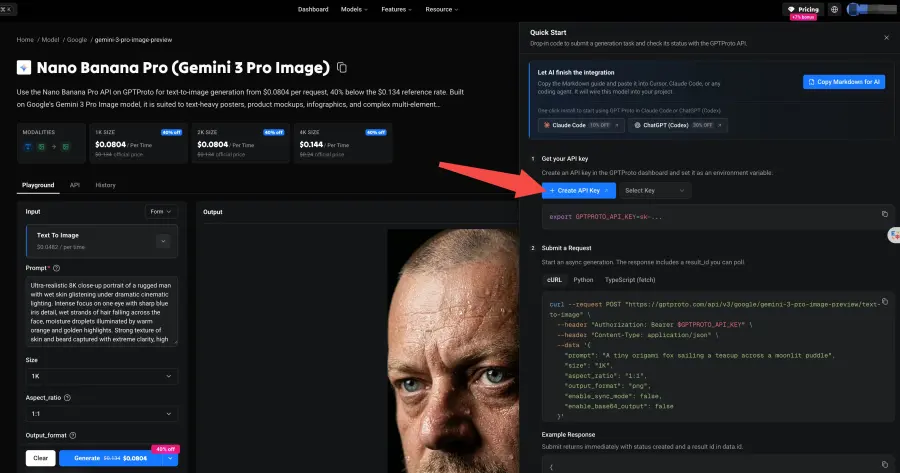
Click Try this model in the upper-right corner of the model page. The Quick Start panel lets you create a new API key or select an existing one.
Click Create API Key.
Copy the new key and store it somewhere private.
Add it to an environment variable named GPTPROTO_API_KEY.
Do not paste it directly into source code.
On macOS or Linux, set the variable for the current terminal session with:
export GPTPROTO_API_KEY="your-api-key"
In Windows PowerShell, use:
$env:GPTPROTO_API_KEY="your-api-key"
This must be a GPT Proto API key. A Google AI Studio key is a different credential and will not authenticate a request sent to the GPT Proto endpoint.
Treat the key like a password. Keep it out of Git, screenshots, browser-side JavaScript, and public AI chats. Google's general API key security guidance also recommends environment variables and warns against exposing keys in client-side applications.
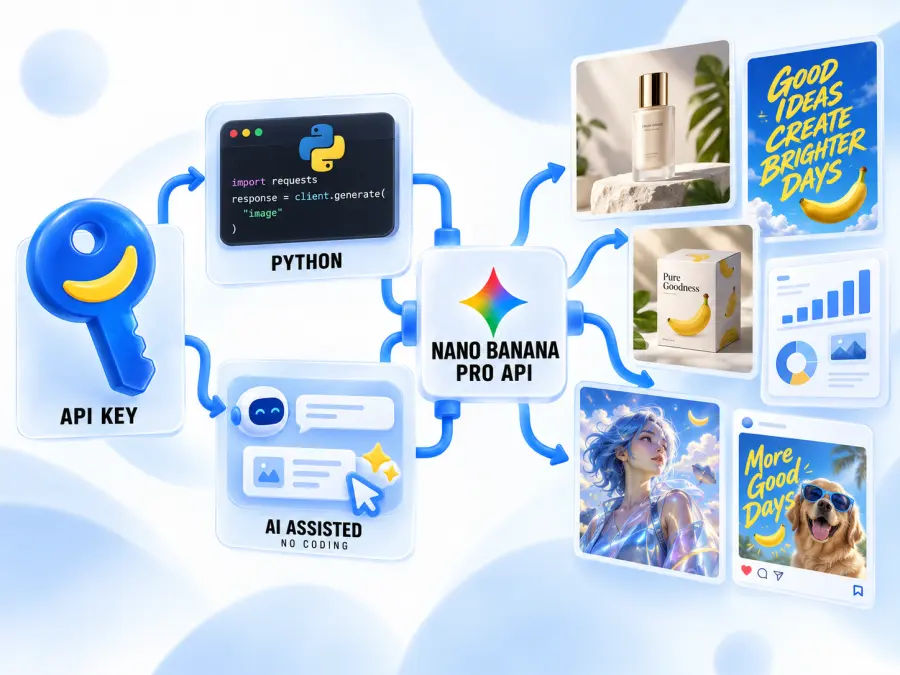
Step 3: Choose Manual or AI-Assisted Integration
After creating the key, choose the route that matches your experience.
| Route |
Best for |
What happens next |
| Manual integration |
You can read Python, JavaScript, or cURL |
Copy the request, run it, and add the result flow to your application |
| AI-assisted integration |
You do not know where the API code belongs |
Give the model-page Markdown to a coding agent and have it modify the project |
If you already know Python, the manual route is faster. If your real question is “Which file should this code go into?”, use the AI-assisted route.
Route A: Call the Nano Banana Pro API with Python
Submit a First Request with cURL
This request starts an asynchronous generation task. It normally returns a task ID rather than the finished image.
curl --request POST "https://gptproto.com/api/v3/google/gemini-3-pro-image-preview/text-to-image" \
  --header "Authorization: Bearer $GPTPROTO_API_KEY" \
  --header "Content-Type: application/json" \
  --data '{
    "prompt": "A tiny origami fox sailing a teacup across a moonlit puddle",
    "size": "1K",
    "aspect_ratio": "1:1",
    "output_format": "png",
    "enable_sync_mode": false,
    "enable_base64_output": false
  }'
A successful submission includes data.id, data.status, and data.urls.get. The output list can still be empty while the status is created or running. That is expected.
Install the Python Dependency
python -m pip install requests
Run a Complete Submit-and-Poll Script
Save the following script as nano_banana_pro.py. It submits the prompt, checks the task every two seconds, stops on failure, and prints the final image URL.
import os
import time

import requests

API_KEY = os.environ.get("GPTPROTO_API_KEY")
SUBMIT_URL = (
    "https://gptproto.com/api/v3/google/"
    "gemini-3-pro-image-preview/text-to-image"
)

if not API_KEY:
    raise RuntimeError("Set GPTPROTO_API_KEY before running this script.")

headers = {
    "Authorization": f"Bearer {API_KEY}",
    "Content-Type": "application/json",
}

payload = {
    "prompt": "A tiny origami fox sailing a teacup across a moonlit puddle",
    "size": "1K",
    "aspect_ratio": "1:1",
    "output_format": "png",
    "enable_sync_mode": False,
    "enable_base64_output": False,
}

def read_data(response):
    response.raise_for_status()
    body = response.json()

    if body.get("code") != 200:
        raise RuntimeError(body.get("message", "GPT Proto returned an error."))

    return body["data"]

submission = requests.post(
    SUBMIT_URL,
    headers=headers,
    json=payload,
    timeout=60,
)
task = read_data(submission)

result_id = task["id"]
poll_url = task.get("urls", {}).get("get")
if not poll_url:
    poll_url = f"https://gptproto.com/api/v3/predictions/{result_id}/result"

print(f"Created task: {result_id}")
deadline = time.monotonic() + 300

while True:
    status = task.get("status")

    if status == "completed":
        outputs = task.get("outputs", [])
        if not outputs:
            raise RuntimeError("The task completed without an output URL.")

        print(f"Image URL: {outputs[0]}")
        break

    if status == "failed":
        raise RuntimeError(task.get("error") or "Image generation failed.")

    if time.monotonic() >= deadline:
        raise TimeoutError("Generation did not finish within five minutes.")

    time.sleep(2)
    result = requests.get(
        poll_url,
        headers={"Authorization": f"Bearer {API_KEY}"},
        timeout=30,
    )
    task = read_data(result)
Run it from the same terminal where you set the environment variable:
python nano_banana_pro.py
Do not treat the first successful POST as a finished generation. The request has only succeeded end to end when the status becomes completed and data.outputs contains a file URL.
Route B: Let a Coding Agent Integrate the API
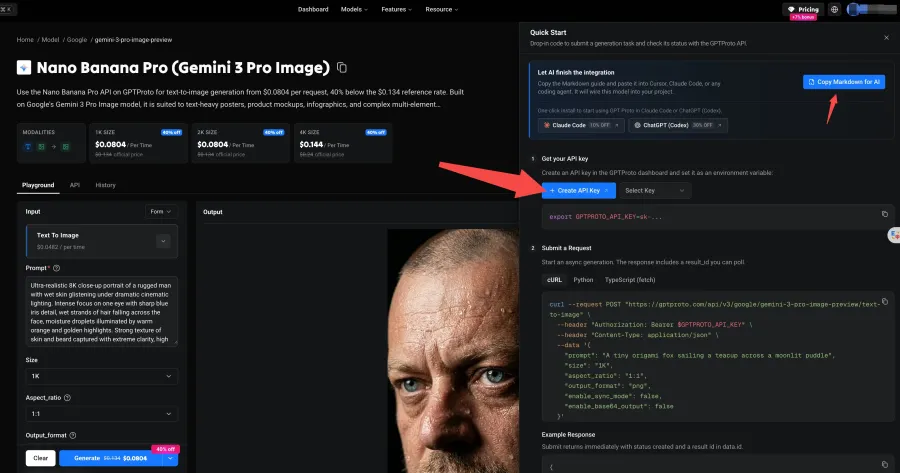
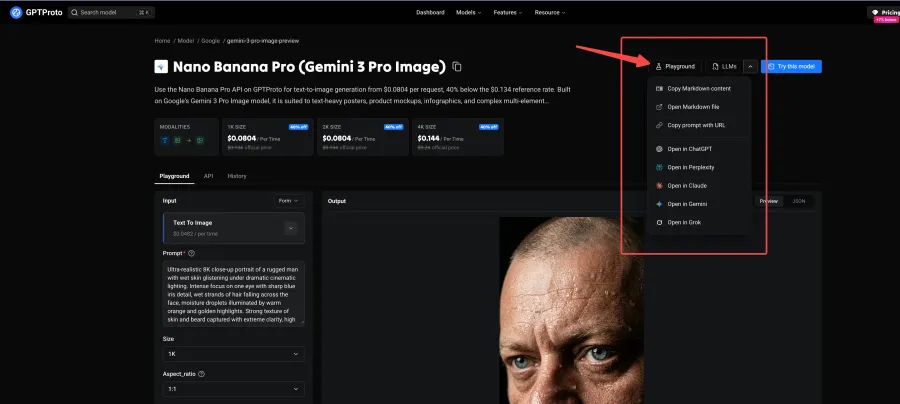
You do not need to retype the API documentation for an AI assistant. The Nano Banana Pro model page can send it the current endpoint, schema, authentication method, response fields, and code examples.
Open Try this model and choose Copy Markdown for AI. You can also open the LLMs menu and choose one of the following:
Copy Markdown content
Open Markdown file
Copy prompt with URL
Open in ChatGPT
Open in Claude
Open in Gemini
Open in Grok
The machine-readable version is also available from the model page's Nano Banana Pro Markdown guide.
Give the Agent Your Project, Not Just a Blank Chat
A browser chatbot can explain code, but it may not know your folders, framework, server entry point, or deployment setup. A coding agent such as Codex, Claude Code, or Cursor can inspect those files and place the integration in the correct part of the project.
The agent still needs:
access to the project folder;
permission to edit the relevant files;
a working Python, Node.js, or other runtime;
the Markdown instructions from the model page; and
an API key supplied through an environment variable or secret manager.
This is AI-assisted coding, not a no-code API. The agent writes and connects the code, while you approve the changes and provide the runtime and credentials.
Prompt the Coding Agent
Paste the copied Markdown into the agent, then add this instruction:
Integrate the GPT Proto Nano Banana Pro text-to-image API into this project using the attached Markdown documentation. First inspect the existing stack and identify the correct server-side file. Store the API key in an environment variable named GPTPROTO_API_KEY; never hard-code it or expose it in browser-side code. Implement request submission, asynchronous status polling, failed-task handling, and display of the returned image URL. Add only the files required for this integration. Run a minimal test, then report which files you changed, how to start the project, and any step I still need to complete manually.
Do not paste the real key into the instruction. Set it in your terminal, a local .env file excluded from Git, or the secret settings of your deployment platform.
Check the Agent's Work Before Accepting It
You do not need to understand every line to perform a useful review. Check these eight items:
The key is read from GPTPROTO_API_KEY.
The key is not present in browser code or a committed file.
The model ID is gemini-3-pro-image-preview.
The code calls the text-to-image endpoint shown in this guide.
It reads data.id or data.urls.get after submission.
It waits for completed and handles failed.
It reads the final URL from data.outputs.
The agent ran a real minimal test instead of only saying that the code looks correct.
Try it before connecting the full application: Open the Nano Banana Pro Playground, validate the prompt at 1K, and then give the same settings to your coding agent.
Nano Banana Pro API Parameters and Pricing
The basic text-to-image request needs only a prompt. The other fields control the output and response format.
| Parameter |
Required |
Default |
Accepted values or purpose |
prompt |
Yes |
— |
Description of the image to generate |
size |
No |
1K |
1K, 2K, or 4K |
aspect_ratio |
No |
1:1 |
1:1, 3:2, 2:3, 3:4, 4:3, 4:5, 5:4, 9:16, 16:9, or 21:9 |
output_format |
No |
png |
png or jpeg |
enable_sync_mode |
No |
false |
Wait for the uploaded result before returning |
enable_base64_output |
No |
false |
Return Base64 data instead of a URL |
The live GPT Proto model page listed the following rates when this guide was checked in September 2026:
| Resolution |
Price per generation |
| 1K |
$0.0804 |
| 2K |
$0.0804 |
| 4K |
$0.144 |
Creating a key does not make the image calls free. Each successful generation consumes account balance. Check the live model page before launching a large batch because availability and rates can change.
For early prompt work, start at 1K. Move to 4K only after the composition, wording, and aspect ratio are correct. The tradeoff is simple: 4K produces a larger asset but costs more per attempt.
Common Nano Banana Pro API Errors
| Problem |
Likely cause |
What to do |
400 Bad Request |
Invalid JSON, field name, value, or blocked input |
Compare the request with the current model-page schema |
401 Unauthorized |
Missing or invalid key |
Confirm GPTPROTO_API_KEY and the Authorization header |
403 Forbidden |
Insufficient balance or missing permission |
Check the account balance and key status |
413 Request Entity Too Large |
Request body is too large |
Reduce uploaded or Base64 content |
429 Too Many Requests |
Calls are arriving too quickly |
Retry with increasing delays and cap the number of attempts |
500, 502, or 504 |
Temporary platform or upstream failure |
Retry a limited number of times; do not create an infinite loop |
| The response has no image |
The task is still created or running |
Poll data.urls.get until it finishes |
Status becomes failed |
The generation did not complete |
Read data.error before retrying |
| The agent says it is done, but nothing runs |
It wrote code without executing it |
Ask for the exact test command and the returned status |
For transient failures, use exponential backoff rather than sending the same request repeatedly without delay. Also log the result ID: it gives you a specific task to inspect instead of a vague “generation failed” report.
Start with One Verified Generation
If you write code, begin with the cURL request and then use the complete Python script to submit and poll the task. If you do not write code, copy the model-page Markdown into a coding agent and ask it to integrate the same flow inside your project.
In both cases, verify one 1K image before building a larger workflow. Open the Nano Banana Pro API page, test the prompt, and use Try this model to create your key or hand the current integration instructions to your coding agent.