The Workflow at a Glance
| Stage |
Input |
Model or task |
Output |
| Product lock |
Original product photo |
Reference image |
Packaging identity anchor |
| Story planning |
25-second concept |
Eight timed story beats |
Shot list |
| Pre-production |
Product image + storyboard prompt |
GPT Image 2 image edit |
One 2×4 storyboard |
| Video production |
Product image + storyboard + timed motion prompt |
Seedance 2.5 reference-to-video |
One 25-second commercial |
| Quality control |
Generated video |
Human review |
Keep, revise, or regenerate |
The important change is the storyboard. The image model decides what each shot should look like before the video model is asked to handle motion, camera direction, timing, character continuity, and product consistency at the same time.
Why the Prompt-Only Version Missed the Story
The original prompt already contained a bedroom, washing machine, detergent pour, drying sheet, scent reaction, flower field, and final product shot. The problem was not a lack of descriptive words.
The problem was that one product image gave the video model only one strong visual anchor. The model still had to invent:
the same woman in several locations;
a bedroom and laundry room that belonged to the same visual world;
the composition of eight different shots;
the washing and pouring actions;
the timing and type of every cut;
the transition into the scent-inspired fantasy scene; and
a stable version of the product packaging.
Without a visual plan, the model simplified the request into something easier to keep coherent: one woman, one room, a gradual floral transformation, and a product reveal.
That explains why adding more adjectives such as “cinematic,” “luxury,” or “emotional” would not solve the real problem. Those words describe the style. They do not define eight compositions or force eight editorial cuts.
Step 1: Use the Product Photo as an Identity Anchor
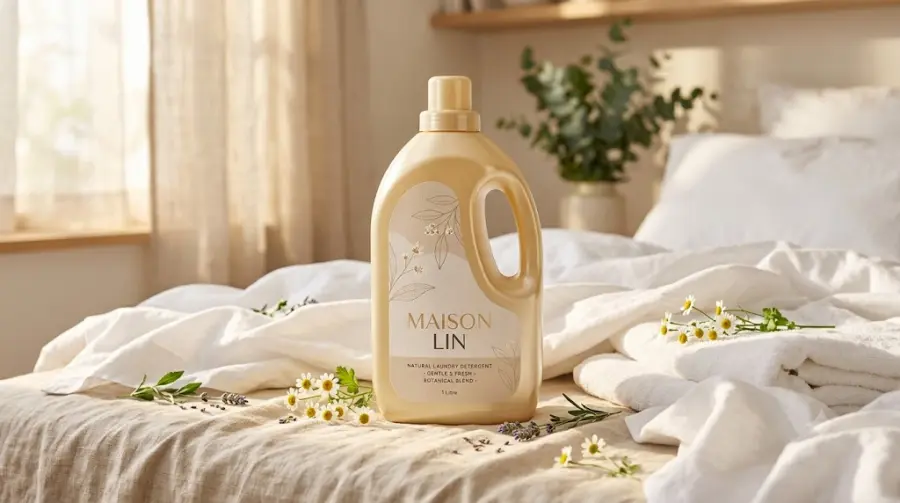
For branded product work, the starting image is not only inspiration. It is the product’s visual identity.
The reference should show as much of the packaging as possible:
bottle silhouette and proportions;
cap shape and color;
handle placement;
label position;
main brand name;
visible materials and finish; and
the lighting and color family you want to preserve.
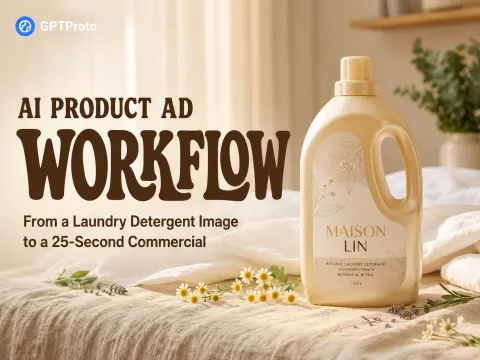
For this test, the source image showed a warm yellow MAISON LIN detergent bottle in a sunlit bedroom. That made it useful as both a packaging reference and a style reference.
Use GPT Image 2 in image-edit or reference-image mode rather than generating the detergent bottle from text alone. GPT Image 2 can process image references at high fidelity, but it is still a generative model. Small label text, logos, handles, and cap geometry should be checked again in the storyboard and final hero shot.
Step 2: Convert the Idea Into Eight Visible Story Beats
A 25-second ad does not need a complicated screenplay. It needs a sequence the viewer can understand without explanation.
For this commercial, I divided the story into eight beats:
| Time |
Story beat |
Visual purpose |
Camera direction |
| 0–3s |
The woman touches a sheet that no longer feels fresh |
Establish the need |
Slow push-in |
| 3–6s |
She loads the sheet into the washing machine |
Begin the process |
Side tracking shot |
| 6–9s |
She opens and pours the detergent |
Show the product in use |
Macro close-up |
| 9–12s |
The sheet tumbles through water and bubbles |
Visualize cleaning |
Washer-door close-up |
| 12–15s |
The clean sheet moves in sunlight |
Deliver visible freshness |
Wide lateral movement |
| 15–18s |
She smells the sheet and closes her eyes |
Connect the benefit to emotion |
Medium close-up |
| 18–22s |
The room opens into chamomile and lavender fields |
Turn scent into a visual payoff |
Wide reveal |
| 22–25s |
The bottle returns in a final hero shot |
Finish with brand recognition |
Slow product push-in and hold |
This shot list also prevents a common AI-video mistake: introducing the payoff too early. The flowers should not take over the bedroom in the opening seconds. They belong after the wash and scent reaction.
Step 3: Generate the Storyboard With GPT Image 2
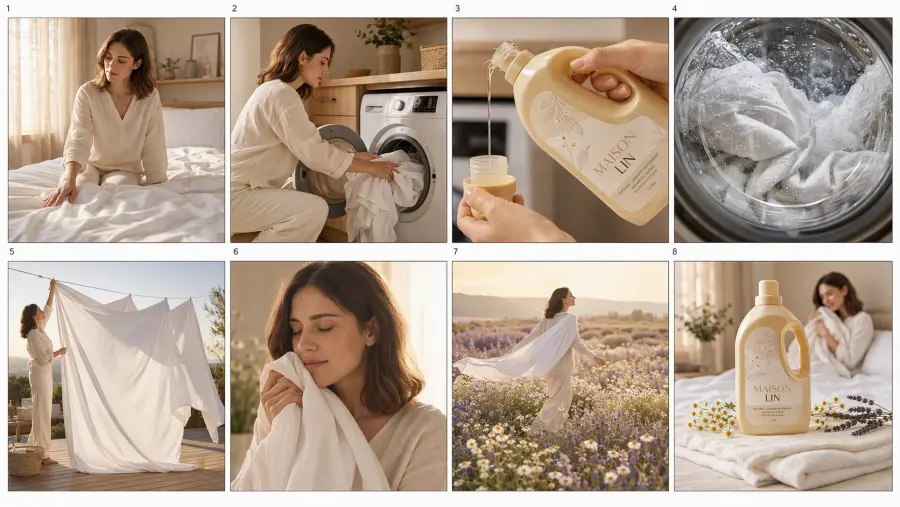
Generating eight scenes independently can cause the woman, outfit, lighting, and home to change from image to image. Instead, I asked GPT Image 2 to create all eight panels on one storyboard sheet.
That does two jobs at once:
It gives the video model a visual map of the complete story.
It lets the image model design the recurring woman, color palette, and environments together on one canvas.
This is not a guarantee of perfect identity. Generative image models can still change a recurring face or brand detail. However, one joint storyboard is usually a stronger starting point than eight unrelated text-to-image requests.
GPT Image 2 Storyboard Prompt
Create a professional eight-panel cinematic storyboard for a 25-second luxury laundry detergent commercial.

Use the uploaded product image as the exact packaging reference. Preserve the original pale warm-yellow bottle, beige cap, ergonomic side handle, bottle proportions, MAISON LIN label placement, typography, and packaging design. Do not redesign the bottle or invent a different brand.

Create exactly eight separate vertical 9:16 compositions arranged in two rows and four columns. Use clean gutters between panels. The story must read from left to right across the top row, then left to right across the bottom row. Place the panel numbers only in the outer margins. Do not add captions, advertising copy, or watermarks.

Establish the woman's exact identity in Panel 1 and reuse that identical character in every following panel. Treat her as one locked character, not eight similar women. Preserve the same facial geometry, eye shape, nose, lips, skin tone, shoulder-length chestnut-brown hair, age, body proportions, cream linen top, and ivory trousers across all panels.

Visual direction: photorealistic premium lifestyle commercial, warm morning sunlight, ivory and beige palette, pale oak interiors, realistic white linen, natural skin texture, soft film grain, restrained luxury, and believable fabric physics. The scent imagery must use white chamomile and soft purple lavender. Do not use red poppies, roses, or random colorful flowers.

Panel 1: In a warm sunlit bedroom, the woman sits on the edge of the bed and touches a slightly rumpled white sheet with a thoughtful, mildly dissatisfied expression. No product and no flowers.

Panel 2: In a refined beige laundry area, the same woman places the white sheet into a modern front-loading washing machine. Capture the action halfway through.

Panel 3: Premium macro shot beside the open washer. Her hand holds the exact detergent bottle while pale liquid detergent pours into the measuring cap. Keep the packaging identical to the reference.

Panel 4: Extreme close-up through the washer door. The white sheet tumbles through clear water and delicate bubbles. No woman, product, or fantasy flowers.

Panel 5: Wide outdoor terrace shot. The clean sheet billows on a minimalist clothesline in warm sunlight while the same woman secures one corner. No magical flowers yet.

Panel 6: Emotional medium close-up in the bedroom. The woman gathers the clean sheet against her face, inhales, and closes her eyes with a subtle expression of comfort. Only a few faint chamomile petals may begin appearing in the distant background.

Panel 7: Wide cinematic fantasy shot. The same woman walks through a golden field of white chamomile and soft purple lavender, carrying the white sheet around her shoulders. Photorealistic flowers and restrained magical realism.

Panel 8: Luxury final product shot in the bedroom. The exact detergent bottle stands upright in sharp focus on folded ivory linen, with small chamomile and lavender sprigs nearby. The same woman appears softly out of focus in the background embracing the clean sheet. Leave negative space for an optional tagline.

Each panel must be a distinct shot prepared for a hard editorial cut, not eight stages of one continuous morph. Do not merge scenes across panels. Avoid altered packaging, duplicated bottles, inconsistent faces, distorted hands, extra fingers, malformed appliances, plastic skin, or artificial CGI flowers.
What to Check Before Moving to Video
Do not reject the board because of tiny decorative differences. Check the details that will affect the video:
Does the sequence clearly read in the correct order?
Does the same woman appear across the relevant panels?
Are her hair and clothing stable?
Does the bottle retain the correct overall silhouette and color?
Are the washer, bedroom, terrace, and fantasy field visually distinct?
Do the flowers wait until the scent section?
Is the final product shot large and clean enough to anchor the ending?
If one panel fails, use its individual shot prompt to repair that panel with the full storyboard and product photo as references. Do not restart with eight independent generations unless you need precise shot-by-shot production control.
Step 4: Give Seedance 2.5 the Storyboard and Product Reference
The storyboard should be treated as a production reference, not as an ordinary first frame.
Upload:
the original detergent image as the product-identity reference; and
the complete storyboard as the sequence and composition reference.
If the interface exposes an omni-reference, multiple-image, Multiframes, or reference-to-video mode, use that mode. A standard first-frame image-to-video field may treat the entire storyboard grid as the opening frame and attempt to animate or transform the grid itself.
For maximum control, separate storyboard panels can be assigned to individual reference slots. For the simplest no-edit experiment in this article, the full board acts as one ordered production map and the prompt explains exactly how to read it.
Seedance 2.5 Video Prompt
Create one complete 25-second vertical 9:16 cinematic laundry detergent commercial with synchronized natural audio.

@Image1 is the exact product identity reference. Preserve the bottle silhouette, pale warm-yellow color, beige cap, handle position, proportions, MAISON LIN label placement, and visible packaging design whenever the product appears.

@Image2 is the complete eight-panel storyboard. Read it from left to right across the top row, then left to right across the bottom row. Treat every panel as a separate shot composition. Follow the same woman, clothing, environment, lighting, and product design shown in the storyboard.

00:00–00:03 — Shot 1. Warm bedroom. Slow push-in as the woman touches the white sheet and notices that it no longer feels fresh.

00:03–00:06 — Hard cut to Shot 2. Side tracking shot as she loads the sheet into the front-loading washing machine.

00:06–00:09 — Hard cut to Shot 3. Macro product close-up. She opens the exact detergent bottle and pours pale liquid into the measuring cap. Natural hand movement and realistic liquid physics.

00:09–00:12 — Hard cut to Shot 4. Close-up through the washer door as the white sheet tumbles through clear water and delicate bubbles.

00:12–00:15 — Hard cut to Shot 5. Wide terrace shot. The clean sheet moves in warm sunlight and a light breeze while the woman secures one corner.

00:15–00:18 — Hard cut to Shot 6. Back in the bedroom, she brings the sheet to her face, inhales, closes her eyes, and relaxes. Hold long enough for the expression to register.

00:18–00:22 — Transition into Shot 7. The scent opens into a photorealistic field of white chamomile and soft purple lavender. The woman walks through it with the sheet moving around her shoulders. No red flowers.

00:22–00:25 — Clean hard cut to Shot 8. Return to the warm bedroom for the final product hero shot. The exact bottle stands upright in sharp focus on folded ivory linen. Hold the packaging steady and readable for the final three seconds.

Use clean editorial cuts at the stated time boundaries. Do not turn the complete commercial into one continuous morphing scene. Do not skip the loading, pouring, washing, drying, or smelling actions. Do not introduce magical flowers before the scent reaction.

Audio direction: soft morning room ambience, subtle fabric movement, a clear bottle-cap sound, gentle pouring sound, low washing-machine rotation, outdoor breeze, and restrained warm piano. No dialogue, narration, subtitles, random lyrics, or generated advertising text.

Photorealistic premium lifestyle advertising, natural skin, realistic hands, believable body movement, realistic liquid and fabric physics, soft film grain, stable warm lighting, and consistent character identity. No duplicated people, extra products, altered packaging, warped hands, plastic skin, excessive foam, random text, or watermark.
Suggested Generation Settings
| Setting |
Value for this test |
| Mode |
Reference-to-video or multimodal reference mode |
| Duration |
25 seconds |
| Aspect ratio |
9:16 |
| Resolution |
Draft at a lower available resolution; use a higher setting for the chosen final version |
| Audio |
On |
| Camera fixed |
Off |
| Seed |
Record the seed if you want to reproduce or compare variations |
GPT Proto currently lists Seedance 2.5 for 4–30-second audio-video generation, so the complete 25-second sequence fits within a single task rather than requiring several short clips.
Step 5: Compare the Two Results
The prompt-only and storyboard-guided methods may use the same product and overall concept, but they give the video model very different levels of direction.
| Evaluation point |
Product image + long prompt |
Product image + storyboard |
| Visual mood |
Warm and cinematic |
Warm and cinematic |
| Number of clear story beats |
Low |
Planned as eight beats |
| Washing actions |
Frequently skipped |
Visually anchored before generation |
| Camera compositions |
Inferred by the model |
Defined in advance |
| Character continuity |
Based mainly on text |
Reinforced by one shared board |
| Product continuity |
Based on the original image |
Reinforced by both product image and board |
| Transitions |
Tends toward continuous transformation |
Directed as cuts and one intentional fantasy transition |
| Manual clip assembly |
Not required, but the story may be incomplete |
Not required if the one-pass output follows the board |
The first test ran for roughly 30 seconds but remained close to one bedroom composition. Flowers gradually spread around the woman and the product appeared near the end. It looked like a mood film rather than a laundry process.
The storyboard-guided version has a clearer advertising structure: setup, product use, washing proof, freshness, emotional payoff, scent visualization, and packshot. The viewer no longer has to infer why the bottle appears.
This does not mean every detail becomes perfect. Packaging text may soften during motion. A flower field may drift toward the wrong species. A hand may briefly cover the label. Those are quality-control issues, not reasons to abandon the workflow.
Does This Completely Remove Video Editing?
It can remove shot assembly. It does not remove review and finishing.
If the generated sequence follows the eight beats, you do not need to create eight video files, arrange them on a timeline, match their color, and hide continuity differences between clips. Seedance 2.5 produces the sequence as one video task.
You may still choose to add:
a verified brand tagline;
a logo end card;
licensed music;
subtitles or a voiceover;
legal or product-claim text; or
a corrected final packshot.
That is different from rebuilding the advertisement from eight unrelated clips.
Storyboard-to-Video vs. Shot-by-Shot Generation
| Approach |
Storyboard-to-video in one pass |
Eight separately generated clips |
| Setup time |
Lower |
Higher |
| Manual editing |
Optional |
Usually required |
| Scene-level control |
Medium |
High |
| Character continuity |
One shared generation can help |
Requires strict references across every clip |
| Fixing one weak shot |
May require a selective edit or regeneration |
Replace only that clip |
| Best use |
Rapid ad drafts, creative testing, social content |
Client finals requiring exact control over every cut |
The one-pass method is not always the most controllable production method. It is the more efficient method when the goal is to turn one product image into a coherent short commercial without building a full editing pipeline.
Common Problems and How to Fix Them
The Video Still Becomes One Continuous Morph
Add explicit timing boundaries and repeat the phrases “hard cut,” “separate shot,” and “do not morph continuously.” Make sure you are using a reference or storyboard mode rather than an ordinary first-frame animation mode.
The Woman Changes Between Scenes
Generate the complete storyboard in one image rather than creating each scene independently. If the face still changes, create a separate character sheet and upload it alongside the product and storyboard.
The Bottle or Label Changes
Upload the original product photo again during the video step. Do not rely on the small bottle inside the storyboard as the only product reference. Keep the final packshot relatively static and inspect it before publication.
Flowers Appear Before the Washing Process
State when the motif is allowed to appear: no magical flowers before the scent reaction. Repeat the restriction in both the image and video prompts.
The Final Product Shot Is Too Short
Reserve the final three seconds for the packshot and explicitly ask the camera to hold. A fast reveal gives viewers too little time to recognize the product.
The Model Skips an Action
Reduce the number of simultaneous actions inside that time range. Each three-second beat should have one main subject action and one main camera instruction.
Is This an Automated Workflow?
This example is a creative workflow, not a fully automated production pipeline.
It contains two model tasks:
GPT Image 2 creates the storyboard from the product reference and creative brief.
Seedance 2.5 creates the complete commercial from the product reference, storyboard, and timed video prompt.
A creator can complete both tasks manually in the GPT Proto browser interface. A developer can later connect the same stages through API calls, store the storyboard and video URLs, add retries, and run the workflow across multiple products.
That is where the workflow becomes automation: the creative logic stays the same, but software handles the repeated submission, result retrieval, storage, and quality-check queue.
Because GPT Proto provides image and video models through the same platform, teams can use one account, one balance, and one API key for both stages instead of maintaining separate provider integrations.
When This Workflow Works Best
This approach is a good fit for:
ecommerce brands starting with one approved product photo;
small teams testing several campaign concepts;
agencies creating fast pre-visualizations for clients;
social ads that need a 15–30-second narrative;
products whose benefits can be shown through a simple process; and
developers building repeatable product-to-video tools.
Use a more controlled shot-by-shot process when every label, hand position, product claim, spoken line, or cut must receive individual approval.
Final Takeaway
The failed version was not caused by a weak visual style. It failed because the video model received a product image and a story written only in words.
The storyboard changed the workflow by converting invisible instructions into visible shot references before motion generation began. That made it possible to ask Seedance 2.5 for a complete 25-second commercial instead of eight separate clips.
The reusable method is simple:
Lock the real product with a reference image.
Divide the ad into timed story beats.
Generate one consistent storyboard with GPT Image 2.
Send the storyboard and original product to Seedance 2.5.
Generate the full sequence once, then review the product, character, actions, and final packshot.
You can test the same approach with GPT Image 2, Seedance 2.5, or explore other models in GPT Proto’s AI image and AI video collections.