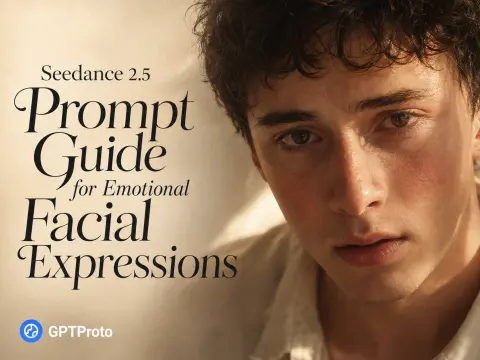
Why “She Looks Sad” Usually Produces a Flat AI Expression
An emotion word describes a state. Video needs change.
If a prompt begins and ends with “very sad,” Seedance 2.5 has no clear reason to alter the eyebrows, eyelids, mouth, breathing, or posture from one second to the next. The result may be visually attractive, but the face often stays locked in one expression.
Three prompt mistakes cause most flat emotional videos:
The prompt names the emotion but not its visible physical effects.
The character reaches maximum intensity in the first second, leaving no emotional progression.
Walking, dialogue, hand actions, camera movement, and background events compete with the face for attention.
Replace abstract direction with observable behavior:
| Weak direction |
Better visible direction |
| She looks very sad. |
Her inner eyebrows lift, her lower eyelids tighten, and her lips remain pressed together. |
| He becomes shy. |
He lowers his gaze, draws his shoulders inward, and tightens his fingers around the notebook. |
| She starts crying. |
Moisture gathers first; one tear falls only after she fails to remain composed. |
| He is nervous. |
He swallows, takes a shallow breath, and briefly avoids eye contact. |
| She is angry. |
Her jaw tightens before her stare hardens, while one nostril widens with a controlled breath. |
The takeaway is simple: describe what a camera can see, not what only the character can feel.
The Emotional Performance Formula for Seedance 2.5
A reliable prompt for real expressive video has seven parts:
Emotional trigger

+ attempt to suppress the reaction

+ involuntary facial leakage

+ breathing and body response

+ timed escalation

+ restrained recovery

+ camera and continuity constraints
Resistance is the part most prompts miss. A character who immediately cries, blushes, or shouts is displaying an emotion. A character who tries to prevent the reaction and fails is performing it.
For example, do not write only “his face turns red when his crush is discovered.” Give him a conflicting intention: he wants to appear calm. That resistance creates eye-contact avoidance, a delayed blush, a failed attempt to speak, tightened fingers, and a restrained smile. Those small reactions make the larger emotion believable.
Do not stack every possible cue into every stage. Choose two or three facial actions, one breathing response, and one small body action for each emotional beat. More instructions can produce more conflict, not more realism.
Translate Emotions into Visible Facial Actions
Use this table as a direction library. Pick the cues that fit the shot rather than copying an entire row.
| Emotion |
Eyes and brows |
Mouth and jaw |
Breathing and body |
| Holding back tears |
Glossy lower eyelids; inner brows gradually lift and draw together |
Lips press together; lower lip trembles; chin tightens |
Swallows once; uneven breathing; slight shoulder tremor |
| Embarrassment |
Gaze drops; brief upward glance from beneath the eyelashes |
Lips part without speaking; gently catches the lower lip; restrained smile |
Shoulders draw inward; fingers tighten; breath catches |
| Suppressed anger |
Fixed stare; brows lower unevenly |
Jaw clenches; lips flatten |
Controlled nasal breathing; rigid shoulders; hands remain still |
| Fear |
Eyes widen before scanning; upper eyelids stay tense |
Lips part; jaw briefly freezes |
Breath catches; chest stays tense; body leans back slightly |
| Suppressed laughter |
Eyelids narrow; gaze briefly breaks |
One corner of the mouth rises first; lips compress again |
Breath escapes through the nose; shoulders twitch once |
| Relief |
Brow tension releases; eyes soften and refocus |
Lips part before a small exhale; jaw relaxes |
Shoulders lower; breathing lengthens; posture opens |
Words such as restrained, hesitant, involuntary, gradual, and almost imperceptible help control intensity. They do not replace the physical action. “A subtle emotional expression” is still vague; “his chin trembles almost imperceptibly while he keeps his gaze lowered” is directable.
Example 1: Holding Back Tears — Image-to-Video Prompt
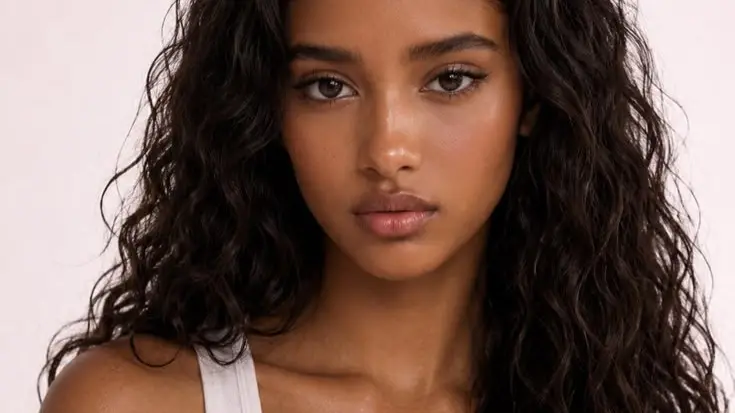
This example begins with a known character image and animates a 15-second emotional progression. The reference image should define the face, age, hairstyle, clothing, accessories, and initial composition. The prompt should spend most of its words on performance and continuity rather than redesigning the person.
[image]
[video]
Emotional timeline
| Time |
Emotional beat |
Visible cues |
| 0–3s |
Holding it together |
Pressed lips, tense chin, glossy eyes, one swallow |
| 3–5s |
Control begins to fail |
Inner brows lift, lower lip trembles, moisture gathers |
| 5–10s |
Restrained breakdown |
Eyes close, tears fall unevenly, breathing becomes shaky |
| 10–12s |
Physical recovery |
Head lowers, a shaky breath, sleeve wipes tears |
| 12–15s |
Emotional aftermath |
Wet eyes reopen, gaze turns away, sadness remains |
Copy-paste image-to-video prompt
@Image 1 defines the character’s exact identity, facial structure, hairstyle, clothing, accessories, age, and overall appearance. Preserve the same person throughout the entire video. Do not redesign, beautify, age, or replace the character.

Create a single continuous 15-second cinematic close-up based on @Image 1. The character is facing someone emotionally important just outside the camera and desperately trying not to cry.

[0–3s — trying to stay composed]
The character initially holds a controlled expression. Their lips press tightly together, the jaw becomes slightly tense, and the chin muscles tighten. They swallow once and take a small unsteady breath. Their eyes gradually become glossy, but no tears fall yet.

[3–5s — composure beginning to fail]
The inner eyebrows lift and draw subtly together. The lower eyelids tighten, the nose becomes faintly flushed, and the lower lip begins to tremble involuntarily. One corner of the mouth pulls downward slightly before the other. Moisture slowly gathers along the lower eyelids.

[5–10s — restrained emotional breakdown]
The character tries once more to suppress the emotion but fails. Their eyes squeeze shut, the brow contracts naturally, and tears begin to roll down the cheeks at slightly different speeds. Their mouth quivers into a quiet, restrained sob. Small involuntary tremors pass through the chin, throat, and shoulders as their breathing becomes uneven.

[10–12s — catching their breath]
The character lowers their head, takes a shaky breath through parted lips, and gently wipes the tears with their sleeve or the soft fabric of their clothing. The gesture feels spontaneous, hesitant, and imperfect.

[12–15s — fragile recovery]
They slowly raise their head and attempt to regain control. Their lips press together, they swallow, and their wet, reddened eyes look away from the camera. The crying begins to subside, but sadness remains visible in their breathing, gaze, and facial tension.

Maintain the original composition and visual style of @Image 1. Use a tight eye-level close-up, realistic skin movement, natural blinking, physically accurate tears, subtle breathing, and restrained micro-expressions. Keep the background stable with only slight natural environmental movement.

No cuts, no identity drift, no facial redesign, no hairstyle or clothing changes, no sudden exaggerated crying, no melodramatic acting, no symmetrical artificial tears, no rapid head shaking, no warped facial features, no beauty-filter skin, and no extra people entering the frame.
The starting image matters. A fully cheerful portrait forces the model to travel too far before the first emotional beat. A face already covered in tears removes the buildup. The best starting frame sits between those extremes: glossy lower eyelids, pressed lips, mild chin tension, but no tear has fallen.
If the source image is a half-body or full-body portrait, preserve that framing and request one slow push toward a close-up. Do not combine the push-in with walking, turning, and large hand gestures. The face is the scene.
Example 2: A Shy Boy Whose Secret Crush Is Discovered
This text-to-video example uses a different emotion but the same structure:
Discovery → Freeze → Avoid eye contact → Blush spreads
→ Accidental glance → Gentle lip bite → Shy aftermath
The important detail is delay. The blush should begin around the ears and spread gradually across the cheeks and nose. Instant bright-red skin looks like a filter. Moist eyes should suggest vulnerability without turning the scene into crying.
Copy-paste text-to-video prompt
Create a single continuous 12-second cinematic close-up of a shy 18-year-old young man whose secret crush has just been discovered by someone standing off-camera.

He has a gentle, youthful appearance, soft slightly tousled dark hair, clear natural skin, and simple casual clothing. He is standing in a quiet school corridor near a window during soft late-afternoon light. A folded handwritten love note is partially visible between the pages of the notebook held against his chest.

[0–2s — sudden realization]
Someone off-camera notices the hidden love note and looks at him knowingly. The young man freezes for a brief moment. His eyes widen slightly and his breath catches as he realizes that his secret has been discovered.

[2–5s — embarrassed avoidance]
He immediately lowers his gaze toward the floor, unable to maintain eye contact. His shoulders draw inward slightly and his fingers tighten around the notebook. His lips part as if he wants to explain, but no words come out.

[5–8s — blush spreading]
A natural blush begins around the tips of his ears and gradually spreads across his cheeks and the bridge of his nose. The color deepens visibly but remains realistic rather than cartoonish. His lower eyelids tighten slightly, and his eyes become glossy with faint tears of intense embarrassment and vulnerability, without actually crying.

[8–10s — trying to hide his feelings]
He briefly glances upward from beneath his eyelashes, accidentally meets the other person’s gaze, and immediately looks down again. He gently catches his lower lip between his teeth, trying to suppress a nervous, involuntary smile. His chin trembles almost imperceptibly.

[10–12s — shy emotional aftermath]
He hugs the notebook closer to his chest, turns his face slightly away, and releases his lower lip. His cheeks remain deeply flushed. His eyes stay lowered and moist, while the corners of his mouth hold the faintest restrained, embarrassed smile, revealing that his feelings are genuine.

Naturalistic live-action performance, intimate coming-of-age atmosphere, realistic skin texture, subtle facial muscle movement, visible breathing, natural blinking, shallow depth of field, soft window light, and gentle background blur. Static eye-level close-up with an extremely slow push-in. Focus primarily on the gradual emotional change in his eyes, lips, cheeks, and breathing.

No dialogue, no exaggerated anime reaction, no instant bright-red face, no cartoon blush marks, no tears running down the cheeks, no hysterical crying, no broad smile, no seductive expression, no exaggerated lip biting, no face distortion, no identity changes, and no camera cuts.
Two phrases prevent common failures here. Glossy with faint tears ... without actually crying separates emotional moisture from a crying scene. Gently catches his lower lip between his teeth keeps the action small enough to avoid mouth distortion.
Text-to-Video vs. Image-to-Video Emotional Prompts
The emotional timeline can be reused in both modes, but the prompt should not carry the same workload.
| Prompt component |
Text-to-video |
Image-to-video or reference workflow |
| Character identity |
Describe age, appearance, hair, clothing, and role |
Let the uploaded image define identity |
| Setting |
Describe the location, time, and light |
Preserve the source or add only necessary context |
| Main prompt focus |
Character, scene, and performance |
Performance, timing, and identity continuity |
| Main risk |
Generic character or identity changes |
Face drift, mouth distortion, or source-image redesign |
| Best use |
Building a complete scene from scratch |
Animating an established character |
ByteDance’s full Seedance 2.5 workflow supports extensive multimodal referencing, including up to 30 images, 10 videos, and 10 audio clips, according to the official launch details. That provider-level capability is broader than every third-party route.
At the time of writing, the main Seedance 2.5 API page on GPT Proto publicly exposes text-to-video with prompt, aspect ratio, duration, resolution, audio, camera, and seed controls. Use the image-to-video prompt above only in an interface that actually provides an image or reference input. Do not paste @Image 1 into a text-only endpoint and expect it to understand an image that was never uploaded.
How to Make Emotional Video Look Cinematic, Not Theatrical
Keep the camera close. An eye-level close-up or medium close-up gives facial changes enough pixels to remain visible. A wide shot can work for body language, but it is the wrong default when the eyes and lower lip carry the scene.
Use one restrained camera move. A very slow push-in or slight handheld drift adds presence without competing with the performance. Rapid orbiting, zooming, and head movement make face stability harder.
Build asymmetry into the reaction. One mouth corner can fall before the other. A tear can leave one eye first. The character can glance up and then immediately look down. Perfectly synchronized facial changes often feel synthetic.
Direct breathing. A held breath, one swallow, a shaky inhale, or shoulders lowering after an exhale connects the face to the body. This is especially useful when the emotional change must remain quiet.
Leave an aftermath. Do not end at the emotional peak. Give the final two or three seconds to recovery: the character releases their lip, blinks through wet eyes, looks away, or tries to steady their breathing. The residual emotion is often more convincing than the largest expression.
Why Your Seedance 2.5 Facial Expressions Still Look Wrong
| Problem |
Likely cause |
Prompt adjustment |
| The face stays flat |
Only abstract emotion words were used |
Add visible changes in the eyes, brows, mouth, jaw, and breathing |
| The character cries instantly |
The prompt has no buildup |
Reserve the first stage for resistance and delayed moisture |
| The acting looks melodramatic |
Too many strong cues occur at once |
Use restrained, hesitant, and fewer actions per stage |
| Tears look artificial |
They appear symmetrically or in excess |
Delay the first tear and vary the timing between both eyes |
| The mouth warps during lip biting |
The physical direction is too forceful |
Replace “bites hard” with “gently catches the lower lip” |
| The uploaded character changes |
The prompt redescribes or redesigns the person |
State that the reference defines identity and appearance |
| Facial detail disappears |
Large movement or busy camera work competes for attention |
Use a close-up and one slow camera move |
| The emotion vanishes after one second |
The prompt defines a peak but no ending state |
Add a recovery attempt and residual gaze or breathing |
When a generation misses, change one variable at a time. If tears fail, revise only the tear timing. If the acting is too strong, reduce the number of simultaneous cues. If the identity drifts, simplify movement and strengthen the reference-preservation instruction. Rewriting the entire prompt after every attempt makes it difficult to learn which change worked.
Reusable Seedance 2.5 Emotional Expression Prompt Template
[Reference and identity instructions, if a reference input is available]

Create a single continuous [duration]-second cinematic [close-up / medium close-up].

The character has just [emotional trigger], but tries to [resistance].

[0–Xs — initial reaction]
[Describe two or three visible eye, brow, mouth, breathing, or hand reactions.]

[X–Xs — emotion leaking through]
[Describe involuntary micro-expressions, gaze behavior, and gradual physical change.]

[X–Xs — emotional peak]
[Describe a controlled release without exaggerated acting.]

[X–Xs — aftermath]
[Describe the recovery attempt, residual breathing, and final gaze.]

Camera:
[Choose the framing and one restrained camera movement.]

Continuity:
[State which identity, clothing, background, lighting, and composition details must remain unchanged.]

Avoid:
[Instant emotional change, exaggerated acting, facial distortion, identity drift, rapid head movement, artificial symmetrical reactions, and unrelated background action.]
For a 10–15 second single-shot performance, four timed stages are usually enough. For a longer 30-second narrative, use the extra time for an external trigger or a second story beat rather than stretching the same facial reaction across the entire clip. Seedance 2.5 officially supports up to 30 seconds per generation and timestamp-level direction, but ByteDance also notes remaining limits around complex physical motion and scenes with multiple interacting subjects. Keep the scene narrow when facial acting is the priority. See the official Seedance 2.5 model overview for the current provider-level capability summary.
How to Generate an Emotional Video with Seedance 2.5 on GPT Proto
Open the Seedance 2.5 model page and choose the text-to-video task.
Paste the complete emotional prompt. Set the aspect ratio, duration, resolution, audio preference, camera behavior, and seed shown by the live controls.
Generate the first version and score only four things: emotional timing, face stability, physical realism, and whether the final two seconds preserve the emotional aftermath.
Revise the weakest stage instead of replacing the whole prompt.
Developers can submit the same text-to-video prompt through the model route. The endpoint below is confirmed by the live model route; use the current parameter panel as the source of truth if available values change.
curl --location 'https://gptproto.com/api/v3/bytedance/dreamina-seedance-2-5-260628/text-to-video' \
  --header 'Authorization: GPTPROTO_API_KEY' \
  --header 'Content-Type: application/json' \
  --data '{
    "prompt": "Create a single continuous 12-second cinematic close-up of a shy young man whose secret crush has just been discovered. He freezes, lowers his gaze, gradually blushes, gently catches his lower lip, and ends with moist eyes and a restrained embarrassed smile. Natural skin texture, subtle breathing, no dialogue, no cartoon blush, no tears falling, no camera cuts.",
    "aspect_ratio": "16:9",
    "duration": 12,
    "resolution": "720p",
    "generate_audio": false,
    "camera_fixed": false,
    "seed": -1
  }'
If you want to compare other video models with the same emotional timeline, keep the prompt, duration, framing, and seed policy constant, then browse the AI video model collection. A fair comparison asks which model preserves the emotional arc—not which one produced the prettiest first frame.