商品写真を動く映像に変えるのは簡単です。フック、プロセス、変化、そして最後の商品披露を盛り込んだ広告に仕上げるのは、はるかに難しくなります。
洗濯用洗剤の画像1枚でこれを試しました。最初の試みでは、商品写真と1つの長いシネマティックプロンプトを使いました。生成された動画は洗練されていましたが、1つの連続した視覚的変化のように展開しました。女性がベッドで横たわり、花が徐々にシーンを埋め、終盤近くで洗剤ボトルが現れました。雰囲気はありましたが、プロンプトで説明した洗濯の動作はほとんど動画に反映されませんでした。
2つ目のアプローチでは、プロンプトをただ長くするのではなく、入力を変えました。このアイデアを8パネルの絵コンテに変換するために、GPT Image 2を使い、その後、商品画像と絵コンテをSeedance 2.5に渡し、1回の25秒生成のための視覚的な参照として使いました。
結果は、実用的な絵コンテから動画へのワークフローです:
商品画像1枚 → 8パネルの絵コンテ1つ → マルチショット広告1本
8本の動画クリップを個別に生成したり、ターミナルや手動でショットを組み立てるタイムラインを使ったりすることなく、完全な初稿を作成できます。
ワークフローの概要
| ステージ |
入力 |
モデルまたはタスク |
出力 |
| 製品の固定 |
元の商品写真 |
参照画像 |
パッケージのアイデンティティ基準 |
| ストーリー設計 |
25秒のコンセプト |
時間指定された8つのストーリービート |
ショットリスト |
| プリプロダクション |
商品画像+ストーリーボード用プロンプト |
GPT Image 2による画像編集 |
1枚の2×4ストーリーボード |
| 動画制作 |
商品画像+ストーリーボード+時間指定モーションプロンプト |
Seedance 2.5による参照画像から動画への変換 |
1本の25秒CM |
| 品質管理 |
生成された動画 |
人による確認 |
採用、修正、または再生成 |
重要な変化はストーリーボードです。動画モデルにモーション、カメラの方向、タイミング、キャラクターの連続性、製品の一貫性を同時に処理させる前に、画像モデルが各ショットの見た目を決めます。
プロンプトだけのバージョンでストーリーが伝わらなかった理由
元のプロンプトには、寝室、洗濯機、洗剤を注ぐ場面、乾いたシーツ、香りへの反応、花畑、最後の商品ショットがすでに含まれていました。問題は説明的な言葉が不足していたことではありません。
問題は、1枚の商品画像だけでは、動画モデルに強力な視覚的基準が1つしか与えられなかったことです。モデルは依然として次の要素を発明しなければなりませんでした。
複数の場所に登場する同じ女性
同じビジュアル世界に属する寝室と洗濯室
異なる8つのショットの構図
洗濯や注ぐ動作
すべてのカットのタイミングと種類
香りに着想を得た幻想的なシーンへの遷移
安定した製品パッケージの表示
視覚的な計画がなかったため、モデルは依頼を、一貫性を保ちやすい形、つまり1人の女性、1つの部屋、徐々に花へと変化する演出、そして商品の登場へと単純化しました。
これが、「映画的」「高級」「感情的」といった形容詞を増やしても本当の問題は解決しなかった理由です。これらの言葉はスタイルを説明するだけで、8つの構図を定義したり、8回の編集カットを強制したりするものではありません。
ステップ1:商品写真をアイデンティティ基準として使う
ブランド商品の制作では、開始画像は単なるインスピレーションではありません。商品の視覚的アイデンティティそのものです。
参照画像には、パッケージをできるだけ多く写す必要があります。
ボトルのシルエットと比率
キャップの形状と色
ハンドルの位置
ラベルの位置
主要ブランド名
見えている素材と仕上げ
維持したい照明とカラーファミリー
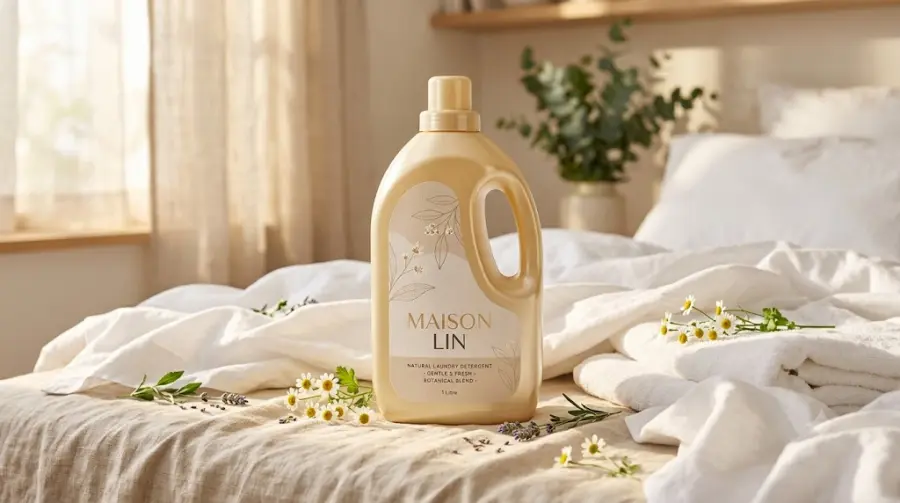
今回のテストでは、元画像に、日差しの入る寝室に置かれた温かみのある黄色のMAISON LIN洗剤ボトルが写っていました。そのため、パッケージの参照とスタイルの参照の両方として役立ちました。
洗剤ボトルをテキストだけで生成するのではなく、GPT Image 2を画像編集モードまたは参照画像モードで使用してください。GPT Image 2は画像参照を高い忠実度で処理できますが、それでも生成モデルです。小さなラベル文字、ロゴ、ハンドル、キャップの形状は、ストーリーボードと最終的なヒーローショットで再度確認してください。
ステップ2:アイデアを8つの目に見えるストーリービートに変換する
25秒の広告に複雑な脚本は必要ありません。説明なしでも視聴者が理解できるシーケンスが必要です。
このCMでは、ストーリーを8つのビートに分けました。
| 時間 |
ストーリービート |
映像上の目的 |
カメラの方向 |
| 0~3秒 |
女性が、もう新鮮に感じられないシーツに触れる |
必要性を提示 |
ゆっくりしたプッシュイン |
| 3~6秒 |
彼女がシーツを洗濯機に入れる |
プロセスを開始 |
横方向のトラッキングショット |
| 6~9秒 |
彼女が洗剤を開けて注ぐ |
使用中の商品を見せる |
マクロのクローズアップ |
| 9~12秒 |
シーツが水と泡の中を回転する |
洗浄を視覚化 |
洗濯機ドアのクローズアップ |
| 12~15秒 |
清潔になったシーツが日差しの中で揺れる |
目に見える清涼感を届ける |
横方向のワイド移動 |
| 15~18秒 |
彼女がシーツの香りを嗅ぎ、目を閉じる |
ベネフィットを感情につなげる |
ミディアムクローズアップ |
| 18~22秒 |
部屋がカモミールとラベンダーの花畑へと開けていく |
香りを視覚的な見せ場に変える |
ワイドリビール |
| 22~25秒 |
最後のヒーローショットでボトルが戻ってくる |
ブランド認知で締めくくる |
ゆっくり商品にプッシュインして静止 |
このショットリストは、AI動画でよくあるミス、つまり見せ場を早く出しすぎることも防ぎます。冒頭数秒で花が寝室を覆ってはいけません。花は洗濯と香りへの反応の後に登場するものです。
ステップ3:GPT Image 2でストーリーボードを生成する
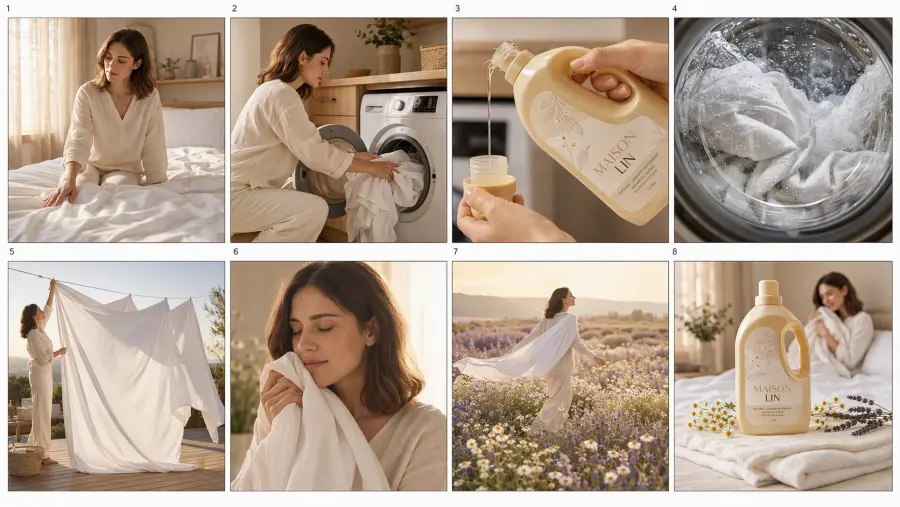
8つのシーンを個別に生成すると、画像ごとに女性、服装、照明、家の雰囲気が変わる可能性があります。そこでGPT Image 2に、1枚のストーリーボードシート上へ8つのパネルをすべて作成させました。
これにより、同時に2つの役割を果たせます。
動画モデルに、ストーリー全体の視覚的な地図を与えられる。
画像モデルが、繰り返し登場する女性、カラーパレット、環境を1つのキャンバス上でまとめて設計できる。
これは完璧な同一性を保証するものではありません。生成画像モデルは、繰り返し登場する顔やブランドの細部を変えることがあります。それでも、1つの共同ストーリーボードは、関連性のない8つのテキスト・画像生成リクエストより、通常は強力な出発点になります。
GPT Image 2ストーリーボード用プロンプト
25秒の高級洗濯洗剤CM用に、プロフェッショナルで映画的な8パネルのストーリーボードを作成してください。

アップロードした商品画像を、パッケージの正確な参照として使用してください。元の淡い暖色系黄色のボトル、ベージュのキャップ、人間工学に基づいた側面ハンドル、ボトルの比率、MAISON LINのラベル位置、タイポグラフィ、パッケージデザインを維持してください。ボトルを再設計したり、別のブランドを創作したりしないでください。

縦長9:16の構図を正確に8つ作り、2行4列に配置してください。パネル間にはきれいな余白を設けてください。ストーリーは上段を左から右へ読み、続いて下段を左から右へ読めるようにしてください。パネル番号は外側の余白にのみ配置してください。キャプション、広告コピー、透かしは追加しないでください。

パネル1で女性の正確なアイデンティティを確立し、以降すべてのパネルで同一のキャラクターを再利用してください。彼女を、似た女性が8人いるのではなく、固定された1人のキャラクターとして扱ってください。すべてのパネルで、同じ顔の形状、目の形、鼻、唇、肌の色、肩までの栗色の髪、年齢、体の比率、クリーム色のリネントップス、アイボリー色のトラウザーズを維持してください。

ビジュアルの方向性:フォトリアルなプレミアム・ライフスタイル広告、暖かな朝の日差し、アイボリーとベージュのパレット、淡いオーク材のインテリア、リアルな白いリネン、自然な肌の質感、柔らかなフィルムグレイン、控えめな高級感、説得力のある布の物理表現。香りのイメージには白いカモミールと淡い紫のラベンダーを使用してください。赤いポピー、バラ、または無作為にカラフルな花を使わないでください。

パネル1:暖かな日差しの入る寝室で、女性がベッドの端に座り、少し乱れた白いシーツに触れている。表情は思慮深く、やや不満げ。商品と花は出さないでください。

パネル2:洗練されたベージュの洗濯スペースで、同じ女性が白いシーツを現代的なドラム式洗濯機に入れている。動作の途中を捉えてください。

パネル3:洗濯機の開いた扉の横で、プレミアムなマクロショット。彼女の手が正確な洗剤ボトルを持ち、淡い色の液体洗剤を計量キャップに注いでいる。パッケージは参照画像と同一に保ってください。

パネル4:洗濯機のドア越しの極端なクローズアップ。白いシーツが透明な水と繊細な泡の中を回転している。女性、商品、幻想的な花は出さないでください。

パネル5:屋外テラスのワイドショット。清潔になったシーツが暖かな日差しの中、ミニマルな物干しロープで風に膨らんでいる。同じ女性が片隅を留めている。まだ魔法の花は出さないでください。

パネル6:寝室での感情的なミディアムクローズアップ。女性が清潔なシーツを顔に寄せ、香りを吸い込み、目を閉じ、安らぎを感じている subtle な表情を見せる。遠くの背景に、かすかなカモミールの花びらが少し現れ始めても構いません。

パネル7:映画的なワイドの幻想ショット。同じ女性が白いカモミールと淡い紫のラベンダーが咲く黄金色の野原を、白いシーツを肩にまとって歩いている。フォトリアルな花と、控えめなマジックリアリズム。

パネル8:寝室での高級感のある最終商品ショット。正確な洗剤ボトルが、折りたたまれたアイボリー色のリネンの上に、シャープなフォーカスで直立している。近くには小さなカモミールとラベンダーの枝。背景では同じ女性が柔らかくぼけた状態で、清潔なシーツを抱きしめている。任意のタグライン用にネガティブスペースを残してください。

各パネルは、連続的なモーフではなく、明確な編集カット用に準備された独立したショットにしてください。パネル間でシーンを融合しないでください。パッケージの変形、ボトルの重複、顔の不一致、歪んだ手、余分な指、形の崩れた家電、プラスチックのような肌、人工的なCGIの花は避けてください。
動画に進む前に確認すること
小さな装飾上の違いだけを理由にボードを却下しないでください。動画に影響する詳細を確認してください。
シーケンスは正しい順序で明確に読めますか?
関連するパネル全体に同じ女性が登場していますか?
髪型と服装は安定していますか?
ボトルの全体的なシルエットと色は正しく保たれていますか?
洗濯機、寝室、テラス、幻想的な野原は視覚的に区別できますか?
花は香りのセクションまで待っていますか?
最後の商品ショットは、エンディングの基準として十分に大きく、すっきりしていますか?
1つのパネルに問題がある場合は、完全なストーリーボードと商品写真を参照として使い、そのパネル専用のショットプロンプトで修正してください。正確なショット単位の制作管理が必要な場合を除き、8つの独立した生成からやり直さないでください。
ステップ4:Seedance 2.5にストーリーボードと商品参照を渡す
ストーリーボードは、通常の最初のフレームではなく、制作上の参照資料として扱う必要があります。
アップロードするもの:
商品アイデンティティの参照として元の洗剤画像
シーケンスと構図の参照として完全なストーリーボード
インターフェースにオムニ参照、複数画像、Multiframes、または参照画像から動画へのモードがある場合は、そのモードを使用してください。標準的な最初のフレームから画像を動画にする欄では、ストーリーボード全体のグリッドを開始フレームとして扱い、グリッド自体をアニメーション化または変形しようとする可能性があります。
最大限の制御を行うには、ストーリーボードの各パネルを個別の参照スロットに割り当てられます。この記事で行う最も簡単な編集なしの実験では、完全なボードを1つの順序付き制作マップとして扱い、プロンプトでその読み取り方を正確に説明します。
Seedance 2.5動画用プロンプト
自然な音声を同期させた、完全な25秒の縦型9:16の映画的な洗濯洗剤CMを1本作成してください。

@Image1は商品の正確なアイデンティティ参照です。商品が登場する際は、ボトルのシルエット、淡い暖色系黄色、ベージュのキャップ、ハンドルの位置、比率、MAISON LINのラベル位置、見えているパッケージデザインを維持してください。

@Image2は8パネルの完全なストーリーボードです。上段を左から右へ読み、続いて下段を左から右へ読んでください。各パネルを独立したショット構図として扱ってください。ストーリーボードに示された同じ女性、服装、環境、照明、商品デザインに従ってください。

00:00~00:03 — ショット1。暖かな寝室。女性が白いシーツに触れ、もう新鮮に感じられないことに気づく様子を、ゆっくりプッシュインで撮影します。

00:03~00:06 — ショット2へハードカット。彼女がシーツをドラム式洗濯機に入れる様子を、横方向のトラッキングショットで撮影します。

00:06~00:09 — ショット3へハードカット。商品のマクロクローズアップ。彼女が正確な洗剤ボトルを開け、淡い色の液体を計量キャップに注ぎます。自然な手の動きとリアルな液体の物理表現。

00:09~00:12 — ショット4へハードカット。洗濯機のドア越しに、白いシーツが透明な水と繊細な泡の中を回転する様子をクローズアップします。

00:12~00:15 — ショット5へハードカット。テラスのワイドショット。清潔なシーツが暖かな日差しとそよ風の中で揺れ、女性が片隅を留めます。

00:15~00:18 — ショット6へハードカット。寝室に戻り、彼女がシーツを顔に寄せ、香りを吸い込み、目を閉じてリラックスします。表情が十分に伝わる長さで保持してください。

00:18~00:22 — ショット7へ遷移。香りが、白いカモミールと淡い紫のラベンダーが咲くフォトリアルな野原へと広がります。女性はシーツを肩にまとい、野原を歩きます。赤い花は使わないでください。

00:22~00:25 — ショット8へ明確にハードカット。暖かな寝室に戻り、最後の商品ヒーローショットを見せます。正確なボトルが、折りたたまれたアイボリー色のリネンの上に、シャープなフォーカスで直立しています。最後の3秒間、パッケージを安定させ、読み取れる状態で保持してください。

指定した時間の境界で、明確な編集カットを使用してください。CM全体を1つの連続したモーフィングシーンにしないでください。シーツを入れる、注ぐ、洗う、乾かす、香りを嗅ぐ動作を省略しないでください。香りへの反応より前に魔法の花を登場させないでください。

音声の方向性:柔らかな朝の室内環境音、控えめな布の動き、明瞭なボトルキャップの音、穏やかに注ぐ音、低い洗濯機の回転音、屋外のそよ風、控えめで暖かなピアノ。会話、ナレーション、字幕、無作為な歌詞、生成された広告テキストは使用しないでください。

フォトリアルなプレミアム・ライフスタイル広告。自然な肌、リアルな手、説得力のある体の動き、リアルな液体と布の物理表現、柔らかなフィルムグレイン、安定した暖かな照明、一貫したキャラクターのアイデンティティ。人物の重複、余分な商品、変形したパッケージ、歪んだ手、プラスチックのような肌、過剰な泡、無作為な文字、透かしは不可。
推奨生成設定
| 設定 |
今回のテストでの値 |
| モード |
参照画像から動画、またはマルチモーダル参照モード |
| 長さ |
25秒 |
| アスペクト比 |
9:16 |
| 解像度 |
利用可能な低い解像度で下書きを作成し、選択した最終版にはより高い設定を使用 |
| 音声 |
オン |
| カメラ固定 |
オフ |
| シード |
再現またはバリエーション比較を行う場合は、シードを記録 |
GPT Protoでは現在、4~30秒の音声付き動画生成にSeedance 2.5を掲載しているため、完全な25秒のシーケンスを複数の短いクリップに分けず、1つのタスクで収めることができます。
ステップ5:2つの結果を比較する
プロンプトのみの方法とストーリーボードを使う方法は、同じ商品と全体的なコンセプトを使う場合でも、動画モデルに与える指示のレベルが大きく異なります。
| 評価項目 |
商品画像+長いプロンプト |
商品画像+ストーリーボード |
| ビジュアルの雰囲気 |
暖かく映画的 |
暖かく映画的 |
| 明確なストーリービート数 |
少ない |
8つのビートとして計画 |
| 洗濯の動作 |
頻繁に省略される |
生成前に視覚的に固定 |
| カメラ構図 |
モデルが推測 |
事前に定義 |
| キャラクターの連続性 |
主にテキストに基づく |
共有ボード1枚で強化 |
| 商品の連続性 |
元画像に基づく |
商品画像とボードの両方で強化 |
| トランジション |
連続的な変化になりやすい |
カットと、意図的な幻想的トランジション1回として指示 |
| 手動クリップ編集 |
必須ではないが、ストーリーが不完全になる可能性がある |
ワンパス出力がボードに従えば不要 |
最初のテストは約30秒続きましたが、ほぼ1つの寝室の構図にとどまりました。花が女性の周囲に徐々に広がり、終盤近くで商品が登場しました。洗濯のプロセスというより、ムードフィルムのような仕上がりでした。
ストーリーボードを使ったバージョンでは、セットアップ、商品の使用、洗浄の証明、清涼感、感情的な見せ場、香りの視覚化、パックショットという、より明確な広告構成になりました。ボトルが登場する理由を、視聴者が推測する必要はもうありません。
これは、すべての細部が完璧になるという意味ではありません。動きの中でパッケージの文字がぼやけることがあります。花畑が本来と異なる種類の花に寄ってしまうこともあります。手が一時的にラベルを覆うこともあります。これらは品質管理上の問題であり、ワークフローを放棄する理由ではありません。
これで動画編集は完全に不要になるのか?
これはショットの組み立てを不要にできます。しかし、確認と仕上げまで不要にするものではありません。
生成されたシーケンスが8つのビートに従っていれば、8つの動画ファイルを作成してタイムラインに並べ、色を合わせ、クリップ間の連続性の違いを隠す必要はありません。Seedance 2.5は、1つの動画タスクとしてシーケンスを生成します。
それでも、次の要素を追加することはできます。
確認済みのブランドタグライン
ロゴのエンドカード
ライセンス取得済みの音楽
字幕またはボイスオーバー
法的文言または商品訴求文
修正済みの最終パックショット
これは、関連性のない8つのクリップから広告を再構築することとは異なります。
ストーリーボードから動画へ vs. ショット単位の生成
| アプローチ |
ワンパスでのストーリーボードから動画への変換 |
個別に生成した8つのクリップ |
| 準備時間 |
短い |
長い |
| 手動編集 |
任意 |
通常必要 |
| シーン単位の制御 |
中程度 |
高い |
| キャラクターの連続性 |
共有生成1回で役立つ場合がある |
すべてのクリップで厳密な参照が必要 |
| 弱いショットの修正 |
選択的な編集または再生成が必要になる場合がある |
そのクリップだけを置き換える |
| 最適な用途 |
広告の素早いドラフト、クリエイティブテスト、ソーシャルコンテンツ |
すべてのカットを正確に管理する必要があるクライアント向け最終版 |
ワンパス方式は、常に最も制御しやすい制作方法とは限りません。しかし、1枚の商品画像から、完全な編集パイプラインを構築せずに一貫した短いCMを作ることが目的なら、より効率的な方法です。
よくある問題と解決方法
動画が依然として1つの連続したモーフになる
明確な時間境界を追加し、「ハードカット」「独立したショット」「連続的にモーフさせない」というフレーズを繰り返してください。通常の最初のフレームのアニメーションモードではなく、参照またはストーリーボードモードを使用していることを確認してください。
シーン間で女性が変わる
各シーンを個別に作成するのではなく、完全なストーリーボードを1枚の画像として生成してください。それでも顔が変わる場合は、独立したキャラクターシートを作成し、商品とストーリーボードと一緒にアップロードしてください。
ボトルまたはラベルが変わる
動画のステップでも元の商品写真を再度アップロードしてください。ストーリーボード内の小さなボトルだけを唯一の商品参照にしないでください。最終パックショットは比較的静止させ、公開前に確認してください。
洗濯プロセスの前に花が登場する
モチーフを登場させてよいタイミングを明示してください。香りへの反応より前に魔法の花を出さないでください。この制限を画像プロンプトと動画プロンプトの両方で繰り返してください。
最終商品ショットが短すぎる
最後の3秒間をパックショット用に確保し、カメラを保持するよう明示的に指示してください。素早いリビールでは、視聴者が商品を認識する時間が不足します。
モデルが動作を省略する
その時間範囲内で同時に行う動作の数を減らしてください。3秒間の各ビートには、主な被写体動作を1つ、主なカメラ指示を1つだけ設定してください。
これは自動化されたワークフローか?
この例は完全に自動化された制作パイプラインではなく、クリエイティブワークフローです。
2つのモデルタスクが含まれます。
GPT Image 2が、商品参照とクリエイティブブリーフからストーリーボードを作成します。
Seedance 2.5が、商品参照、ストーリーボード、時間指定された動画プロンプトから完全なCMを作成します。
クリエイターはGPT Protoのブラウザーインターフェースで両方のタスクを手動で完了できます。開発者は後から、同じステージをAPI呼び出しで接続し、ストーリーボードと動画のURLを保存し、再試行を追加し、複数の商品に対してワークフローを実行できます。
ここでワークフローは自動化になります。クリエイティブのロジックは変わりませんが、ソフトウェアが繰り返しの送信、結果の取得、保存、品質確認キューの処理を担います。
GPT Protoは同じプラットフォームを通じて画像モデルと動画モデルを提供するため、チームは別々のプロバイダー連携を維持する代わりに、1つのアカウント、1つの残高、1つのAPIキーで両方のステージを利用できます。
このワークフローが最も効果を発揮する場面
このアプローチは、次の用途に適しています。
承認済みの商品写真1枚から始めるEコマースブランド
複数のキャンペーンコンセプトをテストする小規模チーム
クライアント向けの素早いプリビジュアライゼーションを作成する代理店
15~30秒のナラティブが必要なソーシャル広告
シンプルなプロセスでベネフィットを示せる商品
再利用可能な商品から動画へのツールを構築する開発者
すべてのラベル、手の位置、商品訴求、セリフ、カットについて個別の承認が必要な場合は、より管理しやすいショット単位のプロセスを使用してください。
最終的な要点
失敗したバージョンの原因は、ビジュアルスタイルが弱かったことではありません。動画モデルに与えられたのが、商品画像と、言葉だけで書かれたストーリーだったために失敗したのです。
ストーリーボードは、モーション生成の前に見えない指示を目に見えるショット参照へ変換することで、ワークフローを変えました。その結果、8つの別々のクリップではなく、Seedance 2.5に完全な25秒CMを依頼できるようになりました。
再利用可能な方法はシンプルです。
参照画像で実際の商品を固定する。
広告を時間指定されたストーリービートに分ける。
GPT Image 2で一貫性のあるストーリーボードを1つ生成する。
ストーリーボードと元の商品画像をSeedance 2.5に送る。
シーケンス全体を1回生成し、商品、キャラクター、動作、最終パックショットを確認する。
同じアプローチをGPT Image 2、Seedance 2.5で試したり、GPT ProtoのAI画像およびAI動画コレクションで他のモデルを探したりできます。