GPT Proto

Preview image

Create a Stunning Photo Collage with AI Grid Layouts

Transform your favorite images into a beautiful photo collage effortlessly. Our AI maker suggests perfect templates and auto-arranges every shot in seconds.
Flexible Aspect Ratios

Design professional grids tailored for Instagram, banners, or print portfolios. Our collage maker adapts to any social media format.

Generates a grid of cartoon-style circular character avatars with text labels, ideal for UI mockups or cast lists. { "type": "character avatar grid", "theme": "{argument name=\"theme\" default=\"Journey to the West mythology\"}", "style": "{argument name=\"art style\" default=\"clean 2D cartoon vector illustration, thick outlines, flat colors\"}", "layout": { "background": "{argument name=\"background color\" default=\"light gray\"} subtle texture", "format": "grid of circular portraits with text labels centered below each circle", "rows": [ { "count": 4, "items": [ {"label": "Sun Wukong", "description": "monkey boy with golden headband and red scarf"}, {"label": "Tang Sanzang", "description": "monk with ornate golden crown"}, {"label": "Zhu Bajie", "description": "pig man holding a rake"}, {"label": "Sha Wujing", "description": "bearded man holding a crescent moon staff"} ] }, { "count": 4, "items": [ {"label": "White Dragon Horse", "description": "white horse with golden bridle"}, {"label": "Jade Emperor", "description": "older man with white beard and golden crown"}, {"label": "Guanyin", "description": "goddess holding a willow branch"}, {"label": "Bull Demon Kink", "description": "fierce bull demon in armor"} ] }, { "count": 4, "items": [ {"label": "Princess Iron Fan", "description": "woman holding a green palm leaf fan"}, {"label": "Red Boy", "description": "boy with red hair, horns, and a small flame"}, {"label": "Black Wind Demon", "description": "dark shadowy demon with glowing red eyes"}, {"label": "Nezha", "description": "boy with double hair buns holding a flaming spear"} ] }, { "count": 3, "description": "partial row repeating Princess Iron Fan, Black Wind Demon, and Nezha, slightly cropped at the bottom" } ] } }

Prompt
Flexible Aspect Ratios
After

Text & Sticker Add-ons

Personalize your memories further. Add creative text, fun stickers, and unique graphic elements to finish your visual story.

Generates a 9-panel grid of a 3D animated character showing various expressions and outfits while peeking through torn paper. { "type": "3x3 character expression grid", "style": "{argument name=\"art style\" default=\"3D animation, Pixar style\"}", "character_base": "{argument name=\"character description\" default=\"young woman with voluminous dark wavy hair and round wire-rimmed glasses\"}", "common_theme": "{argument name=\"framing concept\" default=\"peeking through a torn hole in white paper\"}", "layout": { "rows": 3, "columns": 3, "total_panels": 9, "panels": [ {"position": "top-left", "expression": "winking", "action": "adjusting glasses", "outfit": "green sweater"}, {"position": "top-center", "expression": "smirking", "action": "lowering dark sunglasses", "outfit": "red leather jacket"}, {"position": "top-right", "expression": "thinking", "action": "finger on chin", "outfit": "yellow hoodie"}, {"position": "middle-left", "expression": "big smile", "action": "arms resting on edge", "outfit": "black and white striped shirt"}, {"position": "middle-center", "expression": "smiling", "action": "thumbs up", "outfit": "orange button-up shirt"}, {"position": "middle-right", "expression": "neutral", "action": "drinking boba tea", "outfit": "blue sweater"}, {"position": "bottom-left", "expression": "happy", "action": "waving", "outfit": "purple sweater vest over white shirt"}, {"position": "bottom-center", "expression": "laughing with eyes closed", "action": "arms crossed", "outfit": "pink cardigan"}, {"position": "bottom-right", "expression": "silly", "action": "poking cheeks", "outfit": "teal sweater"} ] } }

Prompt
Text & Sticker Add-ons
After

Endless Customization

Adjust spacing, borders, and corners in your photo collage. Drag and drop pictures for effortless repositioning and perfect alignment.

Editorial 3x3 photo grid in a clean soft beige studio. Character (matches reference 100%) wearing lightweight dark navy shirt, ivory trousers, barefoot for raw simplicity. Lighting: large diffused key light directly front-right, silver reflector left, subtle rim from top. Shots to include: 1. extreme close-up of lips + cheekbone with blurred hand partially covering (85mm, f/1.8, razor-thin DOF); 2. tight crop on eyes looking into lens with reflection of light strip visible (85mm, f/2.0); 3. black & white close portrait resting chin on fist, face filling frame (50mm, f/2.2); 4. over-shoulder shot, blurred foreground fabric curtain framing half face (85mm, f/2.0); 5. very close frontal with hands overlapping face, light streak across eyes (50mm, f/2.5); 6. tight angled portrait showing hair falling into eyes, soft-focus background (85mm, f/2.2); 7. crop of hands touching jawline, eyes cropped out (50mm, f/3.2, detail-focused); 8. half-body seated sideways on low cube, head turned sharply away, blurred foreground (35mm, f/ 4.5); 9. intense close-up of profile with single tear-like water droplet, cinematic light slice across (85mm, f/ 1.9). Angles: mostly tight headshots with slight high/low tilts, maintaining variation. Capture RAW, professional muted grade, smooth tonal contrast, subtle cinematic grain. Mood: intimate, introspective, character-led editorial minimalism with delicate use of fabric as prop.

Prompt
Endless Customization
After

Smart AI Layout Suggestions

Upload multiple images and let the AI find the perfect photo collage templates. Slide through suggested combinations instantly.

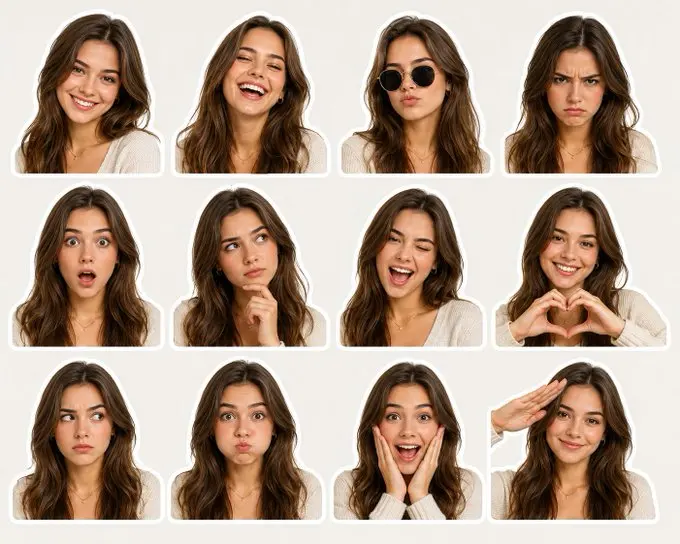
A high-quality sticker pack featuring a young beautiful English woman with long soft brown hair, flawless glowing skin, and attractive facial features, shown in 12 different facial expressions and emotions. Arranged in a clean 4x3 grid on a light neutral beige background. Each portrait is cropped around the shoulders and surrounded by a thick white die-cut sticker border. Expressions include: friendly smile, laughing joyfully, cool pose with black sunglasses, angry frowning face, shocked expression with wide eyes and open mouth, thoughtful thinking pose with hand on chin, playful wink, heart hands gesture, suspicious sideways glance, puffed cheeks, excited surprise with hands on face, and casual salute. Consistent character appearance across all stickers. Realistic digital photography style, ultra-detailed skin and hair texture, soft studio lighting, vibrant natural colors, trendy social media emoji/sticker aesthetic, centered composition, high resolution, clean minimal layout, premium sticker sheet design, photorealistic, cute and expressive.

Prompt
Smart AI Layout Suggestions
After

Frequently Asked Questions

How do I create a photo collage online?

Simply upload your images to our AI generator. The tool automatically analyzes the number of pictures and suggests ideal photo collage layouts for you to customize and download.

Does the AI suggest grid templates automatically?

Yes! Our smart layout feature detects the count and orientation of your uploaded files, offering the best grid combinations so your photo collage looks professionally arranged.

Can I adjust the borders and spacing?

Absolutely. Once the AI generates the initial layout, you can manually drag sliders to tweak border thickness, corner rounding, and inner cell spacing in the collage maker.

What file format will my photo collage be saved as?

You can instantly download your finished photo collage in high-resolution PNG format, perfect for sharing on social media, printing for gifts, or uploading to digital portfolios.

Can I resize my project for Instagram or blogs?

You can easily choose different aspect ratios. Whether you need a square format for Instagram or a wide banner for a blog, the photo collage creator adjusts the cells seamlessly.

Is it possible to add text or stickers?

Yes, our platform provides comprehensive customization. After finalizing your core grid, you can overlay custom typography, captions, and decorative stickers to tell a complete story.

Will this tool work on my mobile device?

You can access our AI tools from any browser, on any device. Create a beautiful photo collage on your smartphone while traveling or fine-tune layouts on your desktop.

Can I reposition pictures after the AI places them?

Of course. Our intuitive drag-and-drop functionality lets you swap images between different grid cells until the visual flow of your photo collage matches your exact vision.

Testimonials

The AI layout suggestions saved me hours. Made a gorgeous family photo collage for my mom's birthday in literally three minutes.

Sarah Jenkins

Event Planner

I use this photo collage tool for my e-commerce product ads. The drag-and-drop feature is super smooth and the high-res PNG downloads are flawless.

Marcus Thorne

Small Business Owner

Finding the right grid templates used to be a nightmare. Now I just upload 10 pics and the collage maker instantly snaps them into the perfect shape.

Emily Chen

Travel Blogger

I travel a lot, and being able to generate a quick travel photo collage on my phone browser before boarding a flight is a massive time-saver.

David Ross

Digital Nomad

Love the text and sticker options. The auto layout handles the hard part, and I get to add fun captions to my social media posts.

Chloe Adams

Content Creator

The ability to adjust corner roundness and border spacing gives my professional portfolio a really polished look. Best AI photo collage platform I've tried!

Jason Wu

Graphic Designer

It handles aspect ratios beautifully. I constantly switch between Instagram square and blog banners, and the collage creator adapts instantly.

Amanda Pierce

Social Media Manager

Putting together a holiday photo collage is so effortless now. The AI suggestions are actually smart and arrange portrait vs landscape shots correctly.

Thomas Miller

Hobbyist Photographer

Fantastic tool for making quick visual stories. The grid builder doesn't compress my files, so everything stays incredibly sharp.

Rachel Kim

Marketing Coordinator

Dragging photos between cells to swap their positions is incredibly satisfying. Building a pet photo collage has never been this addictive.

Leo Bennett

Veterinary Technician

The AI layout suggestions saved me hours. Made a gorgeous family photo collage for my mom's birthday in literally three minutes.

Sarah Jenkins

Event Planner

I use this photo collage tool for my e-commerce product ads. The drag-and-drop feature is super smooth and the high-res PNG downloads are flawless.

Marcus Thorne

Small Business Owner

Finding the right grid templates used to be a nightmare. Now I just upload 10 pics and the collage maker instantly snaps them into the perfect shape.

Emily Chen

Travel Blogger

I travel a lot, and being able to generate a quick travel photo collage on my phone browser before boarding a flight is a massive time-saver.

David Ross

Digital Nomad

Love the text and sticker options. The auto layout handles the hard part, and I get to add fun captions to my social media posts.

Chloe Adams

Content Creator

The ability to adjust corner roundness and border spacing gives my professional portfolio a really polished look. Best AI photo collage platform I've tried!

Jason Wu

Graphic Designer

It handles aspect ratios beautifully. I constantly switch between Instagram square and blog banners, and the collage creator adapts instantly.

Amanda Pierce

Social Media Manager

Putting together a holiday photo collage is so effortless now. The AI suggestions are actually smart and arrange portrait vs landscape shots correctly.

Thomas Miller

Hobbyist Photographer

Fantastic tool for making quick visual stories. The grid builder doesn't compress my files, so everything stays incredibly sharp.

Rachel Kim

Marketing Coordinator

Dragging photos between cells to swap their positions is incredibly satisfying. Building a pet photo collage has never been this addictive.

Leo Bennett

Veterinary Technician

Ready to Use These AI Models in Your Workflow?