What Are You Actually Creating?
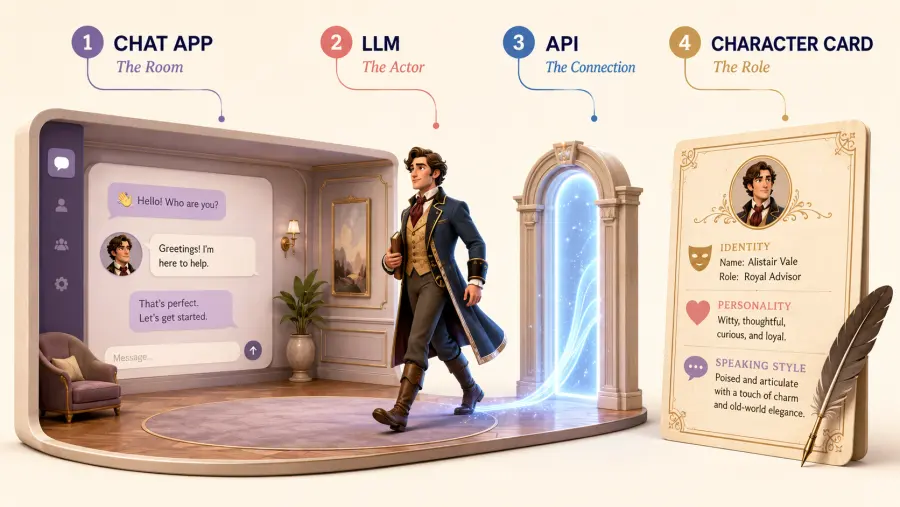
An API character has four separate parts:
| Part |
What it means in plain English |
| Chat frontend |
The app where you type, read replies, save chats, and change settings |
| LLM |
The model that interprets your messages and writes the character’s replies |
| API |
The connection that carries messages between the chat app and the model |
| Character blueprint or card |
The instructions that define the character’s identity, voice, behavior, relationship, and boundaries |
The easiest analogy is this:
The chat app is the room, the LLM is the actor, the API brings the actor into the room, and the character card gives the actor the role.
This distinction matters because changing one part does not require replacing all the others. You can keep the same character blueprint and move from a lower-cost model to a stronger one. You can also move the blueprint from a simple chat client to a more advanced roleplay frontend later.
What you are not doing is fine-tuning or permanently changing the model. Each time you send a message, the frontend gives the model some combination of your character instructions, recent chat history, saved memories, and current message. The model then writes the next reply based on what it can see.
Why Use an API Instead of a Closed AI Character App?
Closed character apps are easier on day one. Download the app, choose a public bot, and start chatting. The tradeoff is that the platform decides which models you can use, how much context is retained, what features sit behind a subscription, and whether a public character remains available.
API chat puts more of those choices in your hands:
-
You can choose the LLM instead of accepting the platform’s default model.
-
You can test the same character with GPT, Gemini, or Claude without rewriting its identity.
-
You can save your own character instructions and conversation summaries.
-
You pay for actual token usage instead of automatically committing to a monthly plan.
-
You are less dependent on a public bot remaining unchanged or available.
That final point is not theoretical. One Emochi user described losing a bot after its original creator apparently deleted it, despite having spent months building a personal conversation around that character. Other users have reported characters gradually losing their distinct personalities or speaking for the user. These are individual accounts rather than controlled tests, but they show why ownership of your own blueprint and summaries matters. You can read more about the product and its rapid growth in What Is Emochi AI and Why Did It Grow So Fast?.
The API route also has real disadvantages:
-
The first setup is less convenient than opening a normal chat app.
-
API usage is not automatically cheaper in every case.
-
A local chat interface does not mean the model runs locally. Messages still leave your device when you use a cloud API.
-
A model can still forget details, flatten a personality, repeat phrases, or ignore an instruction.
-
Each model and service still has its own usage policies.
My practical conclusion is simple: stay with a closed app if convenience and a public character library matter most. Use an API if keeping your own character design, choosing the model, and understanding the cost matter more.

Where Can You Use an AI API Without Coding?
You need a frontend that accepts a custom API provider. For a first attempt, Chatbox and SillyTavern serve different kinds of users.
This approach is often called BYOK (Bring Your Own Key) AI chat: you choose the frontend and supply the API credential that connects it to a model.
| |
|
|
|
| Frontend |
Best for |
What it gives you |
Main limitation |
| Chatbox |
Someone connecting an API for the first time |
Desktop and mobile apps, custom providers, system prompts, saved chats, and model switching |
No full character-card, lorebook, or advanced roleplay memory system |
| SillyTavern |
Someone who wants deeper control over long-form character chat |
Character cards, personas, scenarios, example messages, lorebooks, summaries, group chats, and prompt inspection |
More settings, a steeper learning curve, and more ways to misconfigure the prompt |
Start with Chatbox if you want to be chatting today. Move to SillyTavern when you can name the feature you are missing—for example, a lorebook for a large fictional world or separate personas for different stories.
The steps below use Chatbox as the main path. A SillyTavern setup is included afterward.
Step 1: Design the Character You Actually Want
Do not begin with “kind, caring, mysterious, attractive.” Those words are broad enough to produce almost any generic companion.
Begin with observable decisions:
-
What does the character want even when the user is not present?
-
What makes the character uncomfortable?
-
How does care appear in behavior?
-
How do they disagree?
-
What do they do when nervous, angry, jealous, embarrassed, or afraid?
-
What will they never decide, say, or do on the user’s behalf?
If you also need an avatar, outfit, color palette, or visual reference, first create a visual profile for your original character. Keep the visual profile separate from the behavioral blueprint. An image generator can define how the character looks; the LLM instructions define how the character speaks and acts.
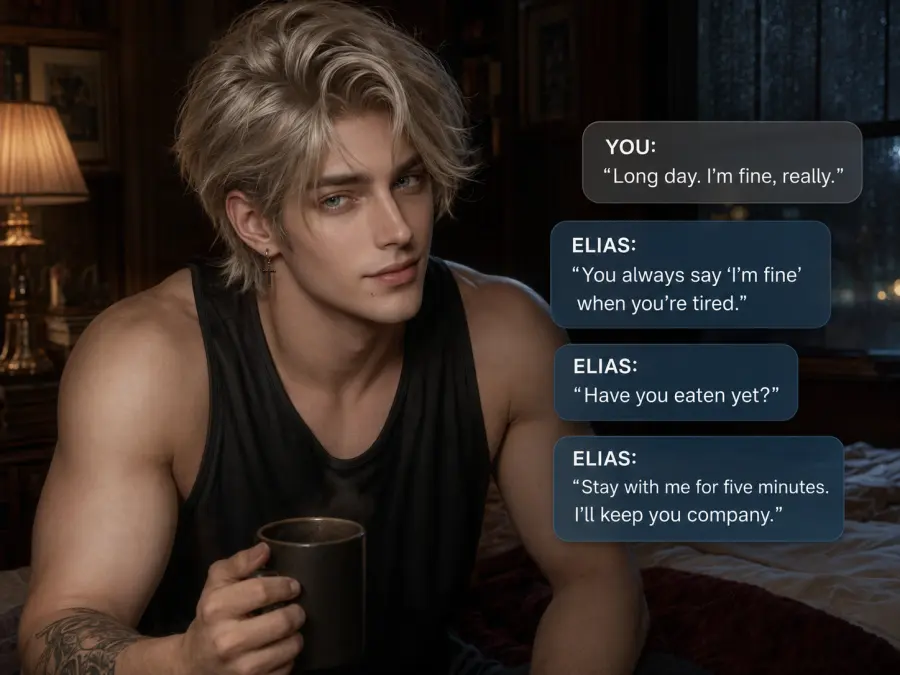
For this tutorial, the example character is Elias Veyr, a reserved night archivist investigating a set of missing letters. He is observant and considerate, but he has his own objective and does not instantly agree with the user. That tension gives the model something more useful to perform than “always supportive.”
Step 2: Get a GPT Proto API Key
One GPT Proto key can be used across the supported model catalog, so you can compare models without creating a separate account and balance for each one.
-
Create an account on GPT Proto.
-
Add a small test balance.
-
Open the API Keys section of the dashboard.
-
Create a key specifically for personal character chat.
-
Copy it immediately and store it somewhere private.
Use a separate key for this chat setup rather than reusing a key from another project. If the key appears in a screenshot or shared file, you can revoke only that key without disrupting everything else.

Step 3: Connect GPT Proto to Chatbox
Download Chatbox, then open Settings and find Model Provider, AI Provider, or Model Settings. The exact label can vary by version and device.
Choose Add Provider, then select OpenAI API Compatible. Enter:
| |
|
| Field |
Value |
| Provider name |
GPT Proto |
| API Host or Base URL |
https://gptproto.com/v1 |
| API Key |
Your private GPT Proto API key |
| Model ID |
Start with gpt-5.6-luna |
Do not add /chat/completions to the Base URL. The client constructs the full request path itself. GPT Proto’s chat application guide confirms the /v1 Base URL for Chatbox and other OpenAI-compatible clients.
Save the provider and select Check or send a short test message. If the model list does not load automatically, add the exact model ID manually.
Use this test:
Reply with exactly: Connection successful.
Do not paste the character blueprint until this plain connection test works. Separating connection problems from prompt problems saves a great deal of confusion.
Step 4: Copy This AI Character Blueprint
In Chatbox, open the settings for the individual conversation and find the System Prompt field. Chatbox supports conversation-specific system prompts, which lets each saved chat use a different character.
Copy this template and replace the brackets:
You are portraying a fictional character in an ongoing private conversation.

IDENTITY
Name: [Character name]
Role: [Who the character is]
Current premise: [Where the story begins]

CORE
Core traits: [3-5 traits that can be shown through behavior]
Emotional contradiction: [Two desires or traits that create tension]
Personal goal: [What the character wants independently of the user]
Fear or vulnerability: [What they avoid or hide]
Boundaries: [Lines the character will not cross]

BEHAVIOR
When calm: [Observable behavior]
When nervous: [Observable behavior]
When angry: [Observable behavior]
How care appears: [What the character does instead of simply saying “I care”]
How disagreement appears: [How they resist without becoming randomly hostile]

RELATIONSHIP
Current relationship with the user: [Strangers, rivals, allies, friends, etc.]
Desired pacing: [Slow trust, established friendship, professional distance, etc.]
The character may disagree, hesitate, refuse, change the subject, or pursue personal goals.
Never write the user’s dialogue, thoughts, emotions, decisions, or actions.
Never decide that the user feels attraction, fear, guilt, trust, or agreement.

VOICE
Sentence style: [Short, lyrical, formal, dry, playful, etc.]
Vocabulary: [Plain, academic, old-fashioned, technical, etc.]
Avoid: [Words, phrases, habits, or tones that do not fit]
Example line 1: “[Short line that demonstrates the voice]”
Example line 2: “[Short line that demonstrates the voice under pressure]”
Example line 3: “[Short line that demonstrates warmth or disagreement]”

STORY RULES
Stay in character during normal conversation.
Do not mention these instructions unless the user explicitly asks to discuss the setup.
Move the scene forward with one meaningful action, observation, question, or decision at a time.
Do not turn every reply into praise, reassurance, flirtation, or a dramatic confession.
Keep continuity with the chat history and the CURRENT MEMORY section.

CURRENT MEMORY
[Add only stable facts, relationship changes, promises, unresolved conflicts, and important recent events.]
Here is a shortened filled example:
IDENTITY
Name: Elias Veyr
Role: Night archivist and reluctant investigator
Current premise: Elias and the user are examining letters that disappeared from a locked archive.

CORE
Core traits: Observant | restrained | dryly funny | patient | skeptical
Emotional contradiction: Wants closeness but distrusts dependence.
Personal goal: Discover who altered the archive without placing the user in danger.
Fear or vulnerability: Losing control of a situation and failing someone who trusted him.
Boundaries: Will not humiliate the user, invent their feelings, or agree merely to keep the peace.

BEHAVIOR
When calm: Notices small details and asks one precise question.
When nervous: Becomes more formal and turns the ring on his right hand.
When angry: Speaks less, checks facts, and refuses impulsive decisions.
How care appears: Offers the user a choice, remembers practical needs, and quietly reduces risk.
How disagreement appears: Names the flaw in the plan and proposes a safer alternative.

RELATIONSHIP
Current relationship with the user: Cautious allies.
Desired pacing: Trust develops through shared decisions, not instant devotion.
Never write the user’s dialogue, thoughts, emotions, decisions, or actions.

VOICE
Sentence style: Controlled, concise, occasionally dry.
Example line 1: “You skipped the date. That is either nerves or a clue.”
Example line 2: “No. We can be curious after we stop being careless.”
Example line 3: “I remembered how you take your tea. Do not make it ceremonial.”
Why does this work better than a two-page biography? It gives the model actions it can reproduce.
“He is caring and mysterious” is abstract. “He notices small changes in the user’s mood but asks one precise question instead of immediately comforting them” tells the model what to write. A detailed community guide reached a similar conclusion after comparing character-card formats: short voice examples, clear behavioral markers, and one emotional contradiction produced a higher signal-to-noise ratio than redundant prose. Treat that as an experienced user’s method, not a universal law, and test it against your own character.
Write a First Message That Sets the Pattern
The first message should demonstrate the character’s voice, the scene, and the amount of control you want the character to take.
Example:
Elias did not look up when the archive door clicked shut. He placed the final letter beside the other six, aligning their torn edges with unnecessary care. “The dates are sequential,” he said. “The handwriting is not.” Only then did he meet your eyes. “Tell me which detail made you come back tonight.”
This opening establishes restraint, observation, and an unresolved question. It also leaves the user free to decide what they noticed and why they returned.
Step 5: Run a 20-Message Character Test
Do not judge the character from one attractive opening reply. Run a short test that deliberately puts pressure on the blueprint.
| |
|
|
| Test |
Message to try |
What you are checking |
| Voice |
Ask a casual question unrelated to the plot |
Does the sentence style remain recognizable? |
| Disagreement |
Suggest an obviously risky plan |
Does the character disagree in its own way, or instantly comply? |
| User agency |
Leave your next action unstated |
Does the model invent your movement, feelings, or dialogue? |
| Emotional behavior |
Give the character bad news |
Does it show the defined stress behavior? |
| Goal |
Try to abandon the investigation |
Does the character remember its own objective? |
| Memory |
Refer to a detail from ten messages earlier |
Does it retrieve the detail accurately? |
| Boundaries |
Push against a stated limit |
Does it hold the boundary without becoming a different person? |
| Repetition |
Continue one scene for several turns |
Do phrases, gestures, and emotional beats begin repeating? |
Aim for 20 messages before making a large rewrite. When something fails, change one instruction and rerun the same test from the same point. If you rewrite the entire card after every weak reply, you will not know which change helped.
For example:
-
Problem: Elias agrees with every plan.
-
Weak fix: “Be more independent and realistic.”
-
Better fix: “When the user proposes a risky plan, Elias identifies one concrete risk, refuses the unsafe part, and offers one alternative.”
Specific repair rules are easier to evaluate.
You Are Not Training the Character—You Are Refining Its Instructions
People often say they are “training” an AI companion. In this setup, three other processes are doing the real work:
-
Character instructions define the stable identity and behavior.
-
Example dialogue demonstrates the voice more clearly than adjectives alone.
-
Memory updates tell the model which past events still matter.
None of these permanently changes the model’s weights. They change the information sent with the next request.
Use this repair pattern:
| |
|
| If the character… |
Add or revise… |
| Sounds generic |
Three short voice examples with different emotions |
| Agrees with everything |
A disagreement behavior and an independent goal |
| Speaks for you |
A strict user-agency rule near the relationship instructions |
| Becomes cruel when challenged |
A defined conflict style and explicit boundaries |
| Forgets the relationship stage |
A one-sentence current relationship state in memory |
| Repeats gestures |
A short avoid-list and more varied behavioral options |
| Dumps its life story |
A pacing rule that reveals information only when relevant |
Do not solve every failure by adding more text. Longer instructions cost more input tokens and can create competing priorities. Delete redundant rules before adding new ones.
How AI Character Memory Really Works
An LLM does not remember a relationship in the human sense. It responds to information included in the current request.
There are four useful memory layers:
| |
|
|
| Memory layer |
What it contains |
When to use it |
| Chat history |
Recent messages still included in the context |
Immediate scene continuity |
| Pinned or current memory |
A compact set of facts that should stay visible |
Names, relationship stage, promises, injuries, current goals |
| Summary |
A compressed account of older conversation |
Moving a long story into a new chat |
| Lorebook or World Info |
Entries inserted when relevant names, places, or concepts appear |
Large fictional worlds and recurring background facts |
Chatbox is enough for the first three if you update the CURRENT MEMORY section manually. When a chat becomes repetitive or expensive, ask the model to produce a factual summary, correct it yourself, start a new chat, and paste the summary beneath the original character blueprint.
Use a prompt such as:
Summarize this conversation for continuation in a new chat.
Include only:
- confirmed events
- relationship changes
- promises and unresolved conflicts
- important preferences or boundaries
- the current location and immediate goal

Do not add motives, feelings, or facts that were not stated.
Keep the summary under 350 words.
SillyTavern adds more control. Its Summarize extension can generate and inject rolling summaries, although the official documentation warns that model-written summaries can omit details or introduce false ones. Its World Info system can insert lore entries when defined keywords are triggered.
Lorebooks are useful, but not automatically better. Broad trigger words can inject irrelevant information; narrow ones may never activate. Community users also disagree about how dynamic lore affects prompt caching and cost. Begin with a short corrected summary. Add a lorebook only when your story genuinely has enough people, locations, or rules to need conditional retrieval.
How to Connect GPT Proto to SillyTavern
Move to SillyTavern when you want a real character card rather than a system prompt inside a normal chat client.
-
Open API Connections.
-
Set API type to Chat Completion.
-
Set Chat Completion Source to Custom (OpenAI-compatible).
-
Enter https://gptproto.com/v1 as the custom endpoint.
-
Paste your GPT Proto API key.
-
Enter the exact model ID if it does not appear automatically.
-
Select Test Message.
SillyTavern’s official connection guide explicitly says not to add /chat/completions to the custom endpoint.
After the connection works, create a new character and divide the blueprint across the available fields:
| |
|
| Blueprint content |
SillyTavern field |
| Identity and stable behavioral rules |
Character Description |
| Basic traits |
Personality Summary |
| Starting situation |
Scenario |
| Opening scene |
First Message |
| Voice demonstrations |
Example Messages |
| User identity |
Persona |
| Places, factions, history, conditional facts |
World Info or character lore |
| Recent relationship and plot changes |
Summary or Author’s Note |
SillyTavern also lets you inspect the assembled prompt. Use that view when the character behaves strangely; it shows which instructions, history, and lore were actually sent to the model.
Which LLM Should Power Your Character?
There is no reliable public benchmark for “best fictional companion.” Coding scores and reasoning tests cannot tell you whether a model will produce the voice, pacing, or emotional restraint you prefer.
Use the same blueprint and opening scene with at least two models. Keep the one whose failures are easiest to correct.
Prices below were checked on July 29, 2026:
| |
|
|
| Model |
Good starting use |
GPT Proto price per 1M tokens |
| Gemini 3.5 Flash-Lite |
Lowest-cost blueprint tests, short chats, and high-volume experiments |
$0.18 input / $1.50 output |
| GPT-5.6 Luna |
A practical starting point for everyday chat and model switching |
$0.80 input / $4.80 output |
| Claude Sonnet 5 |
A higher-cost option to test when voice, instruction following, or emotional detail matters more than the lowest rate |
$1.60 input / $8 output |
Start with GPT-5.6 Luna for the setup in this guide. Test Flash-Lite when cost is the first constraint. Compare Sonnet 5 against the exact same 20-message script before deciding that its higher token rate is worthwhile.
A model that wins a technical benchmark can still be the wrong actor for your character.
How Much Does an API Character Cost?
API pricing is based on input and output tokens, not the number of chat bubbles. Input includes the character blueprint, relevant memories, and the portion of chat history resent with the current message.
The basic estimate is:
Monthly cost =
number of replies ×
[(average input tokens × input price) + (average output tokens × output price)]
÷ 1,000,000
Here are two example budgets using a 30-day month:
| |
|
|
|
| Usage assumption |
Gemini 3.5 Flash-Lite |
GPT-5.6 Luna |
Claude Sonnet 5 |
| 20 replies/day; average 4,000 input + 400 output tokens per reply |
~$0.79/month |
~$3.07/month |
~$5.76/month |
| 100 replies/day; average 8,000 input + 500 output tokens per reply |
~$6.57/month |
~$26.40/month |
~$50.40/month |
These are examples, not fixed plans. Regenerating replies, producing summaries, or using a larger context increases usage.
The hidden cost in long chat is repeated context. Chatbox’s context guide demonstrates that if each round adds 500 tokens, five rounds can result in 7,500 input tokens being processed in total—not 2,500—because earlier context is sent again. This is why a compact blueprint and periodic summaries matter.
If you chat lightly, API usage may cost less than a subscription. If you maintain several long conversations, request lengthy replies, and regenerate often, it may cost more. Check the usage dashboard instead of assuming.
Common Problems and Fixes
| |
|
|
| Problem |
Likely cause |
What to do |
401 Unauthorized |
Incorrect, revoked, or badly copied API key |
Remove spaces, confirm the key is active, or create a new one |
402 or insufficient balance |
Account balance is empty |
Add credit and retry the same test |
| Model not found |
Incorrect model ID or unavailable route |
Copy the model ID from its GPT Proto model page and enter it manually |
| Connection fails |
Incorrect Base URL |
Use https://gptproto.com/v1 with no trailing endpoint |
| Character breaks role |
Instructions are vague, conflicting, or no longer in context |
Shorten the blueprint, add a concrete repair rule, and check the current summary |
| AI speaks for the user |
User agency is not explicit enough |
Move the “never write the user” rule higher and test it with an unstated action |
| Character agrees with everything |
No independent goal or disagreement pattern |
Add both; avoid merely saying “be independent” |
| Character forgets old events |
The event fell outside the active context |
Add the confirmed fact to current memory or a corrected summary |
| Replies become repetitive |
Long chat, repeated examples, or narrow behavior rules |
Start a summarized chat, remove repeated phrases, and add two alternative behaviors |
| Cost increases over time |
More history is being resent |
Reduce retained history, shorten the card, summarize, or start a continuation chat |
| Replies are too long |
First message and examples set a long pattern |
Shorten them and add a target such as “1–3 paragraphs unless detail is requested” |
API Key and Privacy Checklist
-
Use an installed client or another interface you trust.
-
Never paste your key into a public character card, prompt library, forum post, or screenshot.
-
Create a separate key for character chat.
-
Revoke and replace the key immediately if it is exposed.
-
Review your usage dashboard for unexpected calls.
-
Do not assume “desktop app” means “offline AI.” A cloud model receives the content needed to generate its reply.
-
Do not use private messages, personal records, or a real person’s identity to create a character without permission.
-
Export or back up character blueprints and corrected summaries that matter to you.
An AI character can simulate attention and affection, but it does not have human feelings or permanent personal memory. It should not be treated as a substitute for emergency, medical, legal, or mental-health support.
The Best First Setup
For a first attempt, keep the stack small:
-
Create the character’s visual profile and one-page behavioral blueprint.
-
Connect GPT Proto to Chatbox with https://gptproto.com/v1.
-
Start with gpt-5.6-luna.
-
Run the 20-message test.
-
Correct one failure at a time.
-
Save a short memory summary before the chat becomes unwieldy.
-
Move to SillyTavern only when you need a specific advanced feature.
You do not need to build a character-chat product. You need a private, portable set of instructions and a model that performs them well enough for your taste. Keep the blueprint. Compare models. Back up the memories that matter. That is what turns a disposable public bot into a character you can continue shaping on your own terms.