The anatomy of a poster prompt
A poster has to land in about one second, so a prompt that works names four things and nothing more: one hero subject, a genre and mood, the lighting, and where the text goes. That last one is the part people skip. If you don't tell the model to leave space, it fills the frame edge to edge and you're left with nowhere to put the title that doesn't cover a face.
A structure that holds up: [subject + action] + [genre and mood] + [lighting and lens] + [color grade] + [explicit empty space for the title and credits] + [aspect ratio]. Keep it to a few sentences. Longer prompts don't buy you a better poster — they give the model more chances to garble the text.
One line to remember: describe the shot, then tell the model where to leave the canvas blank.
Copy-paste prompts by genre
Each of these is a text-to-image prompt. They reserve space for the title on purpose and ask for a 2:3 frame — the shape of a real one-sheet. Run them on Gemini 3 Pro Image for the richest style, or on gpt-image-2 if you already know the title text will be heavy.
Action
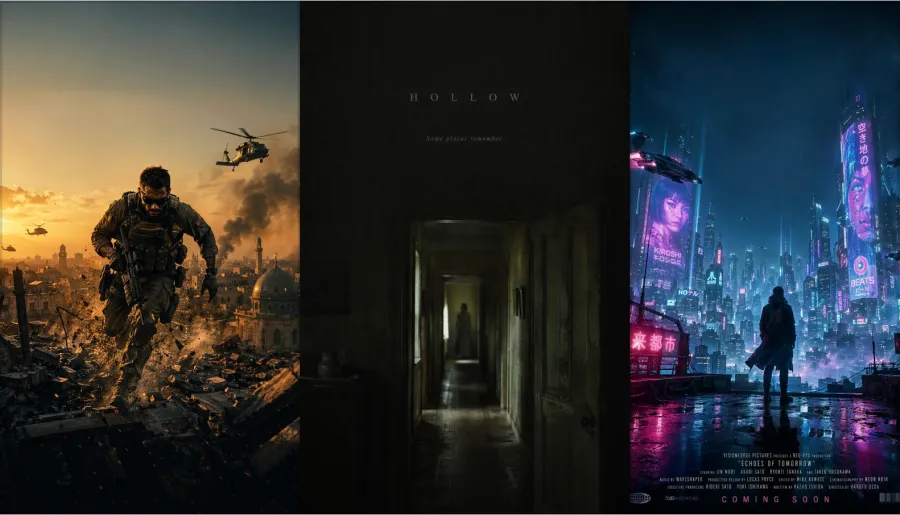
A lone special-forces operative sprinting across a collapsing rooftop at golden hour, dust and debris frozen mid-air, helicopters circling a smoke-filled sky, shot on a 35mm anamorphic lens, strong rim light, teal-and-orange grade, hyper-detailed and cinematic. Leave the top third clean for a bold metallic title and keep the bottom 15% darker for a credits block. Portrait one-sheet, 2:3.
Horror
A dim farmhouse hallway at night seen through a doorway, a single out-of-focus figure standing far at the end, faint moonlight, heavy film grain, desaturated greens and sickly yellows, deep shadows swallowing the edges, 50mm, unsettling negative space. Keep the upper area empty for a thin serif title and a short tagline. Portrait one-sheet, 2:3.
Sci-fi
A lone figure on a rooftop overlooking a neon megacity at night, towering holographic billboards, flying vehicles trailing light, volumetric fog, cyan-and-magenta palette, wet reflective surfaces, ultra-wide cinematic composition. Reserve clear space at top center for a wide futuristic title and the bottom edge for credits. Portrait one-sheet, 2:3.
Romance
Two people standing close under string lights on a rain-slick city street at dusk, warm soft bokeh, gentle backlight, shallow depth of field, film-photography color, intimate and quiet. Leave generous empty sky at the top for an elegant script title and room at the base for a single tagline. Portrait one-sheet, 2:3.
Animated
A brave young inventor and a small round robot companion on a grassy hilltop at sunrise, lush stylized 3D animated-film look, soft global illumination, warm saturated colors, expressive faces, family-adventure tone. Keep the top of the sky open for a large rounded title and the bottom for a release-date strip. Portrait one-sheet, 2:3.
Keep the animated look generic, as above. Asking for a specific studio's house style or characters by name walks you into trademark territory you don't want a commercial poster standing on.
Turn your own photo into a poster
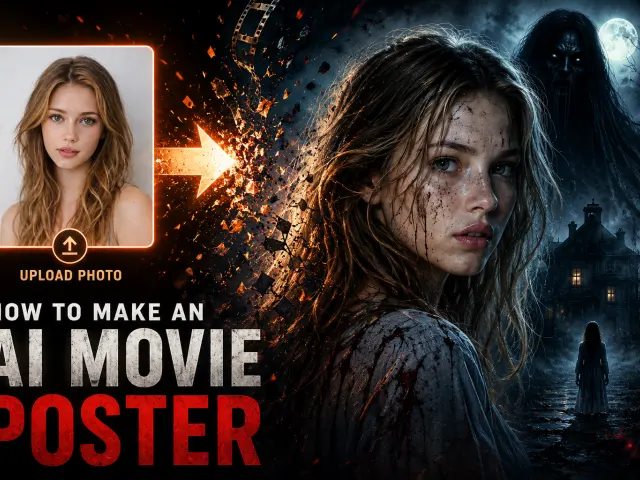
The most-searched version of this is "put me on the poster." That's an image-edit job: you pass a photo as a reference and the model composes the poster around it while holding the likeness. Use your own photo, or a fictional character you have the rights to — not a real celebrity, and not a trademarked character. Putting someone else's face on a poster without consent is the one shortcut here that can actually get you in trouble.
Paste these into an image-edit model with your photo attached:
Action lead
Using the uploaded photo of me as the lead, build a cinematic action one-sheet: a low-angle hero pose at the center, golden-hour rim lighting, smoke and embers behind, teal-and-orange grade. Keep my face and likeness intact. Leave the top third empty for a title. Portrait, 2:3.
Romance, two leads (attach two photos)
Using the two uploaded photos as the two leads, compose a romance poster: the two faces close together, warm light, soft bokeh of a city street at dusk behind them. Preserve both likenesses. Leave space at the top for a script title and a tagline at the bottom. Portrait, 2:3.
Horror solo
Turn the uploaded portrait into the lead of a horror one-sheet: half the face in shadow, cold moonlight, desaturated palette, heavy grain, an empty hallway behind. Keep the likeness. Reserve the upper area for a thin title. Portrait, 2:3.
Want to try these without writing code? Run them on the gpt-image-2 image-edit page or the Gemini 3 Pro Image image-edit page, or skip straight to the finished AI Movie Poster Maker.
Which model: text or style
The two models split cleanly along one line — text precision versus everything else.
gpt-image-2 renders in-image text more accurately than anything else I tested, including dense credit blocks and non-Latin scripts. If your title is in Japanese or Chinese, this is the one. It bills by token ($6.4 per 1M input, $24 per 1M output on GPT Proto), so a single high-quality large poster costs more than a flat per-image model would, and the bill climbs with size and quality.
Gemini 3 Pro Image leans the other way: stronger photoreal style, better character consistency across a series, output up to 4K, and a flat $0.0804 per image. That predictability is the point when you're running a batch.
| |
gpt-image-2 |
Gemini 3 Pro Image (Nano Banana Pro) |
| Best at |
Precise, multilingual in-image text; complex layouts |
Photoreal style, character consistency across a series |
| Max resolution |
Up to a 3840px edge |
Up to 4K (3392×5056 at 2:3) |
| Pricing on GPT Proto |
Token-based: $6.4 / 1M input, $24 / 1M output |
Flat $0.0804 per image |
| Reach for it when |
The title is dense or non-Latin and must be exact |
You want the art, 4K output, or a large batch |
In practice: build the art and style on Gemini 3 Pro Image, and if the title won't come out clean — or you need a second language — run a precise-text pass on gpt-image-2. The trade-off is real. gpt-image-2's accuracy costs more per image, so don't reach for it until the text actually needs it.
Get the proportions right
A theatrical one-sheet is 27×40 inches — a 2:3 ratio. Most prompt guides hand you square images, because that's the model default, and a square poster looks wrong the second you set it next to a real one. Set the shape explicitly.
On gpt-image-2, pass size as pixels: "1024x1536" for a quick 2:3, or larger for print — up to a 3840px long edge, both sides multiples of 16, aspect ratio no wider than 3:1.
On Gemini 3 Pro Image, set aspect_ratio to "2:3" and size to "4K", which gives you 3392×5056 — large enough to print. For social, 9:16 covers stories and 4:5 covers the feed.
The hard part: getting the title text sharp
This is the failure I hit most. Ask one prompt to paint a complex scene, a long title, a tagline, and a credits block, and the text is the first thing to break — letters dissolve, words misspell, kerning collapses. Both models render text far better than last year's diffusion models, but a dense block of typography in the same pass as detailed artwork is still where they crack.
The fix is to split it into two passes.
Pass one: generate the artwork with the title area left empty (every prompt above already does this). Pass two: send that image back through an image-edit call and ask only for the text — title, tagline, and credits, with the font and placement spelled out. Because the model is now editing rather than inventing the whole frame, the text lands clean far more often.
A pass-two image-edit call, using the pass-one image as input:
titled = generate(
    "openai/gpt-image-2/image-edit",
    {
        "prompt": (
            'Add the title "MIDNIGHT SIGNAL" in a bold condensed sans-serif '
            "across the empty top third, a smaller tagline just below it, and a "
            "credits block along the bottom edge. Do not change the rest of the image."
        ),
        "images": [poster["outputs"][0]],   # the pass-one image URL
        "size": "1024x1536",
        "quality": "high",
        "response_format": "url",
    },
)
print(titled["outputs"])
For a non-Latin title, run pass two on gpt-image-2 — its multilingual text rendering is the reason to pay the higher per-image rate. One line to remember: never make the model paint the picture and write the title in the same breath.
Mistakes to avoid
- Cramming a complex scene, a long title, and several characters into one prompt. The text breaks first — split it into two passes.
- Leaving no empty space. With nowhere reserved, the title lands across a face.
- Generating a square. Posters are 2:3; set
size 1024x1536 on gpt-image-2 or aspect_ratio 2:3 on Gemini 3 Pro Image.
- Forgetting resolution. The default is around 1K — for print, pass a larger size explicitly.
- Letting the URL expire. GPT Proto returns a temporary image URL, so download it right away or request
b64_json instead.
- Putting a real actor's face or a trademarked character in the prompt. Use your own photo or original characters; the legal exposure isn't worth it.
Do it via the API: make fifty, not five
Everything above works one poster at a time in a web tool. The reason to touch the API is volume: a different title for every film in a slate, five aspect ratios per poster, the same poster in three languages. GPT Proto runs both models through one async pattern — submit a request, get back a prediction id, poll until it's done. Set your key as an environment variable first (export GPTPROTO_API_KEY=sk-...) and never hard-code it.
A small helper that submits a job and waits for the result:
import os, time, requests

API_KEY = os.environ["GPTPROTO_API_KEY"]
BASE = "https://gptproto.com/api/v3"
HEADERS = {"Authorization": API_KEY, "Content-Type": "application/json"}

def generate(path, body):
    # submit the job
    r = requests.post(f"{BASE}/{path}", headers=HEADERS, json=body)
    r.raise_for_status()
    get_url = r.json()["data"]["urls"]["get"]
    # poll until the prediction finishes
    while True:
        data = requests.get(get_url, headers=HEADERS).json()["data"]
        if data["status"] in ("completed", "failed"):
            return data        # data["outputs"] holds the image URL(s)
        time.sleep(2)
Generate a poster with each model — same call, different body:
# gpt-image-2: pixel sizes + a quality level
poster = generate(
    "openai/gpt-image-2/text-to-image",
    {"prompt": PROMPT, "size": "1024x1536", "quality": "high", "response_format": "url"},
)

# Gemini 3 Pro Image: a size tier + an aspect ratio
poster = generate(
    "google/gemini-3-pro-image-preview/text-to-image",
    {"prompt": PROMPT, "size": "4K", "aspect_ratio": "2:3", "output_format": "png"},
)
print(poster["outputs"])
Batch a whole slate by looping over prompts:
genres = {"action": ACTION_PROMPT, "horror": HORROR_PROMPT, "scifi": SCIFI_PROMPT}

for name, prompt in genres.items():
    out = generate(
        "google/gemini-3-pro-image-preview/text-to-image",
        {"prompt": prompt, "size": "4K", "aspect_ratio": "2:3", "output_format": "png"},
    )
    print(name, out["outputs"])
Prefer cURL for a quick test:
curl --location 'https://gptproto.com/api/v3/openai/gpt-image-2/text-to-image' \
  --header 'Authorization: GPTPROTO_API_KEY' \
  --header 'Content-Type: application/json' \
  --data '{"prompt":"<your poster prompt>","size":"1024x1536","quality":"high","response_format":"url"}'
The one gotcha: the two models take different size parameters on the same endpoint. gpt-image-2 wants a pixel size and a quality level; Gemini 3 Pro Image wants a size tier (1K/2K/4K) and an aspect_ratio. Same auth, same polling, different body. (These calls mirror GPT Proto's documented request shape; check the model pages for the current parameter list before a production run.)
Try it
Want to see it work before writing any code? Open the AI Movie Poster Maker, or run a prompt in the playground on the gpt-image-2 and Gemini 3 Pro Image model pages. When you're ready to batch, the calls above scale to as many posters as you need — and the pricing page shows exactly what each run costs.