What Is Cherry Studio?
Cherry Studio describes itself as an all-in-one AI workstation. In practical terms, it is a desktop application that puts several AI workflows behind one interface:
conversations with different cloud or local models;
side-by-side answers from multiple models;
reusable assistants and agent workflows;
document-based knowledge bases;
MCP connections to external tools;
translation, image generation, notes, and file management.
The client runs on Windows, macOS, and Linux. Its current documentation lists more than 60 provider connection templates. The public website separately advertises more than 300 model options and more than 1,000 built-in assistants. These numbers describe different things: a provider is a connection, a model is the system answering a request, and an assistant is a saved role or workflow.
Cherry Studio is distributed under the GNU Affero General Public License v3. “Open source,” however, does not mean that every model behind the interface is free. A local Ollama model can run on your own hardware. A cloud model normally charges through the account associated with its API key.
How Cherry Studio Works
The easiest way to understand Cherry Studio is to separate the client from the model service:
Your prompt
    ↓
Cherry Studio desktop client
    ↓
GPT Proto or another configured provider
    ↓
Selected AI model
    ↓
Response displayed in Cherry Studio
Cherry Studio supports several connection types. Its official provider documentation lists OpenAI-compatible services using /v1/chat/completions, Anthropic-compatible services using /v1/messages, Gemini connections, and local HTTP services such as Ollama and LM Studio.
This design has a practical advantage: one interface can hold several providers and models. You can compare two answers without copying a prompt between browser tabs, or keep a cheaper model for routine work and a stronger model for difficult requests.
The trade-off is configuration. You are responsible for choosing a provider, entering the correct API address, adding valid model IDs, and monitoring usage. Cherry Studio cannot repair an expired key or make an incompatible endpoint behave like an OpenAI chat endpoint.
The Cherry Studio Features That Matter
Multi-model conversations
Cherry Studio can send the same question to multiple models and keep the results together. This is useful when the answer is subjective or difficult to verify—for example, comparing code reviews, translations, or document summaries.
The cost is easy to miss. A prompt sent to three paid models creates three API requests. The desktop client simplifies the workflow, but it does not combine those calls into one charge.
Assistants and agents
Assistants package instructions for recurring jobs such as translation, editing, or coding. Agent features go further by letting supported models interact with files, commands, or connected tools.
Capability still depends on the selected model. A saved assistant can organize instructions, but it cannot add vision, tool use, or a larger context window to a model that does not support those features.
Knowledge bases and RAG
Cherry Studio can build knowledge bases from local files, websites, sitemaps, and manually entered material. Its documentation lists formats including PDF, DOCX, PPTX, XLSX, TXT, and Markdown. You can inspect retrieval results before using the knowledge base in a conversation.
This is more useful than simply attaching a long document to every prompt, but it introduces another dependency: the embedding model and retrieval settings affect which passages reach the chat model. A fluent answer is not proof that the correct passage was retrieved.
MCP and external tools
Model Context Protocol support lets compatible assistants connect to services such as databases, note systems, and developer tools. MCP expands what a chat client can do, but every added server also expands the system's permission and security surface. Review what a server can read or modify before enabling it.
Translation, images, and productivity tools
The client also includes dedicated translation and image-generation panels, Markdown notes, global search, file management, and interface customization. These make Cherry Studio broader than a basic chat wrapper. They do not guarantee that every configured model will work in every panel; the provider and model must support the required input and output format.
Is Cherry Studio Free, and Is It Private?
The short answer is: the client is free and open source, while model usage may cost money.
| Component |
What happens |
| Cherry Studio application |
Free and licensed under AGPLv3 |
| API keys, chat history, and preferences |
Stored locally by default |
| Local models such as Ollama |
Can run without sending prompts to a cloud model |
| GPT Proto or another cloud provider |
Receives the request and applies its own usage and billing rules |
| Optional cloud backup or third-party integrations |
Governed by the selected external service |
Cherry Studio's privacy policy, updated August 20, 2026, says that API keys, conversation history, and preferences are stored on the user's device by default. When you configure your own third-party API key, the client connects directly to that provider rather than routing the request through Cherry Studio's servers.
That is a narrower claim than “all data stays local.” If you use a cloud model, your prompt and the context required for the response still go to that model service. For sensitive work, check the provider's retention and privacy terms—or use a local model when the task permits it.
How to Connect Cherry Studio to GPT Proto
GPT Proto provides one account and API key for accessing supported models through a shared balance. Cherry Studio can connect to compatible services through its custom OpenAI provider option.
1. Install Cherry Studio
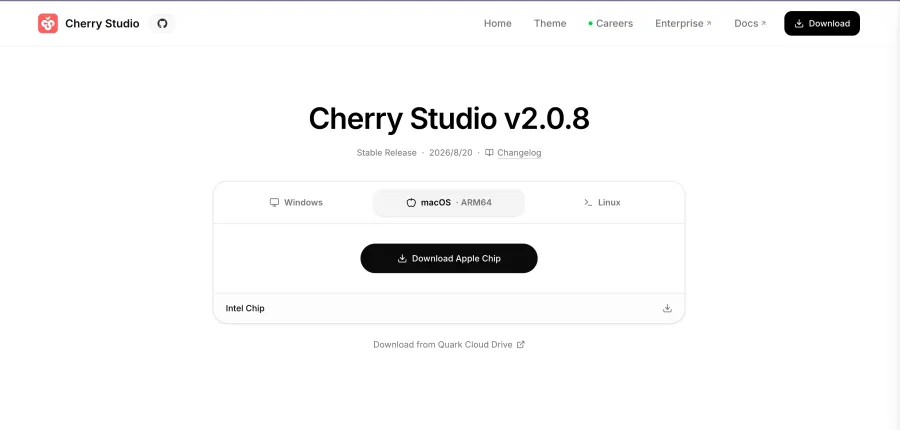
Download the correct package for Windows, macOS, or Linux from the official installation page. Open the application once installation finishes.
2. Create a GPT Proto API key
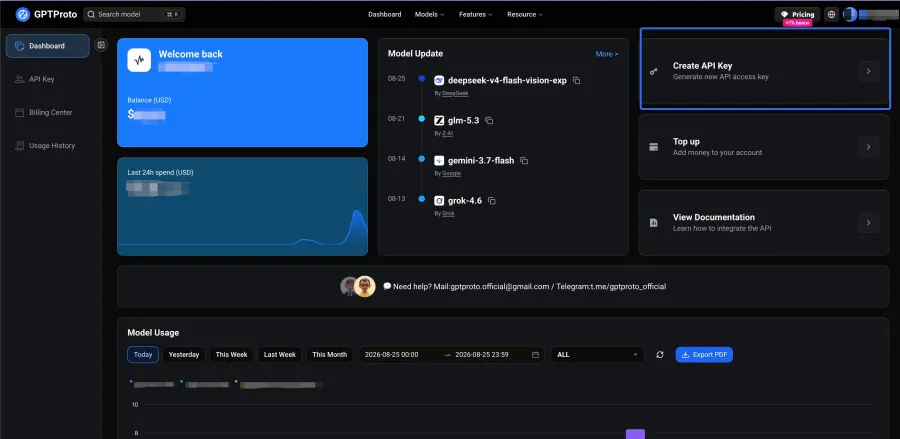
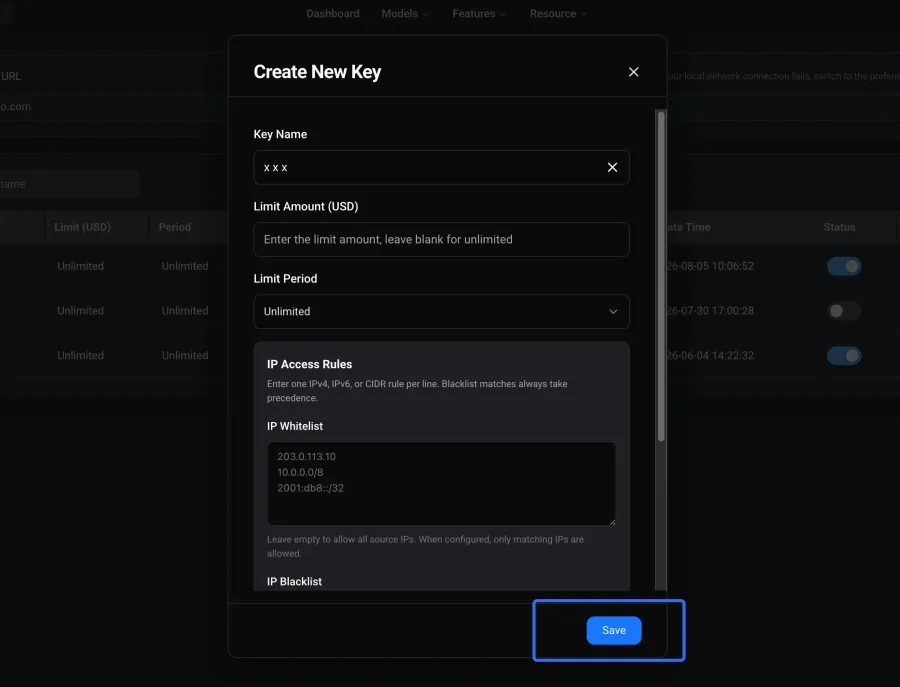
Open the GPT Proto homepage, create an account, and generate an API key from the dashboard. Copy it once and store it in a password manager or another secure location. Do not place a real key in screenshots, source control, or public support posts.
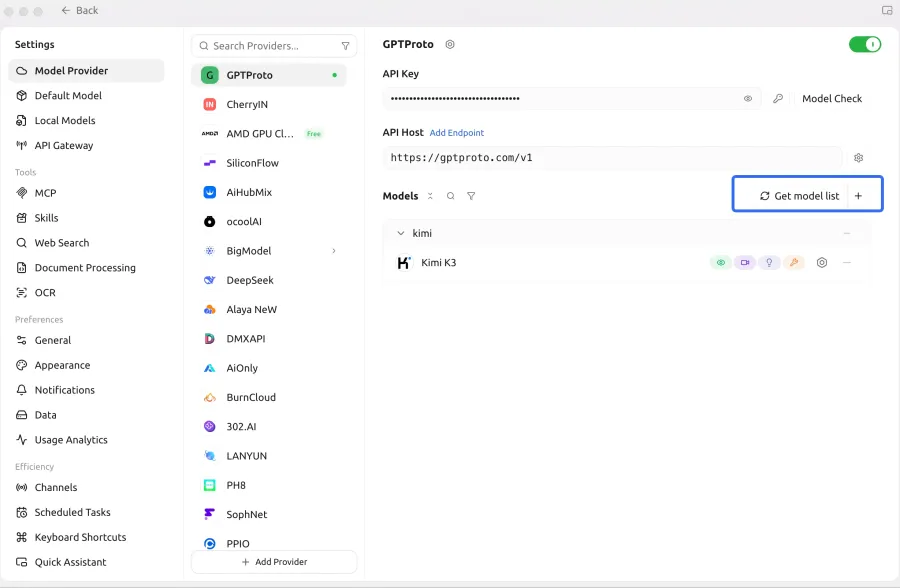
3. Add GPT Proto as a custom provider
In Cherry Studio:
Open Settings.
Select Model Services.
Click Add at the bottom of the provider list.
Enter GPT Proto as the provider name.
Select OpenAI as the provider type.
Paste your GPT Proto API key.
Enter https://gptproto.com/v1 as the GPT Proto API base URL.
Enable the provider and click Check.
Cherry Studio's official custom-provider guide confirms this configuration flow. It also supports manually adding a model ID when automatic model discovery is unavailable.
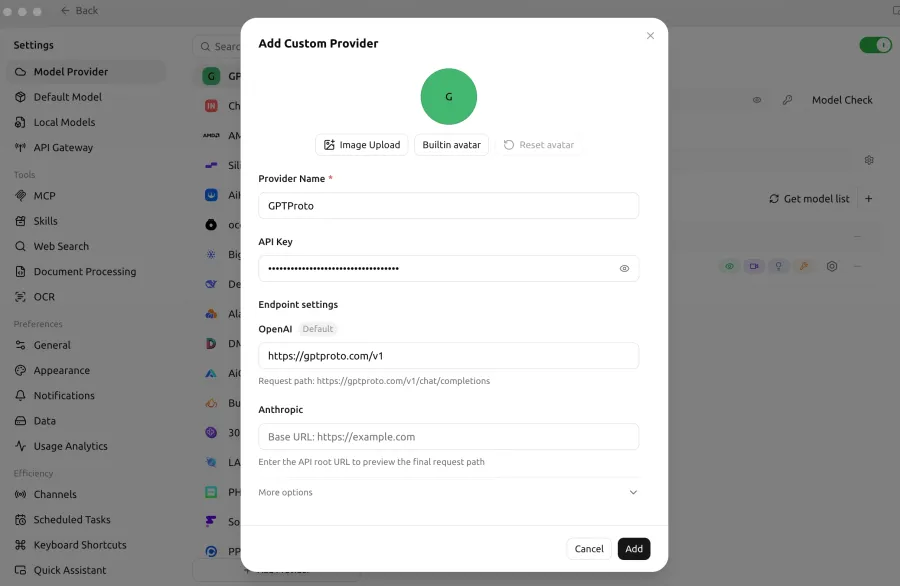
This configuration was verified with the https://gptproto.com/v1 Base URL. Cherry Studio accepted the key, completed its connection check, and returned a response from a compatible chat model.
4. Add a compatible model
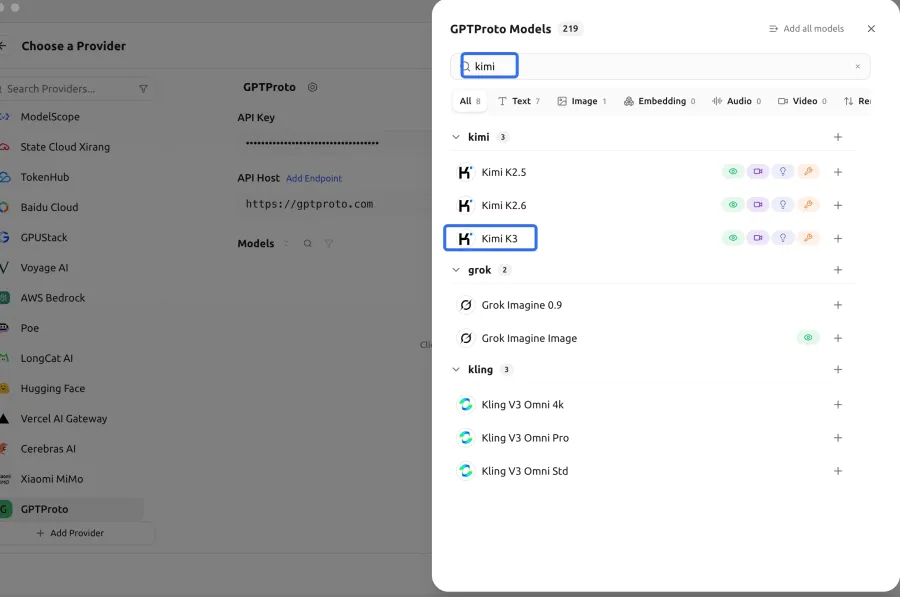
Use Get Model List if the GPT Proto endpoint supports automatic discovery in the tested Cherry Studio version. If the list is empty, add the exact model ID manually.
You can review available products in the GPT Proto model catalog, but do not assume every catalog item belongs in Cherry Studio's chat selector. Text and compatible multimodal chat models use conversational endpoints. Image and video generation products may use separate request formats and will not necessarily work in a standard chat panel.
Only add model IDs intended for the chat workflow. The connection test described below was completed successfully with a compatible GPT Proto chat model.
5. Send a test message
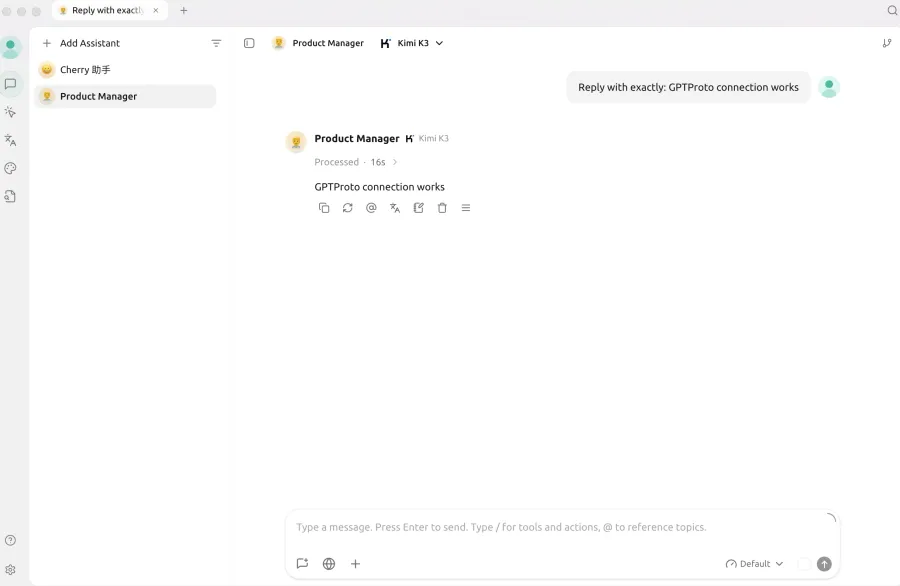
Select a verified model under the GPT Proto provider and send a short, deterministic prompt:
Reply with exactly: GPT Proto connection works
A successful response confirms that Cherry Studio can reach the selected model. It does not prove that every model or advanced feature is compatible.
6. Isolate API problems with cURL
If the Cherry Studio test fails, call the same chat endpoint outside the client. This separates an API credential problem from a Cherry Studio configuration problem.
export GPTPROTO_API_KEY="replace-with-your-key"
export GPTPROTO_MODEL="replace-with-a-chat-model-id"

curl --location 'https://gptproto.com/v1/chat/completions' \
  --header "Authorization: ${GPTPROTO_API_KEY}" \
  --header 'Content-Type: application/json' \
  --data "{
    \"model\": \"${GPTPROTO_MODEL}\",
    \"messages\": [
      {
        \"role\": \"user\",
        \"content\": \"Reply with exactly: GPT Proto connection works\"
      }
    ],
    \"stream\": false
  }"

unset GPTPROTO_API_KEY GPTPROTO_MODEL
This request shape was verified on August 25, 2026. It returned HTTP 200 and a standard choices[0].message.content response using the raw API key in the Authorization header.
The three checks produced the following results:
| Verification |
Expected result |
Observed result |
| Cherry Studio connection check |
Provider accepts the Base URL and API key |
Passed |
| First Cherry Studio conversation |
Compatible model returns a normal chat response |
Passed |
| Direct cURL request |
HTTP 200 with choices[0].message.content |
Passed |
Cherry Studio vs. Browser-Based AI Apps
| Question |
Cherry Studio |
Typical browser chat subscription |
| Where do you chat? |
Desktop client |
Provider website |
| Can you add several providers? |
Yes |
Usually limited to the provider's own models |
| Do you need an API key? |
For most custom cloud providers |
Usually no |
| How are cloud calls billed? |
By the configured API provider |
Usually by subscription or the site's plan |
| Can you run local models? |
Yes, through supported local services |
Usually no |
| Can you compare models in one workspace? |
Yes |
Usually requires separate tabs or services |
| Setup effort |
Higher |
Lower |
My assessment: Cherry Studio makes sense when model choice and workflow control matter more than instant setup. If you use only one model a few times per week, its provider settings and usage tracking may be more work than you need.
Limitations to Consider Before Using Cherry Studio
First, the application and the model service are separate products. A Cherry Studio update can change the interface, while a provider can independently change model IDs, pricing, limits, or authentication.
Second, feature support is uneven. A model that handles text chat may not support image input, tools, or the parameters Cherry Studio exposes. Adding a model name to the list does not make those capabilities appear.
Third, local storage has limits as a privacy guarantee. Your chat history and key may stay on your device, but prompts sent to cloud models are processed under the selected provider's policies.
Finally, the interface contains many options. That is useful for someone comparing models or building a knowledge workflow. It can feel excessive for a person who wants one chat box and no configuration.
Common GPT Proto Setup Problems
| Symptom |
Likely cause |
What to check |
401 or invalid-key error |
Incorrect key or authentication format |
Recopy the key, remove spaces, and verify the required authorization format |
| Connection check fails |
Incorrect Base URL or blocked connection |
Compare the URL with the current GPT Proto documentation and test it with cURL |
| Model list is empty |
Discovery endpoint unavailable or unsupported |
Add one verified model ID manually |
| Model-not-found error |
Wrong, retired, or unavailable model ID |
Copy the exact current ID from GPT Proto documentation or the model page |
| Insufficient-balance error |
Account has no usable credit |
Check the GPT Proto dashboard before retrying |
| Text works but image or video fails |
The model uses a different API format |
Use a compatible chat model or call the specialist API outside the chat panel |
Change one variable at a time. First verify the key and endpoint, then the model ID, then optional parameters. Replacing everything at once makes the error harder to isolate.
Who Should Use Cherry Studio?
Cherry Studio is a good fit for people who regularly compare models, bring their own API keys, work with local documents, or connect AI to tools through MCP. Developers, researchers, and heavy AI users get the most value because they can reuse one workspace without committing to one model vendor.
It is a weaker fit for someone who wants a free model service with no account setup, uses AI only occasionally, or needs every request to remain offline. In those cases, a single browser chat or a dedicated local-model interface may be simpler.
Final Verdict
Cherry Studio is best understood as an interface layer for AI work. It brings models, documents, assistants, and tools into one desktop application, but it does not remove the need to choose and pay for the services behind those models.
For multi-model users, that trade is reasonable: more setup in exchange for one place to manage conversations and switch providers. If that matches your workflow, create a key on GPT Proto and choose a compatible text model from the model catalog. Test one model first. Add the rest only after the basic connection works.