Grok AI Image Generator

Turn a text prompt into photorealistic images, advertising posters, character art, and editorial layouts — powered by xAI's Grok image model, with legible text and logos rendered straight into the frame. Drop in a photo to edit or restyle it, or start from a blank prompt. Set your size, aspect ratio, and format, then generate in seconds. You pay per image from a prepaid balance, with no monthly subscription to sign up for.

Preview image
History
Download

What Is the Grok AI Image Generator?

The Grok AI image generator is GPTProto's hosted access to grok-imagine-image, the text-to-image model from xAI's Grok, built on the Aurora engine. You type a prompt — or upload a reference image and describe a change — and the model returns a finished image in your chosen size, aspect ratio, and output format. It handles two workflows from the same panel: text-to-image, where a written description becomes a new picture, and reference-based editing, where you upload an image and the model reworks it while keeping the subject recognizable.


Aurora was released by xAI in December 2024 and is the engine behind every still image Grok produces. Unlike diffusion models that start from noise and denoise toward a picture, it generates the image autoregressively — closer to how a language model reads text — which is what gives it strong prompt adherence and unusually clean lettering inside the frame.


On xAI's own apps, Grok image generation moved to paid-only access in 2026: the free tier no longer includes it, and full access runs through subscriptions starting around $30/month. On GPTProto there's no subscription — you pay per image from a prepaid balance. The bound grok-imagine-image model is listed at $0.012 per image (40% off the $0.02 market rate), and the exact cost for each run shows on the Generate button before you commit.

What Makes Grok Images Look Right

Legible In-Image Text and Logos

Most image models paint text as texture, so headlines come out as garbled shapes. Aurora generates the image autoregressively, closer to how it reads language, so headline type, taglines, and logo lettering come out readable. That's why the poster examples carry clean "NOISE THEORY" and full ad taglines inside the frame, which is the single hardest thing for most generators to get right. For advertising mockups, magazine covers, and brand art, it often means you can skip the post-production text layer entirely.


Photorealistic Detail

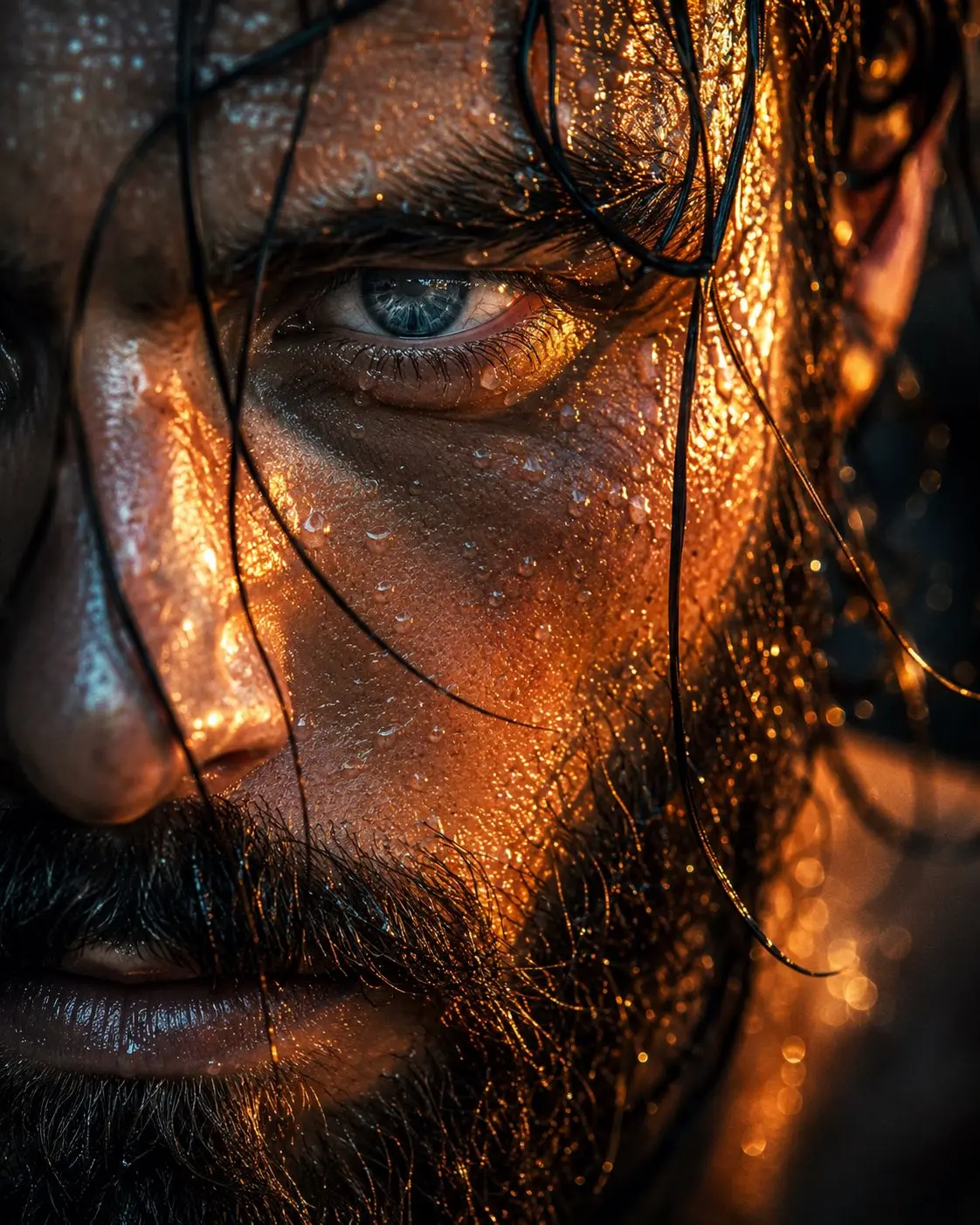
Grok renders human anatomy, skin texture, and complex lighting with enough fidelity for close-up portrait work: sharp iris and hair detail, believable rim light, and high contrast between light and shadow, as in the rugged-portrait example. The same realism carries into product and automotive shots, where reflections, materials, and surface detail hold up at larger sizes.


Prompt Control and Output Settings

You shape the result with three settings alongside the prompt: Size (up to 1K), Aspect ratio (square, portrait, landscape, and wide formats), and Output format (JPEG or PNG). Because the model has no fixed seed, the same prompt varies between runs — so generating two or three outputs and picking the best is faster than re-running one prompt over and over.
Tips for Sharper Results

A few habits get noticeably more out of the model:

  • Be specific about lighting and lens. Phrases like "soft studio key light," "warm rim light," or "8K close-up" steer the look far more reliably than vague adjectives.
  • Quote the exact text you want rendered. Put headline copy in quotation marks so it lands cleanly in the image instead of being paraphrased.
  • Suppress clutter when you need a clean shot. The model tends to add decorative copy and credits on its own; add "no additional text or decorative elements" for minimal product shots.
  • Match the aspect ratio to the use. Portrait ratios for posters and covers, landscape for ads, square for social.
  • Generate in small batches. With no seed to lock results, two or three runs give you a better pick than a single attempt.

Frequently Asked Questions

What can I create with the Grok AI image generator?

Photorealistic portraits, advertising and product posters, fashion and editorial layouts, anime and mascot art, and concept visuals — including designs with readable text and logos rendered inside the image.

How do I generate images with Grok AI?

Sign in to GPTProto, add prepaid credit, type a prompt in the Grok AI Generator (or upload a reference image to edit), choose your size and aspect ratio, and click Generate. The image renders in seconds.

Is Grok AI image generation free or paid?

On xAI's own Grok apps, image generation is paid-only as of 2026 — the free tier no longer includes it, and full access runs through subscriptions starting around $30/month. On GPTProto there's no subscription: you pay per image from a prepaid balance, with grok-imagine-image listed at $0.012 per image.

Are there limits on how many images I can generate?

You're limited by your prepaid balance, not by the fixed daily quotas xAI applies to its subscription tiers. Each image is billed individually, and the cost shows before you generate.

What's the content policy for Grok image generation?

Grok's image model applies content moderation — it's a filtered model, not an uncensored one. It blocks sexual content involving real people, content involving minors, and graphic violence. Stylized, commercial, and artistic prompts within those bounds are supported.

How much does each image cost?

The bound grok-imagine-image model is priced at $0.012 per image (currently 40% off the $0.02 market rate). The exact charge for each run — which scales with resolution and output settings — appears on the Generate button before you commit.

Is there an API for Grok image generation?

Yes. The same model is available through an OpenAI-compatible endpoint — see the grok-imagine-image model page for the request format and API docs.

Are there limits on the length of the cinematic content?

Currently, you can generate short-form cinematic clips optimized for quick rendering and high impact, complete with matching synchronized audio.

Testimonials

Marcus T.

Content Creator

The grok ai is ridiculously fast. I generated a photorealistic image for my blog in exactly 4 seconds. Game changer!

Sarah Jenks

Video Editor

I was skeptical about the synchronized audio feature, but it matched my cinematic sequence perfectly. Huge time saver.

David L.

Graphic Designer

Finally, an ai tool that actually understands complex lighting. The photorealistic details in my portraits are insane.

Elena R.

Creative Director

Generating cinematic clips used to take hours of rendering. Now the grok ai handles my conceptual drafts instantly.

James P.

Marketer

Love the lightning-fast generation speed. Sometimes the output needs a second prompt tweak, but overall fantastic.

Anita K.

Social Media Manager

The integration of synchronized audio with ai clip generation is exactly what I needed for my social media shorts.

Brian C.

Ad Agency Producer

I use the grok ai daily to storyboard commercial concepts. The photorealistic images help clients visualize clearly.

Rachel W.

Indie Filmmaker

Fast, reliable, and incredibly detailed. The cinematic outputs have completely replaced my old stock footage workflow.

Tom H.

Small Business Owner

Super intuitive interface. Even as a beginner, I got a stunning ai clip on my first try with great sound design.

Linda S.

Art Director

The speed is unmatched. Producing a photorealistic image batch for my presentation took mere seconds. Highly recommend!