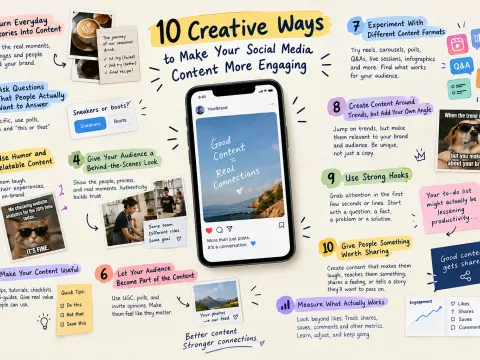
Turn Everyday Stories Into Content
People connect with stories because stories give information a human context. Instead of only sharing what your company sells, show the experiences, challenges, and moments behind your work.
For instance, a coffee shop may post a story about the creation of a new seasonal drink that they've developed, along with the original recipe that failed and the process of how they got to the final one. A software company might tell the tale of a feature they often requested their customers to have in their software.
It can be interesting to make even the little things into stories. Reflect on what happened, who was involved, what was the challenge and what was the outcome. This makes it easier for followers to connect with the content as opposed to just another promotional message.
Ask Questions That People Actually Want to Answer
One of the easiest methods of getting interaction is by using questions, however not all questions lead to interaction. Questions like "what do you think" are simple to ignore because they are too easy, or they feel like the same question.
Rather ask specific questions related to your audience's experiences. One fashion company could ask, "So which do you want to retain, sneakers or boots?" One question for a productivity account might be, "What is your one task that you always put off?"
Polls, quizzes and "this or that" posts can also be used. This enables people to easily and rapidly join and boosts response rates.
Use Humor and Relatable Content
You can use humor to make your content highly memorable. People would be more apt to share something that makes them laugh, particularly when it takes an experience that they are familiar with from their own life.
Here's where memes come in handy since they convey an idea easily and can humanize a brand. For example, a marketing agency might produce a funny post regarding checking website analytics the 20th time in a day. Five minutes before you take a test, an online learning platform could make a joke about opening a textbook.
You're not required to become a comedy account. The trick is to know what kind of a joke your audience can pull off and doing so without straying too far off your brand.
If you need to produce it in a hurry, a meme maker can assist you to make social posts that are shareable and familiar in a format you may not be able to create by yourself without expertise.
Give Your Audience a Behind-the-Scenes Look
It is easy for customers to get excited about a brand when they can see behind the scenes. Behind-the-scenes content promotes transparency and makes your audience feel connected with the people behind the scenes.
A restaurant may display its chef cooking food before opening. The packaging of a product could be demonstrated by a clothing company. A content creator can post the steps required to create a video, including planning, shooting, and editing.
Introduce team members and what they do, too. Such copy will help connect followers with a person behind the logo, website or social media account.
The content doesn't have to be spotless. The behind-the-scenes footage can actually be more authentic if it's just a bit more casual and away from the setup of a commercial.
Make Your Content Useful
People follow you because of useful content, entertainment draws attention. Consider what questions your audience members often ask and create posts around the answers.
For instance, a skin care firm can show you how to create a basic morning regimen. A travel company can provide some real packing strategies. A financial education account might use a simple everyday scenario to explain a complex concept.
Tutorials, checklists, tips and mini-guides or short explanations can be useful. If they see valuable information on your account repeatedly, they will be more likely to bookmark your articles and visit your account again.
Concentrate on the practical aspect of the value.
When you're contemplating publishing an educational post, ask yourself if someone could actually take a different approach after reading it. If the answer is yes, you likely have a valuable piece of content.
Let Your Audience Become Part of the Content
When social media users are not considered passive viewers, that's when social media becomes more engaging. Provide ways for them to participate.
This is especially effective when it comes to user-generated content. Invite customers to post pictures, videos, reviews or experiences with your product. If you wish, use one of your own accounts to highlight some of these contributions.
You can also ask followers to vote on new products, pick a product design, propose product topics or submit questions for a potential video. This could make people feel that their opinion actually matters within your community.
A small clothing company may allow users to vote on what color to include in an upcoming line, for instance. After the choice has been decided, the brand can publish the outcome and acknowledge the community for assisting in the selection.
Experiment With Different Content Formats
A good idea of content, but the format doesn't contribute to the interest. What it is presented as can drastically change the information's reception.
If you're the type of blogger who posts pictures, why not post a short video? For most caption writers, try carousels. For those that love watching videos, consider a live Q&A or mini-interview.
Consider experimenting with some of the following formats:
It's not necessary to embrace all formats at once. Select one different format and use it for a couple of posts. Be mindful of the types that elicit pertinent responses, not just following the latest trend.
Create Content Around Trends, but Add Your Own Angle
Trends can help your content go viral among people who wouldn't normally find your account. But it's easy to miss the mark by following exactly the same, making your post indistinguishable from thousands of others.
Rather, you should question ways to customize a trend for your specific market or audience. A real estate company may broadcast a top performing audio clip to poke fun at house shopping. A university account might take a viral approach to the description of student life. A tech company might be able to use a popular meme to illustrate an everyday technical issue.
The trend should be in addition to the idea, not as the idea. The content is unique due to your own point of view.
Quick action is also important. Trends can come and go and content teams should have an easy way of spotting trends and determining if they are relevant to the brand.
Use Strong Hooks
If the first few seconds or first line don't evoke curiosity, even good content can be ignored. The introduction should immediately explain to the reader or viewer why they should continue to read or watch.
Rather than begin a post with "Today we are going to discuss five productivity tips," consider starting with a more specific idea, like "Your to-do list might actually be lessening productivity."
A good hook might present a surprising fact, ask a question, state a common problem, or offer a helpful solution. It's not about duping people to click. The idea is to provide them with a real incentive to go on.
After getting their attention, ensure that the rest of the material fulfills the opening.
Give People Something Worth Sharing
One of the best indicators of good content is if individuals desire others to see it. Content that you can share is likely to make people laugh, teach them something useful, share a feeling or tell a story about an experience they know.
Consider when you last messaged someone via social media. One of the reasons you probably didn't share it was because it was professionally designed. You shared it because it got you thinking, it made you laugh, you learnt something from it, or you said, "This is literally us."
Think about creating with that reaction. If you have a business account, think of what your followers would want to share with their peers, friends, partners, or family.
Measure What Actually Works
While it's true that creativity is a key quality, results should not be ignored in creating effective social media posts. Once you've created various kinds of posts, review the results of your audience.
Are carousels in education more successful? Are there more shares for humorous posts? Is the number of comments increasing with short videos? Do questions result in discussions?
You shouldn't only pay attention to the number of followers and likes. There are several different metrics that can show different types of engagement. Shares and saves can signify that the content is valuable and comments can serve as an indicator that a topic is spurring discussion.
Improve future content by using these patterns. You don't have to give up on creativity when it doesn't work out as expected. Instead, view each post as a small experiment, learning more about your audience.
Conclusion
To create engaging social media content is all about knowing what people want to see, feel, learn and share. Deliver better stories, play with formats, make judicious use of humour, encourage feedback, and listen.
Not all posts are meant to go viral. Pay attention to regularly producing content that warrants some people to pause their scroll and interact with your brand.