What Is the Claude AI API?
The Claude AI API is a programmatic interface that lets an application send messages or supported content to a Claude model and receive a structured response. A customer-support system can use it to classify tickets, a coding agent can ask it to inspect a repository, and a document workflow can send text or supported files for analysis.
When you access Claude directly, the main interface is Anthropic’s POST /v1/messages endpoint. A conversation is stateless at the API level: if your application needs earlier messages, it sends the relevant history again with the next request. Anthropic also provides APIs for Message Batches, Token Counting, Models, Files, and Skills, but Messages is the place to start for a standard text interaction.
The Claude chat product and Claude API are separate billing surfaces. Paying for a consumer Claude subscription should not be treated as API credit, and creating an API key does not create a separate per-key charge. API cost comes from usage.
Claude API Models Compared: Fable, Opus, Sonnet, and Haiku
The current Claude family has four practical tiers. Their names signal different capability, speed, and cost targets, but the safest choice still comes from testing your own prompts.
| Model |
Exact API model ID |
Context / max output |
Relative speed |
Best starting use |
| Claude Fable 5.1 |
claude-fable-5-1 |
1M / 128K |
Slower |
Hardest reasoning and long-horizon agents after Opus falls short |
| Claude Opus 5 |
claude-opus-5 |
1M / 128K |
Moderate |
Capability-first evaluation, complex coding, and enterprise agents |
| Claude Sonnet 5 |
claude-sonnet-5 |
1M / 128K |
Fast |
Everyday coding, analysis, content, and tool use |
| Claude Haiku 4.5 |
claude-haiku-4-5-20251001 |
200K / 64K |
Fastest |
High-volume, latency-sensitive, and cost-sensitive work |
The factual recommendation in Anthropic’s model-selection documentation is to start with Opus 5 for most capability-first workloads. Fable 5.1 is the next step when Opus at higher effort still fails the evaluation. That is a meaningful change from older guides that treated Sonnet as the automatic default.
My practical recommendation is narrower. If answer quality is the first constraint, begin your evaluation with Opus 5. If you are designing a cost-aware production service, test Sonnet 5 against the same evaluation set before committing. Haiku 4.5 belongs in routing, extraction, classification, and other high-volume paths where speed and price matter more than handling the hardest reasoning case. Fable 5.1 should be an escalation tier. Its higher capability target comes with the highest price and slower relative latency.
One naming detail is easy to miss: a dateless model ID is not necessarily an alias that changes underneath your application. Anthropic states that, from Claude 4.6 onward, dateless IDs identify pinned snapshots. Record the exact ID you tested, even when it does not contain a date.
Which Claude AI API Provider Should You Use?
Choosing a Claude AI API provider is partly a product decision and partly an integration decision. Direct Anthropic access gives you the native Messages API. GPT Proto gives you an OpenAI-compatible chat-completions contract across supported models.
| Decision point |
Direct Anthropic API |
GPT Proto route |
| Authentication |
Anthropic key and official SDK |
One GPT Proto bearer key |
| Request contract |
Anthropic Messages API |
OpenAI-compatible /v1/chat/completions |
| Price basis |
Anthropic’s official list price |
Current Claude collection lists rates 10% below the official rates |
| Model switching |
Claude family |
One key and prepaid balance across supported models and providers |
| Feature access |
Upstream source of truth |
Route support can differ or arrive later |
Use Anthropic directly when native response semantics and access to the latest upstream features matter most. Use GPT Proto when an OpenAI-compatible integration, one balance across multiple model providers, or the current lower listed token rates are more valuable.
There is a cost to that convenience: route support is not guaranteed to match every upstream modality, beta header, tool feature, or response field. Check the individual route before designing around it. You can compare the Claude models currently available through GPT Proto before choosing an integration.
Claude AI API Pricing: What Does One Request Cost?
Claude AI API pricing is based mainly on input and output tokens, not on the API key itself. The table below compares Anthropic’s current list prices with the prices displayed in GPT Proto’s Claude collection. Rates are in US dollars per 1 million tokens.
| Model |
Anthropic input / output |
GPT Proto input / output |
| Claude Fable 5.1 |
$10 / $50 |
$9 / $45 |
| Claude Opus 5 |
$5 / $25 |
$4.50 / $22.50 |
| Claude Sonnet 5 |
$2 / $10 |
$1.80 / $9 |
| Claude Haiku 4.5 |
$1 / $5 |
$0.90 / $4.50 |
Per-million-token pricing is hard to interpret until it becomes a request. Suppose one API call sends 10,000 input tokens and receives 2,000 output tokens:
request cost = (input tokens ÷ 1,000,000 × input rate) + (output tokens ÷ 1,000,000 × output rate)
| Model |
Anthropic cost for the request |
GPT Proto cost for the request |
| Fable 5.1 |
$0.200 |
$0.180 |
| Opus 5 |
$0.100 |
$0.090 |
| Sonnet 5 |
$0.040 |
$0.036 |
| Haiku 4.5 |
$0.020 |
$0.018 |
The important cost lesson is not merely that Haiku is cheaper. Output tokens cost five times as much as input tokens across these four current rates. A verbose response policy can therefore matter as much as the model choice.
Anthropic’s Message Batches API reduces standard input and output token charges by 50%. Prompt caching follows a different calculation: a 5-minute cache write costs 1.25 times the base input rate, a 1-hour write costs twice the base input rate, and a normal cache read costs 0.1 times the input rate. Fable 5.1 cache reads use a lower 0.025 multiplier. These features help only when the workload actually reuses content or can wait for batch processing; adding them to a one-off request increases complexity without creating savings.
How to Get a Claude AI API Key
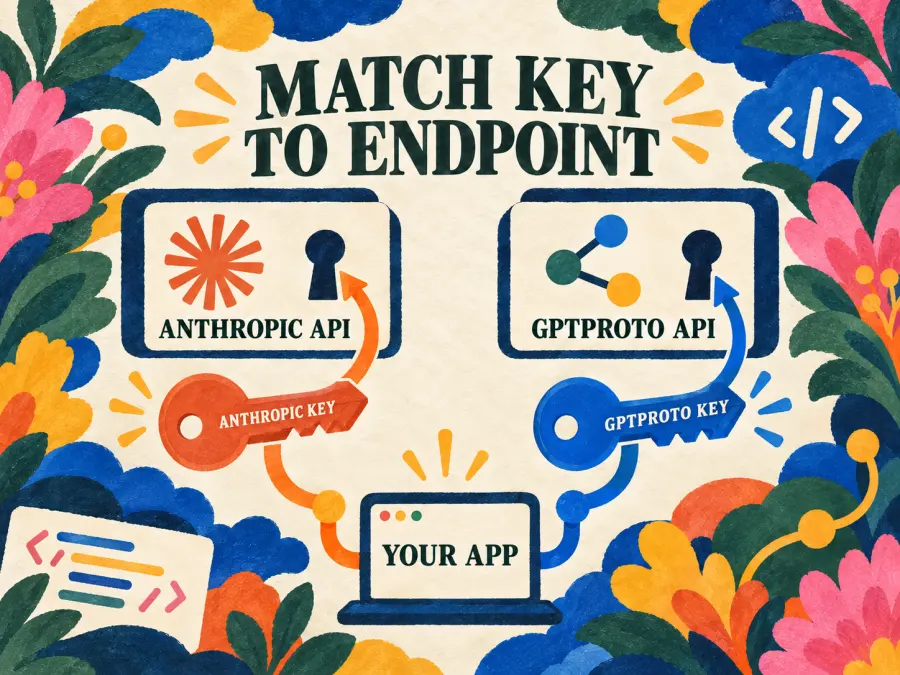
The correct key depends on the endpoint you plan to call. An Anthropic key belongs to Anthropic’s API. A GPT Proto key belongs to GPT Proto’s endpoint.
Option 1: Create an Anthropic API key
Open the Claude Console, then go to Settings → API keys. Create a key and choose the available name, expiration, linked account, and workspace settings. The full secret is displayed once and starts with sk-ant-, so copy it into a secure secrets store at creation time.
For local development, expose it to the official SDK through an environment variable:
export ANTHROPIC_API_KEY="your-anthropic-key"
Option 2: Create a GPT Proto API key
Create a key in the GPT Proto dashboard’s API Keys area, store it securely, and expose it as a separate variable:
export GPTPROTO_API_KEY="your-gptproto-key"
Requests to GPT Proto authenticate with Authorization: Bearer $GPTPROTO_API_KEY. The same key and prepaid balance can access the Claude models currently supported by GPT Proto, so you do not need a separate Anthropic key for that route.
Never commit either secret to Git, paste it into public logs, or ship it inside browser code. Keep model calls on the server or behind a service that can read environment variables or a secrets manager. If a key is exposed, revoke it rather than trying to hide the leak with another commit.
How to Use the Claude AI API
The two examples below solve the same task, but their contracts are different. Direct Anthropic code receives Anthropic content blocks. GPT Proto returns an OpenAI-style chat-completions object.
Send a request directly with Anthropic’s Python SDK
Install the official package:
python -m pip install anthropic
With ANTHROPIC_API_KEY set, send a request:
import anthropic

client = anthropic.Anthropic()

message = client.messages.create(
    model="claude-opus-5",
    max_tokens=1000,
    messages=[
        {
            "role": "user",
            "content": "Explain idempotency in one paragraph."
        }
    ],
)

for block in message.content:
    if block.type == "text":
        print(block.text)
message.content is a list of content blocks, so the example checks each block type before printing text. Do not assume the entire response is one plain string.
When you add a system instruction, place it in the top-level system parameter. Anthropic’s Messages API does not use a message with a system role. max_tokens is also a request-level parameter, capped by the selected model’s maximum output.
Send a Claude request through GPT Proto
GPT Proto uses an OpenAI-compatible endpoint and bearer authentication:
curl --request POST "https://gptproto.com/v1/chat/completions" \
  --header "Authorization: Bearer $GPTPROTO_API_KEY" \
  --header "Content-Type: application/json" \
  --data '{
    "model": "claude-sonnet-5",
    "messages": [
      {
        "role": "user",
        "content": "Explain idempotency in one paragraph."
      }
    ]
  }'
For a successful GPT Proto response, read the generated text from choices[0].message.content. Token accounting is returned in the usage object. Before copying this into production, confirm that claude-sonnet-5 is still listed on the Claude Sonnet 5 model page and run the request with your own key.
Do not mix the two request contracts
One tempting mistake is to put a GPT Proto key into anthropic.Anthropic(api_key=...) without configuring a compatible base URL. The Anthropic SDK then targets Anthropic’s default endpoint, where the GPT Proto key is invalid. The reverse mismatch is equally unhelpful: Anthropic’s content-block response parsing does not describe GPT Proto’s OpenAI-style object.
Pick one route, then keep its endpoint, key, payload, and response parser together.
Claude AI API Use Cases: Match the Model to the Workload
A model table is only a starting hypothesis. The final choice should come from a small evaluation set drawn from the work your application actually performs.
| Workload |
Start with |
Why |
Trade-off |
| Classification, extraction, routing, and sub-agents |
Haiku 4.5 |
Lowest listed cost and fastest relative tier |
Less suitable for the hardest multi-step reasoning |
| Everyday coding, content, data analysis, and tool use |
Sonnet 5 |
Balanced price and capability |
Not Anthropic’s highest-capability option |
| Complex coding agents and higher-stakes enterprise work |
Opus 5 |
Anthropic’s capability-first default |
Official input and output rates are 2.5 times Sonnet 5 rates |
| Long-running research and the hardest reasoning |
Fable 5.1 |
Escalation tier when Opus still misses |
Highest price and slower relative tier |
For many systems, the best design uses more than one model. Routine requests can go to Haiku or Sonnet. Cases that fail a validator, involve a higher-risk action, or require deeper reasoning can move to Opus. Fable sits above that path when an evaluation shows a real gain.
This worker-and-advisor pattern can reduce cost, but it adds routing logic and another failure mode. Log why a request was escalated and compare the final result against the cheaper model; otherwise, expensive routing tends to spread without evidence.
Upstream Claude models support text and image input, text output, tool use, and multilingual work. That does not prove that every capability is available through every provider route. Check the selected model page before promising image, document, or tool behavior to your users.
Before Production: Model IDs, Limits, Errors, and Cost Controls
A successful first request proves that authentication and payload shape work. It does not prove that an integration is ready for real traffic.
First, pin the exact model ID you evaluated. Current dateless Claude IDs can still refer to fixed snapshots. A model change should be deliberate: rerun the evaluation, compare cost and output behavior, and then update the production configuration.
Second, handle failure states by category rather than retrying everything:
| Status |
Meaning |
What to do |
| 400 |
Invalid request |
Validate parameters and message structure |
| 401 |
Authentication error |
Check the key and environment variable |
| 402 |
Billing error |
Check credits or billing setup |
| 403 |
Permission error |
Check account and workspace access |
| 404 |
Resource not found |
Check the endpoint and model ID |
| 413 |
Request too large |
Reduce the request body |
| 429 |
Rate or spend limit reached |
Back off and inspect current limits |
| 500 |
Internal server error |
Retry safely |
| 504 |
Gateway timeout |
Retry with safeguards against duplicate work |
| 529 |
API overloaded |
Back off and retry |
Anthropic’s SDKs retry rate-limit and transient 5xx failures twice by default with exponential backoff. That is useful, but it does not remove the need for application-level timeouts, request tracing, and duplicate-work protection.
Rate limits and spend limits are separate. Anthropic documents a 32 MB request limit for standard endpoints including Messages and Token Counting, 256 MB for Message Batches, and 500 MB for Files. A short burst can also hit a token-bucket limit even when the longer average looks acceptable.
At minimum, log the model ID, input tokens, output tokens, latency, request ID, error status, and estimated cost. These fields let you answer the production question that matters: did a more expensive model improve the result enough to justify its bill?
Pick the Route, Then Test the Model
Choose the access route first: direct Anthropic for native semantics and upstream features, or GPT Proto for an OpenAI-compatible contract, one cross-provider key, and currently lower listed Claude rates. Then test the least expensive model that can meet your quality requirement.
Haiku and Sonnet cover the efficiency end of the family. Opus is the capability-first starting point. Fable belongs at the top of an escalation path, not in every request. Before integrating, compare current Claude API availability and pricing on GPT Proto, then validate the chosen model with your own prompts.