Почему фраза «Она выглядит грустной» обычно создаёт невыразительную мимику ИИ
Слово, обозначающее эмоцию, описывает состояние. Видео требует изменений.
Если промпт начинается и заканчивается словами «очень грустная», у Seedance 2.5 нет понятной причины менять положение бровей, век, рта, дыхание или позу от секунды к секунде. Результат может быть визуально привлекательным, но лицо часто остаётся зафиксированным в одном выражении.
Три ошибки в промптах становятся причиной большинства невыразительных эмоциональных видео:
Промпт называет эмоцию, но не описывает её видимые физические проявления.
Персонаж достигает максимальной интенсивности в первую секунду, не оставляя места для эмоционального развития.
Ходьба, диалоги, движения рук, движение камеры и события на заднем плане конкурируют с лицом за внимание.
Замените абстрактные указания наблюдаемым поведением:
| Слабое указание |
Более точное видимое указание |
| Она выглядит очень грустной. |
Внутренние уголки её бровей поднимаются, нижние веки напрягаются, а губы остаются плотно сжатыми. |
| Он становится застенчивым. |
Он опускает взгляд, слегка сутулится и сильнее сжимает пальцы вокруг блокнота. |
| Она начинает плакать. |
Сначала в глазах появляется влага; одна слеза падает только после того, как ей не удаётся сохранить самообладание. |
| Он нервничает. |
Он сглатывает, делает неглубокий вдох и на мгновение избегает зрительного контакта. |
| Она злится. |
Её челюсть напрягается, прежде чем взгляд становится жёстким; одна ноздря расширяется на контролируемом вдохе. |
Вывод прост: описывайте то, что может увидеть камера, а не то, что способен почувствовать только персонаж.
Формула эмоциональной игры для Seedance 2.5
Надёжный промпт для реалистичного выразительного видео состоит из семи частей:
Эмоциональный триггер

+ попытка подавить реакцию

+ непроизвольные проявления на лице

+ реакция дыхания и тела

+ постепенное усиление во времени

+ сдержанное восстановление

+ ограничения камеры и непрерывности
Сопротивление — это часть, которой не хватает большинству промптов. Персонаж, который сразу плачет, краснеет или кричит, просто демонстрирует эмоцию. Персонаж, который пытается предотвратить реакцию и терпит неудачу, действительно её проживает.
Например, не пишите только: «его лицо краснеет, когда раскрывается его влюблённость». Добавьте противоречивое намерение: он хочет выглядеть спокойным. Это сопротивление создаёт избегание зрительного контакта, запаздывающее покраснение, неудачную попытку заговорить, напряжённые пальцы и сдержанную улыбку. Именно такие небольшие реакции делают сильную эмоцию правдоподобной.
Не добавляйте все возможные признаки на каждом этапе. Для каждой эмоциональной фазы выберите два или три движения лица, одну реакцию дыхания и одно небольшое движение тела. Избыток инструкций может привести к конфликту, а не к большей реалистичности.
Переводите эмоции в видимые движения лица
Используйте эту таблицу как библиотеку указаний. Выбирайте признаки, соответствующие кадру, вместо того чтобы копировать всю строку целиком.
| Эмоция |
Глаза и брови |
Рот и челюсть |
Дыхание и тело |
| Сдерживаемые слёзы |
Блестящие нижние веки; внутренние уголки бровей постепенно поднимаются и сближаются |
Губы сжимаются; нижняя губа дрожит; подбородок напрягается |
Один раз сглатывает; дыхание становится неровным; плечо слегка дрожит |
| Смущение |
Взгляд опускается; короткий взгляд вверх из-под ресниц |
Губы размыкаются без слов; лёгкое покусывание нижней губы; сдержанная улыбка |
Плечи слегка сводятся внутрь; пальцы напрягаются; дыхание перехватывает |
| Сдерживаемый гнев |
Неподвижный взгляд; брови опускаются неравномерно |
Челюсть сжимается; губы вытягиваются в линию |
Контролируемое носовое дыхание; напряжённые плечи; руки остаются неподвижными |
| Страх |
Глаза расширяются, прежде чем взгляд начинает метаться; верхние веки остаются напряжёнными |
Губы размыкаются; челюсть на мгновение замирает |
Дыхание перехватывает; грудь остаётся напряжённой; тело слегка отклоняется назад |
| Сдерживаемый смех |
Веки сужаются; взгляд на мгновение прерывается |
Сначала приподнимается один уголок рта; затем губы снова сжимаются |
Воздух выходит через нос; плечи один раз вздрагивают |
| Облегчение |
Напряжение бровей спадает; глаза смягчаются и снова фокусируются |
Губы размыкаются перед коротким выдохом; челюсть расслабляется |
Плечи опускаются; дыхание становится более глубоким; поза раскрывается |
Такие слова, как сдержанный, нерешительный, непроизвольный, постепенный и почти незаметный помогают контролировать интенсивность. Но они не заменяют физическое действие. «Тонкое эмоциональное выражение» всё ещё расплывчато; «его подбородок почти незаметно дрожит, пока он держит взгляд опущенным» — конкретное указание.
Пример 1: сдерживаемые слёзы — промпт для преобразования изображения в видео
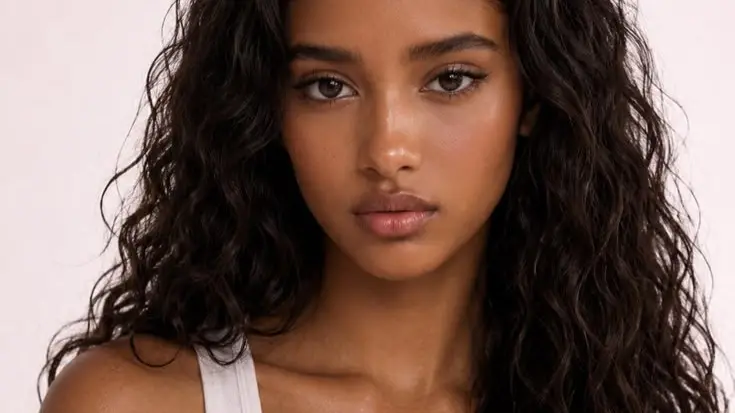
Этот пример начинается с изображения известного персонажа и превращает его в 15-секундную эмоциональную сцену. Референсное изображение должно определять лицо, возраст, причёску, одежду, аксессуары и исходную композицию. Большая часть промпта должна быть посвящена игре и непрерывности, а не изменению внешности человека.
[image]
[video]
Эмоциональная временная шкала
| Время |
Эмоциональная фаза |
Видимые признаки |
| 0–3 с |
Сохраняет самообладание |
Сжатые губы, напряжённый подбородок, блестящие глаза, одно сглатывание |
| 3–5 с |
Контроль начинает ослабевать |
Внутренние уголки бровей поднимаются, нижняя губа дрожит, появляется влага |
| 5–10 с |
Сдерживаемый срыв |
Глаза закрываются, слёзы падают неравномерно, дыхание становится прерывистым |
| 10–12 с |
Физическое восстановление |
Голова опускается, следует дрожащий вдох, рукав вытирает слёзы |
| 12–15 с |
Эмоциональные последствия |
Влажные глаза снова открываются, взгляд отворачивается, грусть остаётся |
Готовый промпт для преобразования изображения в видео
@Image 1 defines the character’s exact identity, facial structure, hairstyle, clothing, accessories, age, and overall appearance. Preserve the same person throughout the entire video. Do not redesign, beautify, age, or replace the character.

Create a single continuous 15-second cinematic close-up based on @Image 1. The character is facing someone emotionally important just outside the camera and desperately trying not to cry.

[0–3s — trying to stay composed]
The character initially holds a controlled expression. Their lips press tightly together, the jaw becomes slightly tense, and the chin muscles tighten. They swallow once and take a small unsteady breath. Their eyes gradually become glossy, but no tears fall yet.

[3–5s — composure beginning to fail]
The inner eyebrows lift and draw subtly together. The lower eyelids tighten, the nose becomes faintly flushed, and the lower lip begins to tremble involuntarily. One corner of the mouth pulls downward slightly before the other. Moisture slowly gathers along the lower eyelids.

[5–10s — restrained emotional breakdown]
The character tries once more to suppress the emotion but fails. Their eyes squeeze shut, the brow contracts naturally, and tears begin to roll down the cheeks at slightly different speeds. Their mouth quivers into a quiet, restrained sob. Small involuntary tremors pass through the chin, throat, and shoulders as their breathing becomes uneven.

[10–12s — catching their breath]
The character lowers their head, takes a shaky breath through parted lips, and gently wipes the tears with their sleeve or the soft fabric of their clothing. The gesture feels spontaneous, hesitant, and imperfect.

[12–15s — fragile recovery]
They slowly raise their head and attempt to regain control. Their lips press together, they swallow, and their wet, reddened eyes look away from the camera. The crying begins to subside, but sadness remains visible in their breathing, gaze, and facial tension.

Maintain the original composition and visual style of @Image 1. Use a tight eye-level close-up, realistic skin movement, natural blinking, physically accurate tears, subtle breathing, and restrained micro-expressions. Keep the background stable with only slight natural environmental movement.

No cuts, no identity drift, no facial redesign, no hairstyle or clothing changes, no sudden exaggerated crying, no melodramatic acting, no symmetrical artificial tears, no rapid head shaking, no warped facial features, no beauty-filter skin, and no extra people entering the frame.
Исходное изображение имеет значение. Полностью радостный портрет заставляет модель пройти слишком длинный путь до первой эмоциональной фазы. Лицо, уже покрытое слезами, убирает постепенное нарастание. Лучший исходный кадр находится между этими крайностями: блестящие нижние веки, сжатые губы, лёгкое напряжение подбородка, но ни одна слеза ещё не упала.
Если исходное изображение представляет персонажа по пояс или в полный рост, сохраните эту композицию и запросите медленное приближение к крупному плану. Не совмещайте приближение с ходьбой, поворотом и широкими жестами рук. Лицо — это сцена.
Пример 2: застенчивый парень, чью тайную влюблённость раскрыли
В этом примере преобразования текста в видео используется другая эмоция, но та же структура:
Раскрытие → Оцепенение → Избегание взгляда → Распространяющееся покраснение
→ Случайный взгляд → Лёгкое покусывание губы → Застенчивые последствия
Важна задержка. Покраснение должно начаться вокруг ушей и постепенно распространиться на щёки и нос. Мгновенно ярко-красная кожа выглядит как фильтр. Влажные глаза должны намекать на уязвимость, но не превращать сцену в плач.
Готовый промпт для преобразования текста в видео
Create a single continuous 12-second cinematic close-up of a shy 18-year-old young man whose secret crush has just been discovered by someone standing off-camera.

He has a gentle, youthful appearance, soft slightly tousled dark hair, clear natural skin, and simple casual clothing. He is standing in a quiet school corridor near a window during soft late-afternoon light. A folded handwritten love note is partially visible between the pages of the notebook held against his chest.

[0–2s — sudden realization]
Someone off-camera notices the hidden love note and looks at him knowingly. The young man freezes for a brief moment. His eyes widen slightly and his breath catches as he realizes that his secret has been discovered.

[2–5s — embarrassed avoidance]
He immediately lowers his gaze toward the floor, unable to maintain eye contact. His shoulders draw inward slightly and his fingers tighten around the notebook. His lips part as if he wants to explain, but no words come out.

[5–8s — blush spreading]
A natural blush begins around the tips of his ears and gradually spreads across his cheeks and the bridge of his nose. The color deepens visibly but remains realistic rather than cartoonish. His lower eyelids tighten slightly, and his eyes become glossy with faint tears of intense embarrassment and vulnerability, without actually crying.

[8–10s — trying to hide his feelings]
He briefly glances upward from beneath his eyelashes, accidentally meets the other person’s gaze, and immediately looks down again. He gently catches his lower lip between his teeth, trying to suppress a nervous, involuntary smile. His chin trembles almost imperceptibly.

[10–12s — shy emotional aftermath]
He hugs the notebook closer to his chest, turns his face slightly away, and releases his lower lip. His cheeks remain deeply flushed. His eyes stay lowered and moist, while the corners of his mouth hold the faintest restrained, embarrassed smile, revealing that his feelings are genuine.

Naturalistic live-action performance, intimate coming-of-age atmosphere, realistic skin texture, subtle facial muscle movement, visible breathing, natural blinking, shallow depth of field, soft window light, and gentle background blur. Static eye-level close-up with an extremely slow push-in. Focus primarily on the gradual emotional change in his eyes, lips, cheeks, and breathing.

No dialogue, no exaggerated anime reaction, no instant bright-red face, no cartoon blush marks, no tears running down the cheeks, no hysterical crying, no broad smile, no seductive expression, no exaggerated lip biting, no face distortion, no identity changes, and no camera cuts.
Здесь предотвращают типичные ошибки две фразы. Блестящие глаза с лёгкими слезами ... но без настоящего плача отделяют эмоциональную влагу от сцены плача. Легко придерживает нижнюю губу зубами сохраняет движение достаточно небольшим, чтобы избежать искажения рта.
Эмоциональные промпты для преобразования текста в видео и изображения в видео
Эмоциональную временную шкалу можно использовать в обоих режимах, но промпт не должен выполнять одинаковый объём работы.
| Компонент промпта |
Текст в видео |
Изображение в видео или рабочий процесс с референсом |
| Идентичность персонажа |
Опишите возраст, внешность, волосы, одежду и роль |
Позвольте загруженному изображению определить идентичность |
| Место действия |
Опишите место, время и освещение |
Сохраните исходный вариант или добавьте только необходимый контекст |
| Основной фокус промпта |
Персонаж, сцена и игра |
Игра, тайминг и сохранение идентичности |
| Основной риск |
Шаблонный персонаж или изменение идентичности |
Искажение лица, рта или переработка исходного изображения |
| Лучшее применение |
Создание полной сцены с нуля |
Анимация уже созданного персонажа |
Полный рабочий процесс ByteDance для Seedance 2.5 поддерживает расширенное мультимодальное использование референсов, включая до 30 изображений, 10 видео и 10 аудиоклипов, согласно официальным сведениям о запуске. Возможности на уровне провайдера шире, чем возможности каждого стороннего интерфейса.
На момент написания статьи основная страница API Seedance 2.5 на GPT Proto публично предоставляет преобразование текста в видео с настройками промпта, соотношения сторон, длительности, разрешения, аудио, камеры и seed. Используйте приведённый выше промпт для преобразования изображения в видео только в интерфейсе, который действительно поддерживает загрузку изображения или референса. Не вставляйте @Image 1 в текстовый эндпоинт и не ожидайте, что он поймёт изображение, которое никогда не было загружено.
Как сделать эмоциональное видео кинематографичным, а не театральным
Держите камеру близко. Крупный или средний крупный план на уровне глаз даёт изменениям лица достаточно пикселей, чтобы оставаться заметными. Общий план может хорошо работать для языка тела, но это не лучший вариант по умолчанию, когда сцену несут глаза и нижняя губа.
Используйте одно сдержанное движение камеры. Очень медленное приближение или лёгкое ручное покачивание добавляет присутствия, не конкурируя с игрой. Быстрое вращение, зум и движения головы усложняют сохранение стабильности лица.
Добавляйте асимметрию в реакцию. Один уголок рта может опуститься раньше другого. Слеза может сначала появиться из одного глаза. Персонаж может поднять взгляд, а затем сразу опустить его. Идеально синхронные изменения лица часто выглядят искусственно.
Направляйте дыхание. Задержка дыхания, одно сглатывание, дрожащий вдох или опускание плеч после выдоха связывают лицо с телом. Это особенно полезно, когда эмоциональная перемена должна оставаться тихой.
Оставляйте последствия. Не заканчивайте сцену на эмоциональном пике. Отведите последние две-три секунды на восстановление: персонаж отпускает губу, моргает влажными глазами, отводит взгляд или пытается выровнять дыхание. Остаточная эмоция часто убедительнее самого сильного выражения.
Почему мимика Seedance 2.5 всё ещё выглядит неправильно
| Проблема |
Вероятная причина |
Изменение промпта |
| Лицо остаётся невыразительным |
Использовались только абстрактные слова об эмоциях |
Добавьте видимые изменения глаз, бровей, рта, челюсти и дыхания |
| Персонаж сразу начинает плакать |
В промпте нет постепенного нарастания |
Отведите первую фазу на сопротивление и отложенное появление влаги |
| Игра выглядит мелодраматичной |
Слишком много сильных признаков возникает одновременно |
Используйте сдержанные, нерешительные реакции и меньше действий на каждом этапе |
| Слёзы выглядят искусственно |
Они появляются симметрично или в чрезмерном количестве |
Отложите первую слезу и варьируйте время её появления в обоих глазах |
| Рот искажается во время покусывания губы |
Физическое указание слишком резкое |
Замените «кусает сильно» на «легко придерживает нижнюю губу» |
| Загруженный персонаж меняется |
Промпт заново описывает или изменяет человека |
Укажите, что референс определяет идентичность и внешность |
| Детали лица исчезают |
Большие движения или активная работа камеры отвлекают внимание |
Используйте крупный план и одно медленное движение камеры |
| Эмоция исчезает через секунду |
Промпт задаёт пик, но не описывает конечное состояние |
Добавьте попытку восстановления и остаточную реакцию взгляда или дыхания |
Если генерация не удалась, изменяйте по одной переменной за раз. Если не работают слёзы, исправьте только их тайминг. Если игра слишком сильная, уменьшите количество одновременных признаков. Если идентичность меняется, упростите движения и усильте указание на сохранение референса. Полная переработка промпта после каждой попытки не позволяет понять, какое изменение сработало.
Многоразовый шаблон промпта Seedance 2.5 для эмоциональной мимики
[Reference and identity instructions, if a reference input is available]

Create a single continuous [duration]-second cinematic [close-up / medium close-up].

The character has just [emotional trigger], but tries to [resistance].

[0–Xs — initial reaction]
[Describe two or three visible eye, brow, mouth, breathing, or hand reactions.]

[X–Xs — emotion leaking through]
[Describe involuntary micro-expressions, gaze behavior, and gradual physical change.]

[X–Xs — emotional peak]
[Describe a controlled release without exaggerated acting.]

[X–Xs — aftermath]
[Describe the recovery attempt, residual breathing, and final gaze.]

Camera:
[Choose the framing and one restrained camera movement.]

Continuity:
[State which identity, clothing, background, lighting, and composition details must remain unchanged.]

Avoid:
[Instant emotional change, exaggerated acting, facial distortion, identity drift, rapid head movement, artificial symmetrical reactions, and unrelated background action.]
Для одноимпульсной сцены длительностью 10–15 секунд обычно достаточно четырёх этапов с таймингом. Для более длинного 30-секундного повествования используйте дополнительное время для внешнего триггера или второй сюжетной фазы, а не растягивайте одну и ту же реакцию лица на весь ролик. Seedance 2.5 официально поддерживает до 30 секунд на одну генерацию и указания с привязкой к временным меткам, однако ByteDance также отмечает существующие ограничения для сложных физических движений и сцен с несколькими взаимодействующими персонажами. Если приоритетом является мимика, держите сцену простой. Ознакомьтесь с официальным обзором модели Seedance 2.5, чтобы узнать актуальные возможности провайдера.
Как создать эмоциональное видео с Seedance 2.5 на GPT Proto
Откройте страницу модели Seedance 2.5 и выберите задачу преобразования текста в видео.
Вставьте полный эмоциональный промпт. Установите соотношение сторон, длительность, разрешение, параметры аудио, поведение камеры и seed, указанные в активных элементах управления.
Создайте первую версию и оцените только четыре параметра: эмоциональный тайминг, стабильность лица, физическую реалистичность и сохранение эмоциональных последствий в последние две секунды.
Измените самый слабый этап, а не заменяйте весь промпт.
Разработчики могут отправить тот же промпт для преобразования текста в видео через маршрут модели. Указанный ниже эндпоинт подтверждён действующим маршрутом модели; если доступные значения изменятся, ориентируйтесь на текущую панель параметров.
curl --location 'https://gptproto.com/api/v3/bytedance/dreamina-seedance-2-5-260628/text-to-video' \
  --header 'Authorization: GPTPROTO_API_KEY' \
  --header 'Content-Type: application/json' \
  --data '{
    "prompt": "Create a single continuous 12-second cinematic close-up of a shy young man whose secret crush has just been discovered. He freezes, lowers his gaze, gradually blushes, gently catches his lower lip, and ends with moist eyes and a restrained embarrassed smile. Natural skin texture, subtle breathing, no dialogue, no cartoon blush, no tears falling, no camera cuts.",
    "aspect_ratio": "16:9",
    "duration": 12,
    "resolution": "720p",
    "generate_audio": false,
    "camera_fixed": false,
    "seed": -1
  }'
Если вы хотите сравнить другие видеомодели по той же эмоциональной временной шкале, сохраняйте неизменными промпт, длительность, композицию и правила использования seed, а затем изучите коллекцию видеомоделей ИИ. Честное сравнение должно показывать, какая модель лучше сохраняет эмоциональную дугу, а не какая создала самый красивый первый кадр.