What Is the Seedance API?
Seedance is ByteDance's family of generative video models. The API turns a prompt—and, on supported routes, images, audio, or video references—into a video job that runs asynchronously. Your application submits a request, keeps the returned result identifier, checks the job status, and then retrieves the completed output.
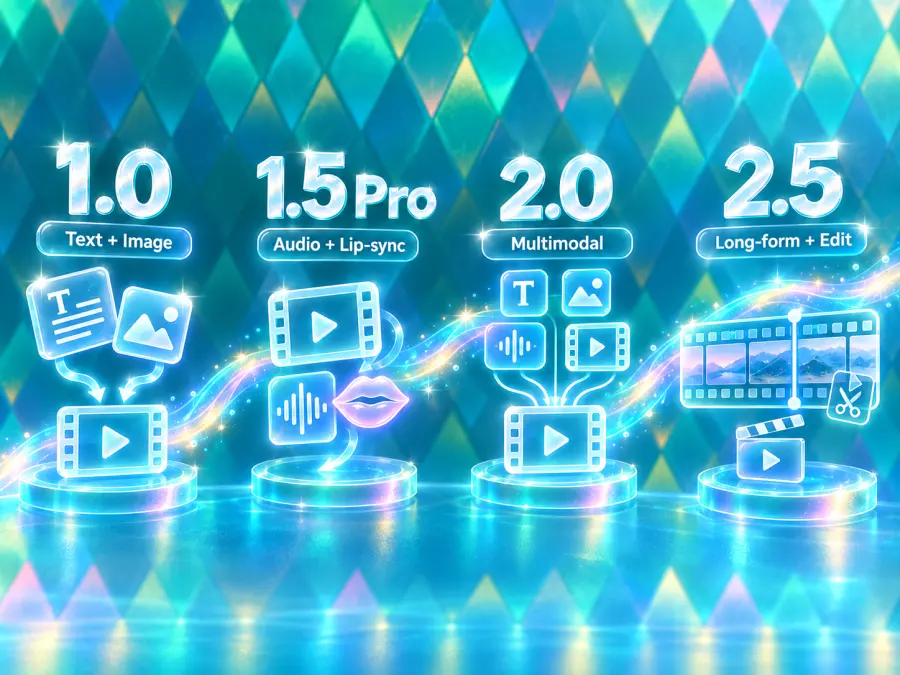
The family has changed substantially since Seedance 1.0. The Seedance 1.0 research paper describes text-to-video, image-to-video, native multi-shot generation, and subject consistency. Seedance 1.5 Pro added joint audio-video generation, multilingual lip-sync, and stronger cinematic control. Seedance 2.0 accepts combinations of text, image, audio, and video references, while Seedance 2.5 focuses on longer directed sequences and video editing.
For developers, “Seedance AI API” usually means one of two access paths: an official ByteDance enterprise route or an API platform that exposes Seedance models behind a consistent key and billing system. This guide uses the latter path through GPT Proto.
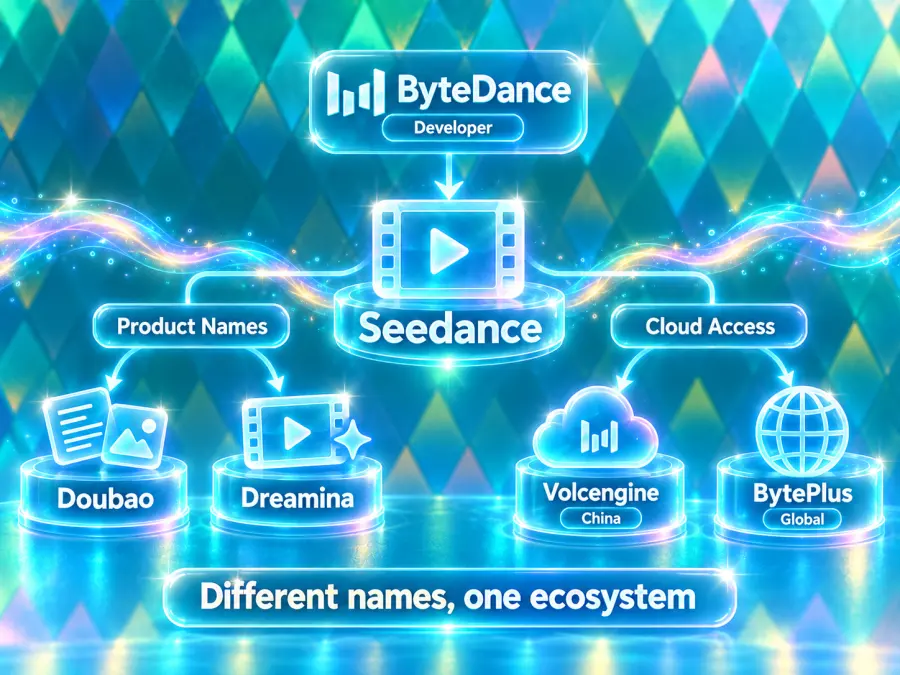
ByteDance, Doubao, Dreamina, Volcengine, and BytePlus Explained
Search results use several names for the same model family, which can make Seedance API access look more complicated than it is:
ByteDance is the company that develops Seedance.
Doubao is a ByteDance AI product name used in China and appears in some API routes.
Dreamina is another ByteDance product name and appears in several Seedance 2.x model IDs.
Volcengine is ByteDance's cloud platform in mainland China. The Seedance 1.5 Pro paper identifies it as an access point for that release.
BytePlus is the enterprise brand many international developers encounter when looking for ByteDance services. Exact product availability can vary by market and account.
These labels describe the developer, product surfaces, cloud channels, or route naming—not five unrelated model families. For example, GPT Proto's standard Seedance 2.0 model ID is dreamina-seedance-2-0-260128, while some routes use a doubao-seedance prefix.
Use the model ID shown on the current model page instead of guessing it from a product name. That is especially important for searches such as “Doubao Seedance 2.0 API,” “Seedance 2.0 API Chinese version,” or “BytePlus API,” where the search phrase may describe an access channel rather than a different model.
Seedance API Models Compared
The Seedance model collection is the best place to confirm which versions are currently online. Here is the practical difference between the main choices.
| Model |
GPT Proto model ID |
Best fit |
Current page controls |
| Seedance 1.0 Pro |
seedance-1-0-pro-250528 |
Existing text-to-video or image-to-video workflows |
2–12 seconds; 480p, 720p, 1080p |
| Seedance 1.5 Pro |
seedance-1-5-pro-251215 |
Audio-video generation and lip-sync workflows |
4–12 seconds; 480p, 720p, 1080p; audio toggle |
| Seedance 2.0 Mini |
dreamina-seedance-2-0-mini-260615 |
Lower-cost experiments and higher-volume drafts |
4–15 seconds in the current selector; 480p, 720p; audio toggle |
| Seedance 2.0 Fast |
dreamina-seedance-2-0-fast-260128 |
Latency-sensitive previews and iteration |
4–15 seconds in the current selector; 480p, 720p; audio toggle |
| Seedance 2.0 |
dreamina-seedance-2-0-260128 |
General multimodal video generation |
4–15 seconds; 480p through 4K options on the current GPT Proto page |
| Seedance 2.5 |
dreamina-seedance-2-5-260628 |
Longer directed scenes and current-generation projects |
4–30 seconds; 480p, 720p; audio and camera controls |
A few details need context. The Seedance 2.0 research release describes native 480p and 720p output; GPT Proto's current standard 2.0 page also exposes 1080p and 4K options. Treat those as route-level output options rather than rewriting the original model paper. Likewise, a model page may list several supported input types even when a particular example endpoint covers only text-to-video. Always check the endpoint-specific request schema.
For a new integration, start with Seedance 2.0 Mini when cost matters most, Seedance 2.0 when you need the broadest reference workflow, or Seedance 2.5 when you need longer shots and more directing control. Keep Seedance 1.0 Pro and 1.5 Pro for established workflows whose behavior you already know.
Compare All Seedance API Models
Check current model IDs, supported inputs, and live pay-as-you-go pricing before choosing a route.
Explore Seedance Models
Seedance API Pricing
Seedance API pricing depends on the model, duration, aspect ratio, resolution, and whether audio is generated. A single “price per video” can therefore be misleading. The examples below use values shown by GPT Proto's live model calculators on September 11, 2026.
| Model and configuration |
Current displayed price |
| Seedance 1.0 Pro, 5s, 480p, 1:1 |
$0.102 per run |
| Seedance 1.5 Pro, 10s, 480p, 1:1, no audio |
$0.102 per run |
| Seedance 1.5 Pro, 10s, 480p, 1:1, with audio |
$0.204 per run |
| Seedance 2.0 Mini, 480p, 1:1 |
$0.0237 per second |
| Seedance 2.0, 480p, 1:1 |
$0.0739 per second |
| Seedance 2.0, 720p, 16:9 |
$0.1663 per second |
| Seedance 2.0, 1080p, 16:9 |
$0.4116 per second |
| Seedance 2.5, 480p, 1:1 |
$0.1130 per second |
| Seedance 2.5, 720p, 16:9 |
$0.2542 per second |
For example, a five-second Seedance 2.5 job at 720p and 16:9 is approximately $1.271 before any taxes or account-specific adjustments: 5 × $0.2542. A four-second 480p square job is approximately $0.452.
Use the individual model page for the final estimate. The GPT Proto pricing page explains the broader billing model, while model pages show configuration-level video costs. Budget for retries as well as successful outputs.
How to Get a Seedance API Key
You do not need a separate key for every Seedance version on GPT Proto. One account key can authenticate requests across supported models.
Open GPT Proto and create or sign in to your account.
Add sufficient balance for the model and test configuration you plan to call.
Create an API key in the account dashboard.
Copy the key once and store it in a secret manager or server-side environment variable.
Open the chosen model page and copy its current model ID, endpoint, and request fields.
Do not place the key in browser JavaScript, a public mobile bundle, a chatbot prompt, or a Git repository. Your backend should own the credential and call the Seedance API for the client.
Set the key locally before running the examples:
export GPTPROTO_API_KEY="replace_with_your_key"
If you found this page by searching “how to get Seedance 2.0 API,” the important distinction is that the account key and model ID are separate. The key proves who is making the request; the model ID selects Seedance 2.0, Mini, Fast, 2.5, or a legacy version.
Get Your Seedance API Key
Create one GPT Proto key and use it across Seedance and other supported video, image, and text models.
Create an API Key
Seedance API Quickstart with cURL
The following request submits a five-second, 720p Seedance 2.5 text-to-video job with audio. It uses the endpoint currently shown on the Seedance 2.5 model page.
curl --request POST \
  "https://gptproto.com/api/v3/doubao/dreamina-seedance-2-5-260628/text-to-video" \
  --header "Authorization: Bearer $GPTPROTO_API_KEY" \
  --header "Content-Type: application/json" \
  --data '{
    "prompt": "A paper boat sailing through a rainy miniature city at night",
    "aspect_ratio": "16:9",
    "duration": 5,
    "resolution": "720p",
    "generate_audio": true,
    "camera_fixed": false,
    "seed": -1
  }'
The submission response contains the identifier needed to check the result. Copy that returned identifier into a shell variable; do not assume the JSON field name without checking the current response or API documentation.
export result_id="replace_with_returned_identifier"

curl --request GET \
  "https://gptproto.com/api/v3/predictions/$result_id/result" \
  --header "Authorization: Bearer $GPTPROTO_API_KEY"
If the job is still processing, wait briefly and request the status again. When the status response reports completion, read the returned output URL and save the file to your own storage if you need durable control over retention and delivery.
Video generation can take much longer than a chat completion, so holding one HTTP request open until it finishes is fragile. In production, store submitted IDs, poll them from a worker, and update your job record on success or failure.
To call another version, change both the endpoint and request body to match that model page. Do not only swap the display name. For example, Seedance 2.0, Seedance 2.0 Mini, Seedance 1.5 Pro, and Seedance 1.0 Pro have their own schemas and available controls.
How to Add the Seedance 2.0 API to a Chatbot or AI Agent
Seedance is a video model, not a conversational model. Your chatbot should use it as a tool inside a larger workflow.
The user asks for a video in natural language.
The chat model converts that request into a clear production prompt and structured settings.
Your server-side tool validates duration, resolution, aspect ratio, and estimated cost.
The tool submits the Seedance job and stores the returned result ID.
A background worker polls the result endpoint.
The chatbot receives the completed video URL or a failure message and presents it to the user.
If your agent platform cannot call custom HTTP tools, connecting a Seedance model to the same account is not enough. The platform must expose an HTTP request, function-calling, MCP, plugin, or custom-tool mechanism.
Keep polling outside the language model's reasoning loop. Use a worker and assign an internal job ID so a user retry does not accidentally submit two paid generations.
Before submission, show the user the selected model, duration, resolution, audio setting, and estimated price. This confirmation step is especially useful in chat interfaces, where a short request such as “make that longer and 4K” can change the cost sharply.
Common Seedance API Errors
Exact error bodies may change, but the failure categories below cover most integrations.
| Symptom |
Likely cause |
What to check |
401 or unauthorized response |
Missing, invalid, or exposed API key |
Bearer header, key status, server environment |
400 or validation failure |
Unsupported field, value, or request shape |
Current schema, duration range, resolution, aspect ratio |
| Insufficient balance |
Account cannot cover the request |
Balance and estimated configuration cost |
| Job stays pending |
Generation queue or slow configuration |
Poll interval, timeout policy, status endpoint |
| Prompt or input rejected |
Safety policy or unsupported material |
Prompt wording, consent, asset rights, input format |
| Mode unavailable |
Endpoint does not support that input combination |
Text-to-video versus image/reference route |
| Cost is higher than expected |
Resolution, length, audio, or retries changed |
Log submitted settings and calculate before sending |
Do not retry every failure automatically. Validation and authentication errors require a change. Retry transient server or network failures with capped exponential backoff, and preserve the original job ID.
Which Seedance Version Should You Use?
Choose based on the workflow, not the largest version number alone:
Use Seedance 2.0 Mini for inexpensive drafts, prompt testing, and higher-volume workloads.
Use Seedance 2.0 Fast when turnaround matters more than using the standard route.
Use Seedance 2.0 for general production and multimodal reference workflows.
Use Seedance 2.5 for current projects that need longer clips, directed action, or stronger video editing and reference control. GPT Proto's visible example currently focuses on text-to-video, so confirm the route you need before promising image- or video-reference input in your product.
Use Seedance 1.5 Pro when its audio-video and lip-sync behavior already fits an existing pipeline.
Use Seedance 1.0 Pro mainly for compatibility with a tested legacy integration.
Run the same representative prompt through two candidates and compare usable-output rate, not only per-run price. A cheaper model that needs three retries can cost more than a higher-priced model that succeeds on the first attempt.
Safety and Production Limits
Only upload images, voices, and videos you own or are licensed to use. Get clear consent before generating a recognizable person's face or voice, and do not use Seedance to impersonate someone, evade disclosure requirements, or create deceptive evidence.
For production, record the model ID, input settings, job ID, timestamps, cost estimate, and final status. Avoid logging the API key or private source media. Add user-visible moderation, rate limits, budget limits, and a process for deleting stored assets.
Final Verdict
The Seedance API is already available, so “when does the Seedance API come out?” is no longer the main question. The useful decision is which route matches your product.
Seedance 2.0 Mini is the cost-first starting point, standard 2.0 is the general multimodal choice, and 2.5 is the strongest fit for longer directed video work. Use one server-side GPT Proto API key, copy the exact endpoint from the live model page, and build around asynchronous submit-and-poll jobs from the beginning.
Start Building with the Seedance API
Choose a Seedance model, copy its current endpoint, and run your first video job with one GPT Proto API key.
Try the Seedance API