What Is Gemini API?
The Google Gemini API provides direct access to Google's family of language models designed to process and generate text, images, audio, video, and code. Unlike earlier AI models that handled text alone, Gemini understands multiple input types simultaneously, making it useful for complex real-world problems.
Google organizes Gemini into several model tiers, each optimized for different use cases. Gemini 3 Pro represents the frontier of capability, delivering superior reasoning and multimodal understanding. Gemini 2.5 Flash balances performance with speed, excelling at mixed tasks. Gemini Flash-Lite offers cost-effective processing for high-volume applications. This tiered approach means developers can match model selection to specific needs rather than paying premium prices for every request.
The core appeal is simplicity. Rather than juggling separate services for text analysis, image understanding, video processing, and code generation, developers can use one consistent API interface. This unified approach reduces integration complexity and accelerates time to production.
Key Capabilities of Gemini API
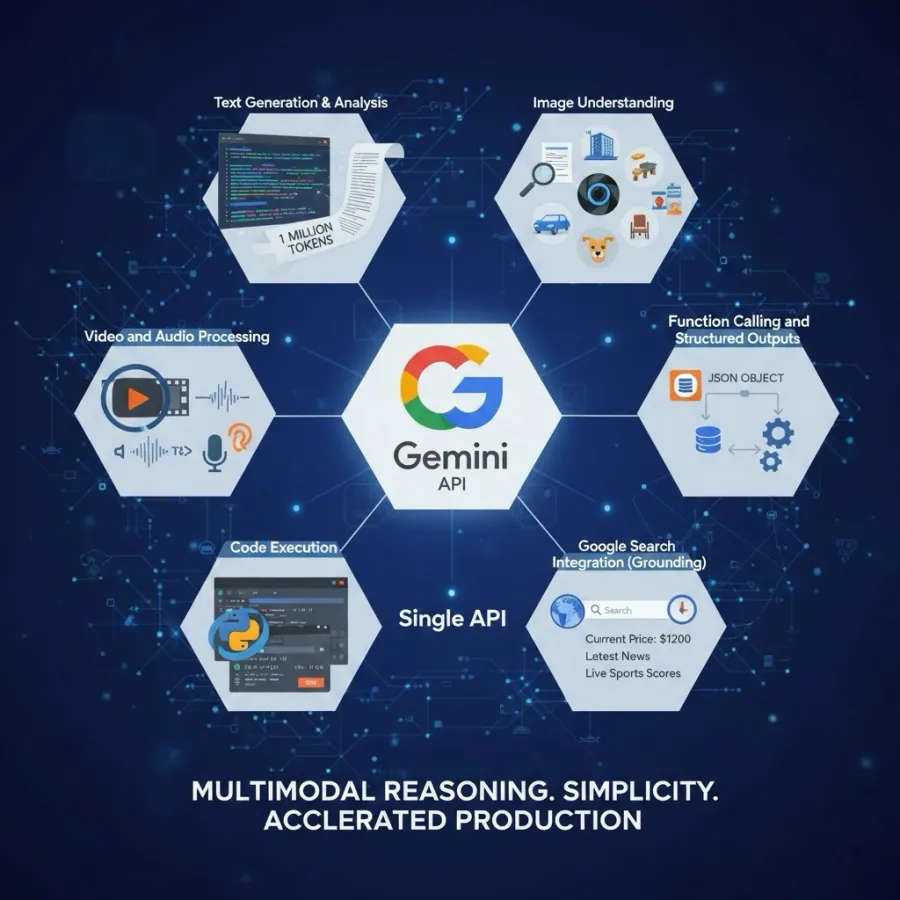
Text Generation & Analysis
Process natural language prompts and receive generated responses. Context windows reach up to 1 million tokens across most Gemini API models, enabling analysis of entire codebases, long documents, or extended conversations without summarization. This matters because it eliminates the "context window exceeded" problem that plagued earlier APIs.
Image Understanding
Send images alongside text prompts and receive detailed analysis, captions, or answers to visual questions. Real-world use cases: extract text from scanned documents, analyze architectural photos, identify objects in user-uploaded images, verify document authenticity, moderate user-generated content at scale.
Video and Audio Processing
Analyze video content to understand scenes, actions, and context. Convert audio inputs to text understanding for transcription workflows and audio-based query systems. The difference from competitors: Gemini handles this natively without separate API calls.
Function Calling and Structured Outputs
Request responses in specific formats—JSON objects, lists, or custom schemas. This bridges AI and business logic. Instead of parsing free-form text, your application receives properly structured data ready for database storage or downstream processing.
Code Execution
Built-in capability to write and run code during processing. Invaluable for mathematical computations, data analysis, and debugging workflows. Gemini can write Python, execute it, and return results—all in one API call.
Google Search Integration (Grounding)
Access real-time information from the web rather than relying only on training data from early 2024. Makes responses more accurate for time-sensitive queries: current prices, recent news, live sports scores, newly released products.
Unlike earlier AI models that handled text alone, the Gemini API understands multiple input types simultaneously. This matters because real-world problems are multimodal. Analyzing a legal document with embedded images, charts, and footnotes requires genuinely multimodal reasoning, not hacks that chain together separate services.
The core appeal to developers is simplicity. Rather than juggling separate services for different capabilities, you use one consistent API interface through Google Gemini API. This unified approach reduces integration complexity and accelerates time to production by 40-60% compared to managing multiple providers.
The History and Evolution of Google Gemini API
Google's journey toward Gemini began with recognition that AI development was accelerating beyond their early expectations. When the industry erupted around large language models in late 2022, Google responded with Bard, an experimental chatbot. However, Bard revealed critical limitations:
-
Occasional factual errors in responses
-
Struggled with certain reasoning tasks
-
Limited multimodal understanding capabilities
-
Felt like a research project, not production-ready
Rather than iterating incrementally, Google made a bold architectural choice. They built the Gemini API from scratch as a genuinely multimodal foundation model, trained simultaneously on text, images, video, and audio—not adapted from a text-only base. This architectural decision proved transformative because Gemini could reason across modalities in ways that felt more natural and capable.
Gemini's Development Timeline:
-
December 2023: Gemini 1.0 released, demonstrating multimodal capabilities
-
April 2024: Gemini 1.5 Pro introduces 1 million token context window
-
August 2024: Gemini 2.0 announces reasoning advancements
-
Late 2024: Gemini 3 and 2.5 Flash release with major performance improvements
-
2025: Ongoing iteration cycle with releases every 3-6 months

Google's strategy differs markedly from competitors: they ship frequently and iterate based on developer feedback rather than pursuing perfection in single major releases. This means new model versions of the Google Gemini API roll out roughly every 3-6 months, meaning your choice of model today may change dramatically next quarter.
Which Gemini API Model Should You Actually Use?
Understanding the available Gemini API models is critical because Google offers options across performance tiers and specialized domains. Choosing wrong costs you 5-10x more than necessary for many applications.
All Gemini API Models Quick Comparison
| Model |
Best For |
Cost |
Speed |
Context |
| Gemini 3 Pro |
Maximum accuracy, complex reasoning |
$110/1M input |
1-3 sec |
200K |
| Gemini 3 Flash |
Production apps, balanced performance |
$0.38/1M input |
0.5-1.5 sec |
1M |
| Gemini 2.5 Pro |
Specialized reasoning tasks |
$4/1M input |
1-2 sec |
200K |
| Gemini 2.5 Flash |
Long-context, cost-effective |
$0.38/1M input |
0.5-1.5 sec |
1M |
| Gemini Flash-Lite |
High-volume, simple tasks |
$0.07/1M input |
Fast |
1M |
Most developers should start with Gemini 3 Flash, not Pro. The performance gap narrowed significantly in 2025, while the cost gap remained wide.
Gemini 3 Pro—When Quality Matters More Than Cost
Gemini 3 Pro is Google's most advanced model as of 2025. Use this when:
-
Accuracy directly impacts revenue or safety (legal analysis, medical diagnosis assistance)
-
Complex multi-step reasoning is essential
-
You're building a premium product where cost is less critical than quality
-
Coding challenges require sophisticated algorithmic thinking
Performance edge: Superior on complex reasoning benchmarks, coding competitions, and nuanced language understanding.
Downsides: Slower responses (1-3 seconds) and 13x more expensive than Flash-Lite for the same tokens.
Gemini 3 Flash—The Practical Sweet Spot for Most Developers
Gemini 3 Flash provides frontier-class performance at significantly lower cost. This model represents the practical choice for most production applications. Use this when:
-
Building production applications where cost matters but quality must be excellent
-
You want faster responses than Pro (typically 0.5-1.5 seconds)
-
Handling mixed workloads where some requests need high capability
-
80% of your use cases don't require Pro's maximum reasoning power
Most developers find this the practical sweet spot for production applications using the Google Gemini API. It's where most development teams should default.
Gemini 2.5 Pro and Flash—Previous Generation Options
Gemini 2.5 Pro represents the previous generation's flagship. It maintains strong reasoning and coding capabilities. When to consider: If you have existing code optimized for 2.5 Pro, or if specific benchmarks show better performance on your exact use case.
Gemini 2.5 Flash balances performance with efficiency effectively. The distinguishing feature: 1 million token context window, double that of 2.5 Pro. Use this when analyzing entire codebases, processing long documents without summarization, or managing extended conversations where history matters.
Gemini Flash-Lite—Ultra-Cost-Efficient Processing
Prioritizes speed and cost. At 1/4 the price of Flash while maintaining surprising capability for straightforward tasks using the Gemini API. When to use:
-
Simple classification tasks (categorizing support tickets)
-
High-frequency, low-complexity requests (sentiment analysis of social media)
-
Basic summarization of short content
-
When processing thousands of requests daily, cost compounds into major savings
How to Actually Choose Your Gemini API Model
Rather than abstract guidance, here's the decision framework used by successful development teams:
Step 1: Start with your quality requirement
-
Maximum accuracy required? → Gemini 3 Pro
-
High quality acceptable? → Gemini 3 Flash
-
Acceptable quality sufficient? → Flash-Lite
Step 2: Consider your volume
-
Under 100 calls/month? → Any model, focus on quality
-
100K-1M calls/month? → Consider Flash to balance cost and quality
-
1M+ calls/month? → Strongly consider Flash-Lite for simple tasks, Flash for complex
Step 3: Test on your actual data
Don't trust benchmarks. Run your specific use case on Flash and Pro, measure quality difference, calculate breakeven point. This typically takes 2-4 hours and provides exact guidance.
Step 4: Implement hybrid routing
Most sophisticated applications don't use one Gemini API model. They route simple requests to Flash-Lite, complex requests to Flash, and only escalate to Pro when necessary. This reduces average cost by 60-70% without sacrificing quality.
How to Obtain and Manage Your Gemini API Key
Accessing the Google Gemini API begins with obtaining an API key, the credential that authenticates your application's requests.
Getting Your Gemini API Key: Quick Start (5 minutes)
-
Visit Google AI Studio at https://aistudio.google.com/apikey (no credit card required for free tier)
-
Sign in with your Google account
-
Click "Create API key in new Google Cloud project"
-
Copy the generated key
-
Store it in your .env file: GEMINI_API_KEY=your_key_here
Google provides code samples in Python, JavaScript, Go, Java, C#, and REST format. The simplest is Python:
import os
from google import genai
client = genai.Client(api_key=os.environ.get("GEMINI_API_KEY"))
response = client.models.generate_content(
model="gemini-2-5-flash",
contents="Explain how machine learning works in 3 sentences",
)
print(response.text)
This works immediately. No authentication complexity, no service account setup needed.
Setting Up Your Gemini API Key for Production Applications
Google AI Studio works for experiments, but production requires a Google Cloud project:
-
Create a Google Cloud project at https://console.cloud.google.com/
-
Enable the Generative Language API
-
Create a service account with appropriate permissions
-
Implement OAuth or API key rotation
This provides better access control, billing management, monitoring, and audit logs. Most teams make this transition when moving from prototype to production (typically at 100K+ requests per month).
Gemini API Key Security Best Practices (Non-Negotiable)
-
Treat API keys like passwords—they grant full API access
-
Store keys in environment variables, never hardcode them into source code
-
Rotate your Gemini API key every 90 days in production
-
Use different keys for development and production environments
-
Regenerate keys immediately if exposed (commit to GitHub, logs, etc.)
-
Implement rate limiting and quotas on your application side
-
Monitor API usage patterns for suspicious activity
Understanding Gemini API Pricing and Cost Optimization
The Gemini API uses token-based pricing. A token represents a small unit of text—roughly 4 characters on average. The word "Gemini" equals one token; "artificial intelligence" might be 2-3 tokens; a space or punctuation mark might be 0.5 tokens.
Critical understanding: You pay for both input tokens (what you send) and output tokens (what the model generates). Output tokens cost 2-3x more than input tokens because generation is computationally more expensive than processing.
Practical Gemini API Pricing Calculation Example
Customer support chatbot handling 10,000 queries monthly with 150 input tokens and 120 output tokens per request using the Gemini API:
-
Input: 10,000 × 150 = 1.5M tokens = $0.23 (using Flash at $0.15/1M)
-
Output: 10,000 × 120 = 1.2M tokens = $0.72 (using Flash at $0.60/1M)
-
Monthly cost: $0.95 (free tier) or $4.75-$9.50 for hourly availability
At this scale, Gemini is genuinely cheap. However, if each query generates 1,000 output tokens (very long responses), the same application costs $37.50/month—still affordable but worth noting.
Complete Gemini API Pricing Comparison (2025)
| Model |
Input Price |
Output Price |
Best Use Case |
| Gemini 3 Pro |
$110/1M |
$330/1M |
Complex reasoning |
| Gemini 3 Flash |
$0.38/1M |
$1.52/1M |
Production apps |
| Gemini 2.5 Pro |
$4/1M |
$12/1M |
Specialized tasks |
| Gemini 2.5 Flash |
$0.15/1M |
$0.60/1M |
Long context |
| Gemini Flash-Lite |
$0.07/1M |
$0.28/1M |
Simple tasks |
Important Context Surcharges for Gemini API Pricing
-
Gemini 3 Pro and 2.5 Pro charge additional fees for context exceeding 200,000 tokens
-
Flash models maintain flat pricing regardless of context size
-
For very long documents, Flash becomes more economical despite lower raw capability
Real cost scenario: Processing 100 long documents (100K tokens each) for analysis using the Google Gemini API:
-
Using Gemini 3 Pro: ~$1,200 (includes surcharges)
-
Using Gemini 2.5 Flash: $15 (flat pricing advantage)
This illustrates why understanding the specific Gemini API pricing requirements matters more than picking the "best" model.
Gemini API Pricing: Cost Optimization Strategies That Actually Work
Collect multiple queries and process them together overnight or during off-peak hours. Google offers explicit Batch API with 50% discount for deferred processing. Works for content generation, data analysis, and any non-real-time task.
If your application repeatedly uses the same system instruction, template, or references the same document, caching stores that information once. Subsequent reads cost only 10% of normal input token rate.
Test different tiers on your actual data to find the cost-to-quality ratio that works for your business. Don't assume Pro is always necessary when evaluating Gemini API pricing.
Route simple requests to Flash-Lite, complex requests to Flash, and only escalate to Pro when necessary through the Gemini API.
Accessing Gemini API Through GPT Proto
GPT Proto AI API Provider exemplifies the next generation of AI infrastructure—a unified API platform that consolidates access to dozens of leading AI models including Gemini, Claude, GPT, and specialized providers like Midjourney, Sora, Kling, and ByteDance's Seedance. Rather than managing separate authentication credentials, API keys, and billing accounts for Google Cloud (Gemini), OpenAI (GPT), Anthropic (Claude), and others, developers connect once to GPT Proto and gain instant access to all integrated models through a single unified API and authentication mechanism.
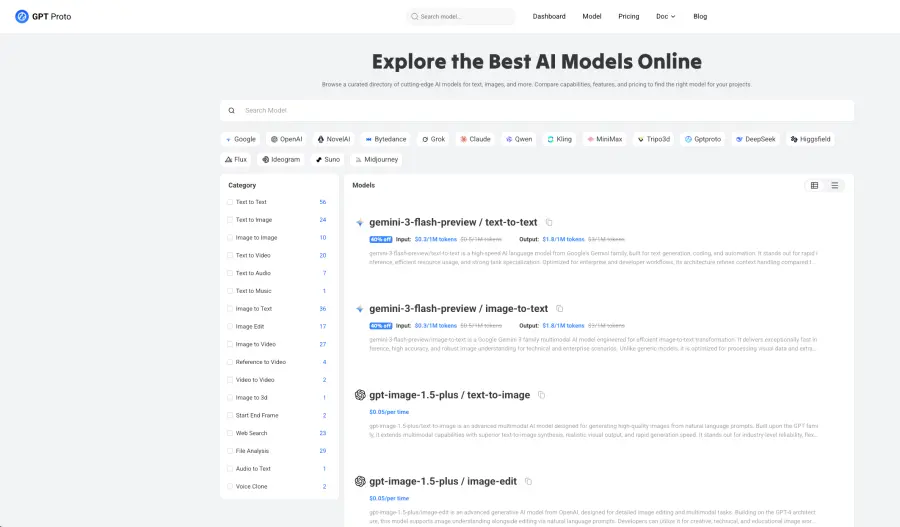
GPT Proto's platform offers significant advantages: pricing that's 40-80% off compared to direct provider rates, consolidated billing that simplifies accounting and volume discounts, intelligent cost-optimized routing that automatically selects the most economical model for each request type, and failover protection that switches to alternative models if Gemini experiences load or outages. The platform supports text models (Gemini, GPT-5, Claude Sonnet), image generation (Gemini Image Preview, GPT-Image-1.5, Seedream), video creation (Veo 3.1, Sora 2, Kling), and audio processing—all accessible through identical API syntax.
For developers building production applications, GPT Proto's request analytics dashboard provides visibility into which models perform best on specific tasks, enabling data-driven optimization decisions. The integration path is straightforward: connect your Gemini API credentials once, update your code to use GPT Proto's unified endpoint instead of Google's direct API, and optionally add other providers as needed. This approach eliminates vendor lock-in while reducing infrastructure complexity, making it ideal for teams that want flexibility, better economics, and the ability to A/B test different models on actual production traffic.
Gemini API Rate Limits, Quotas, and Scaling
The Gemini API enforces rate limits to maintain stability and fair resource sharing. Understanding these limits prevents surprises when your application gains users.
Rate Limits by Tier
| Tier |
Requests/Min |
Concurrent |
Monthly Limit |
| Free |
15 |
1 |
1.5M tokens |
| Paid |
120 |
10 |
Custom quota |
| Enterprise |
Custom |
Custom |
Custom SLA |
Free tier rate limits are intentionally restrictive. They're sufficient for development and small-scale testing but inadequate for production. Paid tier allows significantly higher concurrency and scales with your needs through the Gemini API.
Scaling Your Gemini API Implementation
For production applications expecting 1,000+ concurrent requests:
-
Implement request queuing on your application side
-
Request quota increases through Google Cloud Console (takes 2-7 days)
-
Consider implementing client-side rate limiting to never exceed hard limits
-
Monitor actual usage patterns to anticipate future growth
Google publishes a 99.9% uptime SLA for the Gemini API in standard tier. Enterprise customers negotiating custom agreements can achieve 99.95%+ with priority support.
Conclusion
The Google Gemini API delivers legitimate competitive advantages with native multimodal capabilities, a 1 million token context window, reasonable pricing on Flash models, and deep Google ecosystem integration—making it an excellent choice for visual understanding, extended document analysis, and applications needing Google Search integration. However, 2025's best practice isn't choosing one provider but rather strategic multi-model implementation: using Gemini API for multimodal tasks and long-context analysis, Claude for nuanced reasoning, GPT for domain-specific strengths, and specialized providers for niche needs. Unified platforms like GPT Proto AI API solve the operational complexity by providing a single API interface across dozens of models, consolidated billing, 40-80% cost savings compared to direct rates, intelligent routing that optimizes for cost and performance, and analytics revealing which models excel at which tasks. Start by setting up a Gemini API key through Google AI Studio for prototyping, move to Google Cloud projects for production with proper authentication and monitoring, then integrate unified platforms as your application scales and incorporates multiple AI providers. With thoughtful planning and strategic provider selection, the Gemini API becomes a cost-effective engine powering next-generation applications that deliver genuine value to users.