Recent industry reports show that 74% of organizations have adopted an API-first approach in 2024, marking a significant shift from traditional code-first development. As businesses increasingly rely on APIs to power applications and AI systems, the need for reliable testing tools has never been more critical. The 2025 State of the API report reveals that 93% of teams still face collaboration challenges, highlighting the ongoing need for efficient API development platforms. Postman, used by over 35 million developers worldwide, has become the leading solution for simplifying API workflows.
This article covers the following key topics:
-
Understanding what Postman is and how it works
-
Core features that make Postman essential for developers
-
Step by step guide to testing APIs with Postman
-
Alternatives to consider, including GPT Proto for unified AI API access
-
Common questions about using Postman effectively
What is Postman
Postman is a software company offering an API platform for developers to design, build, test, and collaborate on APIs. Think of it as a powerful toolkit that makes working with APIs simpler and more efficient, whether you are a solo developer or part of a large team.
Postman allows developers to send HTTP requests, analyze responses, automate workflows, and collaborate efficiently. The platform eliminates the need to write extensive code just to test if an API works correctly. Instead, you get an intuitive interface where you can quickly create requests, view responses, and organize your work into collections.
Key Features of Postman
Postman offers several powerful features that streamline API development:
API Design and Documentation: Postman provides a visual editor to create API endpoints, set parameters, request and response payloads, and authentication settings. You can design APIs using OpenAPI, GraphQL, or other popular formats. The platform also generates documentation automatically from your requests, making it easy to share API specifications with team members.
Request Builder: The request builder is where most API testing happens. You can select different HTTP methods like GET, POST, PUT, and DELETE, add headers, set authentication, and include request bodies. Postman supports various data formats including JSON, XML, and form data.
Automated Testing: You can write tests for your Postman API requests in JavaScript in the Post-response tab. These tests validate that your API behaves as expected, checking status codes, response times, and data structure. Automated testing integrates seamlessly with continuous integration workflows.
Collections and Environments: Collections let you group related API requests together for better organization. Environments allow you to manage different sets of variables for development, staging, and production, making it simple to switch contexts without changing your requests.
Collaboration Tools: Postman's Workspaces give teams a shared development area that streamlines API development. Teams can work together in real time, share collections, and maintain a single source of truth for API specifications.
Pros and Cons of Postman
Understanding the strengths and limitations helps you make informed decisions:
| Advantages |
Limitations |
| User-friendly interface requires minimal setup |
Free plan limits mock servers and monitoring features |
| Supports all major API types including REST, GraphQL, and SOAP |
Postman Flow can complicate API testing with drag-and-drop interfaces |
| Built-in support for API keys, OAuth, Bearer Tokens, and Basic Auth |
Advanced features require paid subscriptions |
| Extensive documentation and active community |
Learning curve for complex automation scenarios |
| Cross-platform availability on Windows, Mac, and Linux |
Performance can slow with very large collections |
How to Use Postman to Test API
Getting started with Postman is straightforward. Here is a practical guide to testing your first API.
Step 1: Download and Install Postman
Visit the Postman website and download the application for your operating system. Postman offers both desktop applications and a web version. Create a free account to access collaboration features and save your work in the cloud.
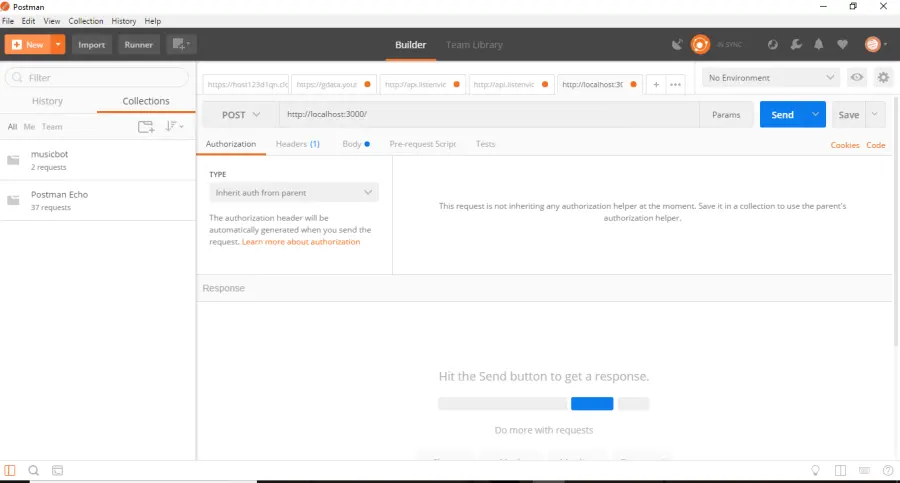
Step 2: Create Your First Request
Click the New button in the top left corner and select HTTP Request. You will see the main request interface with several key components.
The request builder includes:
-
URL bar where you enter your API endpoint
-
Method dropdown to select GET, POST, PUT, DELETE, or other HTTP methods
-
Tabs for parameters, headers, body, and authentication
-
Send button to execute the request
-
Response panel showing results
Step 3: Send a Simple GET Request
Enter your API URL and select GET as the method, then click Send. For example, testing a public API like https://api.github.com/users/octocat will return user information in JSON format.
The response section displays several important details:
-
Status code indicating success or errors (200 for success, 404 for not found)
-
Response time in milliseconds
-
Size of the response data
-
Response body with the actual data returned
Step 4: Add Parameters and Headers
Many APIs require additional information. Click the Params tab to add query parameters as key-value pairs. Use the Headers tab to include necessary headers like content type or authorization tokens.
For authentication, navigate to the Authorization tab and select your authentication type. Postman supports various methods including API keys, OAuth 2.0, and bearer tokens.
Step 5: Test POST Requests with Body Data
POST requests send data to create new resources. Select POST as the method, enter your endpoint URL, and click the Body tab. Choose the appropriate format such as JSON or form data, then enter your data. Click Send to submit the request.
Step 6: Write Test Scripts
Adding scripts to the Scripts Post-response tab enables you to write and validate API tests. Common tests include verifying status codes, checking response times, and validating data structure.
Example test script:
pm.test("Status code is 200", function () {
pm.response.to.have.status(200);
});
pm.test("Response time is less than 500ms", function () {
pm.expect(pm.response.responseTime).to.be.below(500);
});
Step 7: Organize with Collections
Save your requests into collections for better organization. Click the Save button after creating a request, then create or select a collection. Collections help you group related requests, run multiple tests together, and share work with teammates.
Postman Alternative: GPT Proto for Unified AI API Access
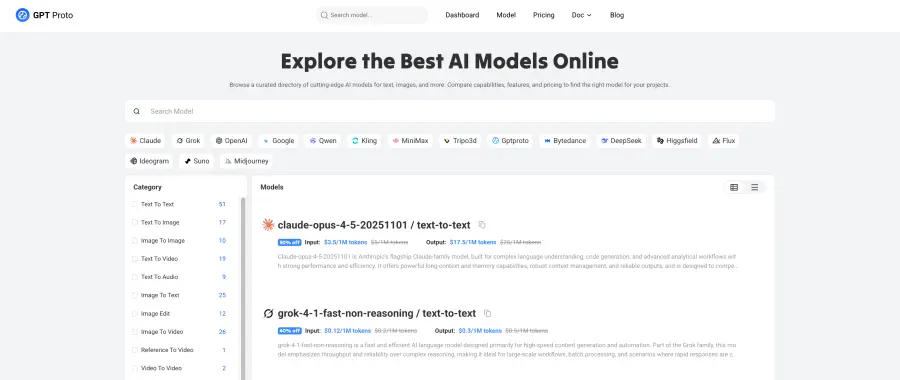
As the API landscape evolves, developers face new challenges managing multiple AI models and services. GPT Proto provides access to top AI models through a unified API with rock-solid uptime, lightning-fast responses, and competitive prices.
Why Consider GPT Proto
The API development world is rapidly changing, especially with AI integration. GPT Proto cuts integration time by up to 80% while providing access to the best AI models available. Instead of managing separate accounts for GPT, Claude, Gemini, and other AI services, GPT Proto AI API Platform consolidates everything into a single platform.
GPT Proto provides access to popular AI models including:
-
GPT-5.1 Codex: Next-generation model designed for code generation and natural language tasks with fast, accurate results
-
Claude Sonnet 4.5: Anthropic's smartest model for complex reasoning, coding, and long-form content with up to 10M token context
-
Claude Haiku 4.5: Fastest, most cost-effective model offering near-frontier reasoning at one-third the cost of larger models
-
Gemini 3 Pro: Google's most advanced multimodal model excelling in complex reasoning and long-context understanding
-
Gemini 2.5 Flash: Ultra-fast model optimized for real-time, high-volume tasks with up to 1 million tokens context
-
Grok 4: xAI's advanced model with 1.7 trillion parameters, featuring a massive 130,000-token context window
-
DeepSeek-V3: Open-source model with 671 billion parameters using Mixture-of-Experts architecture for efficient inference
-
DeepSeek-R1: High-speed model designed for logical reasoning, problem-solving, and mathematical tasks
-
GPT-4o: OpenAI's multimodal model processing text and images with enhanced speed and accuracy
-
Sora 2: OpenAI's flagship text-to-video model generating high-fidelity, realistic videos with synchronized audio
-
For more AI Models please visit: https://gptproto.com/model
Key advantages include:
-
Unified Access: Access these powerful AI models through one platform with a single API key, one billing system, and consistent integration patterns across all services.
-
Cost Efficiency: GPT Proto offers 30-50% lower pricing than competitors without sacrificing quality. Transparent pricing with no hidden fees helps teams predict and control costs effectively.
-
Developer Experience: Easy-to-use documentation enables quick integration by developers. The platform supports multiple programming languages with comprehensive code examples and responsive technical support.
-
Reliability: Purpose-built infrastructure ensures minimal latency for API requests with 99.9% uptime through redundant systems. Global endpoints reduce response times for users worldwide.
When to Use GPT Proto vs Postman
GPT Proto and Postman serve different but complementary purposes in API development:
Use Postman when you need to:
-
Test and debug any type of API during development
-
Create comprehensive API documentation
-
Collaborate with teams on API specifications
-
Build automated test suites for quality assurance
-
Work with diverse API types beyond AI models
Use GPT Proto when you need to:
-
Integrate multiple AI models into applications
-
Reduce costs for AI API usage
-
Simplify authentication across different AI providers
-
Access cutting-edge models as they become available
-
Build AI-powered features without managing multiple vendors
Many development teams use both tools together. Postman helps test and validate AI API integrations, while GPT Proto provides the unified access layer that simplifies production deployments.
Frequently Asked Questions
What is the difference between Postman and other API testing tools?
Postman simplifies API testing with its intuitive graphical interface, eliminating the need for complex code. Unlike command-line tools or code-based testing frameworks, Postman provides visual request building, automatic response formatting, and built-in collaboration features. The platform also offers extensive documentation, a large community, and regular updates that keep pace with evolving API standards.
Is Postman free to use?
Postman offers both free and paid plans. The free plan includes essential features such as up to 1000 monthly API requests, creating and managing collections, limited mock servers, monitoring, and workspaces. For individual developers and small projects, the free tier provides sufficient functionality. Paid plans offer additional features like increased API call limits, advanced collaboration tools, and enhanced monitoring capabilities.
Can Postman handle authentication for secure APIs?
Yes, Postman supports multiple authentication methods including API keys, OAuth 1.0 and 2.0, bearer tokens, basic authentication, and AWS signatures. You can configure authentication at the collection level to apply it automatically to all requests, or set it individually for specific endpoints. Postman also allows you to store sensitive credentials as environment variables, keeping them secure and easily manageable across different testing environments.
How do I share API collections with my team in Postman?
Postman makes sharing straightforward through workspaces and collections. Create a team workspace where members can access shared collections, environments, and documentation. You can export collections as JSON files for version control or sharing outside Postman. The platform also allows you to generate shareable links and publish documentation that updates automatically when you modify your collections. Team plans include additional collaboration features like comment threads and access controls.
Conclusion
Postman has established itself as an essential tool for API development, offering developers a comprehensive platform for designing, testing, and collaborating on APIs. With 74% of organizations adopting API-first approaches, understanding how to use Postman effectively becomes increasingly important for modern development teams.
Whether you are testing a simple REST API or managing complex microservices architectures, Postman provides the features and flexibility needed to streamline your workflow. For teams working extensively with AI models, combining Postman with platforms like GPT Proto creates a powerful toolkit that handles both traditional and AI-powered API development efficiently. By mastering these tools, developers can build more reliable applications while reducing the time spent on repetitive testing tasks.