GPT Proto

GPTProto

  • ダッシュボード
  • LLM

    • openai
      GPT 6 Astra新機能
    • z-ai
      GLM 5.3
    • claude
      Claude Fable 5
    • deepseek
      DeepSeek v4 Pro
    • google
      Gemini 3.7 Flash
    • grok
      Grok 4.6
    モデルを見る >

    画像

    • grok
      Grok Imagine Image 2.0新機能
    • openai
      GPT Image 2
    • google
      Nano Banana Pro (Gemini 3 Pro Image)
    • google
      Nano Banana 2 (Gemini 3.1 Flash Image)
    • midjourney
      Midjourney
    • bytedance
      Seedream 5.0 Pro (Build 260628)
    モデルを見る >

    動画

    • qwen
      Wan 3.0新機能
    • bytedance
      Seedance 2.5 (Build 260628)
    • bytedance
      Seedance 2.0 (Build 260128)
    • bytedance
      Seedance 2.0 Mini (Build 260615)
    • kling
      Kling v3.0 4K
    • vidu
      Vidu Q3 Turbo
    モデルを見る >
    227+ 種類のモデルを見る >
  • ジェネレーター

    • 画像生成
    • 動画生成
    • キャンバスで編集
    • チャット

    機能

    • AIビデオテスト新機能
    • AIパッケージデザインジェネレーター
    • アニメAIアートジェネレーター
    • AIオブジェクト除去
    • AI画像エディター
    • AIモーション転送
    • AIウォーターマーク除去
    • オンラインAI画像高画質化ツール
    • オンライン背景削除ツール
    • AI顔交換画像
    すべて表示 >

    プロンプト

    • Seedance 2.0 プロンプト新機能
    • GPT Image 2 プロンプト
    • Nano Banana Pro プロンプト
    • Seedream 5.0 Pro プロンプト
    • Midjourney プロンプト
  • AIブログ

    • OpenRouter vs GPTProto:料金、モデル、ルーティング、そして2026年に優れているAPIはどちらか?
    • AIプロダクト広告ワークフロー:洗濯用洗剤の画像から25秒のCMまで
    • DeepSeek V4 ProとGLM 5.2:2026年に優れているのはどちら?
    • 2026年版:API、バッチ編集、商品写真に最適な画像編集AIモデル7選
    • DeepSeek V4 Pro vs Kimi K3:0813アップデート後に何が変わった?
    すべて表示 >

    AIインサイト

    • DeepSeekのピーク時料金が開始されました:APIの料金が高くなるのはいつですか?
    • GLM-5.3とは? Z.aiの静かなコーディングプラン開始、料金、確認済みのアップグレード
    • OpenAIの最新モデルAstraとは? リリース日・ベンチマーク・他モデルとの比較(2026)
    • MiniMax H3の登場:動画編集のアップグレードで実際に何が変わるのか
    • Emochi AIとは?なぜこれほど急成長しているのか(2026年)
    すべて表示 >

    AIドキュメント

    • gpt-image-2
    • gpt-5.4
    • kimi-k2.5
    • claude-opus-4-6
    • kling-v3.0-pro
    すべて表示 >

    AIスキル

    • browser-use
    • claude-to-im
    • competitive-ads-extractor
    • content-creator
    • data-storytelling
    すべて表示 >
料金プラン+7%ボーナス
English繁體中文한국어日本語EspañolРусский
今すぐ始める
  1. ホーム
  2. /モデル
  3. /Grok
  4. /grok-imagine-image-2.0 / image-edit
Grok
Grok Imagine Image 2.0
$ 
The Grok Imagine Image 2.0 API image edit offers developers a powerful, high-fidelity solution for programmatic image modification. By leveraging the advanced architecture of Grok Imagine Image 2.0, this API allows for precise, context-aware image editing directly through the GPT Proto platform. Whether you are performing localized adjustments, style transfers, or complex visual refinements, this tool ensures identity preservation and high-quality output. Developers can easily manage their workflow and scale operations by choosing to add funds to their account, ensuring uninterrupted access to these sophisticated editing capabilities for enterprise-grade creative applications.

モダリティ

入力: テキスト入力: 画像
出力: 画像

API 利用例
$ 
curl --request POST "https://gptproto.com/api/v3/grok/grok-imagine-image-2.0/image-edit" \
  --header "Authorization: Bearer $GPTPROTO_API_KEY" \
  --header "Content-Type: application/json" \
  --data '{
    "images": [],
    "prompt": "A tiny origami fox sailing a teacup across a moonlit puddle",
    "aspect_ratio": "auto",
    "resolution": "1k",
    "quality": "medium",
    "enable_sync_mode": false,
    "response_format": "url"
  }'
Grok Imagine Image 2.0 の料金

1回のサンプル費用から始め、テスト予算を選びます。

モデル料金

resolutionqualityinput_image_nnPrice
1klow01$0.0400
low02$0.0800
low03$0.1200
low04$0.1600
low05$0.2000
low06$0.2400
low07$0.2800
low08$0.3200
low09$0.3600
low010$0.4000
low11$0.0500
low12$0.0900
low13$0.1300
low14$0.1700
low15$0.2100
low16$0.2500
low17$0.2900
low18$0.3300
low19$0.3700
low110$0.4100
low21$0.0600
low22$0.1000
low23$0.1400
low24$0.1800
low25$0.2200
low26$0.2600
low27$0.3000
low28$0.3400
low29$0.3800
low210$0.4200
low31$0.0700
low32$0.1100
low33$0.1500
low34$0.1900
low35$0.2300
low36$0.2700
low37$0.3100
low38$0.3500
low39$0.3900
low310$0.4300
low41$0.0800
low42$0.1200
low43$0.1600
low44$0.2000
low45$0.2400
low46$0.2800
low47$0.3200
low48$0.3600
low49$0.4000
low410$0.4400
low51$0.0900
low52$0.1300
low53$0.1700
low54$0.2100
low55$0.2500
low56$0.2900
low57$0.3300
low58$0.3700
low59$0.4100
low510$0.4500
medium01$0.0600
medium02$0.1200
medium03$0.1800
medium04$0.2400
medium05$0.3000
medium06$0.3600
medium07$0.4200
medium08$0.4800
medium09$0.5400
medium010$0.6000
medium11$0.0700
medium12$0.1300
medium13$0.1900
medium14$0.2500
medium15$0.3100
medium16$0.3700
medium17$0.4300
medium18$0.4900
medium19$0.5500
medium110$0.6100
medium21$0.0800
medium22$0.1400
medium23$0.2000
medium24$0.2600
medium25$0.3200
medium26$0.3800
medium27$0.4400
medium28$0.5000
medium29$0.5600
medium210$0.6200
medium31$0.0900
medium32$0.1500
medium33$0.2100
medium34$0.2700
medium35$0.3300
medium36$0.3900
medium37$0.4500
medium38$0.5100
medium39$0.5700
medium310$0.6300
medium41$0.1000
medium42$0.1600
medium43$0.2200
medium44$0.2800
medium45$0.3400
medium46$0.4000
medium47$0.4600
medium48$0.5200
medium49$0.5800
medium410$0.6400
medium51$0.1100
medium52$0.1700
medium53$0.2300
medium54$0.2900
medium55$0.3500
medium56$0.4100
medium57$0.4700
medium58$0.5300
medium59$0.5900
medium510$0.6500
2klow01$0.0600
low02$0.1200
low03$0.1800
low04$0.2400
low05$0.3000
low06$0.3600
low07$0.4200
low08$0.4800
low09$0.5400
low010$0.6000
low11$0.0700
low12$0.1300
low13$0.1900
low14$0.2500
low15$0.3100
low16$0.3700
low17$0.4300
low18$0.4900
low19$0.5500
low110$0.6100
low21$0.0800
low22$0.1400
low23$0.2000
low24$0.2600
low25$0.3200
low26$0.3800
low27$0.4400
low28$0.5000
low29$0.5600
low210$0.6200
low31$0.0900
low32$0.1500
low33$0.2100
low34$0.2700
low35$0.3300
low36$0.3900
low37$0.4500
low38$0.5100
low39$0.5700
low310$0.6300
low41$0.1000
low42$0.1600
low43$0.2200
low44$0.2800
low45$0.3400
low46$0.4000
low47$0.4600
low48$0.5200
low49$0.5800
low410$0.6400
low51$0.1100
low52$0.1700
low53$0.2300
low54$0.2900
low55$0.3500
low56$0.4100
low57$0.4700
low58$0.5300
low59$0.5900
low510$0.6500
medium01$0.0800
medium02$0.1600
medium03$0.2400
medium04$0.3200
medium05$0.4000
medium06$0.4800
medium07$0.5600
medium08$0.6400
medium09$0.7200
medium010$0.8000
medium11$0.0900
medium12$0.1700
medium13$0.2500
medium14$0.3300
medium15$0.4100
medium16$0.4900
medium17$0.5700
medium18$0.6500
medium19$0.7300
medium110$0.8100
medium21$0.1000
medium22$0.1800
medium23$0.2600
medium24$0.3400
medium25$0.4200
medium26$0.5000
medium27$0.5800
medium28$0.6600
medium29$0.7400
medium210$0.8200
medium31$0.1100
medium32$0.1900
medium33$0.2700
medium34$0.3500
medium35$0.4300
medium36$0.5100
medium37$0.5900
medium38$0.6700
medium39$0.7500
medium310$0.8300
medium41$0.1200
medium42$0.2000
medium43$0.2800
medium44$0.3600
medium45$0.4400
medium46$0.5200
medium47$0.6000
medium48$0.6800
medium49$0.7600
medium410$0.8400
medium51$0.1300
medium52$0.2100
medium53$0.2900
medium54$0.3700
medium55$0.4500
medium56$0.5300
medium57$0.6100
medium58$0.6900
medium59$0.7700
medium510$0.8500
関連モデル
すべてのモデル
Grok Imagine Image 2.0
現在
$ 
byGrok$0.04 / 1回あたり1K · 2K · more
Seedream 5.0 Pro (Build 260628)
$ 
byBytedance$0.0405 / 1回あたり1K · 2K
Nano Banana 2 Lite (Gemini 3.1 Flash-Lite Image)
$ 
byGoogle$0.0202 / 1回あたり1K
Nano Banana 2 (Gemini 3.1 Flash Image)
$ 
byGoogle$0.0402 / 1回あたり1K · 2K · 4K
GPT Image 2
$ 
byOpenAI$6.4/M input$24/M output
Nano Banana 2 (Gemini 3.1 Flash Image)
$ 
byGoogle$0.0402 / 1回あたり1K · 2K · 4K
Seedream 5.0 (Build 260128)
$ 
byBytedance$0.0298 / 1回あたり
Doubao Seedream 5.0 (Build 260128)
$ 
byBytedance$0.0298 / 1回あたり
Grok Imagine Image
$ 
byGrok$0.012 / 1回あたり
Kling Image o1
$ 
byKling$0.0224 / 1回あたり
GPT Image 1.5
$ 
byOpenAI$5.6/M input$22.4/M output
Grok Imagine 0.9
$ 
byGrok$0.135 / 1回あたり
Grok 4 Image
$ 
byGrok$0.042 / 1回あたり
GPT Image 1 Mini
$ 
byOpenAI$1.75/M input$5.6/M output
Image Watermark Remover
$ 
byGPTProto$0.01 / 1回あたり
Image Zoom
$ 
byGPTProto$0.02 / 1回あたり
Grok 2 Image
$ 
byGrok$0.042 / 1回あたり
Qwen Image
$ 
byQwen$0.0315 / 1回あたり
Flux Kontext Max
$ 
byFlux$0.064 / 1回あたり
Flux Kontext Pro
$ 
byFlux$0.032 / 1回あたり
Ideogram Reframe v3
$ 
byIdeogram$0.048 / 1回あたり
Ideogram Edit v3
$ 
byIdeogram$0.048 / 1回あたり
Ideogram Remix v3
$ 
byIdeogram$0.048 / 1回あたり
Midjourney
$ 
byMidjourney$0.0608 / 1回あたり
モデル解像度入力 → 出力
Grok Imagine Image 2.0現在
$ 
—$0.04 / 1回あたり1K · 2K · more
入力: テキスト入力: 画像
出力: 画像
Seedream 5.0 Pro (Build 260628)
$ 
$0.04 / 1回あたり1K · 2K
入力: テキスト入力: 画像
出力: 画像
Nano Banana 2 Lite (Gemini 3.1 Flash-Lite Image)
$ 
$0.02 / 1回あたり1K
入力: テキスト入力: 画像
出力: 画像
Nano Banana 2 (Gemini 3.1 Flash Image)
$ 
$0.04 / 1回あたり1K · 2K · 4K
入力: テキスト入力: 画像
出力: 画像
GPT Image 2
$ 
$6.40 / $24.00 per 1M—
入力: テキスト入力: 画像
出力: 画像
Nano Banana 2 (Gemini 3.1 Flash Image)
$ 
$0.04 / 1回あたり1K · 2K · 4K
入力: テキスト入力: 画像
出力: 画像
Seedream 5.0 (Build 260128)
$ 
$0.03 / 1回あたり—
入力: テキスト入力: 画像
出力: 画像
Doubao Seedream 5.0 (Build 260128)
$ 
$0.03 / 1回あたり—
入力: テキスト入力: 画像
出力: 画像
Grok Imagine Image
$ 
$0.01 / 1回あたり—
入力: テキスト入力: 画像
出力: 画像
Kling Image o1
$ 
$0.02 / 1回あたり—
入力: テキスト入力: 画像
出力: 画像
GPT Image 1.5
$ 
$5.60 / $22.40 per 1M—
入力: テキスト入力: 画像
出力: 画像
Grok Imagine 0.9
$ 
—$0.14 / 1回あたり—
入力: テキスト
出力: 画像
Grok 4 Image
$ 
$0.04 / 1回あたり—
入力: テキスト
出力: 画像
GPT Image 1 Mini
$ 
$1.75 / $5.60 per 1M—
入力: テキスト入力: 画像
出力: 画像
Image Watermark Remover
$ 
—$0.01 / 1回あたり—
入力: 画像
出力: 画像
Image Zoom
$ 
—$0.02 / 1回あたり—
入力: 画像
出力: 画像
Grok 2 Image
$ 
$0.04 / 1回あたり—
入力: テキスト
出力: 画像
Qwen Image
$ 
$0.03 / 1回あたり—
入力: テキスト
出力: 画像
Flux Kontext Max
$ 
$0.06 / 1回あたり—
入力: テキスト入力: 画像
出力: 画像
Flux Kontext Pro
$ 
$0.03 / 1回あたり—
入力: テキスト入力: 画像
出力: 画像
Ideogram Reframe v3
$ 
$0.05 / 1回あたり—
入力: 画像
出力: 画像
Ideogram Edit v3
$ 
$0.05 / 1回あたり—
入力: 画像
出力: 画像
Ideogram Remix v3
$ 
$0.05 / 1回あたり—
入力: テキスト
出力: 画像
Midjourney
$ 
$0.06 / 1回あたり—
入力: テキスト入力: 画像
出力: 画像
例
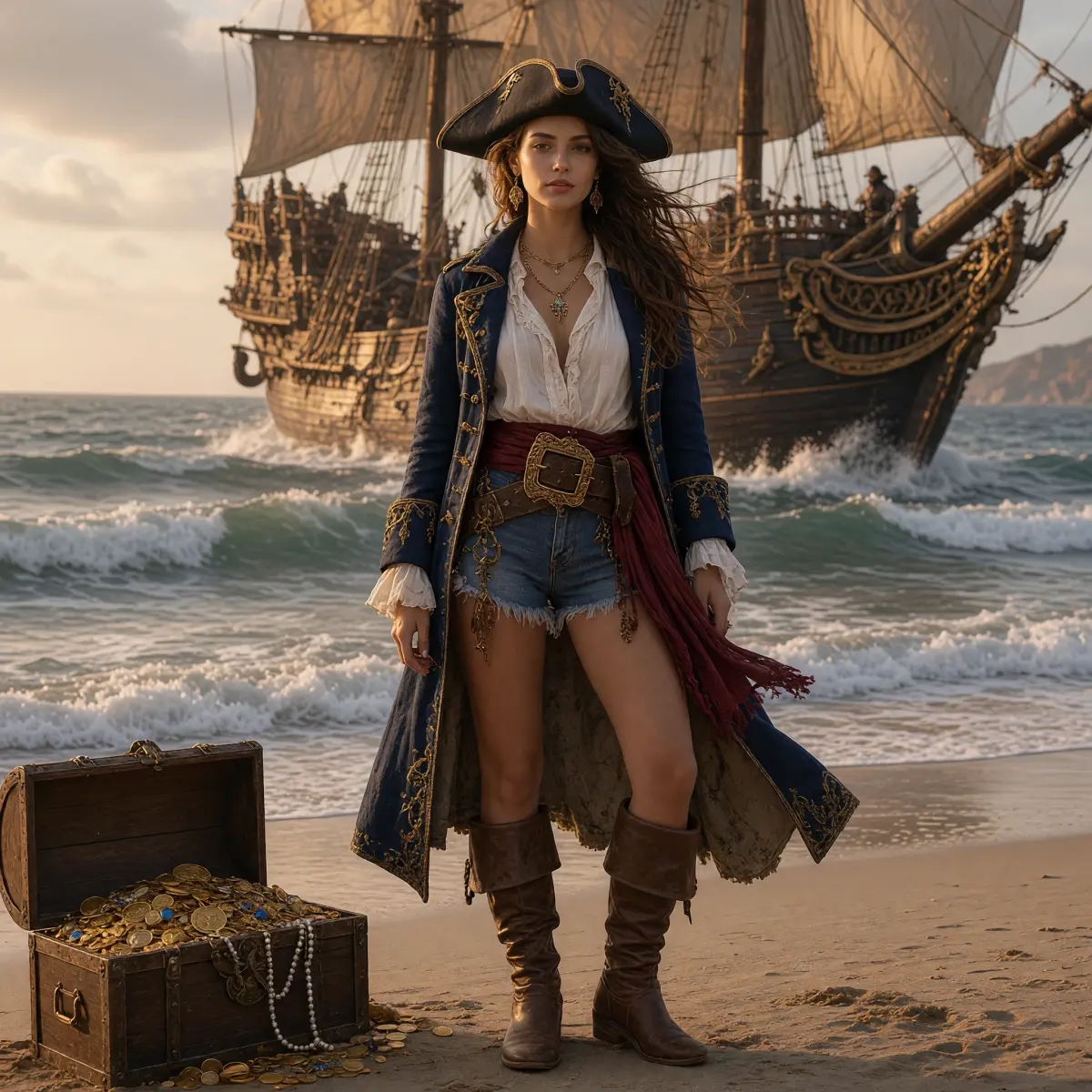
Transform her into a stylish pirate captain while preserving her face and overall stance. Replace the outfit with a dark navy pirate coat, leather belt, tall boots, and layered accessories. Add a dramatic pirate ship behind her, wind-blown sails, treasure chest details, and a bold adventurous atmosphere. Keep the image realistic, cinematic, and detailed.
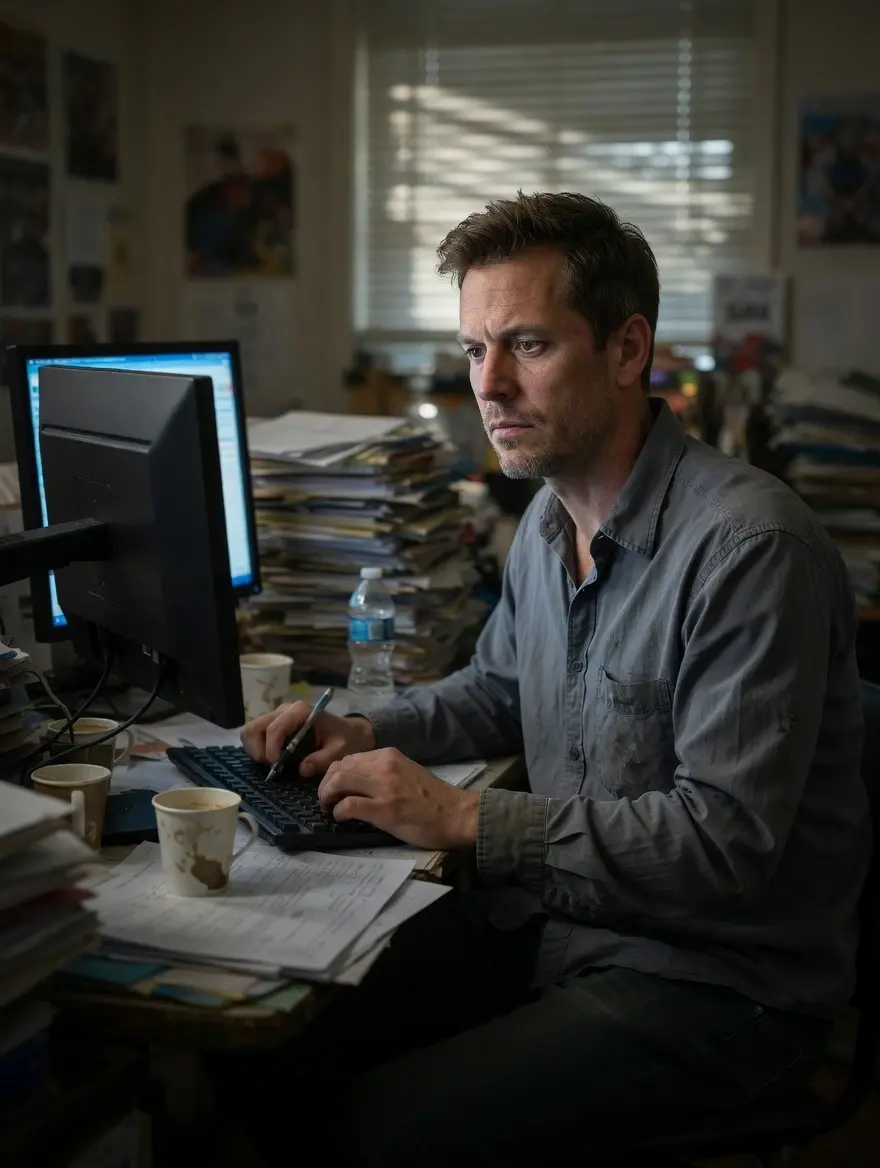
Let the man in the Figure sits at a cluttered desk in a dimly lit office, surrounded by stacks of papers, half-empty coffee cups, and a blinking computer monitor. He wears a worn gray button-up shirt and dark trousers, with one hand resting on the keyboard and the other gripping a pen. His expression is weary but focused, eyes fixed on the screen as if deep in thought or solving a complex problem. Natural light filters through blinds, casting soft shadows across the room. The office has a lived-in feel—posters on the wall, a water bottle on the desk, and a faint smell of stale coffee. Medium shot, eye-level perspective, realistic lighting, detailed textures, naturalistic atmosphere.
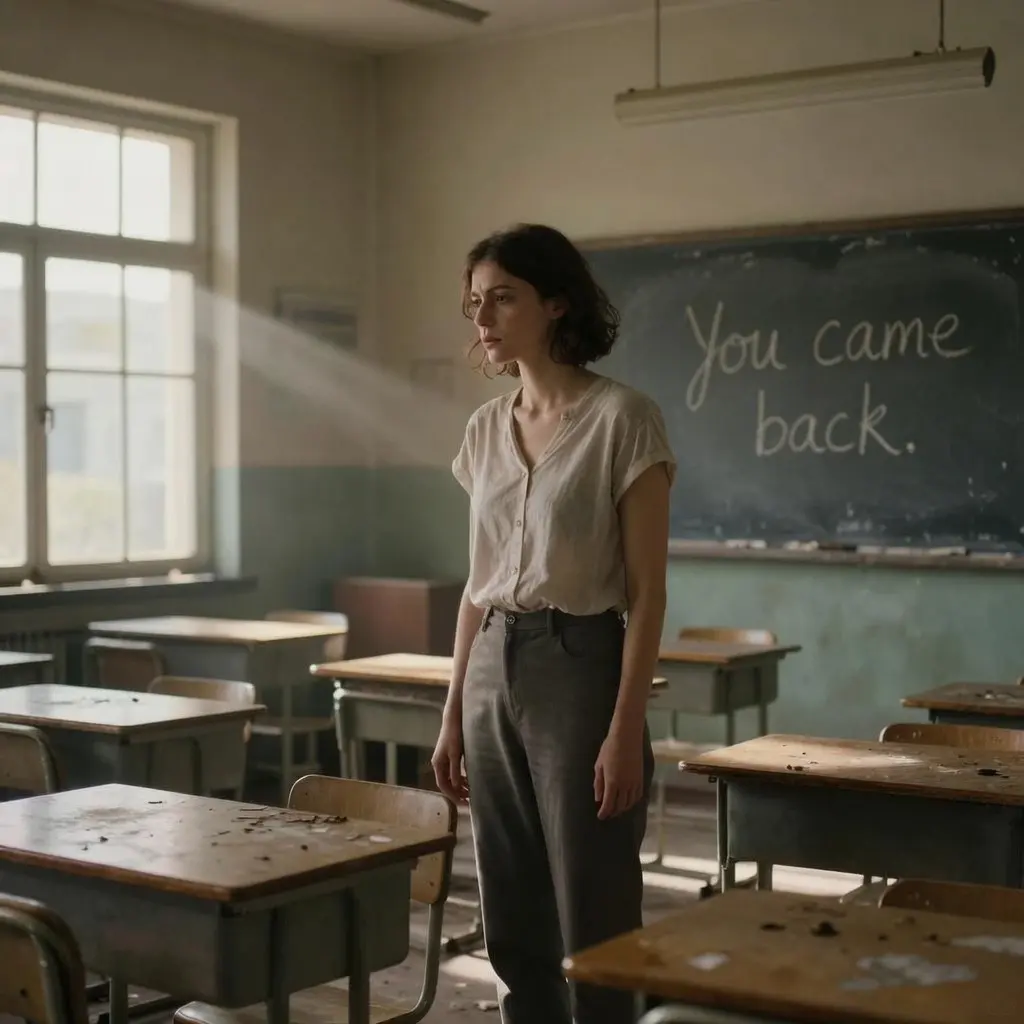
Add a faint handwritten chalk message on the old blackboard: “You came back.” Preserve the woman, classroom layout, desks, broken windows, sunlight beams, and muted color palette. The message should look old, dusty, and naturally written in chalk.
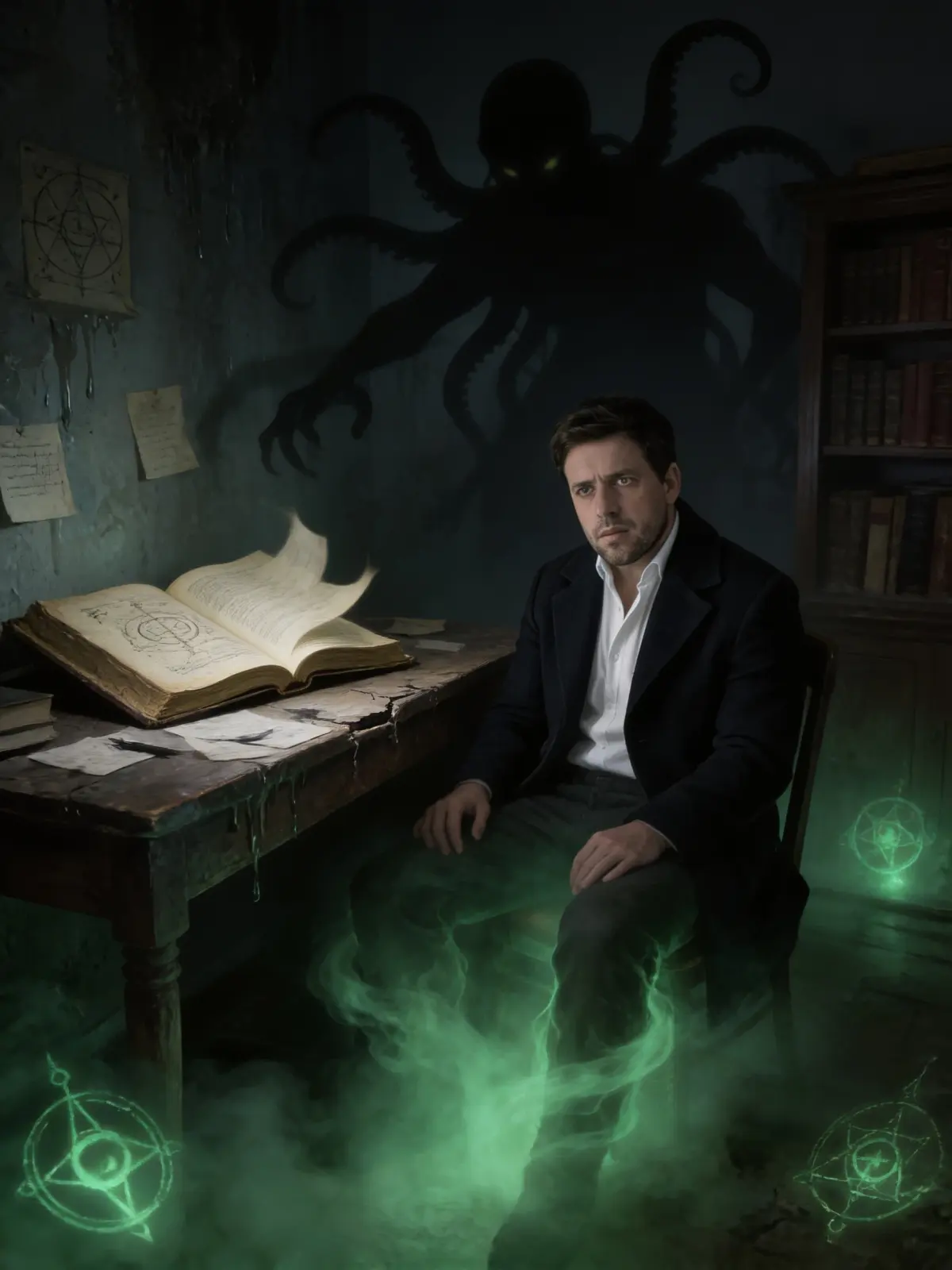
I want to generate 2 images. Transform this portrait into a Lovecraftian cosmic horror character poster. Preserve the man's face, identity, pose, coat structure, and exhausted expression. Replace the plain background with a dim, decaying study filled with ancient books, damp walls, and occult notes. Add faint greenish fog, subtle eldritch symbols glowing behind him, and a massive shadowy tentacled silhouette barely visible in the darkness above. Make his eyes look more haunted, as if he has seen something beyond human understanding. Keep it atmospheric, realistic, and psychologically disturbing rather than overly graphic.

Understanding the Grok Imagine Image 2.0 API Image Edit

The Grok Imagine Image 2.0 API image edit is an advanced generative tool designed for developers and creative professionals who require programmatic control over image manipulation. Built on the sophisticated Grok Imagine Image 2.0 architecture, this API allows for high-fidelity edits that maintain the core integrity and identity of the original source material.

Designed for seamless integration within the GPT Proto ecosystem, the model is ideal for workflows involving automated retouching, stylistic adjustments, and intelligent content modification. By providing the API with clear instructions and source images, users can achieve complex visual results with minimal overhead.

  • High-fidelity preservation of subject identity during edits.
  • Intelligent, context-aware modifications for seamless integration.
  • Efficient, scalable performance suitable for enterprise-level applications.
  • Easy integration through the robust GPT Proto API infrastructure.

Who Should Use Grok Imagine Image 2.0 API image edit for Image Editing?

Who Should Choose Grok Imagine Image 2.0 API image edit for Image Editing?

This API is specifically engineered for professional environments where high-quality, reproducible image modifications are required. It is an ideal choice for teams that need to integrate sophisticated AI editing into their existing software stack.

  • E-commerce developers building automated product retouching services.
  • Creative agencies managing large-scale brand asset generation.
  • Game developers requiring efficient, consistent character or environment asset variations.
  • Digital media platforms implementing user-facing, AI-powered image editing tools.

Pro Tips for Using Grok Imagine Image 2.0 API image edit for Image Editing

  • Always ensure your source images are high-resolution and well-lit to provide the best data for the model.
  • Use explicit preservation instructions to define which areas of the image must remain untouched by the API.
  • When performing localized edits, ensure that your mask boundaries are precise to avoid bleeding effects.
  • Maintain consistent style references if you are applying edits across a large series of images to ensure temporal and visual harmony.
  • Test your workflow with varying input complexities to understand the API's behavior under different creative constraints.

Harnessing Grok Imagine Image 2.0 API Image Edit for Professional Visual Workflows

Transform your visual content pipeline with the Grok Imagine Image 2.0 API image edit, now available for seamless integration on GPT Proto. Visit GPT Proto Models to explore how this high-performance tool can elevate your image processing capabilities.

Solving Complex Image Editing Challenges

Modern visual applications require more than just simple filters; they demand intelligent, context-aware modifications that respect the original image's structure while applying precise changes. The Grok Imagine Image 2.0 API image edit addresses this by providing a robust framework for image manipulation. By utilizing advanced neural models, this API excels at maintaining subject identity and spatial coherence, which are often the primary pain points in programmatic image editing. Whether you need to modify specific regions, adjust textures, or refine compositions, the API provides the necessary control to execute these tasks with high reliability.

Localized Content Refinement

One of the most powerful aspects of the Grok Imagine Image 2.0 API image edit is its ability to perform localized edits without compromising the integrity of the surrounding image. When using the API, ensure that your input masks or instructions are clearly defined. By focusing the model on specific coordinates or subject areas, you can achieve granular control over output, effectively isolating the desired changes from the rest of the visual data. This is essential for e-commerce, character design, and photography workflows where accuracy is paramount.

Consistent Style and Identity Preservation

Maintaining visual consistency across a batch of edited images is a significant hurdle in creative operations. The Grok Imagine Image 2.0 API image edit leverages deep contextual understanding to ensure that style, lighting, and subject characteristics remain consistent throughout the modification process. By providing high-quality reference inputs, you can guide the model to apply edits that feel organic and professional. This capability allows teams to maintain brand standards while automating the labor-intensive aspects of image production.

The precision offered by the Grok Imagine Image 2.0 API image edit changes how we approach automated asset generation. It provides the stability needed for production-scale visual tasks while maintaining the artistic intent of our original source files.

Platform Stability and Integration on GPT Proto

Integrating the Grok Imagine Image 2.0 API image edit into your existing infrastructure is streamlined through the GPT Proto ecosystem. We prioritize developer experience by providing comprehensive documentation at GPT Proto Docs, ensuring that your implementation is both efficient and scalable. The platform architecture is designed to handle high-concurrency requests, allowing your applications to process large volumes of image data without latency bottlenecks.

FeatureStandard ModelsGrok Imagine Image 2.0 API image edit on GPT Proto
Identity PreservationModerateHigh
Contextual AwarenessBasicAdvanced
Integration ComplexityHighLow
ScalabilityVariableHigh

Pricing and Operational Workflow

Accessing the power of the Grok Imagine Image 2.0 API image edit is transparent and flexible. Users can easily manage their usage by visiting the Billing Center to top-up their balance. By maintaining a sufficient recharge amount, you ensure that your production pipelines remain active and responsive. For detailed information on managing your API keys and monitoring usage, head to the GPT Proto Dashboard. Explore more tips and industry insights by reading our latest articles on the GPT Proto Blog.

Common Questions About Grok Imagine Image 2.0 API image edit

Find answers to frequently asked questions regarding the Grok Imagine Image 2.0 API image edit and its integration on GPT Proto.

What is the primary function of the Grok Imagine Image 2.0 API image edit?

The Grok Imagine Image 2.0 API image edit is designed to perform precise, programmatic modifications to images while maintaining subject identity and high visual quality.

How do I start using the Grok Imagine Image 2.0 API image edit?

You can begin by setting up your account on GPT Proto, adding a recharge amount to your balance, and accessing your API credentials via the dashboard.

Does the Grok Imagine Image 2.0 API image edit support localized edits?

Yes, the Grok Imagine Image 2.0 API image edit allows for localized modifications, provided you supply the necessary instructions or masks to target specific areas.

Can I use Grok Imagine Image 2.0 API image edit for commercial projects?

Yes, the Grok Imagine Image 2.0 API image edit is suitable for commercial applications when integrated through the GPT Proto platform.

What should I do if my Grok Imagine Image 2.0 API image edit requests are failing?

Check your API keys and ensure you have sufficient funds by visiting the billing center on GPT Proto.

How does the Grok Imagine Image 2.0 API image edit handle image identity?

The model uses advanced context-aware algorithms to preserve the essential features and identity of the subject during the Grok Imagine Image 2.0 API image edit process.

Is the Grok Imagine Image 2.0 API image edit documentation available?

Yes, comprehensive documentation for the Grok Imagine Image 2.0 API image edit can be found on the GPT Proto documentation site.

Are there limitations on the input image format for Grok Imagine Image 2.0 API image edit?

Please refer to the official GPT Proto documentation for specific file format and size requirements supported by the Grok Imagine Image 2.0 API image edit.

How do I monitor my usage of the Grok Imagine Image 2.0 API image edit?

You can monitor your total usage and balance history directly through your account dashboard on GPT Proto.

Can I integrate the Grok Imagine Image 2.0 API image edit into my existing mobile app?

Yes, the Grok Imagine Image 2.0 API image edit is fully compatible with mobile backends via standard API integration.

Does the Grok Imagine Image 2.0 API image edit require specific prompt engineering?

Effective use of the Grok Imagine Image 2.0 API image edit involves clear, descriptive instructions to guide the model's editing behavior.

What is the best way to scale my use of the Grok Imagine Image 2.0 API image edit?

To scale your operations, keep your account balance updated and utilize the efficient request handling provided by the GPT Proto infrastructure.

GPT Proto

グローバルな規模と安定性でAIイノベーションを推進:

主力製品であるGPT Protoを通じて、テキスト、ビジョン、音声など、世界をリードするAIプロバイダーのAPIにアクセスし、統合するための統一インターフェースを提供します。開発者や企業が統合を簡素化し、制限なくイノベーションを加速できるよう支援します。

グローバルなインフラストラクチャ、ローカルなコンプライアンス:

To ensure enterprise-grade reliability and compliance, Talent Tech Global Limited operates specifically as our global Billing and Contracting Entity. Meanwhile, our core technical infrastructure and R&D teams are strategically distributed across global innovation hubs, including Silicon Valley, Singapore, and Hong Kong.

拡張性を考慮した設計:

私たちは安定性が何よりも重要であると理解しています。当社のプラットフォームは、動的なオートスケーリングをサポートする堅牢な分散型アーキテクチャ上に構築されています。パイロット運用から数百万件の同時リクエストの処理まで、システムは需要に合わせて即座に拡張され、ビジネスの成長を妨げないインフラストラクチャを保証します。

ナビゲーション

  • ダッシュボード
  • モデル
  • 画像生成
  • AI画像高画質化
  • AI背景削除
  • 動画生成
  • キャンバスで編集
  • チャット
  • 機能
  • 料金プラン
  • AIドキュメント
  • AIブログ
  • AIインサイト
  • AIスキル

機能

  • AIビデオテスト
  • AIパッケージデザインジェネレーター
  • アニメAIアートジェネレーター
  • AIオブジェクト除去
  • AI画像エディター
  • AIモーション転送
  • AIウォーターマーク除去
  • オンラインAI画像高画質化ツール
  • オンライン背景削除ツール
  • AI顔交換画像
  • AIパスポート写真メーカー
  • MS Paint AI Generator
  • AI Clothes Remover
  • 無制限AI画像生成
  • AIフレンチキスジェネレーター
  • AI映画ポスタージェネレーター
  • Artlist IO スタジオ
  • オンライン マジック消しゴム
  • Luma Dream Machine
  • 顔評価
Explore all features >

LLM

  • GPT 6 Astra
  • GLM 5.3
  • Claude Fable 5
  • DeepSeek v4 Pro
  • Gemini 3.7 Flash
  • Grok 4.6
  • Gemini 3.8 Flash
  • Claude Fable 5.1
  • Qwen3.8 Max 0902
  • GLM 5.3 Flash
  • DeepSeek v4 Flash Vision Exp
  • Qwen3.8 Max
  • Claude Opus 5
  • Gemini 3.6 Flash
  • Gemini 3.5 Flash Lite
  • Kimi K3
  • GPT 5.6 Luna
  • GPT 5.6 Terra
  • GPT 5.6 Sol
  • Grok 4.5
すべてのモデルを見る >

画像

  • Grok Imagine Image 2.0
  • GPT Image 2
  • Nano Banana Pro (Gemini 3 Pro Image)
  • Nano Banana 2 (Gemini 3.1 Flash Image)
  • Midjourney
  • Seedream 5.0 Pro (Build 260628)
  • Nano Banana 2 Lite (Gemini 3.1 Flash-Lite Image)
  • Nano Banana 2 (Gemini 3.1 Flash Image)
  • Seedream 5.0 (Build 260128)
  • Doubao Seedream 5.0 (Build 260128)
  • Vidu Q2
  • Grok Imagine Image
  • Kling Image o1
  • GPT Image 1.5
  • Seedream 4.5 (Build 251128)
  • Doubao Seedream 4.5 (Build 251128)
  • Grok Imagine 0.9
  • Qwen Image LoRA
  • Qwen Image Plus LoRA
  • Qwen Image Plus
すべてのモデルを見る >

動画

  • Wan 3.0
  • Seedance 2.5 (Build 260628)
  • Seedance 2.0 (Build 260128)
  • Seedance 2.0 Mini (Build 260615)
  • Kling v3.0 4K
  • Vidu Q3 Turbo
  • Kling v3 Omni 4K
  • Seedance 2.0 Fast (Build 260128)
  • Vidu 2.0
  • Doubao Seedance 2.0 (Build 260128)
  • Doubao Seedance 2.0 Fast (Build 260128)
  • Kling v3 Omni Pro
  • Kling v3 Omni Std
  • Kling v3.0 Pro
  • Kling v3.0 Std
  • Vidu Q3 Pro
  • Kling v2.6 Std
  • Vidu Q2 Pro
  • Vidu Q2 Turbo
  • Vidu Q2 Pro Fast
すべてのモデルを見る >

お問い合わせ

ご質問やご意見がございましたら、以下のいずれかのチャンネルからご連絡ください。

TelegramWhatsApp

© 2026 Talent Tech Global Limited (Hong Kong). All rights reserved.

登録住所: Unit 1022a, Beverley Commercial Centre, 87-105 Chatham Road South, Tsim Sha Tsui, Hong KongCertificate No.: 79462435-000-12-25-0
  • 会社概要
  • プライバシーポリシー
  • 利用規約
  • サイトマップ
相互リンクlogoto.videotopostudio.cc

入力

出力

Preview image
次へ: