What Z-Image Turbo Does for Modern Content Creation
The world of AI art moves incredibly fast. One day we're impressed by a blurry face, the next we're looking at Z-Image Turbo and questioning reality. This specific model has carved out a niche among creators who prioritize photorealism above all else.
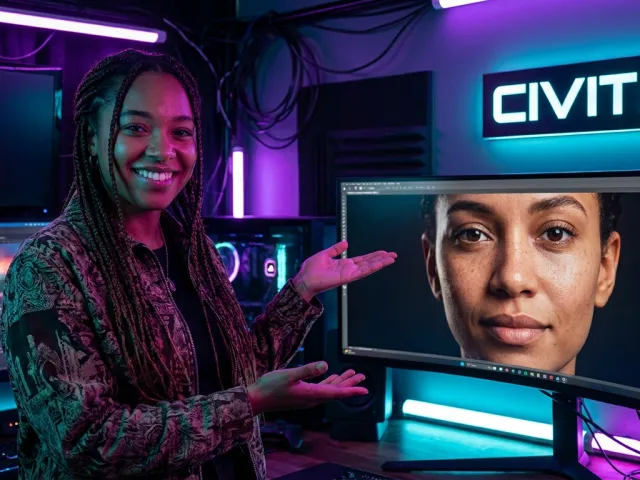
Z-Image Turbo stands out because it doesn't just "guess" what a person looks like. It captures the finer details that other models often miss. Whether it's the way light hits skin or the complexity of human anatomy, this tool delivers.
Most people come to this model because they're tired of the "plastic" look. You know the one. Every face looks like it's made of wax. Z-Image Turbo fixes that by introducing genuine texture and depth to every output.
It's a high-speed engine designed for those who need quality without the wait. When we talk about turbo realistic results, we're talking about a model that balances processing power with aesthetic precision. It's a heavy hitter in the current AI landscape.
The Realistic Image Generation Advantage
Why does realism matter so much? Because in professional workflows, "good enough" usually isn't. The realistic image generation capabilities here are driven by advanced training on high-fidelity photography datasets. This isn't just about high resolution; it's about accuracy.
Users frequently mention how the Z-Image Turbo AI handles subsurface scattering. That's a fancy way of saying light travels through skin naturally. It prevents that flat, gray look that plagues lower-tier generators. It creates a sense of warmth and life.
"The way it handles subsurface scattering and micro-textures is pretty nice. It’s the difference between a character and a person."
Beyond skin, the model tackles micro-textures. Think about the pores on a nose or the slight imperfections in a fabric. These are the details that trick the human eye into believing an image is real. This fast image generation doesn't cut corners on those vital bits.
How to Get Started with Z-Image Turbo Workflows
Setting up your first Z-Image Turbo workflow might feel daunting if you're coming from simpler tools. But the payoff is worth the learning curve. Most experienced practitioners prefer using a modular interface like ComfyUI to get the most out of the model.
The goal is to create a repeatable system. You don't want to just roll the dice every time. A solid Z-Image Turbo workflow allows you to control every aspect, from the initial noise to the final upscaling step. This level of control is what separates hobbyists from pros.
First, you'll need the model weights. Many creators head to community hubs like Civitai to find specific editions. The "Deedeemegadoodo" edition is a popular choice for those looking for a specific aesthetic. Once you have the files, it's all about the nodes.
And if you're looking for a more streamlined way to access high-end models without managing local hardware, you should explore all available AI models on a unified platform. It saves a lot of headaches when you're jumping between different versions.
Mastering the Z-Image Turbo Prompt Structure
Your Z-Image Turbo prompt is the steering wheel. If you're vague, you'll get generic results. This model responds best to highly detailed, descriptive language. Don't just say "a woman." Describe the lighting, the camera lens, and the atmosphere.
A typical high-performance prompt looks like a technical spec sheet. Mention "4K high-resolution" and "hyper-realistic candid selfie." These keywords prime the Z-Image Turbo AI to prioritize photographic fidelity. It tells the engine to look for patterns that match real-world photography rather than digital art.
Orientation matters too. Specifying "landscape orientation" or "portrait" helps the model frame the subject correctly. If you're struggling with composition, try adding "candid" or "unposed." This often breaks the stiff, centered symmetry that many AI models default to when they're confused.
Using a Z-Image Turbo prompt effectively also means knowing what to exclude. Negative prompts are your best friend. Filter out things like "cartoonish," "oversaturated," or "deformed." This narrows the search space for the AI, leading to much cleaner outputs on the first try.
Key Z-Image Turbo Features for Professional Creators
What makes this the best image generator for specific tasks? It's the focus on the "hard stuff." For years, AI struggled with hands and feet. We've all seen the six-fingered nightmares. Z-Image Turbo is remarkably good at getting these right.
The model seems to have a better internal map of human joints. It understands how fingers should wrap around an object. It’s definitely the best tool when you care about the small details of hands and feet. This accuracy saves hours of post-production editing.
Another key feature is the speed. In a production environment, you can't wait five minutes for one image. This model lives up to the "Turbo" name by delivering results in seconds. This fast image generation allows for rapid prototyping and iterative design.
| Feature |
Z-Image Base |
Z-Image Turbo |
Benefit |
| Generation Speed |
Moderate |
Ultra-Fast |
Faster iterations |
| Realism Level |
High |
Extreme |
Better skin texture |
| Concept Variety |
High |
Moderate |
Base is more flexible |
| Ease of Use |
Requires Tuning |
Plug-and-Play |
Quick setup |
Advanced Detailers and LORAs
To really push the Z-Image Turbo model, you need to use detailers. These are specific modules that focus on one part of the image, like the eyes or hands. Your Z-Image Turbo workflow should include dedicated nodes for these areas to ensure consistency.
Detailers act like a second pass. After the main image is generated, the detailer zooms in and refines the target area. For portrait work, using a head detailer ensures the eyes are sharp and the skin pores are visible. It’s about stacking quality layers.
You can also incorporate LORAs (Low-Rank Adaptation). These are small, lightweight models trained on specific styles or people. By combining the Z-Image Turbo AI with a high-quality LORA, you can achieve hyper-specific looks that the base model can't reach alone.
For those managing multiple projects, keeping track of your usage is vital. You can monitor your API usage in real time to ensure your costs stay within budget while running these complex workflows. It’s all about efficiency.
Real-World Z-Image Turbo Use Cases
Where does this actually get used? One major area is stock photography replacement. Many small businesses don't have the budget for a custom photo shoot. Using Z-Image Turbo, they can generate realistic images that look like they were taken in a professional studio.
Fashion designers also use it for concept visualization. They can prompt for specific fabrics and lighting to see how a garment might look on a realistic model. The turbo realistic output helps stakeholders visualize the final product without expensive physical samples.
In the gaming industry, concept artists use the Z-Image Turbo model to quickly generate character references. It’s much faster to generate twenty variants of a character's face than to paint them by hand. It serves as a powerful brainstorming partner.
Social media managers are another group seeing huge benefits. Creating unique, eye-catching visuals for every post is exhausting. With a solid Z-Image Turbo workflow, they can churn out high-quality content that stops the scroll. The speed is the real game-changer here.
Improving Marketing Visuals with AI
Marketing is all about trust. If your images look fake or "AI-ish," customers will back away. This is where the realistic image generation of Z-Image Turbo pays off. It produces images that feel authentic and relatable rather than sterile.
Think about a lifestyle brand. They need photos of people using their products in natural settings. Achieving this with the Z-Image Turbo AI requires a mix of good prompting and the right workflow. The results often surpass what you’d find on standard stock sites.
You can also use the model for A/B testing. Want to see if a red background performs better than a blue one? Generate both in seconds. This level of flexibility was impossible just a few years ago. It’s about data-driven creative decisions.
For developers building these tools into their own apps, the Z-Image Turbo model is a dream. If you're ready to build, you can get started with the Z-Image Turbo API through GPT Proto's unified interface. It simplifies the integration process significantly.
Z-Image Turbo Limitations & Alternatives
No model is perfect. One of the main complaints about Z-Image Turbo is the "variety" problem. Because it's a distilled model designed for speed and realism, it can sometimes get stuck in a rut. You might find that it generates very similar faces for different prompts.
This lack of diversity is a trade-off. You get high quality and speed, but you lose some of the "creative chaos" found in the Base model. If you need 100 completely unique characters, you might find yourself tweaking the Z-Image Turbo prompt more than you’d like.
Anatomy is generally great, but there's a recurring issue with "elongated fingers." While it gets the number of fingers right, sometimes the proportions are slightly off. It's much better than the alternatives, but you still need to keep a watchful eye during the generation process.
- Consistency Issues: Repeated concepts can lead to visual stagnation.
- Anatomical Quirks: Occasional long fingers or strange joint angles.
- Prompt Sensitivity: Requires precise language to avoid generic looks.
- Model Size: Turbo versions are optimized, but still need decent VRAM.
Comparing Z-Image Turbo to Other Models
How does it stack up against the competition? Many users compare it to Flux or Nano Banana. While those models have their strengths, Z-Image Turbo often wins on pure photorealism. It feels less like a "painter" and more like a "photographer."
The Base version of Z-Image offers more flexibility. If you want to experiment with abstract art or unusual styles, Base is the better choice. But for anyone doing human-centric work, the Z-Image Turbo AI is usually the preferred tool for its ease and cleaner results.
Some people find that models like Flux2.DEV offer better prompt adherence for complex scenes with many objects. However, when the focus is a single subject with high skin detail, Z-Image Turbo remains the best image generator in the eyes of many practitioners.
If you're looking for more advanced ways to automate your image tasks, you might want to try GPT Proto intelligent AI agents. They can help bridge the gap between simple generation and complex production pipelines by handling the "thinking" part of the workflow.
Is Z-Image Turbo Worth It?
At the end of the day, whether this tool is worth your time depends on your goals. If you're an artist who wants to explore weird, surreal landscapes, there might be better options. But for anyone working in the realm of realism, it's a top-tier choice.
The balance of speed and quality is hard to beat. You aren't just getting fast image generation; you're getting images that look like they were shot on a high-end DSLR. That value is hard to quantify until you see it in your own projects.
The learning curve for ComfyUI and advanced detailers is real, but it's an investment in your craft. Once you have a Z-Image Turbo workflow that works, you become a one-person production studio. The efficiency gains are massive.
Don't just take my word for it. Try it out. Look at the community workflows on Civitai. See what other people are building. The Z-Image Turbo AI is a tool that rewards curiosity and technical precision. It’s a powerful addition to any creator's toolkit.
And remember, the landscape is always changing. What’s "Turbo" today might be standard tomorrow. But right now, this model represents a sweet spot for realistic image generation. It’s fast, it’s beautiful, and it’s surprisingly accurate where it counts.
For those looking to integrate this into a larger business strategy, GPT Proto offers a way to access this model and many others through a single, cost-effective API. With up to 70% discounts and a unified billing center, it’s the smart way to scale your AI capabilities without the overhead of managing multiple accounts.
Written by: GPT Proto
"Unlock the world's leading AI models with GPT Proto's unified API platform."