An LLM API lets software send instructions to a large language model and receive the result as structured data. That simple interface is the difference between chatting with a model in a browser and putting the model inside a support workflow, coding agent, document processor, or internal application.
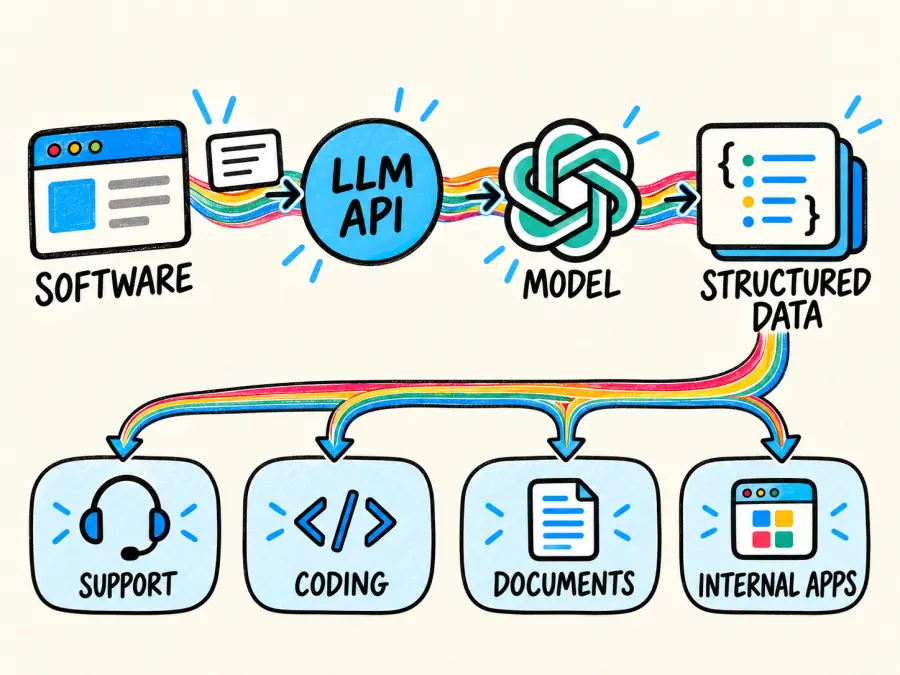 The hard part is no longer making one request. It is choosing the right access layer, protecting the API key, testing quality and latency, and predicting what each successful result will cost. Those choices matter because an LLM API is not the model itself. It is the contract between your application and the system serving that model.
Michael Johnson2026-03-18
What Is an LLM API? Keys, Gateways, Pricing, Providers, and Testing in 2026
Learn what an LLM API is, how keys and gateways work, how to test models, compare token pricing, and access 200+ models through GPTProto.
Table of contents
What Is an LLM API?
An LLM API is usually an HTTP interface that accepts a request containing a model name, instructions, and input data, then returns model-generated output in JSON or as a stream of events. IBM uses a translator analogy for this role: the API sits between an application and the language model so the two can exchange information without the application owning the model infrastructure. That is a useful starting point, provided we keep one distinction clear: the interface and the model behind it are separate components.
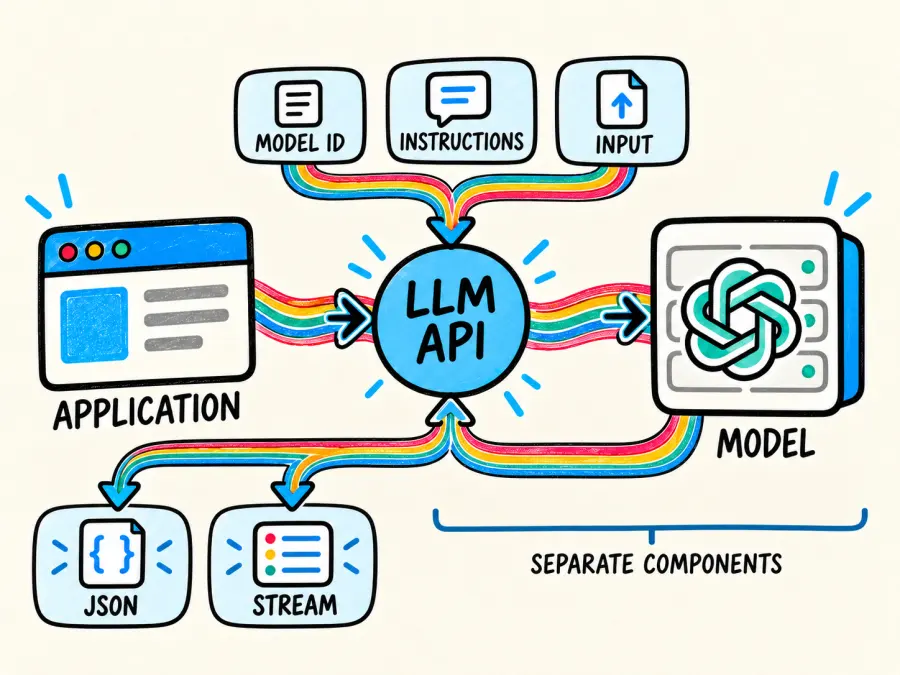
Consider a customer-support application. The application may collect a question, retrieve account data, build a prompt, and call an LLM API. The model produces text, but the surrounding application still decides what context to send, whether the answer passes validation, and whether a person must approve it. The API supplies model access. It does not supply the entire business process.
| Component | What it does | What it does not do by itself |
|---|---|---|
| Large language model | Predicts and generates tokens from the supplied context | Manage your users, permissions, database, or product workflow |
| LLM API | Defines how software authenticates, sends input, and receives output | Guarantee that every answer is correct |
| SDK | Wraps HTTP requests in Python, JavaScript, or another language | Remove the need to understand errors, limits, and billing |
| Application | Adds data, tools, validation, user experience, and business rules | Train or host a model merely by calling an API |
In plain English: the model writes the answer; the API delivers the request and response; your application remains responsible for everything around them.
How an LLM API Request Works
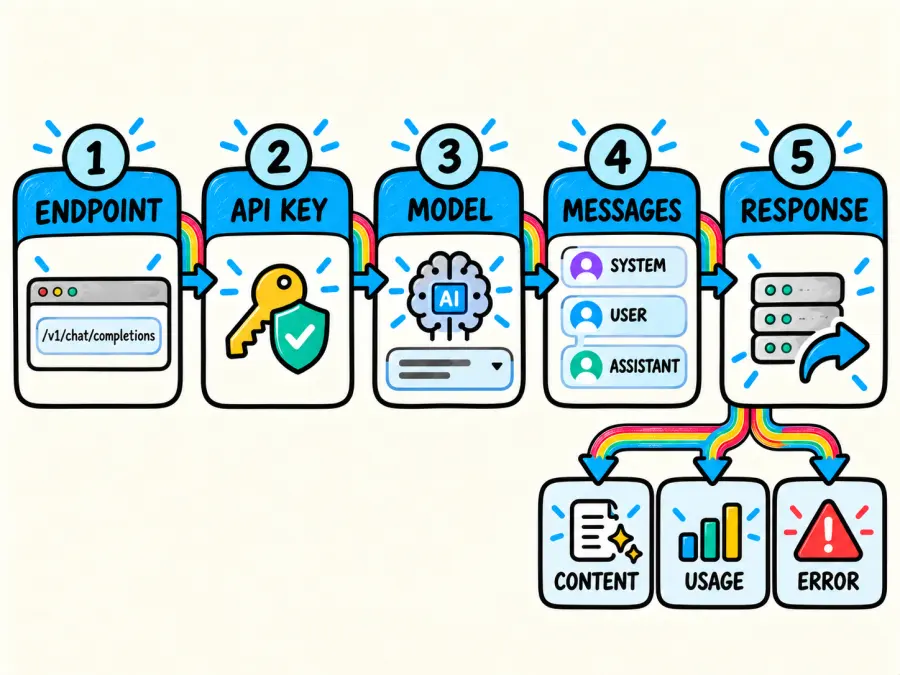
A typical request has five moving parts.
First, your application targets an endpoint such as /v1/chat/completions. Second, it authenticates with an LLM API key. Third, it names a model. Fourth, it sends a payload—often a messages array containing system, user, and assistant roles. Finally, the server returns generated content, usage data, or an error.
The payload is commonly JSON because JSON maps cleanly to objects in most programming languages. A minimal chat request looks like this conceptually:
{
  "model": "qwen3.8-max-0902",
  "messages": [
    {"role": "user", "content": "Explain retrieval-augmented generation in two sentences."}
  ]
}
Some APIs return the completed response at once. Others support streaming, which sends partial output as it is generated. Streaming usually improves perceived responsiveness because the user sees the first text before generation finishes. The tradeoff is additional client logic: you must process events, handle interrupted streams, and decide what to display if the request fails halfway through.
Model-specific features still vary. A common request shape can make migration easier, but it does not mean that every model supports identical context lengths, modalities, tool calls, or structured-output behavior. Treat compatibility as a shared baseline, then verify the model page before relying on a feature.
Direct Provider, LLM API Gateway, Router, or Self-Hosting?
These terms are often mixed together, although they describe different decisions.
| Access method | What you get | Main tradeoff | Best fit |
|---|---|---|---|
| Direct LLM API provider | Native access, documentation, and provider-specific features | Separate contracts, keys, billing, and integrations for each provider | Teams committed to one model family or dependent on native features |
| LLM API gateway or aggregator | One access layer for models from multiple providers | Some provider-specific features may arrive later or use a normalized format | Teams comparing models or reducing integration and billing sprawl |
| LLM router | A policy layer that selects a model or backend for each request | Routing rules add behavior that must be tested and monitored | Workloads that deliberately trade quality, latency, availability, and cost |
| Self-hosted model API | Control over infrastructure, deployment, and data path | You operate GPUs, serving software, scaling, monitoring, and upgrades | Teams with the workload and expertise to justify infrastructure ownership |
What Is an LLM API Key?
An LLM API key is a secret credential used to associate requests with an account or project. The server checks it before processing a call, then applies the relevant permissions, rate limits, and billing rules.
For bearer authentication, the request normally includes a header in this form:
Authorization: Bearer YOUR_API_KEY
The word “bearer” is literal: anyone holding the credential may be able to use it. Keep the key on your server, load it from an environment variable or secret manager, and never place it in browser JavaScript, a mobile bundle, a public repository, or a screenshot. OpenAI's API reference gives the same server-side handling guidance, while the OWASP Secrets Management Cheat Sheet covers rotation, storage, and lifecycle controls in more depth.
One key can authenticate calls made by several application workers or AI agents if the account policy permits it. It does not create, coordinate, or supervise those agents. Agent orchestration lives in your application or agent framework; the key only authenticates their requests.
For production, separate keys by environment and service where possible. That limits the blast radius of a leak and makes usage easier to attribute. The cost is more credential administration, but one shared key for every developer, deployment, and customer is a poor bargain.
Make Your First LLM API Call with GPT Proto
GPT Proto exposes an OpenAI-compatible chat-completions endpoint for supported text models. The live Qwen3.8 Max 0902 model page specifies the endpoint, bearer authentication, and model string used below.
Create a GPT Proto API key, store it as an environment variable, and send this cURL request:
export GPTPROTO_API_KEY="replace-with-your-key"

curl --request POST "https://gptproto.com/v1/chat/completions" \
  --header "Authorization: Bearer $GPTPROTO_API_KEY" \
  --header "Content-Type: application/json" \
  --data '{
    "model": "qwen3.8-max-0902",
    "messages": [
      {
        "role": "user",
        "content": "Explain retrieval-augmented generation in two sentences."
      }
    ]
  }'
A successful chat-completions response contains the generated message under choices[0].message.content. In Python, the same request can use the OpenAI SDK with GPT Proto's base URL:
pip install openai
import os
from openai import OpenAI

client = OpenAI(
    api_key=os.environ["GPTPROTO_API_KEY"],
    base_url="https://gptproto.com/v1",
)

response = client.chat.completions.create(
    model="qwen3.8-max-0902",
    messages=[
        {
            "role": "user",
            "content": "Explain retrieval-augmented generation in two sentences.",
        }
    ],
)

print(response.choices[0].message.content)
Two details cause many first-call failures. Use Bearer for this /v1/chat/completions surface, and copy the exact model ID from the live model page. A display name and an API model string are not always interchangeable.
How to Run an LLM API Test That Tells You Something Useful
A one-line “hello” prompt is a connectivity check, not a model evaluation. It can confirm that the key, endpoint, model ID, and response parser work. It cannot tell you whether the model will follow your schema, use retrieved evidence correctly, write acceptable code, or stay within your latency target.
A useful LLM API test has three layers.
Start with transport. Record success rate, HTTP status, timeouts, and malformed responses. Then measure user-visible performance. Artificial Analysis defines time to first token as the interval between sending a request and receiving the first token, while output speed measures tokens received per second after generation begins. These metrics answer different questions: TTFT affects how quickly the response feels alive; output speed affects how quickly a long answer finishes.
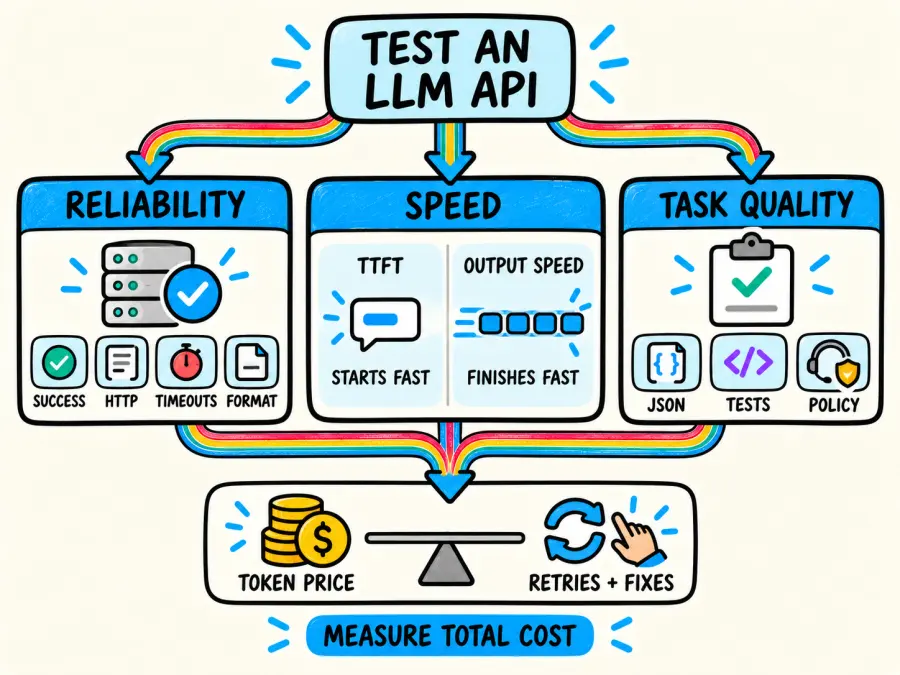
Finally, test the task. Build a fixed set of examples from your own workload and define an acceptance rule before running the models. For extraction, that might be valid JSON plus field-level accuracy. For coding, it might be a passing test suite. For support, it might be correct policy use and proper escalation. The model with the lowest token price can lose if it requires more retries or human corrections.
This Python smoke test measures TTFT and total response time using a streamed request:
import os
import time
from openai import OpenAI

client = OpenAI(
    api_key=os.environ["GPTPROTO_API_KEY"],
    base_url="https://gptproto.com/v1",
)

started = time.perf_counter()
first_token_at = None
parts = []

stream = client.chat.completions.create(
    model="qwen3.8-max-0902",
    messages=[
        {
            "role": "user",
            "content": "Return three risks of deploying an LLM API in production.",
        }
    ],
    stream=True,
)

for event in stream:
    text = event.choices[0].delta.content or ""
    if text:
        if first_token_at is None:
            first_token_at = time.perf_counter()
        parts.append(text)

finished = time.perf_counter()

if first_token_at is None:
    raise RuntimeError("The stream completed without text output.")

print("Response:", "".join(parts))
print(f"TTFT: {first_token_at - started:.3f}s")
print(f"Total time: {finished - started:.3f}s")
Repeat tests with the same prompt set, settings, input sizes, and network region. Model output is variable, and latency changes with load. A single fast run is evidence that one call was fast. Nothing more.
LLM API Price Comparison: Calculate the Request, Not Just the Rate
Text LLM APIs are commonly priced per one million input and output tokens. Output tokens often cost more, so comparing only the input rate can reverse the apparent winner.
The basic calculation is:
request cost =
  (input tokens / 1,000,000 × input rate)

  + (output tokens / 1,000,000 × output rate)
The table below uses GPT Proto's live rates on September 7, 2026. The example request contains 20,000 input tokens and 2,000 output tokens. It excludes cache charges and any modality- or feature-specific fees.
| Model | Input / 1M tokens | Output / 1M tokens | Example request cost |
|---|---|---|---|
| GLM 5.3 Flash | $0.15 | $0.50 | $0.0040 |
| DeepSeek V4 Pro | $1.122 | $3.366 | $0.029172 |
| Gemini 3.8 Flash | $0.90 | $4.50 | $0.0270 |
| Qwen3.8 Max 0902 | $1.80 | $5.40 | $0.0468 |
| GPT 6 Astra | $8.00 | $40.00 | $0.2400 |
| Claude Fable 5.1 | $9.00 | $45.00 | $0.2700 |
These figures show price range, not model ranking. A lower-cost model may be the right choice for classification or high-volume summarization, while a higher-cost model may produce more accepted results on difficult reasoning or coding tasks. That second sentence is a selection hypothesis, not a fact supplied by the rate card. Test it.
For budgeting, I prefer cost per accepted result:
cost per accepted result = total API spend / outputs that pass acceptance checks
This measure captures retries, invalid JSON, rejected answers, and model switching. Token price remains important. It is simply incomplete on its own.
Prices also change. Record the date, model ID, input rate, output rate, cache terms, and any batch or off-peak conditions when you make a decision. Otherwise, a comparison can look precise while quietly mixing different billing assumptions.
How to Choose an LLM API Provider in 2026
Do not begin with a provider's model count. Begin with your workload and eliminate options that cannot meet it.
First, define the capability gate: required input types, context size, structured output, tool use, geographic availability, and any provider-native feature you cannot replace. Next, run owned evaluations on real examples. Public benchmarks can narrow a shortlist, but they do not represent your prompts, retrieval quality, failure costs, or review process.
Then compare latency and reliability under realistic input sizes. A model that responds quickly to a ten-word prompt may behave differently when the request includes a long document. Track error rates and tail latency, not only the best or median call. If the application is interactive, TTFT matters. For background document processing, total completion time and throughput may matter more.
Now calculate cost per accepted result. Include input, output, cached tokens, retries, validation, and human review. If a lower-priced model passes the acceptance gate, use it. If it fails, the low list price is irrelevant.
Finally, review operational fit: key management, rate limits, spend controls, data handling, support, request tracing, and the work required to change models. An OpenAI-compatible interface can reduce switching effort. The price of normalization is that provider-native features may not map one-to-one, so validate the exact model and endpoint you plan to ship.
Using an LLM API by GPT Proto
GPT Proto provides one account, API key, and shared balance for more than 200 supported models. Developers can browse the model catalog or go directly to provider collections for OpenAI, Claude, Google, DeepSeek, Qwen, and Z-AI.
The practical benefit is a smaller integration and billing surface when a team needs to evaluate or use several model families. The tradeoff is the same one attached to any normalized interface: you still need to confirm model-specific inputs, outputs, context, pricing, and feature support.
GPT Proto's OpenAI-compatible chat endpoint lets you change the model field while retaining the same base URL and authentication pattern for supported models. The caller chooses that model. GPT Proto's multi-model access should not be read as a promise of automatic routing, automatic failover, or agent orchestration. If your application needs those behaviors, implement and test the policy explicitly.
That boundary is worth stating because it makes the architecture easier to reason about. GPT Proto supplies access. Your application decides which model handles a request, when to retry, when to fall back, and when to stop.
Production Checklist
Before moving an LLM API integration into production, check the parts that a successful demo does not exercise:
Store keys in a server-side secret manager; do not expose them in clients, logs, or repositories.
Use separate credentials and spend boundaries for development, staging, and production.
Set connection and response timeouts. Cap retries and add backoff for transient errors.
Treat
401as an authentication problem,429as a rate-limit or quota signal, and5xxresponses as server-side or upstream failures unless the response documentation says otherwise.Log your own trace ID and any provider request ID returned by the API. Do not log secrets or unredacted sensitive prompts.
Validate response shape before downstream code consumes it. For structured tasks, reject malformed output rather than guessing.
Maintain an evaluation set and rerun it before changing the model ID, prompt, tools, or retrieval pipeline.
Track input tokens, output tokens, accepted-result rate, latency, error rate, and spend together.
Define fallback rules in application code. Multi-model access alone is not a fallback policy.
The OpenAI API reference recommends reviewing errors, rate limits, and request-ID logging before production. The exact headers and limits can differ by service, but the engineering habit carries over: preserve enough request context to diagnose failures without recording credentials or sensitive data.
The Practical Definition
An LLM API is the boundary between model inference and application engineering. It makes remote models callable, but it does not make their answers correct, their costs predictable, or their failures harmless.
Choose an access layer that matches the workload. Protect the key. Test with acceptance criteria drawn from real tasks. Compare total cost rather than a single token rate. If you need several model families behind one account, start with the GPT Proto model catalog, run the same evaluation set against a shortlist, and keep the model choice explicit in your code.
One Key, More AI Models
Explore affordable access to leading AI models through one OpenAI-compatible API.
Browse API Models
Related features
All FeaturesAI French Kissing Generator
Turn two photos into a romantic AI kiss video in seconds. Our AI French kissing generator animates a natural, lifelike kiss from your own couple photos online.


AI Image Editor
Upload a photo, describe the change, and edit images online with AI. Replace backgrounds, remove objects, restyle scenes, and download the result.
Related models
All models


Frequently Asked Questions
What is an LLM API in simple terms?
It is a software interface for sending input to a large language model and receiving generated output. Your application calls an endpoint; the API handles authentication and transport; the model generates the result.
How do I get an LLM API key?
Create an account with a direct provider or multi-model platform, open its API-key section, and create a credential. Store the key on the server in a secret manager or protected environment variable. Do not embed it in a website or mobile application.
Is an LLM API gateway the same as an LLM router?
No. A gateway provides an access layer to one or more backends. A router applies a policy to choose a model or backend for a request. One product can perform both roles, but the functions are distinct.
How should I run an LLM API test?
Use a basic request to verify the key, endpoint, model ID, and parser. Then use a fixed evaluation set from your workload to measure task acceptance, TTFT, total response time, error rate, and cost per accepted result.
How do I compare LLM API prices?
Multiply input and output tokens by their separate rates, then add cache, tool, modality, retry, and review costs that apply to the workload. Record the price date. Comparing input rates alone is not enough.
Can one LLM API key be used by multiple agents?
It can authenticate requests from multiple workers or agents if the account permits that usage. The key does not create or coordinate a multi-agent system; orchestration remains an application responsibility.
What should I look for in an LLM API provider in 2026?
Check task quality on your own evaluation set, model and feature coverage, latency, reliability, price, data handling, rate limits, observability, support, and switching cost. Weight each factor according to the failure cost of your application.
Does GPTProto automatically route or fail over between LLMs?
This article does not assume either behavior. GPTProto gives developers access to multiple supported models through a shared account and compatible interface, while the request names the model to use. Build and test routing or fallback logic in your application when you need it.
Related Articles
More Blogs
Claude vs ChatGPT for Coding in 2026: Which Is Better for Debugging, Frontend, Python, and Large Codebases?
Claude vs ChatGPT for Coding in 2026: Which Is Better for Debugging, Frontend, Python, and Large Codebases? Is Claude or ChatGPT better at coding? Claude is usually the better fit for interactive development, frontend iteration, and repository-wide reasoning. ChatGPT with Codex is often stronger for terminal-heavy tasks and long autonomous jobs. For routine generation, Python scripts, and isolated debugging, the selected model, supplied context, and ability to run the code matter more than the brand. A useful Claude vs ChatGPT for coding comparison must also separate Claude Code from Codex and Claude APIs from GPT APIs. This guide uses current documentation, published benchmarks, and disclosed third-party tests—not a claimed GPTProto hands-on test. One Key for Your Team
Tiffany Layne | 2026-09-03
7 Best Affordable LLMs for Coding in 2026: API Price vs Performance
The cheapest coding model is not always the cheapest model to use. A model priced at $0.14 per million input tokens looks inexpensive—until it misunderstands the repository, edits the wrong file, and needs three retries. Meanwhile, a model with a higher token price may finish the same patch in one run. That is why this is not another list of models sorted by input price. We first looked for models with enough coding ability to handle terminal work, debugging, and multi-step development tasks. We then compared their input, cached-input, and output prices using the same two simulated workloads. This ranking covers API-accessible LLMs , not coding IDE subscriptions. It also excludes self-hosted models because GPUs, inference infrastructure, maintenance, and engineering time are not free. Prices and benchmark results were checked on August 12, 2026 . Treat them as a snapshot rather than a permanent rate card.
Michael Johnson | 2026-08-12

7 Best Chinese AI Video Models in 2026, Compared by Real-World Use Case
Last checked: August 2026 Chinese AI video models are no longer simply cheaper alternatives to products from the United States. Seedance, MiniMax, Wan, Kling, Vidu, and other Chinese video AI model families now compete at the top of independent leaderboards, while introducing features such as 30-second generation, native audio, video editing, multiple reference assets, and even document-to-video creation. The difficult part is knowing what you are actually comparing. Dreamina is not a model, Hailuo and MiniMax H3 are not interchangeable names, and Qwen is not Alibaba's primary video-generation family. A model with the highest advertised resolution may also be the wrong choice for character acting, product consistency, or high-volume image-to-video work. This guide compares seven of the best Chinese AI video models in 2026 by what each one is genuinely best suited to do. It also separates independently verified performance from newly announced capabilities that still need broader testing. Want to try several models before committing to one? Explore the AI video generation workspace to compare available text-to-video, image-to-video, and reference-to-video models in one place.
Schuyler Stacy | 2026-08-11
7 Best AI Gateways for Developers in 2026: Features, Pricing, and Production Trade-Offs
Pricing and features checked against published product documentation on August 26, 2026. The expensive AI gateway mistake is not choosing the second-best product. It is choosing a gateway built for a different job. Some AI gateways give you one API key, one balance, and immediate access to hosted models. Others expect you to bring provider keys and use the gateway for routing, logging, caching, and budget enforcement. A third group is designed for enterprise platform teams managing APIs, MCP servers, and agent-to-agent traffic. Those products should not be judged as if they do the same thing. One Key for Your Team The short answer: GPTProto is the best fit for affordable access to text, image, video, and audio models without operating gateway infrastructure. OpenRouter has the broadest published model and provider catalog in this comparison. LiteLLM is the default open-source choice for teams prepared to self-host. Cloudflare AI Gateway offers unusually accessible caching, analytics, and dollar-based spend controls. Vercel AI Gateway fits AI SDK and Next.js applications. Portkey, now moving under Prisma AIRS , focuses on observability, guardrails, and organization-wide governance. Kong AI Gateway makes the most sense when a company already uses Kong for API management. This ranking is based on documented features, deployment options, and published AI gateway pricing. It is not an independent latency or uptime benchmark. When a performance claim comes only from a vendor, I treat it as a vendor claim—not a measured result.
Schuyler Stacy | 2026-08-26