
TL;DR
The midjourney v6.1 release overhauls how the image generator interprets complex instructions, trading hyper-realistic plastic textures for believable, tactile details. If you rely on AI for commercial work, you can finally write structured prompts without the engine ignoring half your words.
Generative AI moves at a punishing speed. Just months ago, we accepted wildly unpredictable outputs as the cost of doing business. You would ask for a specific camera angle and precise lighting, only to receive a multicolored mess that barely resembled your original vision. That friction is disappearing.
This update rewards directors over casual observers. By treating prompts more like structured datasets than loose suggestions, the system gives creators granular control over spatial reasoning and style consistency. It forces a shift in methodology, pushing users away from single-word guesses and toward deliberate, architectural prompt design.
Why the Shift to Midjourney V6.1 Matters for Modern Creators
If you've spent any time in the generative AI space lately, you know things move fast. One day we're marvelling at basic shapes, and the next, we're arguing over the texture of a digital orange. But here is the thing: midjourney v6.1 isn't just a minor patch.
It represents a fundamental shift in how the engine interprets our messy human language. Many of us experienced the frustration of the earlier V6 releases. They were powerful, sure, but they often felt like they were fighting against our intent. They were moody and sometimes unpredictable.
With midjourney v6.1, that friction has started to melt away. The aesthetics are noticeably more "human" and less "AI slop." You can feel the difference in the lighting and the way the AI handles micro-details that used to turn into digital mush.
The Improved Aesthetics of Midjourney V6.1
Let's talk about the look. Users on platforms like Reddit have pointed out that midjourney v6.1 brings a certain "soul" back to the images. The previous versions sometimes leaned too hard into a hyper-realism that felt cold and artificial.
This update balances that out. You get textures that feel tactile. Skin looks like skin, not plastic. When you explore the midjourney v6.1 model today, you notice the lighting behaves more like a real-world camera lens would. It is subtle but essential.
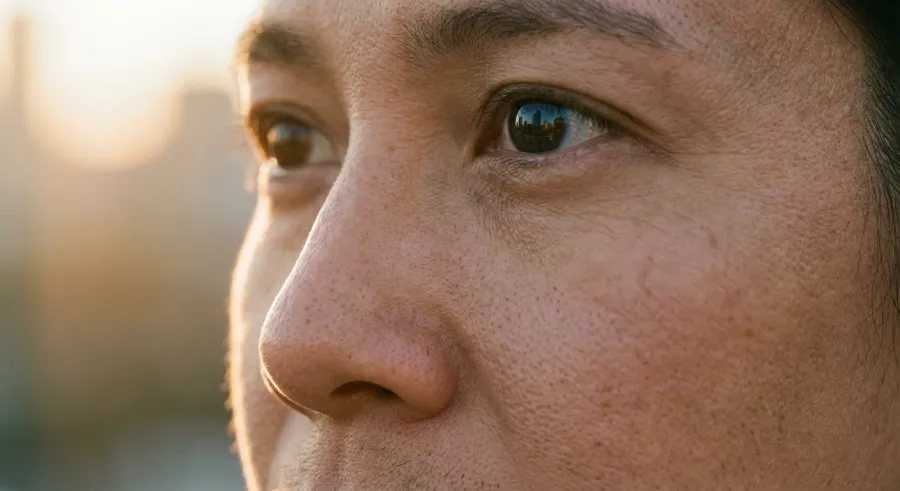
This aesthetic jump is critical for professionals using the API to scale their creative workflows. It reduces the time spent on post-production. You aren't just getting an image; you are getting a foundation that actually looks professional and intentional from the jump.
"The aesthetics in midjourney v6.1 are a massive step up. It feels like the model finally understands the nuance of lighting and texture without over-processing every single pixel into oblivion."
Core Concepts: Understanding Prompt Adherence in Midjourney V6.1
Prompt adherence is the holy grail of generative AI. We want the machine to do what we say, not what it thinks we want. In midjourney v6.1, the coherence between your words and the final pixels has reached a new peak.
In older versions, adding more than three or four descriptors usually led to the AI ignoring half of them. You’d ask for a blue hat, a red coat, and a green parrot, and you’d likely end up with a multicolored mess. Not anymore.
The logic behind the midjourney v6.1 engine has been refined to weight your words more accurately. It handles complex scene descriptions with a level of grace we haven't seen before. This is especially true when using an API to automate bulk image generation.
Decoding Prompt Coherence in Midjourney V6.1
So, how does midjourney v6.1 handle these instructions? It seems to "read" the prompt more like a structured data set than a random string of words. This is a big win for developers integrating the API into their own apps.
When you use the midjourney v6.1 API, you can expect higher consistency across different runs. This means less wasted credits and faster delivery. For those of us monitoring usage, you can track your midjourney API calls to see exactly how these improvements impact your project costs.
The system is also better at spatial reasoning. If you say "to the left of," midjourney v6.1 actually tries to put it there. It isn't perfect, but it's a hell of a lot better than the "chaos theory" approach of previous AI iterations.
| Feature | V6 (Old) | Midjourney V6.1 |
|---|---|---|
| Text Adherence | Hit or Miss | Significantly Improved |
| Skin Texture | Plastic/Smooth | Realistic Pores/Imperfections |
| Long Prompts | Often Ignored | Strong Support |
Step-by-Step Walkthrough: Master Prompting in Midjourney V6.1
Mastering midjourney v6.1 requires a different mindset than the early days. You can't just throw three words at it and expect a masterpiece. Well, you can, but it won't be as good as it could be.
The current state of the AI rewards detail. It wants you to be the director, not just a casual observer. This is why learning the "long prompt" style is so important for midjourney v6.1 users. It craves context and structure.
But there is a catch: you need to be specific, not just wordy. Adding fluff words doesn't help. You need to describe the lighting, the camera angle, and the specific textures you want to see in your midjourney v6.1 output.
The Art of Long Prompting for Midjourney V6.1
Start with your core subject. Then, add the environment. Next, layer in the lighting style. Finally, add technical parameters. For example, in midjourney v6.1, describing the "f-stop" or "shutter speed" actually changes the depth of field in a meaningful way.
If you are using an API to generate these prompts dynamically, structure them like a template. This ensures that every midjourney v6.1 call has the right amount of information to succeed. You can read the full API documentation to see how to pass these complex strings effectively.
Don't be afraid to experiment with different prompt lengths. While midjourney v6.1 loves details, sometimes a shorter prompt combined with a strong style reference can yield surprising results. It’s all about finding that sweet spot for your specific AI project.
- Define the core subject clearly.
- Add a specific location or background.
- Describe the time of day and lighting source.
- Mention the camera lens or artistic style.
- Use midjourney v6.1 specific parameters like --stylize or --chaos.
Common Mistakes & Pitfalls: Avoiding the "AI Slop" in Midjourney V6.1
Even with the upgrades, midjourney v6.1 isn't a magic wand. If you aren't careful, you can still end up with what the community calls "AI slop"—those images that look technically okay but feel generic and lifeless.
One of the biggest mistakes is over-relying on the default settings. If you just type a single word, midjourney v6.1 will fill in the gaps with its own biases. This often leads to that "typical AI look" that everyone recognizes instantly.
Another pitfall is ignoring the anatomy issues. Yes, midjourney v6.1 is better with hands and faces, but it still trips up. If you don't provide enough detail or if your prompt is contradictory, you'll still see the occasional six-fingered hand.
Handling Hands and Faces in Midjourney V6.1
The trick here is to use the "varying" features or "inpainting" when something goes wrong. In midjourney v6.1, the region-vary tool is much more precise. It allows you to fix a wonky eye without destroying the rest of the image.
Also, watch out for "prompt bleeding." This is when a color or object from one part of your prompt leaks into another. In midjourney v6.1, you can mitigate this by using multi-prompts with weights (using ::) to keep different elements separate in the AI's mind.
If you find yourself constantly fighting the model, it might be time to look at how you are structuring your API requests. Sometimes, the way an API sends the data can affect the result. Using a reliable platform like GPT Proto can help, as they offer access to all available AI models with a unified interface.
"I still see people complaining about hands in midjourney v6.1, but half the time, they aren't giving the AI any context on what the hands should be doing. Context is everything."
Expert Tips & Best Practices: Style Consistency in Midjourney V6.1
If you want to produce a series of images that look like they belong together, you need to master style references. This is where midjourney v6.1 really shines for professional designers and brand managers.
The `--sref` parameter allows you to feed a "moodboard" into the engine. Instead of trying to describe a complex art style in words, you just show it an image. Midjourney v6.1 then extracts the "vibe" and applies it to your new prompt.
This is a game-changer for consistency. Whether you are building an AI-powered comic or a marketing campaign, midjourney v6.1 makes it possible to maintain a singular visual language across dozens of generated images.
Using Moodboards and References in Midjourney V6.1
You can even blend multiple style references. Want the lighting of one photo but the brushstrokes of another? Midjourney v6.1 can handle that. Just list the URLs after the `--sref` tag and let the AI do the heavy lifting.
For those working with character designs, the `--cref` (character reference) is equally powerful in midjourney v6.1. It helps keep facial features stable across different poses and settings. It is the closest we have to a "lock" on an AI-generated person right now.
And if you're looking for a way to utilize midjourney v6.1 image-to-image features, you'll find that the new model is far more sensitive to the source image's composition. It respects the original lines while adding its own creative flair.
- Always use `--sref` for brand-specific color palettes.
- Use `--cref` to maintain character identity in midjourney v6.1 storytelling.
- Adjust the `--sw` (style weight) to control how much the reference influences the output.
- Combine `--sref` with `--p` (personalization) for a unique midjourney v6.1 signature look.
What's Next: The Future Beyond Midjourney V6.1
While midjourney v6.1 is the current king, we know that V7 and even V8 are on the horizon. The development team is already looking at ways to improve short prompt performance and eliminate those lingering anatomy bugs.
But for now, midjourney v6.1 is the most stable and "pro-ready" version of the tool. It has moved past the experimental phase and into a space where it can be relied upon for actual commercial work. The integration of high-quality AI into our daily tools is only going to accelerate.
The real shift will happen in the API space. As more developers tap into the power of midjourney v6.1 through standardized interfaces, we'll see AI-generated imagery embedded in apps we use every day. It won't be a separate destination; it will be a feature.
The Role of API Integration in the Future of Midjourney V6.1
We are seeing a trend towards "model aggregation." Instead of being locked into one ecosystem, smart teams are using services to access multiple models. This is where GPT Proto becomes a massive advantage for those working with midjourney v6.1.
With GPT Proto, you can get up to 70% off mainstream AI APIs. They offer a unified interface for OpenAI, Google, Claude, and of course, midjourney v6.1. This means you can switch between performance-first and cost-first modes depending on your current project needs.
Imagine running a workflow where Claude writes your prompts and midjourney v6.1 renders the images, all through a single API connection. That is the kind of efficiency that lets small teams punch way above their weight class. The future isn't just about better models; it's about better access.
So, is midjourney v6.1 worth the hype? Absolutely. It’s not perfect—no AI is—but it’s the most competent version of the engine we’ve seen to date. Whether you’re a hobbyist or a developer scaling a startup, mastering this version is a non-negotiable skill for the current year.
Written by: GPT Proto
"Unlock the world's leading AI models with GPT Proto's unified API platform."


