What Is the Venice API?
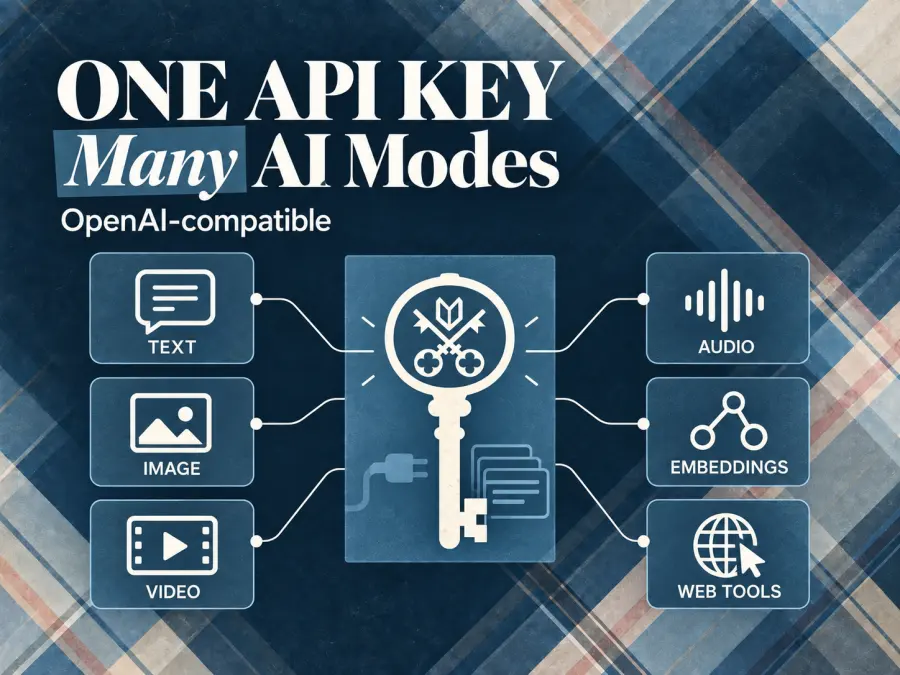
Venice API is an OpenAI-compatible API for text, image, video, audio, embeddings, web tools, and related AI workflows. The official documentation presents it as one API key across multiple modalities, with a model catalog and endpoint-specific references.
For a text application, the core flow is ordinary HTTP: send messages to POST https://api.venice.ai/api/v1/chat/completions, authenticate with Authorization: Bearer <API_KEY>, and read the assistant message from the response. OpenAI compatibility lowers migration cost. It does not mean every OpenAI field or every model capability behaves identically. Tool calling, vision, reasoning controls, file inputs, and Venice-specific features still depend on the selected model and endpoint.
The API currently exposes these broad surfaces:
| Surface |
Typical task |
Important implementation detail |
| Chat Completions |
Chat, coding, reasoning, agents |
OpenAI-compatible; model support varies |
| Image Generation |
Text-to-image and image editing |
One image per request in the documented compatible endpoint |
| Video |
Text-to-video, image-to-video, reference workflows |
Usually asynchronous: quote, queue, retrieve |
| Audio |
Text-to-speech and transcription |
Billed by characters or audio seconds, depending on the task |
| Embeddings |
Search and retrieval pipelines |
Model-specific embedding dimensions and pricing |
| Web tools |
Search and scraping from chat workflows |
Usage fees are separate from token charges |
The practical takeaway is simple: Venice API is better understood as a multimodal inference platform with an OpenAI-compatible text entry point, not as a single chatbot endpoint.
Venice API Quickstart
You need a Venice account, an API key, and a model ID available in the current catalog. The official quickstart uses the VENICE_API_KEY environment variable and the base URL below.
cURL
export VENICE_API_KEY="your-api-key-here"

curl https://api.venice.ai/api/v1/chat/completions \\
  -H "Authorization: Bearer $VENICE_API_KEY" \\
  -H "Content-Type: application/json" \\
  -d '{
    "model": "zai-org-glm-5",
    "messages": [
      {"role": "user", "content": "Give me three practical uses for a private inference API."}
    ]
  }'
The exact model catalog changes, so do not hard-code a model ID from an old tutorial without checking the current /models response or the official model directory.
Python with the OpenAI SDK
import os
from openai import OpenAI

client = OpenAI(
    api_key=os.environ["VENICE_API_KEY"],
    base_url="https://api.venice.ai/api/v1",
)

response = client.chat.completions.create(
    model="zai-org-glm-5",
    messages=[
        {"role": "system", "content": "Answer clearly and briefly."},
        {"role": "user", "content": "What should I log when building an AI agent?"},
    ],
)

print(response.choices[0].message.content)
For streaming, add stream=True and iterate over the returned chunks. For Venice-specific features such as web search, pass venice_parameters through the SDK's extra body mechanism. Keep those fields close to the model-specific integration code; they are not portable OpenAI parameters.
One migration detail is worth keeping in mind: max_tokens is documented as deprecated in favor of max_completion_tokens. A request can be accepted for compatibility and still produce a different result from what you expect if you assume every OpenAI field has the same effect.
Venice API Privacy: Four Modes, Not One Promise
Privacy is the main reason developers look at Venice, but “private” is not a single technical state. The official API privacy documentation describes a shared Venice proxy and four runtime modes:
| Mode |
What it protects |
What it does not automatically mean |
| Anonymous |
Hides your Venice identity from the upstream provider |
The provider may still see prompt content |
| Private |
Contract-enforced zero data retention for prompt and response content after inference |
It does not erase operational metadata needed for billing and abuse prevention |
| TEE |
Runs supported models in a hardware-isolated Trusted Execution Environment |
Only supported models can use it |
| E2EE |
Encrypts prompts client-side so only a verified TEE decrypts them |
Requires attestation, encryption, special headers, and a narrower feature set |
The model list exposes the relevant privacy information. model_spec.privacy tells you whether a model is baseline anonymized or private; capabilities such as supportsTeeAttestation and supportsE2EE indicate stronger options.
This distinction changes how you should select a model. If hiding your account identity from an upstream provider is enough, Anonymous may fit. If prompt and response retention is the concern, look for Private. If your threat model requires hardware-backed isolation, check for TEE. If plaintext must not leave your client, E2EE is the relevant path.
There is a cost to the strongest option. The E2EE flow requires client-side encryption, attestation verification, special headers, and response decryption. The documentation also says that features needing plaintext outside the enclave, including some web search, memory, summaries, and tool flows, are disabled or limited. Privacy controls therefore belong in architecture decisions, not only in a marketing checklist.
Venice may still process operational metadata such as account or wallet identifiers, key identifiers, timestamps, selected models, token counts, billing amounts, rate-limit state, request IDs, IP address, and product events. That is different from storing prompt and response content, but it matters for compliance reviews.
Venice API Pricing: Tokens, Credits, DIEM, and x402
Venice API pricing depends on the modality and the model. Text chat is generally priced per 1 million tokens, while images, audio, video, and web tools use other units.
Examples listed on the official pricing page include:
| Category |
Example |
Listed unit |
| Text input |
OpenAI GPT OSS 120B |
$0.07 / 1M tokens |
| Text output |
OpenAI GPT OSS 120B |
$0.30 / 1M tokens |
| Text input |
Claude Sonnet 5 |
$3.00 / 1M tokens |
| Text output |
Claude Sonnet 5 |
$15.00 / 1M tokens |
| Embeddings |
text-embedding-bge-en-icl |
$0.01 / 1M tokens |
| Image generation |
Anime (WAI) |
$0.01 / image |
| Text-to-speech |
Kokoro TTS |
$3.50 / 1M characters |
| Speech-to-text |
Parakeet ASR |
$0.0001 / second |
These are examples, not a promise that every model uses the same rate. The official page also lists higher-priced frontier models, context-length surcharges for some models, and different prices for image resolution or editing inputs. Video pricing depends on model, resolution, and duration; use the video quote endpoint when you need a current estimate.
Venice presents three main funding paths:
USD or crypto credits: prepaid credits that work across endpoints and do not expire, according to the API overview.
DIEM: staked DIEM provides a daily allowance. The DIEM documentation defines one staked DIEM as $1 of Venice credit per day while it remains staked. Unused daily allowance does not roll over, and the allowance refreshes at 00:00 UTC.
x402: wallet-funded, pay-per-request access using USDC on Base. This can avoid a conventional API key, but it adds wallet and payment-flow requirements.
The DIEM model can be useful for predictable daily agent workloads, but it is not free compute. You still need to acquire or stake the asset, and the daily allowance is not a general-purpose balance that accumulates forever. If a request exceeds the remaining DIEM allocation and no other balance covers it, the API can return 402 INSUFFICIENT_BALANCE.
The pricing page also documents a one-time $10 Venice credit for users upgrading to Pro. Do not describe that as a universal recurring free API allowance. Subscription tiers, API limits, credits, and model access should be checked against the current pricing page before you publish a cost estimate.
Venice API Use Cases
1. Private research and document workflows
A research application can use chat completions for summarization, extraction, classification, and question answering over supplied files. The privacy decision comes first: a Private model may be enough for a zero-retention requirement, while E2EE may be necessary when prompts must be encrypted before leaving the client.
File input is not the same as handing the model an untouched binary file. The API documentation says common files such as PDF, DOCX, PPTX, XLSX, and TXT are extracted into text before being sent to the model. That is convenient for retrieval and summarization, but it should be included in your data-flow review.
2. Coding agents
The OpenAI-compatible surface makes Venice suitable for coding tools and agent frameworks that already support a custom base URL. Streaming, function calling, and structured outputs are documented capabilities, subject to model support.
The trade-off is model selection. A cheap private model may be a good fit for routine edits or classification, while a larger reasoning model may be needed for multi-file refactors. The API does not remove the need to test your own prompts, tool schemas, context size, and failure handling.
3. Web-enabled assistants
Venice-specific parameters can enable web search, citations, and scraping in supported workflows. This is useful for research assistants and live-information agents, but web usage can add separate charges. Treat search results as an external data dependency: log citations, handle empty results, and decide what happens when a search call times out.
4. Image generation and editing
The OpenAI-compatible image endpoint accepts a prompt, model, size, output format, and related fields. The documented endpoint presently supports one image per request. Some fields are accepted for compatibility but are not used by Venice image generation, so copying an OpenAI request body field by field is not a substitute for reading the Venice reference.
Image workflows can fit product mockups, creative variations, background removal, and visual prototyping. They also need moderation and content-policy handling. The moderation field changes how adult content is handled; it should not be presented as a blanket promise that every model or use case is unrestricted.
5. Video generation pipelines
Video is a different programming problem from chat. A typical Venice workflow is:
Optionally call /video/quote to estimate the job cost.
Submit POST /api/v1/video/queue.
Save the returned queue_id.
Poll /video/retrieve until the task completes.
Download the result when the model returns a temporary delivery URL.
A successful queue response means the task entered the queue. It does not mean the video file is ready. Your database should distinguish submitted, processing, completed, failed, client-timeout, and downloaded states. This is one of the clearest differences between the Venice chat API and its media APIs.
What the Venice API Does Not Solve
Venice API reduces integration work, but it does not eliminate operational work.
First, OpenAI compatibility is a migration aid, not a guarantee of identical behavior. Model IDs, supported parameters, reasoning controls, vision support, tool behavior, and file handling vary.
Second, privacy mode is model-dependent. You need to inspect the model catalog instead of assuming that a model available through Venice automatically supports Private, TEE, or E2EE.
Third, price comparison requires the right unit. A text model is priced per token, an image model may be priced per image, speech-to-text per audio second, and video by model-specific job parameters. A single “cost per request” number is usually meaningless without the workload definition.
Finally, the public documentation does not establish an independent latency, uptime, or success-rate benchmark. Those should be measured in your own workload before you move a production agent.
Venice API vs. a Unified Multi-Model Platform
Direct Venice access is a sensible choice when its privacy modes, model catalog, and wallet or credit system match your product. A unified multi-model platform is more useful when you want to compare several providers, keep one shared balance, and change models without maintaining a separate billing relationship for each vendor.
GPT Proto positions itself as an affordable all-in-one AI API with 200+ models across text, image, video, and audio. Its AI Model Gallery is the right place to check whether the model you want is actually available and to compare current model-page pricing. The GPT Proto homepage explains the broader one-key, pay-per-use workflow.
That is a routing and procurement advantage, not proof that GPT Proto is cheaper for every model or that it provides Venice's privacy modes. Check the actual model page, endpoint, price, and policy before migrating a workload.
Final Verdict
Venice API is worth considering when privacy controls and multimodal access matter more than having a completely uniform provider experience. Its strongest technical story is not simply “private AI”: it is an OpenAI-compatible API with selectable privacy modes, a broad model catalog, several payment paths, and separate endpoints for text and media workflows.
The main caution is equally concrete. Read the model metadata, use the official pricing unit, and design for asynchronous media jobs and model-specific feature limits. For developers comparing multiple AI vendors rather than committing to one privacy-oriented provider, start with GPT Proto's model catalog and verify the exact model and price before you write integration code.
Sources checked: Venice API documentation, Quickstart, Privacy, VVV & DIEM, API Pricing, Chat Completions, Image Generations, and Video Queue pages. Checked September 15, 2026.